1. Giới thiệu và kết thúcview
Welcome to the Samsung Galaxy A07 5G. This smartphone is designed to provide a comprehensive mobile experience with advanced features and robust performance. Key highlights include a 6.7-inch 120Hz immersive display, a massive 6000mAh battery, a 50MP True Dual Camera system, and enhanced security with Knox Vault. This manual provides essential information for setting up, operating, and maintaining your device.

Hình 1.1: Hếtview of Samsung Galaxy A07 5G key features.
2. Thiết lập thiết bị
2.1 Có gì trong hộp
Trước khi bắt đầu, hãy đảm bảo tất cả các thành phần đều có sẵn:
- Smartphone (Samsung Galaxy A07 5G)
- Cáp dữ liệu (USB-C sang USB-C)
- SIM Ejection PIN
- Hướng dẫn bắt đầu nhanh

Figure 2.1: Items included with your Samsung Galaxy A07 5G.
2.2 Lắp thẻ SIM
- Xác định vị trí khay thẻ SIM ở bên cạnh thiết bị của bạn.
- Insert the SIM ejection pin into the small hole next to the tray and press gently until the tray pops out.
- Đặt thẻ Nano-SIM và/hoặc thẻ nhớ microSD vào khay sao cho các điểm tiếp xúc màu vàng hướng xuống dưới.
- Cẩn thận đặt khay trở lại vào khe.
2.3 Initial Power On and Data Transfer
Press and hold the Power button until the Samsung logo appears. Follow the on-screen prompts to complete the initial setup. If you are transferring data from an old device, use the Smart Switch feature for a seamless transition of photos, videos, contacts, and apps.

Figure 2.2: Using Smart Switch for easy data transfer.
3. Hướng dẫn vận hành
3.1 Điều hướng cơ bản
The Galaxy A07 5G features a responsive touchscreen. Use gestures like tapping, swiping, pinching, and spreading to navigate the interface, open apps, and interact with content.
3.2 One UI 8 Interface
Experience an intuitive and upgraded user interface with One UI 8, designed for ease of use and enhanced functionality.

Figure 3.1: The new One UI 8 interface.
3.3 Chia sẻ nhanh
Chia sẻ dễ dàng files between Samsung Galaxy devices, and even with iOS and PC devices, using the Quick Share feature.

Figure 3.2: Quick Share functionality.
4. Tính năng của máy ảnh
The Galaxy A07 5G is equipped with a versatile camera system to capture your moments.
- Camera chính 50MP: For clear and detailed photos.
- Camera chiều sâu 2MP: Enhances portraits by separating the subject from the background.
- Camera trước 8MP: Dành cho ảnh selfie và cuộc gọi video độ phân giải cao.

Figure 4.1: Pro-grade camera system.

Figure 4.2: Depth Camera for enhanced portraits.

Figure 4.3: 8MP Selfie Camera.
5. Quản lý pin
The Galaxy A07 5G is powered by a massive 6000mAh battery, designed for extended usage. It also supports 25W fast charging to quickly power up your device.

Hình 5.1: Pin 6000mAh bền bỉ.
5.1 Mẹo giúp kéo dài thời lượng pin
- Hãy điều chỉnh độ sáng màn hình xuống mức thấp hơn.
- Enable power-saving modes when not in active use.
- Hãy đóng các ứng dụng chạy ngầm tiêu thụ quá nhiều năng lượng.
- Disable Wi-Fi, Bluetooth, and GPS when not needed.
6. Tính năng hiển thị
Enjoy a vibrant visual experience on the 6.7-inch immersive display with a 120Hz refresh rate for smooth scrolling and an 800 nits High Brightness Mode (HBM) for clear viewing even in bright outdoor conditions.

Figure 6.1: Immersive 120Hz display.
7. Kết nối
The Galaxy A07 5G supports superfast 5G speeds with up to 12 5G bands, ensuring swift and reliable connectivity for streaming, gaming, and downloading. It also includes standard connectivity options such as Bluetooth, USB, and Wi-Fi.
8. Software Updates and Security
Your Galaxy A07 5G is designed for long-term relevance and security, offering 6 generations of OS upgrades and 6 years of security updates from the first global launch date.

Figure 8.1: Extended OS upgrade support.
8.1 Samsung Knox Vault
The device features Samsung Knox Vault (EAL5+ certified), providing advanced security to protect your private information from unauthorized access.
9. Physical Design and Durability
The Galaxy A07 5G boasts a slim, modern design with an 8.2mm thickness. It also offers IP54-rated protection against dust and splashes, ensuring durability in various conditions.

Figure 9.1: IP54-rated protection against spills and splashes.
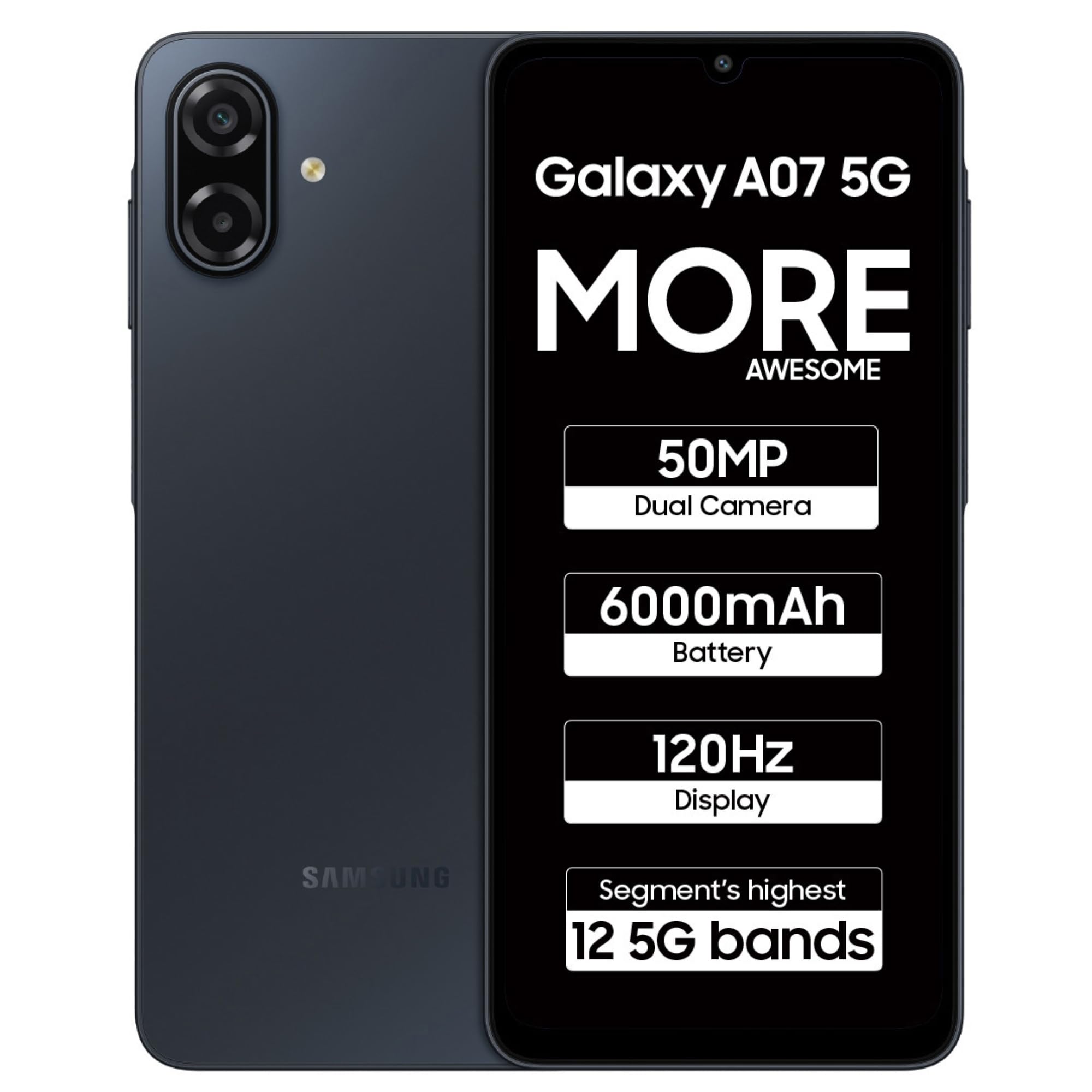
Figure 9.2: Samsung Galaxy A07 5G (Black).
10. Bảo trì
To ensure optimal performance and longevity of your Samsung Galaxy A07 5G, follow these maintenance guidelines:
- Cập nhật phần mềm: Thường xuyên kiểm tra và cài đặt các bản cập nhật phần mềm để tận hưởng những tính năng mới nhất, các bản vá bảo mật và những cải tiến về hiệu năng.
- Vệ sinh: Dùng vải mềm, không xơ để lau màn hình và thân thiết bị. Tránh sử dụng hóa chất mạnh hoặc vật liệu mài mòn.
- Quản lý lưu trữ: Định kỳ xóa những thứ không cần thiết filevà ứng dụng để giải phóng dung lượng lưu trữ và duy trì tốc độ thiết bị.
- Chăm sóc pin: Tránh nhiệt độ quá cao và không để pin cạn kiệt thường xuyên.
KHAI THÁC. Xử lý sự cố
Nếu bạn gặp sự cố với thiết bị của mình, hãy thử các bước khắc phục sự cố phổ biến sau:
- Thiết bị không phản hồi: Nhấn và giữ nút Nguồn khoảng 10 giây để buộc khởi động lại thiết bị.
- Sự cố ứng dụng: Clear the cache and data of the problematic app, or uninstall and reinstall it.
- Sự cố kết nối: Toggle Wi-Fi or Bluetooth off and on. For mobile data, ensure your SIM card is properly inserted and your plan is active.
- Hiệu suất chậm: Hãy đóng các ứng dụng không sử dụng, xóa bộ nhớ cache và đảm bảo có đủ dung lượng lưu trữ. Chỉ nên khôi phục cài đặt gốc như biện pháp cuối cùng (nhớ sao lưu dữ liệu trước).
- Sự cố sạc: Ensure the data cable and charger are securely connected and undamaged. Try a different charger or cable if available.
12. Thông số kỹ thuật
Detailed technical specifications for the Samsung Galaxy A07 5G (Model: SM-A076B).
| Tính năng | Đặc điểm kỹ thuật |
|---|---|
| Hệ điều hành | Android 16.0 |
| Kích thước sản phẩm | 0.82 x 7.74 x 16.74 cm; 199 g |
| Số hiệu mẫu sản phẩm | SM-A076B |
| Công nghệ kết nối | Bluetooth, USB, Wi-Fi |
| GPS | True (Built-In GPS) |
| Tính năng đặc biệt | Dual SIM, Expandable Memory, Mobile Hotspot Capability, Supports USB OTG |
| Tính năng hiển thị | Wireless, Touchscreen, 720 x 1600 Resolution, 120Hz Refresh Rate, 800 nits HBM |
| Tính năng của máy ảnh | Front (8MP), Rear (50MP Main, 2MP Depth) |
| Jack âm thanh | 3.5mm |
| Yếu tố hình thức | Thanh |
| Màu sắc | Đen |
| Xếp hạng công suất pin | 6000 triệuamp Giờ |
| Kích thước bộ nhớ RAM đã cài đặt | 4GB |
| Mô hình CPU | Mediatek Dimensity 6300 |
| Tốc độ CPU | 2.4 GHz |
| Xếp hạng IP | IP54 |
13. Bảo hành và Hỗ trợ
Để biết thông tin bảo hành và hỗ trợ khách hàng, vui lòng tham khảo trang web chính thức của Samsung website or contact Samsung customer service. Samsung provides extensive support with over 3300 service touchpoints.

Figure 13.1: Samsung service center network.
Bạn cũng có thể ghé thăm Cửa hàng Samsung trên Amazon để biết thêm thông tin về sản phẩm và phụ kiện.


