1. Giới thiệu
This manual provides detailed instructions for the LAUNCH Creader Elite V3.0 OBD2 Scanner, a professional diagnostic tool designed specifically for Land Rover and Jaguar vehicles. It covers device setup, operational procedures for various diagnostic and service functions, software updates, and troubleshooting tips. Please read this manual thoroughly before operating the device to ensure correct usage and optimal performance.
2. Sản phẩm hếtview
2.1. Có gì trong hộp
- 1 * LAUNCH Creader Elite V3.0 OBD2 Scanner for JLR
- 1 * OBD2 Diagnostic Cable
- 1 * Hướng dẫn bắt đầu nhanh
- 1 * Hướng dẫn sử dụng
2.2. Các tính năng chính
The LAUNCH Creader Elite V3.0 offers a comprehensive suite of features for vehicle diagnostics and maintenance:
- Phần cứng được nâng cấp: Features Android 8.1 operating system, 32GB ROM, 3000mAh battery, and 2.4&5GHz dual-band Wi-Fi for improved performance.
- DoIP Protocol Support: Supports the new DoIP protocol for Land Rover & Jaguar models manufactured after 2017 (requires an adapter).
- Full Systems Diagnostics: Provides in-depth scanning for all available vehicle modules, including engine, transmission, ABS, SRS, and more.
- Kiểm soát hai chiều (Kiểm tra chủ động): Allows control of vehicle components and systems for active testing, such as windows, mirrors, wipers, and horn.
- Comprehensive Service Functions: Includes Oil Reset, Electronic Parking Brake (EPB) Reset, Battery Management System (BMS) Reset, Steering Angle Sensor (SAS) Calibration, Injector Coding, Throttle Relearn, Height Calibration, Transmission Adaptation, Crankshaft/Camshaft Relearn, Sunroof Calibration, and more.
- Luồng dữ liệu trực tiếp 4 trong 1: Displays real-time data from multiple sensors simultaneously in a graphical format, with recording and playback capabilities.
- Smart Diagnostic Functions: Features Auto VIN for automatic vehicle identification, DTC Lookup for code explanations, and the ability to generate and share diagnostic reports.
- Chức năng đầy đủ của OBD2: Supports all 10 OBD2 test modes for universal vehicle compatibility (post-1996 models).
- Cập nhật miễn phí trọn đời: Provides lifetime free software updates specifically for Land Rover and Jaguar vehicle brands.
2.3. Device Comparison
The Creader Elite V3.0 offers significant upgrades over previous versions:

Image: Comparison of Creader Elite V3.0, V2.0, and V1.0, highlighting V3.0's superior features like DoIP, Android 8.1, 32GB memory, and 2.4&5GHz WiFi.
2.4. Mô tả vật lý
The device features a durable orange casing with a 4-inch touchscreen display. The back of the device includes product identification details such as the model number, FCC ID, and serial number.
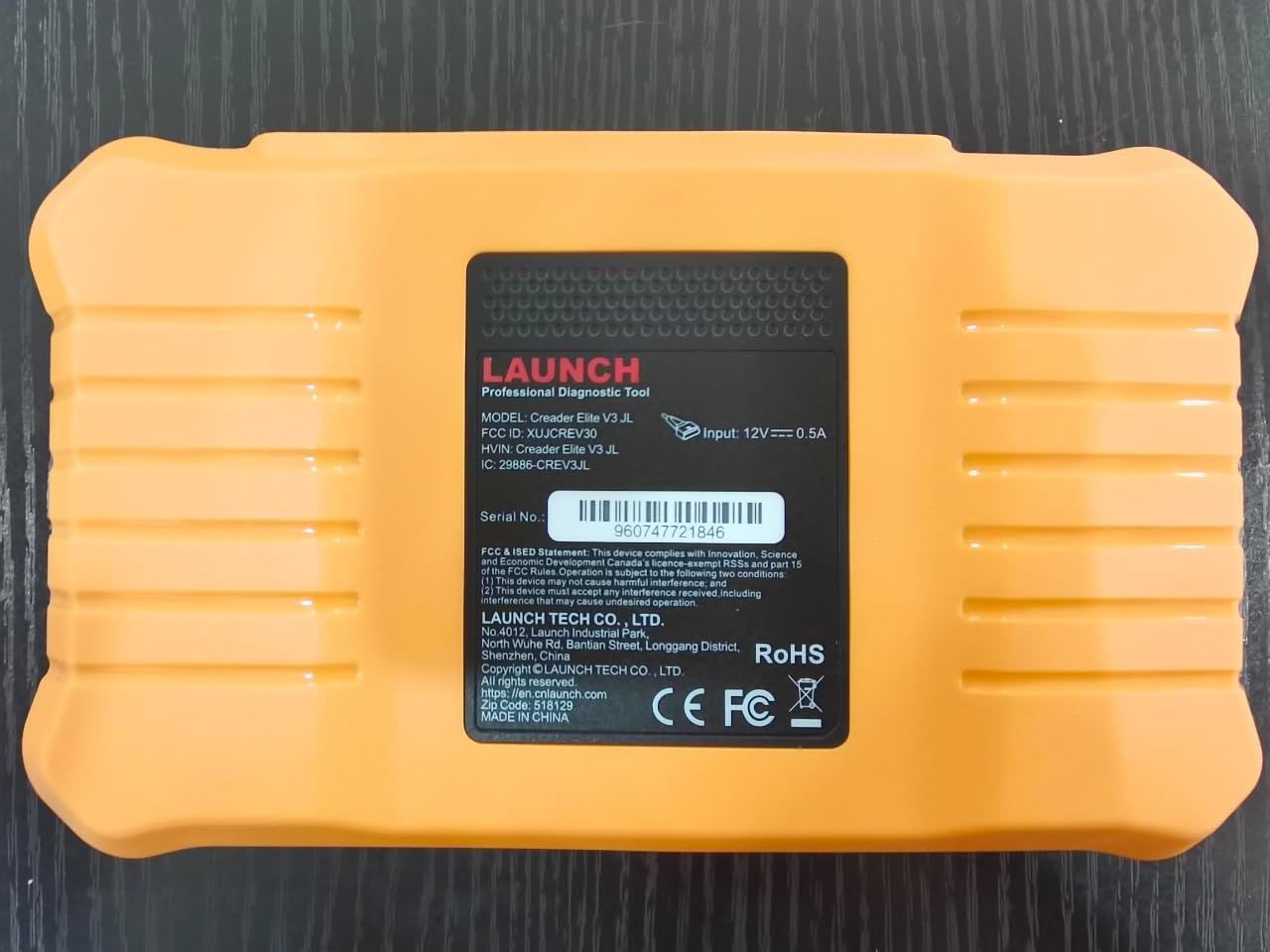
Hình ảnh: Phía sau view of the LAUNCH Creader Elite V3.0, displaying the model number, FCC ID, and serial number (e.g., 960747721846).
3. Thiết lập
3.1. Bật nguồn ban đầu
- Đảm bảo thiết bị đã được sạc đầy hoặc được kết nối với nguồn điện.
- Nhấn và giữ nút nguồn cho đến khi màn hình sáng lên.
- Làm theo lời nhắc trên màn hình để chọn ngôn ngữ và khu vực bạn muốn.
3.2. Kết nối Wi-Fi
- Từ menu chính, điều hướng đến... Cài đặt.
- Lựa chọn Wi-Fi và bật nó lên.
- Chọn mạng Wi-Fi bạn muốn sử dụng từ danh sách và nhập mật khẩu nếu được yêu cầu.
- Confirm the connection. A stable internet connection is required for software updates and online resources.
3.3. Đăng ký và kích hoạt
Upon first use or after a factory reset, you may be prompted to register your device. Follow the on-screen instructions to create an account or log in. This step is crucial for accessing software updates and technical support.
4. Hướng dẫn vận hành
4.1. Kết nối với xe
- Tìm vị trí cổng chẩn đoán OBD2 của xe, thường nằm dưới bảng điều khiển ở phía người lái.
- Hãy đảm bảo rằng hệ thống đánh lửa của xe đang ở vị trí... ON position (engine off or running, depending on the test).
- Connect the OBD2 diagnostic cable to the vehicle's OBD2 port and to the LAUNCH Creader Elite V3.0 device.
- The device will automatically power on or prompt you to do so.
4.2. Chẩn đoán toàn bộ hệ thống
This function allows you to scan all available electronic control units (ECUs) in the vehicle.

Image: Display showing OE-level all system diagnostics, including Auto VIN, fault codes, 4-in-1 live data, and MIL reset.
- Từ menu chính, chọn Chẩn đoán cục bộ.
- Choose the vehicle brand (Land Rover or Jaguar).
- Lựa chọn Tìm kiếm tự động or Lựa chọn thủ công. Auto Search (Auto VIN) will attempt to automatically identify the vehicle.
- Once the vehicle is identified, select Báo cáo sức khỏe or Quét hệ thống to perform a comprehensive scan of all modules.
- Review the diagnostic trouble codes (DTCs) and ECU information. You can then choose to clear codes if necessary.
4.3. Chức năng dịch vụ
The Creader Elite V3.0 provides numerous maintenance and reset services. Access these functions via Diagnose > Brand > System Selection > Special Function.

Hình ảnh: Trênview of various service functions including Oil Reset, Brake Reset, SAS Calibration, Start-Stop Reset, TPMS Reset, Injector Coding, Battery Reset, ABS Bleeding, Seat Calibration, and Height Calibration.
Common services include:
- Đặt lại dầu: Khôi phục hệ thống theo dõi tuổi thọ dầu động cơ.
- Đặt lại EPB: Resets the electronic parking brake after replacement.
- Hiệu chuẩn SAS: Hiệu chỉnh cảm biến góc lái.
- Mã hóa kim phun: Nhập mã số kim phun mới vào ECU.
- Học lại bướm ga: Khôi phục lại vị trí của bướm ga.
- Hiệu chuẩn chiều cao: Calibrates the vehicle's suspension height.
- Đặt lại pin: Registers a new battery replacement.
- Chảy máu ABS: Thực hiện quy trình xả khí hệ thống phanh ABS.
Note: The availability of specific service functions may vary depending on the vehicle model and year. Always check compatibility before performing a service.
4.4. Kiểm soát hai chiều (Kiểm tra chủ động)
Active tests allow you to send commands to vehicle systems and components to verify their functionality.

Image: Depicts bi-directional active tests, showing the device sending commands to vehicle actuators like wipers, windows, clutch, and injectors to check their status.
- Navigate to the desired vehicle system within the diagnostic menu.
- Lựa chọn Kiểm tra hoạt động or Kiểm soát hai chiều.
- Choose the specific component or system you wish to test (e.g., 'Wiper Test', 'Window Test', 'Horn Test').
- Hãy làm theo hướng dẫn trên màn hình để kích hoạt và quan sát phản hồi của linh kiện.
4.5. Chức năng đầy đủ của OBD2
For universal vehicle diagnostics (all OBD2 compliant vehicles after 1996), use the OB II tùy chọn menu.
- Đọc mã: Truy xuất các mã chung (P0, P2, P3, U0) và mã dành riêng cho nhà sản xuất (P1, P3, U1).
- Xóa mã: Clears diagnostic trouble codes and turns off the Malfunction Indicator Light (MIL).
- Dữ liệu trực tiếp: Hiển thị luồng dữ liệu thời gian thực từ các cảm biến của xe.
- I / M Sẵn sàng: Kiểm tra tình trạng sẵn sàng của các thiết bị giám sát liên quan đến khí thải.
- Khung đóng băng: Displays a snapshot of operating conditions at the time of an emission-related fault.
- Kiểm tra cảm biến O2: Truy xuất kết quả kiểm tra giám sát cảm biến O2.
- Kiểm tra giám sát trên xe (Chế độ 6): Truy xuất kết quả cho các thành phần và hệ thống truyền động liên quan đến khí thải.
- Kiểm tra hệ thống EVAP (Chế độ 8): Khởi động quá trình thử nghiệm hệ thống kiểm soát khí thải bay hơi.
- Thông tin xe: Truy xuất số nhận dạng xe (VIN), ID hiệu chuẩn (CALID) và số xác minh hiệu chuẩn (CVN).
4.6. Real-Time Monitoring and Data Stream
Monitor various vehicle parameters in real-time to diagnose intermittent issues or verify repairs.

Image: Real-time monitoring screen showing battery voltage, transmission oil temperature, coolant temperature, and vehicle speed, with a detailed 4-in-1 data stream graph below.
- From the diagnostic menu, select Dữ liệu trực tiếp.
- Hãy chọn các thông số bạn muốn theo dõi.
- The device can display up to four data streams simultaneously in a graphical format.
- Sử dụng Ghi Và Phát lại functions to capture and review data for later analysis.
4.7. Smart Diagnostic Features
The device includes features to streamline the diagnostic process:
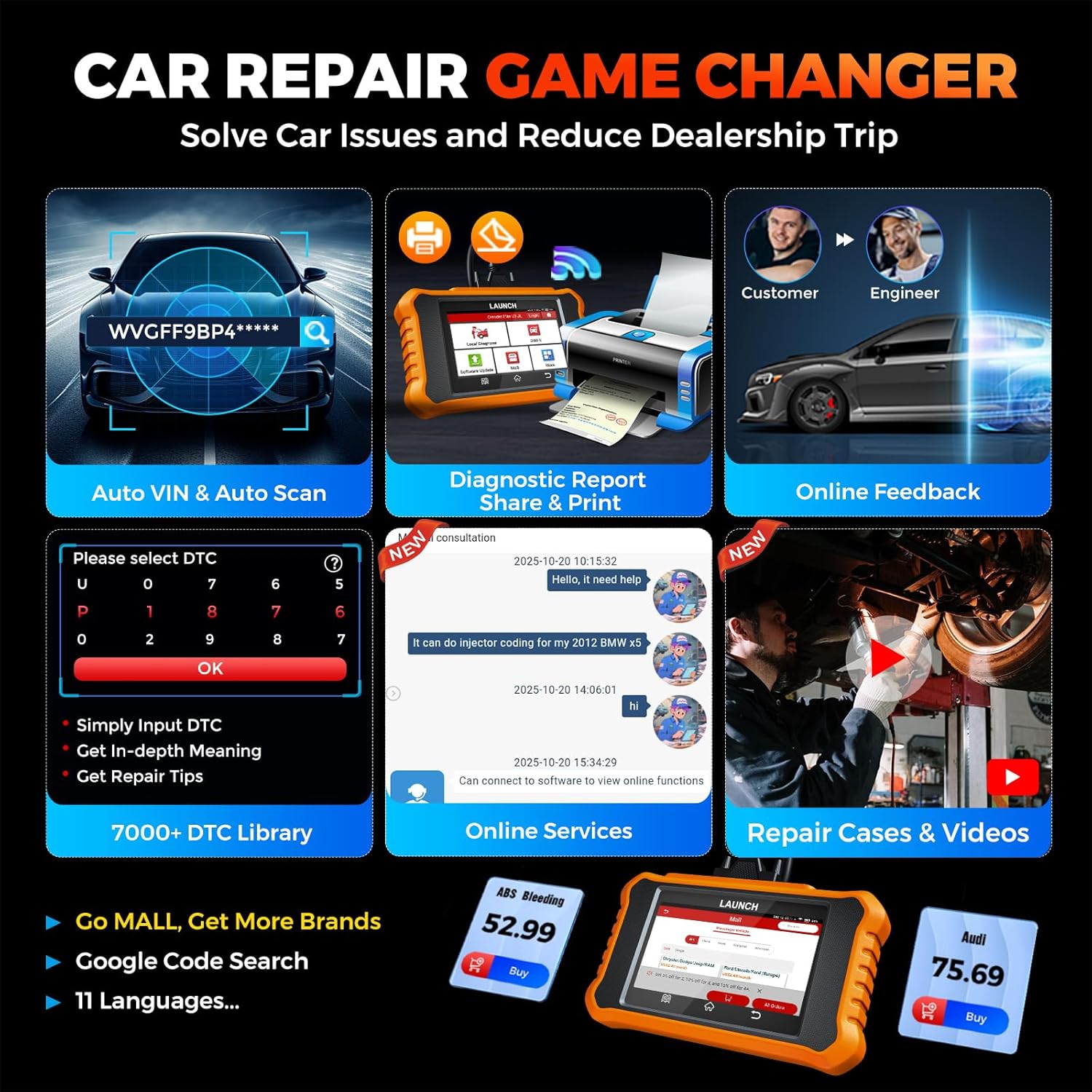
Image: Smart diagnostic features such as Auto VIN, diagnostic report generation and printing, online feedback, 7000+ DTC library, and access to online services.
- Số VIN ô tô: Automatically identifies vehicle information (year, make, model) for quicker diagnostics.
- Tra cứu DTC: Cung cấp giải thích chi tiết về các mã lỗi chẩn đoán.
- Báo cáo chẩn đoán: Generates a professional diagnostic report that can be shared or printed.
- Phản hồi trực tuyến: Allows users to submit feedback or issues directly to technical support.
5. Maintenance & Updates
5.1. Cập nhật phần mềm
The LAUNCH Creader Elite V3.0 offers lifetime free software updates for Land Rover and Jaguar brands.
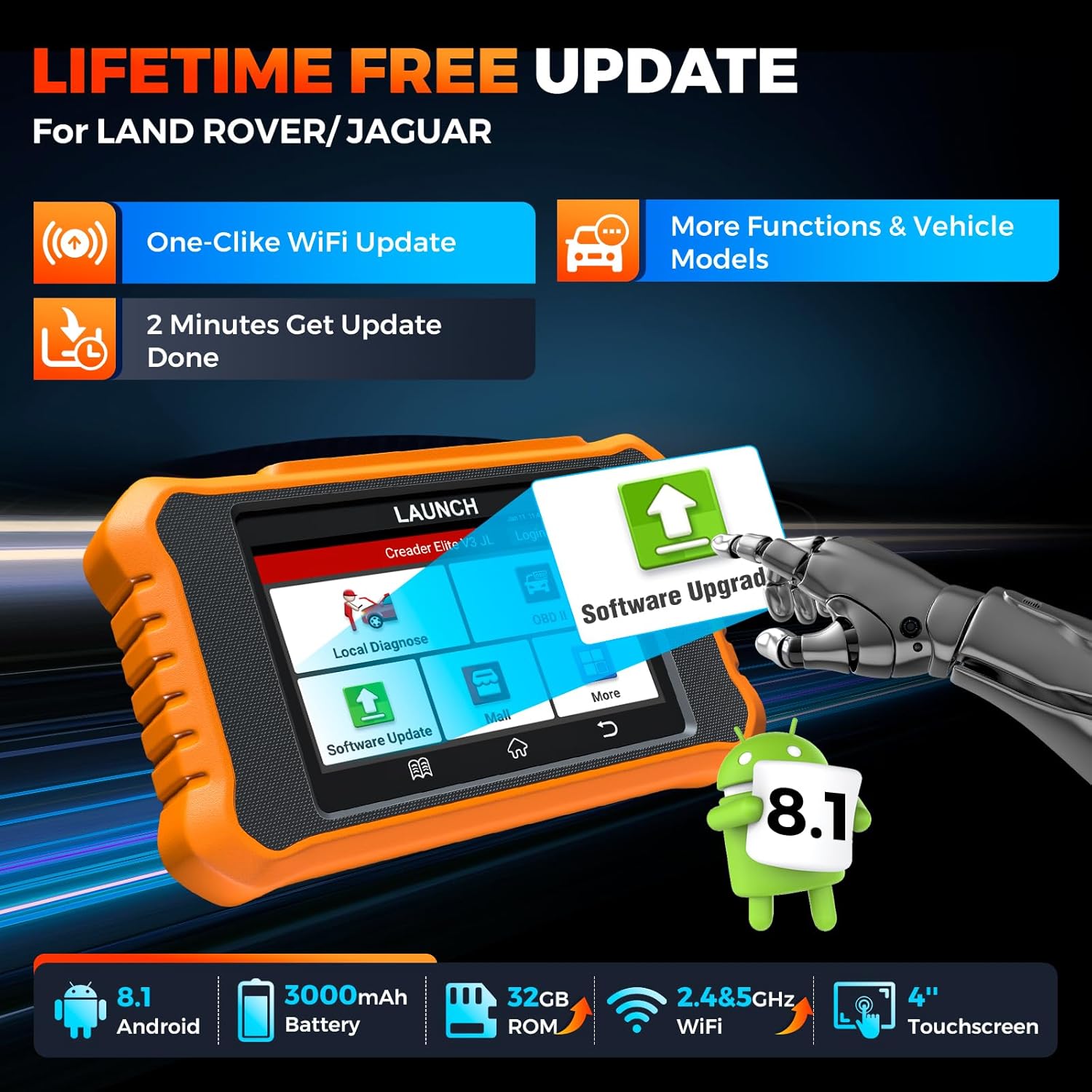
Image: Device screen illustrating the one-click Wi-Fi update process, emphasizing lifetime free updates for Land Rover/Jaguar and the ability to get more functions and vehicle models.
- Đảm bảo thiết bị được kết nối với mạng Wi-Fi ổn định.
- Từ menu chính, chọn Cập nhật phần mềm.
- Thiết bị sẽ kiểm tra các bản cập nhật có sẵn.
- Select the updates you wish to install and follow the on-screen prompts. Updates typically take a few minutes.
5.2. Expanding Vehicle Coverage (Mall)
If you require diagnostic capabilities for other vehicle brands beyond Land Rover and Jaguar, you can purchase additional software packages from the Trung tâm mua sắm application on the device. Please note that software purchased from the Mall is typically valid for one year and may require re-purchase after expiry.
5.3. Chăm sóc thiết bị
- Giữ thiết bị sạch sẽ, không bụi và ẩm.
- Tránh làm rơi thiết bị hoặc để thiết bị chịu tác động mạnh.
- Bảo quản thiết bị ở nơi khô ráo, thoáng mát khi không sử dụng.
- Chỉ sử dụng cáp sạc và phụ kiện được cung cấp.
6. Khả năng tương thích
The LAUNCH Creader Elite V3.0 is primarily designed for:

Image: Device interface showing diagnostic options for Land Rover (Defender, Discovery, Range Rover, Evoque) and Jaguar (E-Pace, F-Pace, F-Type, S-Type, X-Type, XE, XF, XJ, XK) models, with a note on DoIP protocol for models after 2017.
- Landrover: Compatible with models such as Defender, Discovery, Discovery Sport, Range Rover, Range Rover Evoque, etc.
- Báo đốm: Compatible with models such as E-Pace, F-Pace, F-Type, S-Type, X-Type, XE, XF, XJ, XK, etc.
- DoIP Protocol: Supports Land Rover & Jaguar models after 2017, requiring a separate DoIP adapter.
- Universal OBD2: Fully compatible with all OBD2 compliant vehicles manufactured after 1996 for basic OBD2 functions.
For specific vehicle compatibility, it is recommended to contact technical support via obdbox21@163.com.
7. Thông số kỹ thuật
| Người mẫu | LAUNCH Creader Elite 3.0-JL |
| Hệ điều hành | Android 8.1 |
| Kích thước màn hình | 4 inch |
| Bộ nhớ trong (ROM) | 32GB |
| Dung lượng pin | 3000mAh |
| Wi-Fi | 2.4 & 5GHz Dual-band |
| Nguồn điện | Pin chạy bằng |
| Trọng lượng sản phẩm | 1.49 pound |
| Kích thước gói hàng | 8 x 7.5 x 1.5 inch |
| Kiểu lắp ô tô | Universal Fit (for OBD2 functions) |
KHAI THÁC. Xử lý sự cố
8.1. Thiết bị không bật nguồn
- Check battery level. Connect the device to a charger and allow it to charge for at least 30 minutes.
- Đảm bảo nút nguồn được nhấn và giữ đúng cách.
- If connected to the vehicle, ensure the vehicle's ignition is on and the OBD2 cable is securely connected.
8.2. Lỗi giao tiếp với phương tiện
- Verify the OBD2 cable is securely connected to both the device and the vehicle's port.
- Hãy đảm bảo rằng hệ thống đánh lửa của xe đang ở vị trí... ON chức vụ.
- Confirm that the vehicle is OBD2 compliant (generally 1996 and newer for US vehicles).
- Try a different OBD2 compliant vehicle to rule out a vehicle-specific issue.
- Ensure the correct vehicle brand software is installed and up to date.
8.3. Software Update Failure
- Check your Wi-Fi connection for stability and signal strength.
- Ensure the device has sufficient battery charge or is connected to power during the update process.
- Verify that there is enough free storage space on the device.
- Khởi động lại thiết bị và thử cập nhật lại.
8.4. Inaccurate Readings or Functions Not Working
- Ensure the vehicle's make, model, and year are correctly identified by the device.
- Verify that the specific function is supported for your vehicle model and year. Refer to the compatibility section or contact support.
- Ensure the device software is fully updated.
9. Bảo hành và Hỗ trợ
9.1. Thông tin bảo hành
The LAUNCH Creader Elite V3.0 comes with an Extended 60-Day Return & Replacement policy and a 5-Year Quality Backup. Please retain your proof of purchase for warranty claims.
9.2. Hỗ trợ kỹ thuật
For any technical assistance, questions, or compatibility inquiries, please contact our support team:
- E-mail: obdbox21@163.com
- Our support team is available 24/7/365.
Note: Please direct all support inquiries to the provided email address. Do not contact LAUNCH Tech USA for support related to this specific product.