1. Kết thúcview
The SmallRig Wireless Tethering Hub 5566 is designed to extend the wireless control and monitoring capabilities of your camera. It acts as a repeater, allowing you to remotely operate your camera and view live feeds from distances up to 500 meters (1640 feet) using a smartphone or tablet. This device is particularly useful for wildlife photography, documentary filmmaking, and other scenarios where minimizing human presence near the camera is crucial.

Figure 1: Remote monitoring of wildlife using the SmallRig Wireless Tethering Hub.
Video 1: Sản phẩm chính thức đã ra mắtview demonstrating the SmallRig Wireless Tethering Hub's features and applications in wildlife photography.
2. Thiết lập
2.1 Initial Connections and Power
The Wireless Tethering Hub requires a 5V/1A power input via its USB-C port. Connect the provided USB-C cable to the hub and a suitable power source (e.g., a power bank or USB wall adapter). The device is designed to be lightweight and compact for easy deployment.
2.2 Lắp đặt Hub
The hub features multiple 1/4"-20 threaded holes on its top, bottom, and sides, along with anti-twist pins, allowing for versatile mounting options. It can be attached to tripods, light stands, or other SmallRig accessories like power bank holders (ID 2790) or mini V-lock mount plates (ID MD2801B) for extended power solutions.
2.3 Camera and App Connection
The hub extends the Wi-Fi signal from your camera to your monitoring device (smartphone or tablet). It supports both 2.4G and 5G Wi-Fi bands. To connect:
- Ensure your camera's Wi-Fi is enabled.
- Connect your smartphone or tablet to the Wi-Fi network broadcast by the SmallRig hub.
- Use your camera's dedicated manufacturer app (e.g., Sony Imaging Edge, Canon Camera Connect) on your monitoring device to establish a connection with your camera through the hub's extended network.

Figure 2: Wi-Fi 6 connectivity ranges for various camera types with the hub.
3. Hướng dẫn vận hành
3.1 Giám sát và điều khiển từ xa
Once connected, you can remotely monitor your camera's live view and control various parameters through its dedicated app. This includes adjusting focus, zoom, exposure settings, switching between photo and video modes, and triggering the shutter. The real-time wireless repeater ensures a stable connection for precise control.
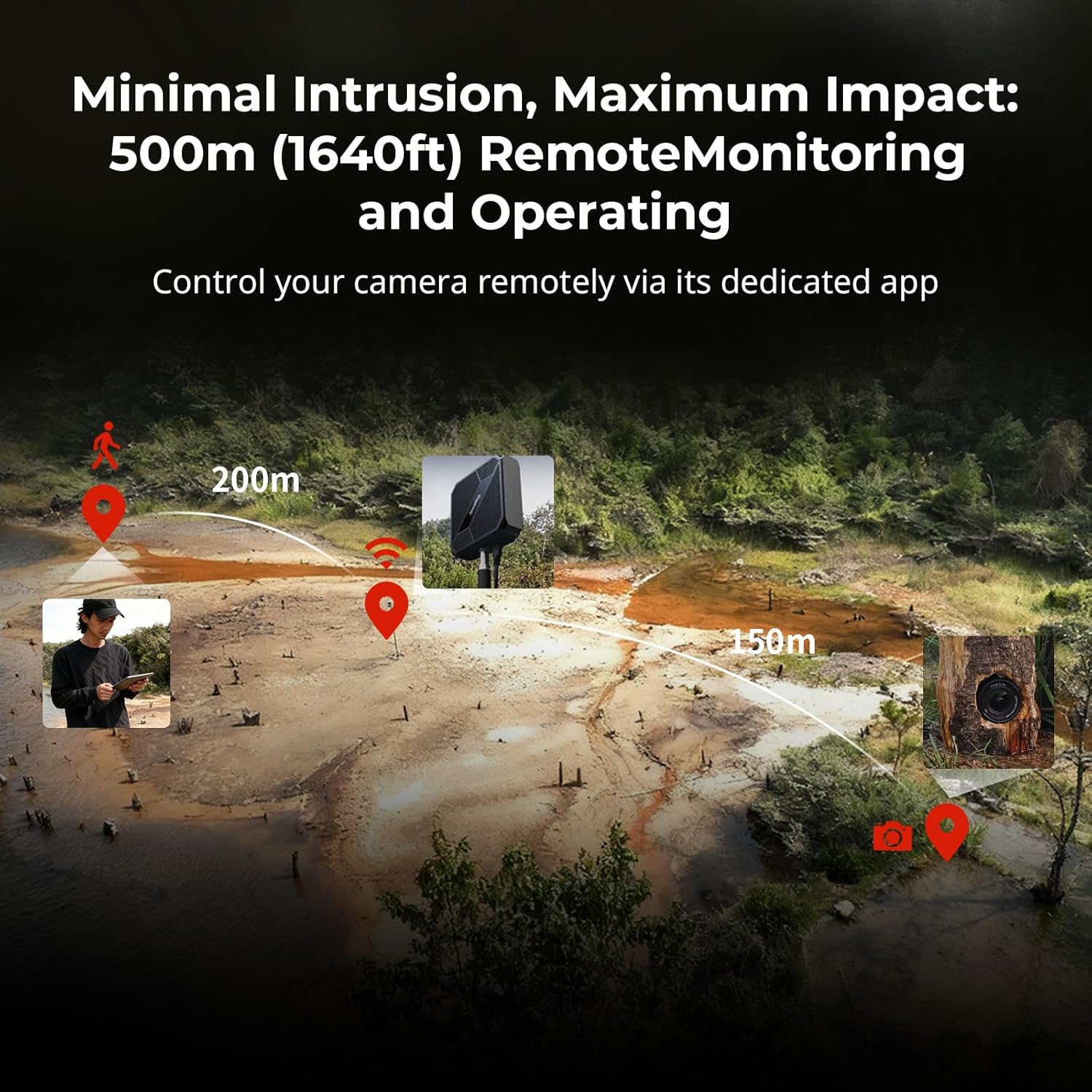
Figure 3: Demonstrating 500m remote monitoring and operation capability.
3.2 Hỗ trợ nhiều camera
The hub supports both single-camera (one-to-one) and multi-camera (one-to-many or many-to-many) workflows. This allows you to control several cameras from different angles or positions using one or multiple monitoring devices, enhancing creative flexibility for complex shoots.

Figure 4: Features including multi-camera control and fast response time.
3.3 On-Demand Recording
Utilize the on-demand recording feature to optimize battery life and preserve memory card space. This allows you to initiate recording only when desired, rather than continuous capture.

Figure 5: On-demand shooting for efficient power and memory usage.
4. Bảo trì
4.1 General Care and Handling
The SmallRig Wireless Tethering Hub is built with durable ABS + PC materials to withstand various conditions. While robust, it is recommended to protect the device from direct exposure to extreme moisture or dust to ensure optimal performance and longevity. Clean the exterior with a soft, dry cloth.
4.2 Quản lý nguồn điện
To maximize runtime, ensure the hub is connected to a reliable power source. The on-demand recording feature can also contribute to efficient power usage by reducing continuous data transmission.
KHAI THÁC. Xử lý sự cố
5.1 Đặt lại thiết bị
If you encounter issues when switching between DJI/Insta360 devices and digital cameras, press and hold the reset button on the side of the repeater for 5 seconds. A reset is not required when switching back from digital cameras to DJI/Insta360 devices.
5.2 Các vấn đề kết nối
- Ensure the hub is powered on and within range of both your camera and monitoring device.
- Verify that your monitoring device is connected to the hub's Wi-Fi network.
- Check that your camera's dedicated app is up-to-date and correctly configured for wireless connection.
- Obstructions between the hub, camera, and monitoring device can affect signal strength. Try repositioning the hub for a clearer line of sight.
6. Thông số kỹ thuật
| Kích thước sản phẩm | 2.51 x 1.51 x 0.59 inch (63.8 x 38.4 x 15.0 mm) |
| Trọng lượng sản phẩm | 7.8 ounce (218 g) |
| Nguyên vật liệu) | ABS + PC |
| Đầu vào nguồn điện | 5V/1A |
| Tiêu chuẩn giao tiếp không dây | 802.11ac, 802.11n (Wi-Fi 6) |
| Phạm vi điều khiển từ xa | Lên đến 500m (1640ft) |
| Khả năng tương thích | Cameras from Sony, Canon, Nikon, Panasonic, DJI, Insta360; Monitoring Devices: Android / iOS |

Figure 6: Product dimensions of the Wireless Tethering Hub.
7. Bảo hành và Hỗ trợ
7.1 Các thành phần bao gồm
Gói bao gồm:
- 1 x Wireless Tethering Hub
- 1 x Cáp USB-C
- 1 x Hướng dẫn sử dụng
7.2 Thông tin bảo hành
This SmallRig product comes with a two-year warranty from the date of purchase, covering manufacturing defects. Please retain your proof of purchase for warranty claims.
7.3 Hỗ trợ khách hàng
For further assistance, technical support, or warranty inquiries, please contact SmallRig customer service through their official webtrang web hoặc nhà bán lẻ nơi sản phẩm được mua.


