1. Giới thiệu
The Audizio Desio is a versatile digital radio that combines classic aesthetics with modern audio technology. It features DAB, DAB+, and FM tuning for clear radio reception, along with Bluetooth 5.0 for wireless streaming, a USB port for media playback, and a 3.5mm AUX input for wired connections. The radio is equipped with a 2.4-inch color LCD display and integrated stereo speakers, making it suitable for various environments such as living rooms, kitchens, or bedrooms.
This manual provides detailed instructions for setting up, operating, and maintaining your Audizio Desio radio. Please read it thoroughly before use to ensure proper functionality and to maximize your listening experience.
2. Thông tin an toàn
- Đảm bảo bộ chuyển đổi nguồn có âm lượngtage matches your local power supply before connecting.
- Không để thiết bị tiếp xúc với mưa, hơi ẩm hoặc nhiệt độ quá cao hoặc quá thấp.
- Tránh đặt thiết bị gần nguồn nhiệt hoặc dưới ánh nắng trực tiếp.
- Không mở casing; chuyển mọi dịch vụ bảo dưỡng cho nhân viên có trình độ.
- Giữ thiết bị tránh xa từ trường mạnh.
- Chỉ làm sạch thiết bị bằng vải mềm, khô.
3. Nội dung gói hàng
Vui lòng kiểm tra xem tất cả các mục có đầy đủ khi mở hộp không:
- Audizio Desio DAB/DAB+/FM Radio
- Bộ đổi nguồn (DC 5V)
- Điều khiển từ xa
- Hướng dẫn sử dụng
4. Điều khiển và kết nối
Điều khiển bảng điều khiển phía trước
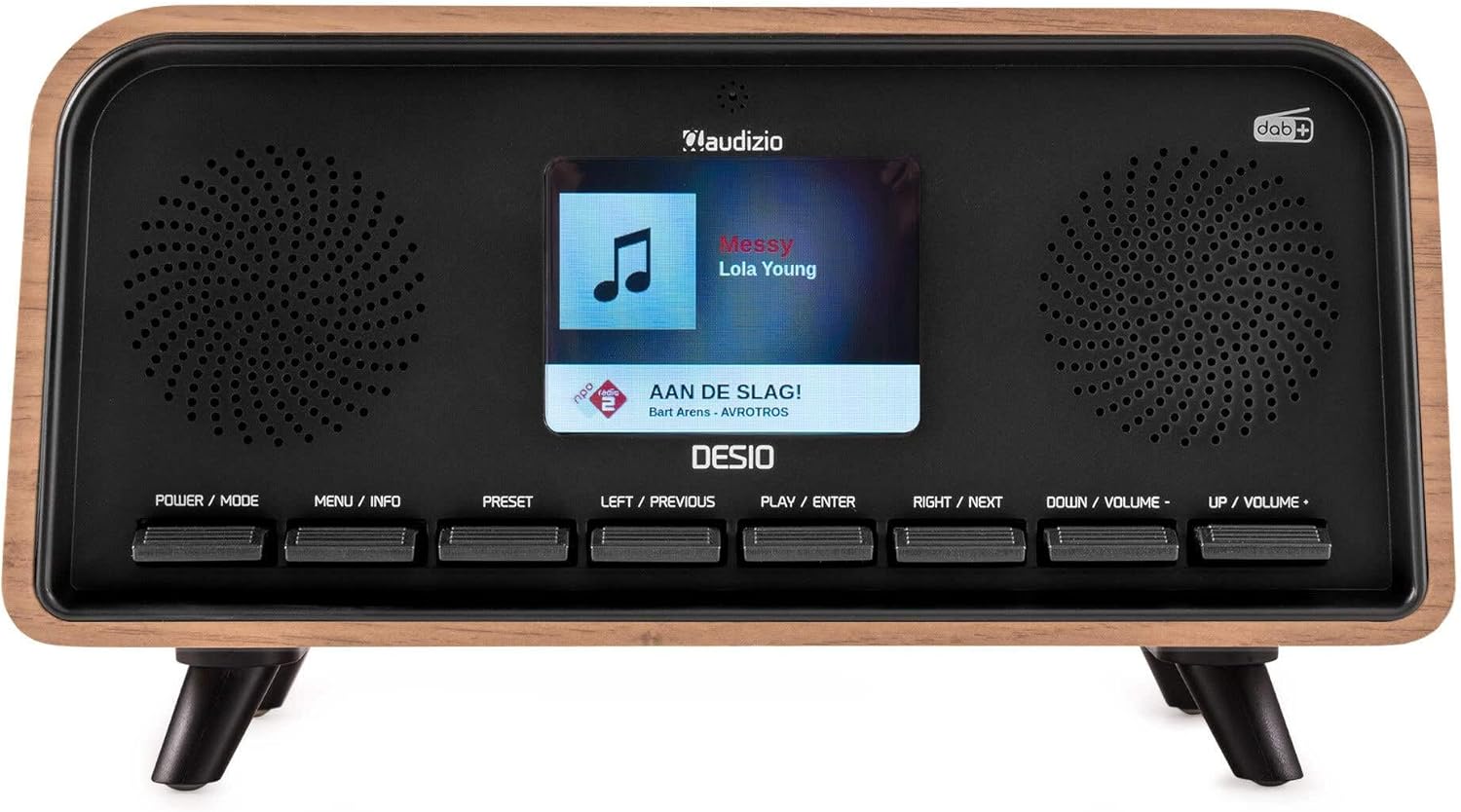
Đằng trước view of the Audizio Desio radio, showing the display playing music with artist and track information. The control buttons are visible below the screen.
- POWER / MODE: Press to turn on/off. Press and hold to switch between DAB, FM, Bluetooth, USB, and AUX modes.
- MENU / INFO: Press to access menu options. In playback mode, press to cycle through information display.
- BẢN LỀ: Press to recall saved stations. Press and hold to save current station.
- LEFT / PREVIOUS: Navigate left in menus, or skip to previous track/station.
- PLAY / ENTER: Confirm selection in menus, or play/pause media.
- RIGHT / NEXT: Navigate right in menus, or skip to next track/station.
- DOWN / VOLUME -: Decrease volume, or navigate down in menus.
- UP / VOLUME +: Increase volume, or navigate up in menus.
Kết nối bảng điều khiển phía sau
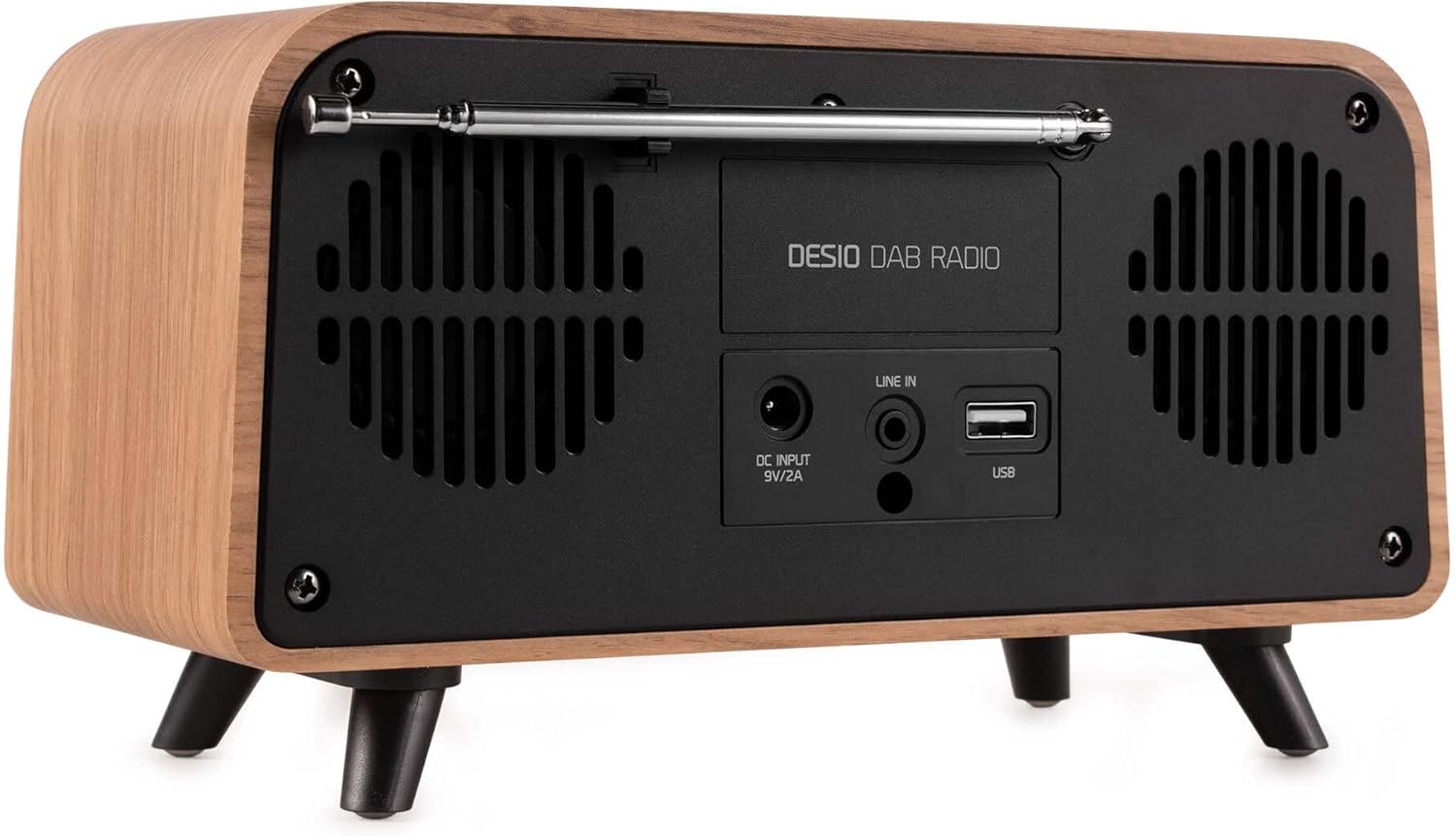
Ở phía sau view of the Audizio Desio radio, highlighting the DC INPUT 9V/2A, LINE IN (3.5mm AUX), and USB ports. The telescopic antenna is extended.
- DC INPUT 9V/2A: Kết nối bộ chuyển đổi nguồn được cung cấp tại đây.
- LINE IN (3.5mm AUX): Kết nối các thiết bị âm thanh ngoài bằng cáp âm thanh 3.5 mm.
- USB: Cắm ổ USB flash để phát nhạc MP3.
- Ăng-ten kính thiên văn: Extend fully for optimal DAB/DAB+ and FM reception.
5. Thiết lập ban đầu
- Kết nối nguồn: Plug the provided DC 5V power adapter into the DC INPUT port on the rear of the radio, then plug the adapter into a wall outlet.
- Mở rộng Ăng-ten: Fully extend the telescopic antenna located on the rear of the unit for best reception.
- Bật nguồn: Nhấn nút CHẾ ĐỘ NĂNG LƯỢNG để bật radio.
- First-time DAB Scan: Upon first power-on, the radio will automatically perform a full scan for DAB/DAB+ stations. This may take a few minutes. The display will show the scanning progress.
- Đặt thời gian/ngày tháng: The time and date will usually be set automatically via DAB signal. If not, you can manually set them via the menu.
6. Hướng dẫn vận hành
6.1 Vận hành Radio DAB/DAB+

Đằng trước view of the Audizio Desio radio, displaying a DAB radio station ('NPO Klassiek') and current time.
- Select DAB Mode: Nhấn nút CHẾ ĐỘ NĂNG LƯỢNG button repeatedly until 'DAB' is displayed.
- Scan for Stations: If no stations are found or you wish to rescan, press MENU / THÔNG TIN, sau đó sử dụng LEFT / PREVIOUS or QUYỀN / TIẾP THEO to select 'Full Scan' and press PLAY / ENTER.
- Chọn trạm: Sử dụng LEFT / PREVIOUS or QUYỀN / TIẾP THEO buttons to browse available stations. Press PLAY / ENTER để chọn một đài.
- Lưu cài đặt trước: Để lưu một trạm, hãy nhấn và giữ nút. CÀI ĐẶT TRƯỚC cái nút. Sử dụng LEFT / PREVIOUS or QUYỀN / TIẾP THEO to choose a preset number (1-50), then press PLAY / ENTER để xác nhận.
- Nhớ lại cài đặt trước: Để gọi lại đài đã lưu, hãy nhấn nút. CÀI ĐẶT TRƯỚC button (do not hold). Use LEFT / PREVIOUS or QUYỀN / TIẾP THEO để chọn cài đặt trước mong muốn, sau đó nhấn PLAY / ENTER.

Đằng trước view of the Audizio Desio radio, showing the 'Preset Recall' menu on the display, indicating empty preset slots.
Hoạt động của đài phát thanh FM 6.2
- Chọn chế độ FM: Nhấn nút CHẾ ĐỘ NĂNG LƯỢNG button repeatedly until 'FM' is displayed.
- Tự động quét: Nhấn và giữ PLAY / ENTER to automatically scan for and save available FM stations.
- Điều chỉnh thủ công: Sử dụng LEFT / PREVIOUS or QUYỀN / TIẾP THEO để tinh chỉnh tần số.
- Save/Recall Presets: Follow the same procedure as for DAB radio (Section 6.1).
6.3 Bluetooth (BT) Operation

Đằng trước view of the Audizio Desio radio, with the display showing 'BT' (Bluetooth) mode and 'Connected' status.
- Select BT Mode: Nhấn nút CHẾ ĐỘ NĂNG LƯỢNG button repeatedly until 'BT' is displayed. The radio will enter pairing mode, indicated by a flashing Bluetooth icon.
- Ghép nối thiết bị: On your smartphone, tablet, or laptop, enable Bluetooth and search for available devices. Select 'Audizio Desio' from the list.
- Kết nối: Once paired, the display will show 'Connected'. You can now stream audio from your device to the radio.
- Kiểm soát phát lại: Use your connected device or the radio's PLAY / ENTER, LEFT / PREVIOUS, Và QUYỀN / TIẾP THEO các nút để điều khiển phát lại.
6.4 Phát lại USB

Đằng trước view of the Audizio Desio radio, with the display showing 'USB' mode, current time, and details of an MP3 file đang được chơi.
- Cắm ổ USB vào: Cắm ổ USB (đã định dạng FAT32) chứa file MP3. filecắm vào cổng USB ở phía sau radio.
- Chọn chế độ USB: Nhấn nút CHẾ ĐỘ NĂNG LƯỢNG button repeatedly until 'USB' is displayed. The radio will automatically start playing the first compatible audio file.
- Điều hướng Files: Sử dụng LEFT / PREVIOUS or QUYỀN / TIẾP THEO to skip tracks. Press PLAY / ENTER để tạm dừng / tiếp tục phát lại.
6.5 đầu vào AUX
- Kết nối thiết bị: Connect an external audio device (e.g., MP3 player, smartphone) to the 'LINE IN' (3.5mm AUX) port on the rear of the radio using a 3.5mm audio cable (not included).
- Chọn chế độ AUX: Nhấn nút CHẾ ĐỘ NĂNG LƯỢNG button repeatedly until 'AUX' is displayed.
- Kiểm soát phát lại: Playback is controlled directly from your connected external device. Adjust volume using the radio's volume controls.
6.6 Chức năng báo thức và hẹn giờ
- Cài đặt báo thức: Truy cập cài đặt báo thức thông qua... MENU / THÔNG TIN button. You can set multiple alarms with customizable sources (DAB, FM, Buzzer), volume, and recurrence (daily, weekdays, weekends).
- Hẹn giờ ngủ: The sleep timer allows the radio to turn off automatically after a set period. Access this function via the MENU / THÔNG TIN Nhấn vào nút và chọn thời lượng mong muốn.
- Chức năng báo lại: When an alarm sounds, press any button (except Power) to activate the snooze function for a short period.
7. Bảo trì
- Vệ sinh: Use a soft, dry, lint-free cloth to clean the radio's surface. Do not use abrasive cleaners, waxes, or solvents.
- Chăm sóc ăng-ten: Hãy cẩn thận khi sử dụng ăng-ten dạng ống lồng để tránh bị cong hoặc gãy.
- Kho: Nếu cất giữ radio trong thời gian dài, hãy ngắt kết nối radio khỏi nguồn điện và cất giữ ở nơi khô ráo, thoáng mát.
KHAI THÁC. Xử lý sự cố
| Vấn đề | Nguyên nhân có thể | Giải pháp |
|---|---|---|
| Không có điện | Bộ chuyển đổi nguồn không được kết nối hoặc ổ cắm bị lỗi. | Kiểm tra kết nối của bộ chuyển đổi nguồn và thử cắm vào ổ cắm khác. |
| Thu sóng DAB/FM kém | Antenna not fully extended or poor signal area. | Fully extend the antenna. Try repositioning the radio. Perform a full scan. |
| Bluetooth không kết nối | Radio not in BT mode, device not in pairing mode, or too far away. | Ensure radio is in BT mode. Put your device in pairing mode. Move device closer to the radio (within 10m). |
| Phát lại USB không hoạt động | USB drive not inserted correctly, unsupported file format, or drive not FAT32. | Cắm lại ổ USB. Đảm bảo files are MP3. Check USB drive format (FAT32). |
| Không có âm thanh từ cổng AUX. | Radio not in AUX mode, cable faulty, or external device volume low. | Select AUX mode. Check 3.5mm cable. Increase volume on both radio and external device. |
9. Thông số kỹ thuật
- Thương hiệu: Audizio
- Người mẫu: Desio
- Công nghệ Tuner: FM, DAB +
- Bluetooth: Version 5.0 (Range: 10m)
- Tùy chọn phát lại: Bluetooth, USB, 3.5mm AUX input
- Trạm đặt trước: 50
- Trưng bày: LCD màu 2.4 inch
- Chức năng: Alarm, Sleep Timer, Snooze, Dimming, Week/Weekend Alarm
- Max Speaker Power: 30Watt
- Nguồn điện: DC 5V (Power Adapter)
- Kích thước sản phẩm (Cao x Rộng x Dày): 32 x 16 x 18cm
- Cân nặng: 1.66kg
10. Bảo hành và Hỗ trợ
This product comes with a standard manufacturer's warranty. For detailed warranty terms and conditions, please refer to the documentation provided at the time of purchase or contact your retailer.
For technical support, troubleshooting assistance, or service inquiries, please contact the Audizio customer support team or your local dealer. Please have your product model number (Desio) and purchase information ready when contacting support.


