Giới thiệu
This manual provides comprehensive instructions for the safe and effective use of your Ambition Soldier Pro 520 Wireless Rotary Tattoo Pen Machine. Please read this manual thoroughly before operating the device to ensure optimal performance and longevity.
Thông tin an toàn
- Chỉ sử dụng ngoài da.
- Tránh xa ngọn lửa trần.
- Always ensure proper sterilization of all equipment before use.
- This device is intended for professional use by trained tattoo artists.
- Do not disassemble or modify the machine, as this may void the warranty and pose safety risks.
Nội dung gói
Upon opening your Ambition Soldier Pro 520 package, verify that all the following items are included:
- 1 x Cordless Tattoo Machine
- 1 x RCA Adapter
- 1 x Extra Battery
- 1 x Extra 32mm Grip
- Cáp 1 x RCA
- 1 x Cáp sạc (Loại C)
- 1 x Accessory Pouch
- 1 x Hard-shell Zippered Case
Tính năng sản phẩm
The Ambition Soldier Pro 520 is engineered for precision and performance, offering a range of features designed for professional tattoo artists:
- Dual Grip & Balanced Design: Crafted from high-quality aluminum alloy, includes a 42mm original grip (309g) and an extra 32mm grip (242g). Both grips feature balanced weight distribution to reduce hand fatigue during extended sessions.
- Hiệu suất vô song: Equipped with an ultra-high torque 520g.cm coreless motor, providing strong, stable, and smooth performance with minimal noise and vibration. Suitable for fine lines and solid shading.
- Adjustable Stroke Control: Features a 2.2–4.2mm adjustable stroke with six gear positions, allowing precise tuning for various tattooing techniques including lining, shading, and coloring.
- Super Long Battery Life with HD Display: A 2400mAh battery offers 7–8 hours of continuous operation on a full charge. The Type-C fast charging port recharges the battery in 2–3 hours. The high-definition screen displays voltage, hertz, battery level, working time, and billing function.
- Two Start Modes: Includes J-Jump start and S-Standard modes for different needle types.
- Tương thích phổ quát: Compatible with most cartridge needles on the market and Ambition Mars-U P1 disposable grips, promoting hygiene and reducing setup time.
Hướng dẫn thiết lập
1. Attaching the Grip
Select your preferred grip (42mm or 32mm). Align the grip with the machine body and twist clockwise until securely fastened. Ensure it is tight enough to prevent movement during operation.
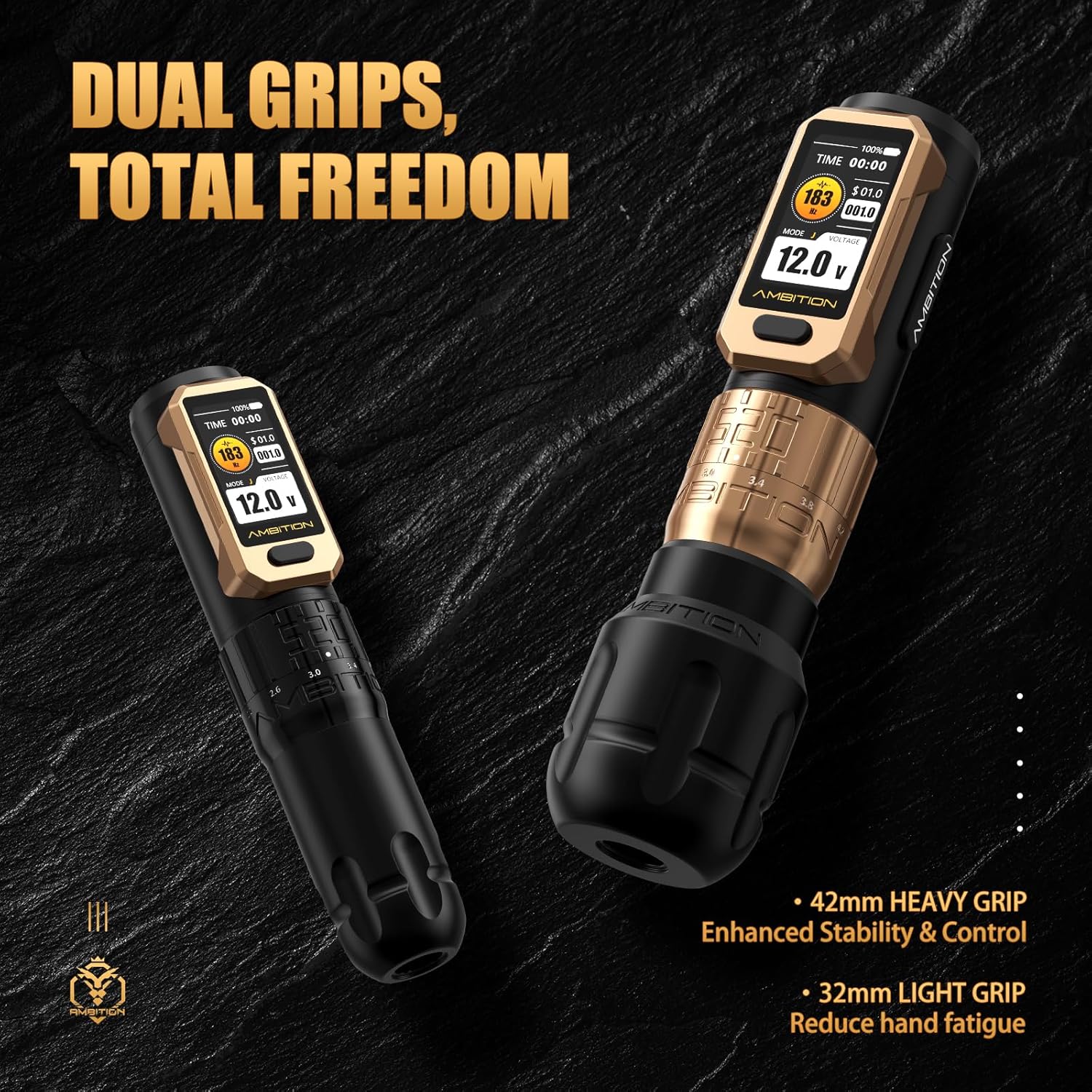
Image: The Ambition Soldier Pro 520 machine shown with both the 42mm heavy grip and the 32mm light grip, highlighting the dual grip options for user comfort and stability.
2. Lắp/Tháo pin
To insert the battery, align the battery pack with the machine's battery compartment and push firmly until it clicks into place. To remove, gently pull the battery pack away from the machine.
3. Attaching Cartridge Needles
Insert the desired cartridge needle into the machine's needle port. Twist slightly to secure it. The machine is compatible with most cartridge needles and Ambition Mars-U P1 disposable grips.

Image: The Ambition Soldier Pro 520 machine with a Mars-U P1 disposable grip attached, demonstrating its compatibility and ease of use for hygienic practices.
Hướng dẫn sử dụng
1. Bật/Tắt nguồn
Press and hold the power button for a few seconds to turn the machine on or off. The HD display will illuminate upon activation.
2. Điều chỉnh âm lượngtage
Once powered on, use the '+' and '-' buttons to adjust the output voltage. Each press adjusts the voltage by 0.1V. The current voltage được hiển thị trên màn hình.
3. Switching Startup Modes
Quickly double-click the power button to switch between startup modes. 'S' indicates Standard mode, and 'J' indicates Jump Start mode. Select the appropriate mode for your needle type.
4. Adjusting Stroke Length
Rotate the adjustable ring on the machine body to select your desired stroke length, ranging from 2.2mm to 4.2mm. There are six distinct settings for precise control.

Image: A close-up of the Ambition Soldier Pro 520's adjustable stroke mechanism, showing the markings for 2.2mm to 4.2mm stroke lengths.
5. Sạc thiết bị
Connect the provided Type-C charging cable to the machine's charging port and to a compatible 5V/2A adapter. The HD display will show the charging status. Avoid completely draining the battery before recharging to prolong battery life.

Image: The Ambition Soldier Pro 520's display showing battery capacity and charging time, with a note on recommended charging input.
BẢO TRÌ
Bảo trì đúng cách đảm bảo tuổi thọ và hiệu suất tối ưu của máy xăm.
- Vệ sinh: After each use, wipe down the exterior of the machine with a suitable disinfectant wipe. Do not immerse the machine in liquids.
- Khử trùng: Ensure all parts that come into contact with skin or ink (e.g., grips, needle cartridges) are properly sterilized or disposed of according to professional hygiene standards.
- Kho: Store the machine in its hard-shell zippered case in a dry, cool place away from direct sunlight and extreme temperatures.
- Chăm sóc pin: To maximize battery life, avoid overcharging or completely discharging the battery. Recharge when the battery level is low.
Xử lý sự cố
| Vấn đề | Nguyên nhân có thể | Giải pháp |
|---|---|---|
| Máy không bật | Pin yếu; Nút nguồn không được nhấn đúng cách | Sạc pin; Nhấn và giữ chặt nút nguồn. |
| Công suất không ổn định/chết máy | Low battery; Faulty needle cartridge; Motor issue | Recharge battery; Replace needle cartridge; Contact support if issue persists. |
| Stroke adjustment not working | Adjustment ring stuck or damaged | Ensure no debris is obstructing the ring; Do not force adjustment. Contact support if damaged. |
| Màn hình không hoạt động | Battery issue; Internal fault | Ensure battery is charged and properly inserted. Contact support. |
Thông số kỹ thuật

Image: A visual representation of the Ambition Soldier Pro 520 machine alongside a table detailing its key specifications.
| Tính năng | Chi tiết |
|---|---|
| Weight (42mm grip) | 309g |
| Weight (32mm grip) | 242g |
| Kích cỡ | 158*42/32mm |
| Động cơ | 22*30mm Coreless Motor |
| Tốc độ động cơ | 12V/9200rpm |
| Mô-men xoắn | 520g.cm |
| Đột quỵ có thể điều chỉnh | 2.2-4.2mm (6 options) |
| Tậptage Phạm vi | 1-12V |
| Dung lượng pin | 2400mAh |
| Thời gian sử dụng | 7-8 Hours (on full charge) |
| Thời gian sạc | 2-3 Hours (Type-C fast charging) |
| Giá trị rung động | 0.8m/giây² |
| Decibel (Đề-xi-ben) | 50-52dB |
| Kích thước sản phẩm | 5.9 x 3 x 2.3 inch |
| Số hiệu mẫu sản phẩm | AB-Soldier520-JS5981-1 |
| Mã số UPC | 810174734812 |
Video sản phẩm chính thức
Video: An official product video demonstrating the features and operation of the Ambition Soldier Pro 520 Tattoo Gun.
Bảo hành và Hỗ trợ
The Ambition Soldier Pro 520 Wireless Rotary Tattoo Pen Machine comes with a Bảo hành 1 năm. For any repair resolutions, technical assistance, or warranty claims, please contact Ambition official support. Ensure you have your model number (AB-Soldier520-JS5981-1) and proof of purchase available when contacting support.
For further information or assistance, please visit the Ambition Store.


