1. Giới thiệu
The DNT Optics HS650 Hydra is a versatile multi-function thermal device designed for various applications. It can operate as a standalone thermal scope, a clip-on thermal attachment for existing optics, or a handheld thermal monocular. This manual provides essential information for the proper setup, operation, and maintenance of your HS650 Hydra device.
2. Sản phẩm hếtview
2.1 Các tính năng chính
- Tính đa năng 3 trong 1: Functions as a standalone scope, clip-on attachment, and handheld monocular.
- Elite Thermal Imaging: Features a 12 µm, ≤18 mK uncooled infrared sensor with a 640×512 resolution and 50mm objective lens.
- AI-Powered Image Super Resolution (ISR): Enhances image clarity and detail, especially at higher digital zoom levels.
- Kết cấu chắc chắn: IP67-rated for waterproof and dustproof protection, shock-resistant housing handles recoil up to .50BMG.
- DNT App Connectivity: Connects to your smartphone for live feed viewing, management, editing, and sharing of content.
2.2 Nội dung gói
Đảm bảo tất cả các mục đều có trong gói hàng của bạn:
- HS650 Thermal Scope ×1
- PMS (Picatinny 0 MOA Short) Mount ×1
- Eye Cup ×1
- Flip Up Cover ×1
- 18650 Flat Top Battery ×2
- Battery Charger ×1
- Cáp USB × 2
- Hướng dẫn sử dụng ×1
- Lens Cleaning Cloth ×1
2.3 Hình ảnh Overview


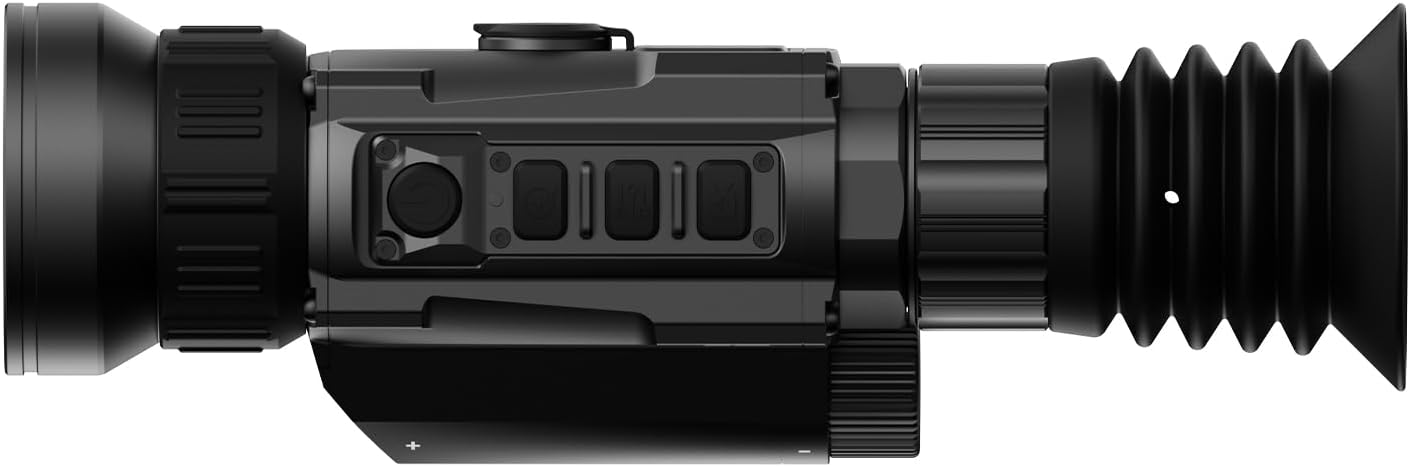


3. Thiết lập
3.1 Lắp đặt pin
- Xác định vị trí ngăn chứa pin trên thiết bị.
- Insert two 18650 Flat Top Batteries, ensuring correct polarity.
- Đóng chặt ngăn chứa pin.
3.2 Tùy chọn gắn kết
The HS650 Hydra can be used in several configurations:
- Standalone Scope: Attach the provided PMS (Picatinny 0 MOA Short) mount to a compatible rail system. Ensure all screws are tightened to the recommended torque.
- Kẹp tóc: Utilize an appropriate quick-detach mount (e.g., DNT QDM150 or QDS150, sold separately) to attach the device in front of your primary optic.
- Handheld Monocular: Use the device without any mounting for portable observation.
3.3 Initial Power-On and App Connection
- Nhấn và giữ nút nguồn để bật thiết bị.
- Download the DNT App on your smartphone.
- Follow the in-app instructions to connect your HS650 Hydra to your smartphone for live viewing and feature control.
4. Hướng dẫn vận hành
4.1 Điều khiển cơ bản
Refer to the device's physical buttons for power, menu navigation, zoom, and recording functions. Detailed button assignments are available in the full user manual.
4.2 Các chế độ chụp ảnh nhiệt
The HS650 Hydra offers various thermal imaging modes to optimize viewing for different environments and preferences. These typically include:
- Tự nhiên: Provides a balanced thermal view.
- Enhanced: Increases contrast for better detail recognition.
- Điểm nổi bật: Emphasizes hot spots for quick target identification.
4.3 Image Super Resolution (ISR)
The AI-Powered Image Super Resolution (ISR) feature enhances image detail, especially when using digital zoom. This feature can be toggled on or off via the device menu or connected app.
4.4 Zoom kỹ thuật số
The HS650 Hydra features a 2.5x base magnification with digital zoom capabilities up to 10x. Use the designated zoom buttons to adjust magnification levels.
4.5 Video kích hoạt giật lùi
The device supports Recoil Activated Video recording, which automatically captures footage when recoil is detected. This ensures important moments are recorded without manual intervention.
5. Bảo trì
5.1 Vệ sinh
- Use the provided lens cleaning cloth to gently wipe the objective and eyepiece lenses. Avoid abrasive materials.
- Đối với thân máy, hãy sử dụng chất liệu mềm,amp vải để loại bỏ bụi bẩn và mảnh vụn.
5.2 Bảo vệ môi trường
The HS650 Hydra is IP67-rated, meaning it is protected against dust ingress and can withstand immersion in water up to 1 meter for 30 minutes. While robust, avoid unnecessary exposure to extreme conditions.
5.3 Lưu trữ
Bảo quản thiết bị ở nơi khô ráo, thoáng mát, tránh ánh nắng trực tiếp và nhiệt độ quá cao hoặc quá thấp. Tháo pin nếu cất giữ trong thời gian dài.
KHAI THÁC. Xử lý sự cố
If you encounter issues with your DNT Optics HS650 Hydra, consider the following:
- Thiết bị không bật nguồn: Check battery charge and ensure batteries are inserted with correct polarity.
- Chất lượng hình ảnh kém: Ensure lenses are clean. Adjust focus and brightness settings. Verify ISR is enabled if desired.
- Sự cố kết nối ứng dụng: Ensure Bluetooth/Wi-Fi is enabled on your smartphone and the device. Restart both the device and the app.
- Mounting stability: Re-check all mounting screws for proper tightness.
For further assistance, please contact DNT Optics customer support.
7. Thông số kỹ thuật
| Thương hiệu | DNT Optics |
| Tên mẫu | HS650 |
| Phong cách | 640-50 |
| Màu sắc | Đen |
| Kích thước sản phẩm | Dài 8.4" x Rộng 2.7" x Cao 2.2" |
| Trọng lượng sản phẩm | 1.02 pound (16.3 ounce) |
| Vật liệu | Metal or High-Quality Plastic |
| Đường kính ống kính vật kính | 68.58 milimét |
| Độ phóng đại tối thiểu | 2.5 lần |
| Thiết bị tương thích | Rifle, Shotgun, Handgun |
| Kiểu lắp đặt | PMS - Picatinny 0 MOA Short |
| Tầm nhìn ban đêm | Không (Chụp ảnh nhiệt) |
| Kiểu lưới ngắm | Điện tử |
8. Bảo hành và Hỗ trợ
For information regarding product warranty, returns, or technical support, please refer to the official DNT Optics website or contact their customer service directly. Contact details can typically be found on the manufacturer's packaging or webđịa điểm.
You can visit the DNT Optics Store for more information: Cửa hàng quang học DNT


