1. Giới thiệu
Cảm ơn bạn đã muaasing the Baseus PicoGo Magnetic Power Bank. This user manual provides essential information for the safe and efficient operation of your device. Please read it thoroughly before use and retain it for future reference.
2. Sản phẩm hếtview
The Baseus PicoGo Magnetic Power Bank is a Qi2 Certified 15W ultra-fast wireless portable charger with a built-in stand. Its ultra-slim 5000mAh battery pack is designed for convenience and efficiency, compatible with iPhone 12-17 series and other USB-C devices.
2.1 Nội dung gói
- Baseus PicoGo Magnetic Power Bank
- Cáp sạc USB-C sang USB-C
- Hướng dẫn sử dụng
2.2 Bố cục thiết bị
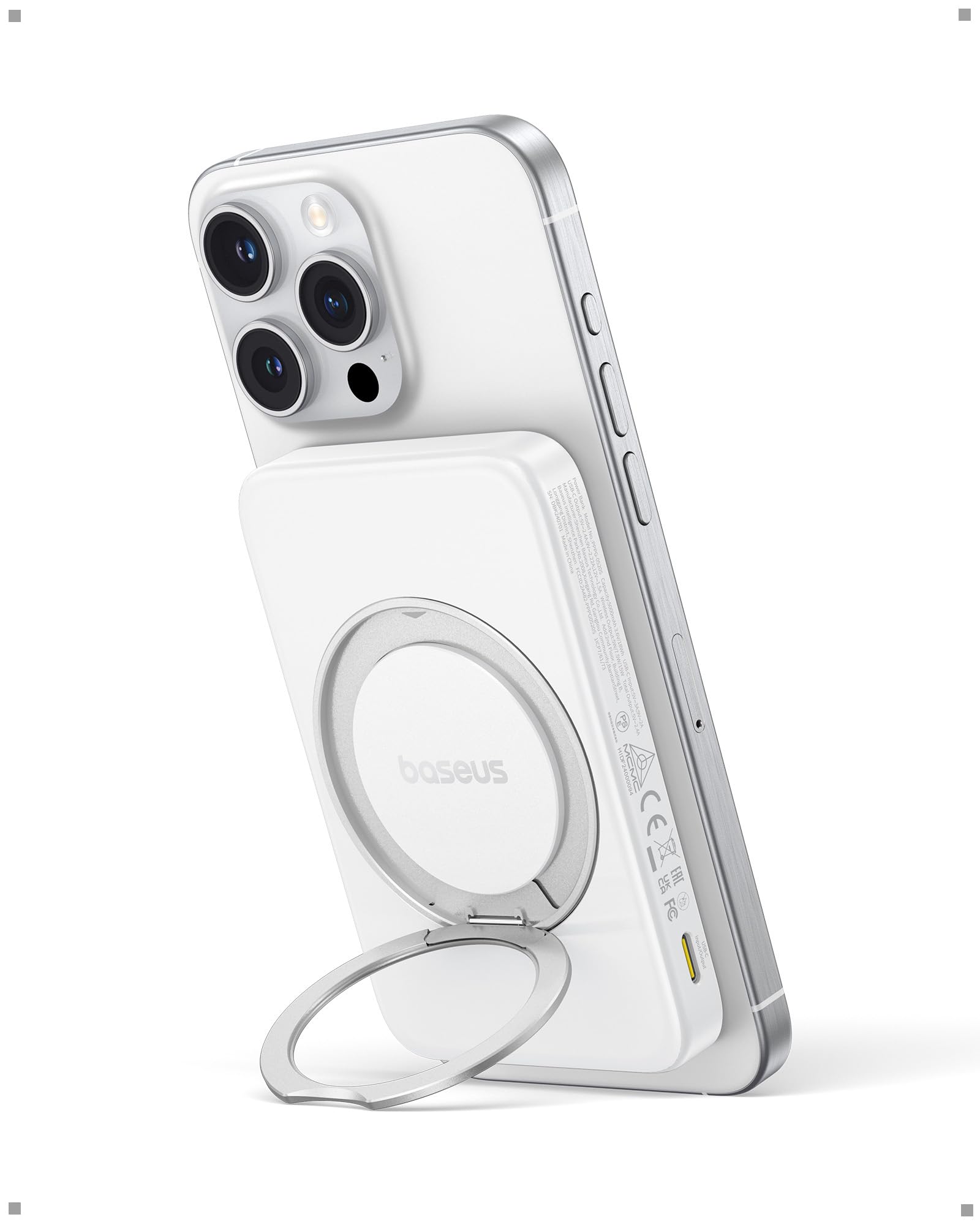
Figure 1: Baseus PicoGo Magnetic Power Bank (Moon White)
The power bank features a sleek design with a magnetic charging surface, LED indicators for battery status, a power button, and USB-C input/output ports. It also includes an integrated rotatable stand for versatile viewgóc nghiêng.

Figure 2: Dimensions of the Baseus PicoGo Power Bank (4.07 x 2.63 x 0.54 inches)
The device is ultra-slim, measuring 0.54 inches thick and weighing 6 ounces, making it highly portable.

Hình 3: Cận cảnh view of the power bank's USB-C input/output ports and power button.
3. Thiết lập
3.1 Sạc pin dự phòng
- Kết nối cáp USB-C sang USB-C được cung cấp kèm theo với cổng USB-C vào/ra của pin dự phòng.
- Kết nối đầu còn lại của cáp với bộ chuyển đổi nguồn USB-C tương thích (không kèm theo).
- Các đèn LED sẽ sáng lên để hiển thị trạng thái sạc. Khi tất cả các đèn LED đều sáng liên tục, tức là pin đã được sạc đầy.
3.2 Bật / Tắt nguồn
- To power on the device, press the power button once. The LED indicators will light up.
- To power off the device, press and hold the power button for a few seconds until the LEDs turn off.
4. Hướng dẫn vận hành
4.1 Wireless Charging (MagSafe Qi2)
The Baseus PicoGo Power Bank supports Qi2-certified 15W ultra-fast MagSafe wireless charging.
- Đảm bảo sạc dự phòng được sạc đầy.
- Align your MagSafe-compatible iPhone (iPhone 12-17 series) with the magnetic charging surface on the power bank. The magnets will snap into place, securing the phone.
- The phone's screen will indicate that charging has begun.

Figure 4: An iPhone receiving 15W wireless charging from the power bank.
For a visual demonstration of the magnetic and stand features, please watch the video below:
Video 1: Official Baseus demonstration of the PicoGo Qi2 Magnetic Power Bank, highlighting its rotatable stand and magnetic attachment.
4.2 Sạc có dây (USB-C)
The power bank's USB-C port supports 20W fast charging for compatible devices.
- Connect your device to the power bank's USB-C input/output port using a compatible USB-C cable.
- Ensure the power bank is powered on. Charging will begin automatically.

Figure 5: An iPhone connected to the power bank via a USB-C cable for wired charging.
4.3 Using the Multi-Function Stand
The integrated magnetic ring stand offers flexible viewtùy chọn ing.
- Gently pull out the ring stand from the back of the power bank.
- Rotate the inner metal ring 360° and adjust the angle freely from 40° to 120° to suit your viewsở thích ing.
- The stand can be used for watching videos, participating in online meetings, or as a secure non-slip grip for selfies and calls.

Figure 6: The power bank's rotatable stand supporting an iPhone for hands-free viewđang.
4.4 Sạc nhiều thiết bị cùng lúc
The power bank allows for simultaneous charging of two devices.
- You can wirelessly charge one device (e.g., iPhone) while simultaneously charging another device via the USB-C port.
- The power bank can also be recharged via USB-C while it is wirelessly charging a device.
5. Bảo trì
- Keep the power bank dry and clean. Avoid exposure to moisture, dust, or extreme temperatures.
- Vệ sinh thiết bị bằng vải mềm, khô. Không sử dụng hóa chất mạnh hoặc vật liệu mài mòn.
- Bảo quản sạc dự phòng ở nơi khô ráo, thoáng mát khi không sử dụng.
- For extended storage, ensure the battery is charged to approximately 50% to prolong its lifespan.
KHAI THÁC. Xử lý sự cố
6.1 Các vấn đề chung
- Thiết bị không sạc được: Ensure the power bank is charged and powered on. Check cable connections and try a different cable or power adapter.
- Sạc chậm: Verify that your device and cables support fast charging. Ensure proper alignment for wireless charging.
- Quá nhiệt: The power bank features intelligent cooling. If excessive heat is detected, charging may slow down or stop. Remove the device from charging and allow it to cool down.
6.2 Ý nghĩa của đèn LED
The LED indicators provide information about the power bank's status:
- Đèn LED đặc: Hiển thị mức pin còn lại.
- Đèn LED nhấp nháy: Indicate the power bank is charging.
7. Thông tin an toàn
The Baseus PicoGo Power Bank is equipped with advanced safety features to protect your devices and ensure safe operation.

Figure 7: Icons representing various safety protections including over-voltage, dưới voltage, overcharge, over-discharge, NTC temperature, over-current, short circuit, and over-power protection.
Các biện pháp bảo vệ này bao gồm:
- Quá voltage Bảo vệ
- Âm lượng thấptage Bảo vệ
- Bảo vệ quá tải
- Bảo vệ quá tải
- Bảo vệ nhiệt độ NTC
- Bảo vệ quá dòng
- Bảo vệ ngắn mạch
- Bảo vệ quá nguồn
7.1 Intelligent Cooling and Heat Dissipation
The power bank incorporates advanced dual cooling technology with sensitive NTC thermistors for real-time temperature control and graphene aerogel for superior heat dissipation. This ensures safer and more reliable charging by keeping your device cool.

Figure 8: Illustration of the dual heat dissipation system using graphene aerogel for optimal thermal management.
7.2 Air-Travel Friendly
With a 5000mAh capacity, the Baseus PicoGo Power Bank is designed to be air-travel friendly, allowing you to stay powered up wherever you go, in compliance with most airline regulations.

Figure 9: The 5000mAh power bank is suitable for air travel, keeping devices charged on the go.
8. Thông số kỹ thuật
| Tính năng | Chi tiết |
|---|---|
| Số hiệu mẫu | PPPG-0520S |
| Dung lượng pin | 5000 triệuamp Giờ (mAh) |
| Đầu ra sạc không dây | Công suất tối đa 15W (Đạt chứng nhận Qi2) |
| Đầu vào / đầu ra USB Type-C | Lên đến 20W |
| Kích thước sản phẩm | 4.07 x 2.63 x 0.54 inch |
| Trọng lượng sản phẩm | 6 ounce |
| Tính năng đặc biệt | Qi2 15W MagSafe wireless portable charger with foldable stand, ultra-slim, LED indicator lights, short circuit protection, over charging protection, pocket size. |
| Màu sắc | Trăng Trắng |
8.1 Khả năng tương thích phổ quát
Pin dự phòng này tương thích với nhiều loại thiết bị, bao gồm:
- Magnetic Wireless (15W Max): iPhone 12-16 Series (For iOS 17.4 and Later), iPhone 17 Series.
- USB-C Port (20W Max): iPad Air/Pro Series, AirPods Series, Samsung S20-S24 Series, Apple Watch Series.

Figure 10: The power bank offers broad compatibility for both wireless and wired charging across various Apple and Samsung devices.
9. Bảo hành & Hỗ trợ
Baseus is committed to providing high-quality products and excellent customer service.
- Bảo hành 2 năm không rắc rối: Enjoy peace of mind with our comprehensive warranty.
- Đảm bảo hoàn tiền trong vòng 30 ngày: Nếu bạn không hài lòng, bạn có thể trả lại sản phẩm trong vòng 30 ngày để được hoàn tiền đầy đủ.
- Hỗ trợ khách hàng trọn đời: Our dedicated support team is available to assist you with any questions or issues.
Để được hỗ trợ thêm, vui lòng truy cập trang web chính thức của Baseus. webtrang web hoặc liên hệ với nhóm hỗ trợ khách hàng của chúng tôi.


