Giới thiệu
This manual provides detailed instructions for the setup, operation, and maintenance of your LIGE EF21-I Smartwatch. Please read this manual thoroughly before using the device to ensure proper function and to maximize its features.
Thông tin an toàn
- Không cố tháo rời hoặc sửa đổi đồng hồ.
- Giữ đồng hồ tránh xa nhiệt độ khắc nghiệt và ánh sáng mặt trời trực tiếp.
- Tránh để đồng hồ tiếp xúc với va đập mạnh hoặc bị rơi.
- Do not use corrosive chemicals to clean the watch.
- This device is not a medical device. Health data is for reference only and should not be used for medical diagnosis or treatment.
- Hãy đảm bảo các điểm tiếp xúc sạc sạch sẽ và khô ráo trước khi sạc.
Nội dung gói
Xác minh rằng tất cả các mục đều có trong gói hàng của bạn:
- LIGE EF21-I Smartwatch
- Cáp sạc từ tính USB
- Cáp sạc Type-C
- Hướng dẫn sử dụng

Image: The package includes both a USB magnetic charging cable and a Type-C charging cable for versatile power options.
Hướng dẫn thiết lập
1. Sạc ban đầu
Before first use, fully charge your smartwatch. Connect the magnetic charging cable to the charging contacts on the back of the watch and the USB end to a power adapter (not included) or a computer USB port. The watch display will show the charging status.

Image: The smartwatch connected to its magnetic charger, indicating its 800 mAh battery capacity.
2. Cài đặt và ghép nối ứng dụng
To unlock all features, download and install the "Fit CloudPro" app on your smartphone.
- Scan the QR code in the manual or on the watch (if available) or search for "Fit CloudPro" in your phone's app store (compatible with Android 8.0+ and iOS 12.0+).
- Mở ứng dụng và tạo tài khoản hoặc đăng nhập.
- Đảm bảo Bluetooth được bật trên điện thoại thông minh của bạn.
- Trong ứng dụng, điều hướng đến mục thiết bị và chọn "Thêm thiết bị" hoặc tùy chọn tương tự.
- Select "EF21-I" from the list of available devices to pair.
- Làm theo lời nhắc trên màn hình để hoàn tất quá trình ghép nối.
Sau khi ghép nối, đồng hồ sẽ đồng bộ hóa thời gian và dữ liệu với điện thoại của bạn.
Hướng dẫn sử dụng
Điều hướng cơ bản
- Màn hình cảm ứng: Vuốt sang trái/phải, lên/xuống để điều hướng qua menu và tính năng. Chạm để chọn.
- Các nút bên: Typically, one button acts as a power/back button, while others may be customizable shortcuts. Refer to the on-screen prompts for specific functions.

Image: The 1.43-inch AMOLED display offers brilliant colors and a fluid, efficient user experience.
Chức năng gọi Bluetooth
The EF21-I Smartwatch supports Bluetooth calls, allowing you to make and receive calls directly from your wrist.
- Đảm bảo đồng hồ được kết nối với điện thoại thông minh của bạn qua Bluetooth.
- Access the "Call" or "Phone" function on your watch.
- You can use the dial pad, access your contacts, or view lịch sử cuộc gọi.
- Advanced noise cancellation ensures clear audio during calls.
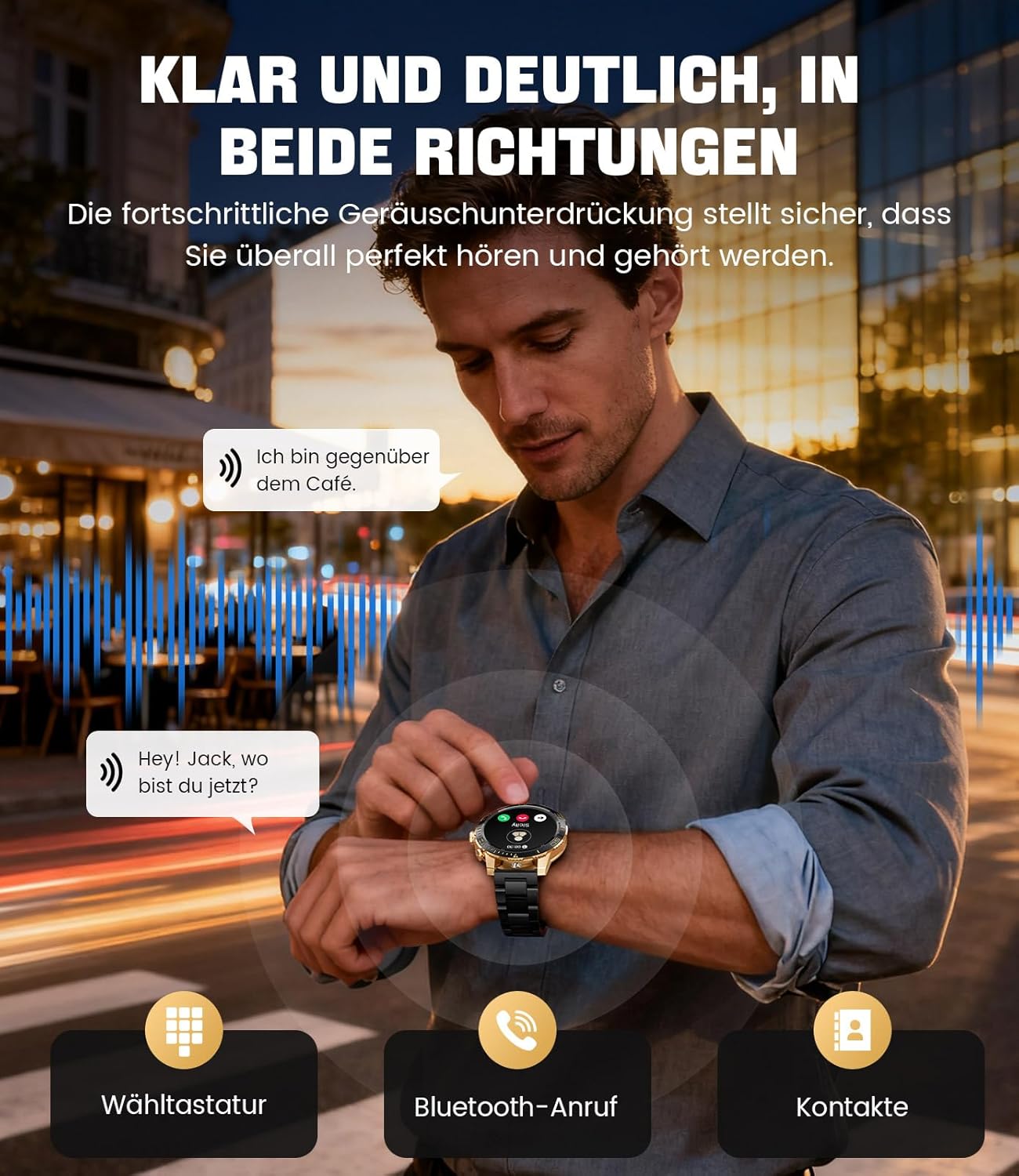
Image: The smartwatch allows clear two-way communication with advanced noise cancellation, featuring a dial pad, Bluetooth call option, and contacts access.
Thông báo
Receive real-time notifications from your smartphone apps directly on your watch.
- Enable app notifications in the "Fit CloudPro" app settings.
- The watch will display incoming calls, SMS, and messages from social media apps (e.g., Facebook, Twitter, Instagram, WhatsApp).
- A quick glance at your wrist allows you to stay informed discreetly.

Image: The smartwatch displays real-time notifications from various social media applications, keeping you informed discreetly.
Theo dõi sức khỏe
The EF21-I Smartwatch acts as your 24/7 health guardian, providing continuous monitoring of key health metrics.
- Nhịp tim: Theo dõi nhịp tim của bạn suốt cả ngày.
- Oxy trong máu (SpO2): Đo mức độ bão hòa oxy trong máu của bạn.
- Theo dõi giấc ngủ: Analyzes your sleep patterns, distinguishing between deep sleep, light sleep, and awake times.
- Giám sát căng thẳng: Theo dõi mức độ căng thẳng.
- Nhắc nhở ít vận động: Nhắc nhở bạn vận động sau những khoảng thời gian không hoạt động.
View detailed health data and trends in the "Fit CloudPro" app.
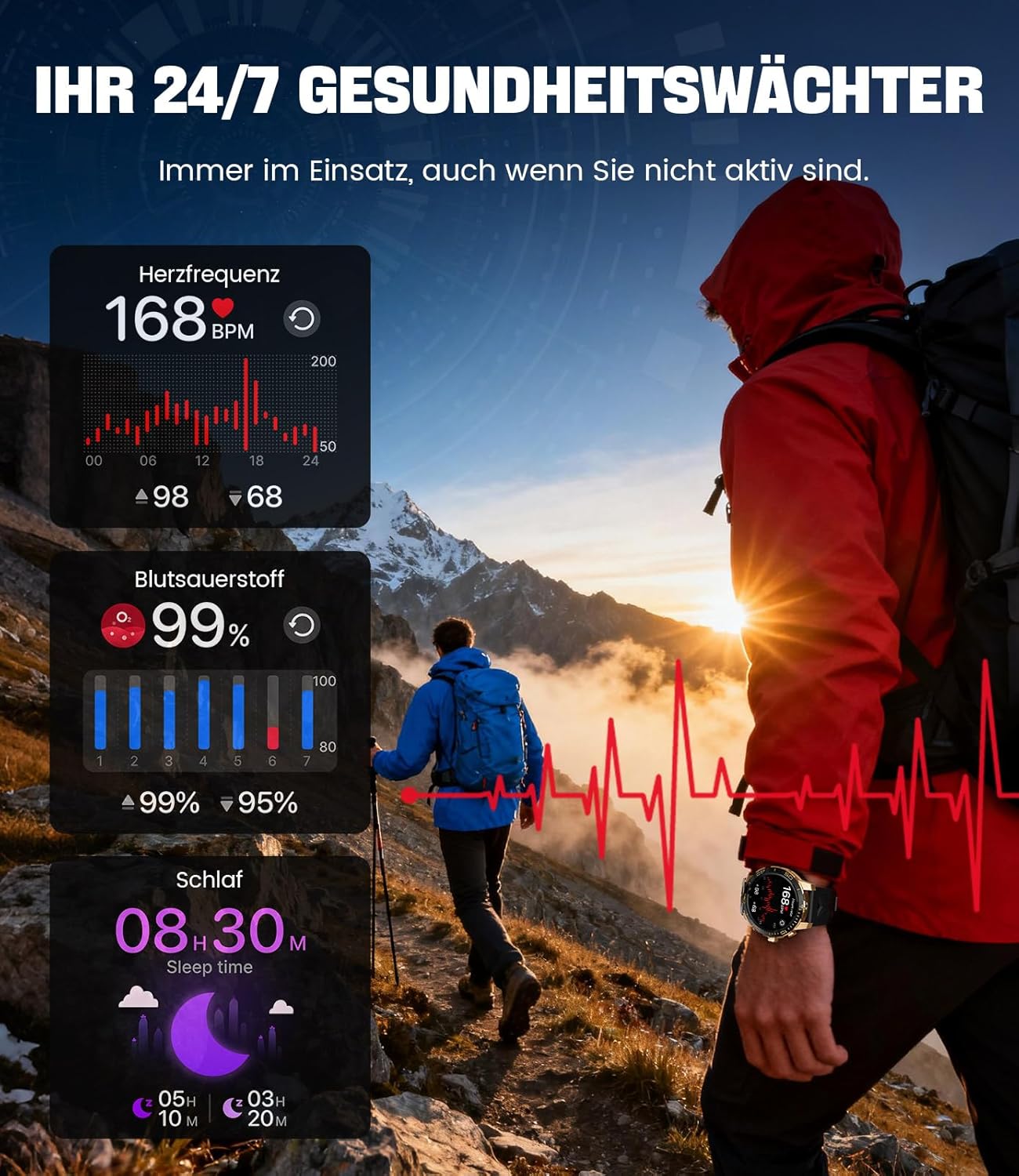
Image: The smartwatch functions as a 24/7 health guardian, monitoring heart rate, blood oxygen, and sleep patterns, even when you are not actively engaged in exercise.
Chế độ thể thao
With over 200 sports modes, the watch helps you track your workouts and achieve your fitness goals.
- Chọn chế độ thể thao mong muốn từ menu của đồng hồ.
- The watch records data such as heart rate, calories burned, and steps taken.
- Automatic recognition for walking, running, and cycling is supported.
- Review your activity data in the "Fit CloudPro" app for performance analysis.

Image: The smartwatch supports over 200 training modes, tracking heart rate, calories, and steps for various activities.
Mặt đồng hồ có thể tùy chỉnh
Tùy chỉnh đồng hồ thông minh của bạn với nhiều mặt đồng hồ khác nhau.
- The watch comes with several pre-installed classic watch faces.
- Access over 200 additional designs through the "Fit CloudPro" app.
- Bạn cũng có thể tải ảnh của riêng mình lên để tạo mặt đồng hồ tùy chỉnh.
Các tính năng bổ sung
- Dự báo thời tiết: Nhận thông tin cập nhật thời tiết theo thời gian thực.
- Đồng hồ báo thức: Đặt báo thức trực tiếp từ cổ tay của bạn.
- Điều khiển camera từ xa: Sử dụng đồng hồ của bạn để kích hoạt camera điện thoại.
- Đèn pin: Activate a flashlight function on your wrist.
- Tìm số điện thoại: Find your misplaced smartphone using the watch.

Image: The smartwatch features a wrist flashlight function, providing illumination for outdoor activities.
BẢO TRÌ
Vệ sinh
- Lau màn hình và thân đồng hồ bằng vải mềm, không xơ.
- Đối với các vết bẩn cứng đầu, dampnhúng vải vào nước một chút.
- Avoid using harsh chemicals, abrasive materials, or ultrasonic cleaners.
- Hãy đảm bảo các điểm tiếp xúc sạc sạch sẽ và không bị bám bụi bẩn.
Khả năng chống nước (IP68)
The LIGE EF21-I Smartwatch is IP68 water-resistant, meaning it can withstand immersion in water up to 1.5 meters for up to 30 minutes. It is suitable for daily use, hand washing, and swimming.
- Không sử dụng đồng hồ trong nước nóng, phòng xông hơi hoặc phòng tắm hơi.
- Tránh nhấn các nút khi đang ở dưới nước.
- After exposure to water, especially saltwater, dry the watch thoroughly.
Xử lý sự cố
Đồng hồ không bật
- Đảm bảo đồng hồ đã được sạc đầy. Kết nối đồng hồ với bộ sạc trong ít nhất 30 phút.
- Nhấn và giữ nút nguồn trong vài giây.
Không thể ghép nối với ứng dụng
- Đảm bảo Bluetooth đã được bật trên điện thoại thông minh của bạn.
- Hãy đảm bảo đồng hồ đã được sạc đầy pin.
- Khởi động lại cả điện thoại thông minh và đồng hồ thông minh của bạn.
- Try unpairing and re-pairing the device through the "Fit CloudPro" app.
- Kiểm tra xem ứng dụng có các quyền cần thiết trên điện thoại của bạn hay không.
Dữ liệu sức khỏe không chính xác
- Đảm bảo đồng hồ được đeo vừa vặn trên cổ tay, không quá lỏng hoặc quá chặt.
- Vệ sinh cảm biến ở mặt sau của đồng hồ.
- Tránh di chuyển quá mức trong khi đo.
- Remember that health data is for reference and not for medical use.
Notifications Not Received
- Hãy kiểm tra xem đồng hồ đã được kết nối với điện thoại của bạn qua Bluetooth chưa.
- Check notification settings in the "Fit CloudPro" app.
- Ensure your phone's notification settings allow the app to send notifications.
- Disable any battery optimization settings for the "Fit CloudPro" app on your phone.
Thông số kỹ thuật
| Tính năng | Chi tiết |
|---|---|
| Thương hiệu | LIGE |
| Số hiệu mẫu | EF21-I |
| Kích thước hiển thị | 1.43 inch |
| Kiểu hiển thị | AMOLED |
| Dung lượng pin | 800 mAh (Pin lithium-polymer) |
| Kết nối | Bluetooth |
| Khả năng tương thích của hệ điều hành | Android 8.0 trở lên & iOS 12.0 trở lên |
| Xếp hạng khả năng chống nước | IP68 |
| Dung lượng lưu trữ bộ nhớ | 256MB |
| Tính năng đặc biệt | Weather forecast, Sedentary reminder, Alarm clock, Touch screen, Always-on display, Bluetooth calling, Heart rate monitor, SpO2 monitor, Sleep monitor, 200+ sports modes, Phone locator |
| GPS | GPS qua điện thoại thông minh |

Image: The smartwatch features impact resistance, indicated by a 'Military Grade Drop-Tested' badge.
Bảo hành và Hỗ trợ
Thông tin bảo hành
The product is supported by a 12-month warranty. Please retain your proof of purchase for warranty claims.
Hỗ trợ khách hàng
For technical assistance, troubleshooting, or warranty inquiries, please contact LIGE customer support. Refer to the contact information provided with your purchase or visit the official LIGE webđịa điểm.