1. Giới thiệu
This manual provides essential instructions for the safe and effective use of your DNT Optics TNC335R ThermNight Thermal & Night Vision Multispectral Scope, bundled with the QDM150 Quick Detach Mount. The TNC335R is an advanced optical device designed for enhanced observation capabilities in various lighting conditions, offering both thermal and night vision functionalities. Please read this manual thoroughly before operating the device.
2. Thông tin an toàn
- An toàn cho mắt: Never look directly at the sun or other intense light sources through the scope, as this can cause permanent eye damage.
- An toàn pin: Use only recommended battery types. Do not mix old and new batteries, or different types of batteries. Dispose of batteries according to local regulations.
- Lắp đặt: Ensure the scope is securely mounted to your firearm using the QDM150 mount. Improper mounting can lead to injury or damage to the device.
- Điều kiện môi trường: Avoid exposing the device to extreme temperatures, direct impact, or corrosive substances.
- BẢO TRÌ: Do not attempt to disassemble or modify the scope. Refer all servicing to authorized DNT Optics personnel.
3. Nội dung gói hàng
Xác minh rằng tất cả các mục đều có trong gói hàng của bạn:
- DNT Optics TNC335R ThermNight Multispectral Scope
- QDM150 Quick Detach Mount
- Mũ ống kính
- Pin sạc
- Cáp sạc USB
- Vải lau ống kính
- Hướng dẫn sử dụng (tài liệu này)
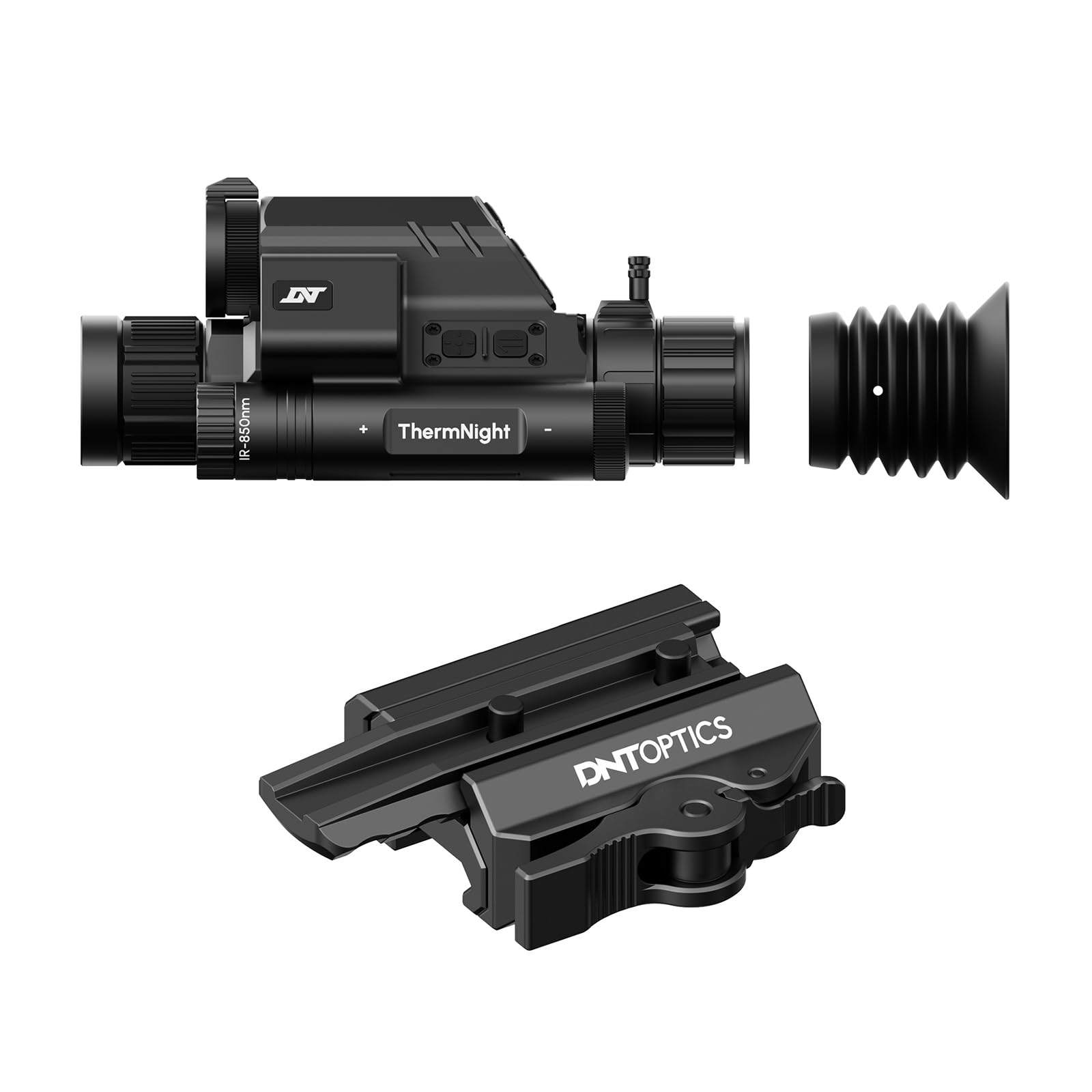
Image 1: DNT Optics TNC335R ThermNight Multispectral Scope with QDM150 mount. This image displays the main scope unit alongside its quick-detach mounting system, providing a visual reference for the product.
4. Thiết lập
4.1 Lắp đặt pin
- Locate the battery compartment on the scope.
- Vặn nắp pin.
- Insert the rechargeable battery, ensuring correct polarity (+/-).
- Securely replace the battery cap.
- Charge the battery fully before first use using the provided USB cable.
4.2 Mounting the QDM150
- Attach the QDM150 mount to the scope according to the mount's specific instructions, ensuring it is firmly secured.
- Position the scope with the QDM150 mount onto your rifle's Picatinny rail.
- Engage the quick-detach levers to lock the mount onto the rail. Verify that the scope is stable and does not wobble.
4.3 Khởi động ban đầu và thiết lập lại về 0
- Nhấn và giữ nút nguồn cho đến khi màn hình sáng lên.
- Perform initial zeroing of the scope according to standard rifle scope zeroing procedures. Refer to the detailed zeroing guide available on the DNT Optics webtrang web để được hướng dẫn toàn diện.
5. Hoạt động
5.1 Bật/Tắt nguồn
- Bật nguồn: Nhấn và giữ nút nguồn trong khoảng 3 giây.
- Tắt nguồn: Press and hold the power button for approximately 5 seconds until the display shuts down.
5.2 Lựa chọn chế độ
The TNC335R offers multiple observation modes:
- Chế độ nhiệt: Detects heat signatures. Ideal for low-light or obscured conditions.
- Chế độ nhìn ban đêm: Amplifies ambient light for clear viewing in near-darkness.
- Chế độ ban ngày: Standard optical viewing for daylight conditions.
Press the 'Mode' button to cycle through the available observation modes.
5.3 Reticle Adjustment
Use the directional buttons or rotary dial (depending on model variant) to adjust the reticle's position for precise aiming. Refer to the on-screen menu for specific reticle options and adjustments.
5.4 Độ sáng và độ tương phản
Navigate to the 'Display Settings' in the main menu to adjust screen brightness and image contrast for optimal viewtrong các môi trường khác nhau.
5.5 Zoom kỹ thuật số
Press the 'Zoom' button to cycle through available digital magnification levels. Note that higher digital zoom levels may reduce image clarity.
6. Bảo trì
6.1 Vệ sinh
- Ống kính: Use the provided lens cleaning cloth or a soft, lint-free cloth specifically designed for optics. Gently wipe the lens surfaces. For stubborn dirt, use a small amount of lens cleaning fluid.
- Thân hình: Lau sạch thân ống ngắm bằng khăn mềm.amp vải. Tránh sử dụng chất tẩy rửa hoặc dung môi có tính mài mòn.
6.2 Chăm sóc pin
- Hãy sạc pin thường xuyên, ngay cả khi không sử dụng nhiều, để duy trì tuổi thọ của pin.
- Store the device with a partially charged battery if storing for extended periods.
6.3 Lưu trữ
Store the scope in a cool, dry place, away from direct sunlight and extreme temperatures. Use the lens caps to protect the optical surfaces.
KHAI THÁC. Xử lý sự cố
| Vấn đề | Nguyên nhân có thể | Giải pháp |
|---|---|---|
| Thiết bị không bật nguồn. | Low or depleted battery; incorrectly installed battery. | Charge the battery; ensure battery is installed with correct polarity. |
| Hình ảnh bị mờ hoặc không rõ ràng. | Lens caps still on; dirty lenses; focus adjustment needed. | Remove lens caps; clean lenses; adjust the focus ring. |
| Các nút không phản hồi. | Thiết bị bị treo; pin yếu. | Perform a soft reset (refer to DNT Optics website for specific instructions); charge battery. |
| QDM150 mount feels loose. | Levers not fully engaged; mounting screws loose. | Ensure quick-detach levers are fully locked; tighten any accessible mounting screws. |
8. Thông số kỹ thuật
- Thương hiệu: DNT Optics
- Tên mẫu: TNC335R
- Trọng lượng sản phẩm: 29.8 Ounce
- Vật liệu: Nhôm
- Thiết bị tương thích: Súng trường, súng săn
- Tầm nhìn ban đêm: Đúng
- Reticle Type: Đi qua
- Loại chủ đề: 1/2"-28
- Màu sắc: Đen
9. Bảo hành và Hỗ trợ
DNT Optics products are covered by a limited warranty. For detailed warranty information, product registration, and technical support, please visit the official DNT Optics webtrang web hoặc liên hệ với bộ phận chăm sóc khách hàng của họ. Giữ lại hóa đơn mua hàng để làm bằng chứng mua hàng khi yêu cầu bảo hành.
Chính thức Webđịa điểm: DNT Optics Store on Amazon


