1. Giới thiệu
The WAVLINK USB4 to 10Gbps Ethernet Adapter provides high-speed wired network connectivity for devices equipped with USB4, Thunderbolt 3, Thunderbolt 4, or Thunderbolt 5 ports. This adapter is designed to deliver stable and low-latency network performance, suitable for demanding applications such as 4K/8K video editing, large file transfers, and multi-gigabit internet access.
2. Nội dung gói hàng
Vui lòng xác minh rằng tất cả các mục được liệt kê dưới đây đều có trong gói hàng của bạn:
- 1x USB4 10 Gigabit Ethernet Adapter
- 1x USB4 C to C Cable (50cm)
- 1x Read Before Use Card
- 1x Driver Download Links
- 1x Safety Information
- Hướng dẫn bắt đầu nhanh về 1x

Image: Package contents including the adapter, USB-C cable, and documentation.
3. Sản phẩm hếtview
The WAVLINK USB4 to 10Gbps Ethernet Adapter features a compact design with an aluminum alloy housing for efficient heat dissipation. It includes an RJ45 10G Ethernet port and a USB-C port for connection to your host device. Dual LED indicators provide visual feedback on link speed and data activity.

Hình ảnh: Chi tiết view of the adapter showing the RJ45 10G Ethernet Port, USB-C Port, LED indicators, included 0.5M 40Gbps USB-C Cable, and dimensions (3.5 x 2.4 x 0.9 inches).
Đèn báo LED:
- Màu xanh lá cây (Rắn): 10Gbps Link
- Màu cam (Rắn): 5G / 2.5G / 1G Link Speed
- Màu xanh lá cây (Nhấp nháy): Hoạt động dữ liệu
4. Hướng dẫn thiết lập
4.1 Cài đặt trình điều khiển
- Hệ điều hành Mac: Native drivers are included. No manual installation is typically required.
- Windows 10/11 & Linux: Manual driver installation is required. Please refer to the provided Driver Download Links card or visit the WAVLINK official website to download and install the appropriate driver software for your operating system.
4.2 Các bước kết nối
- Ensure your computer has a USB4, Thunderbolt 3, Thunderbolt 4, or Thunderbolt 5 port.
- Connect the WAVLINK USB4 to 10Gbps Ethernet Adapter to your computer's compatible USB-C port using the provided USB4 C to C cable.
- Connect a Cat6A or higher grade Ethernet cable from your 10G-capable modem/router/switch to the RJ45 10G Ethernet port on the adapter.
- Verify the LED indicators on the adapter for link status and data activity.

Image: The adapter connected to a laptop, illustrating the physical connection.
4.3 Requirements for 10Gbps Speed
To achieve true 10Gbps wired performance, the following conditions must be met:
- Your broadband internet speed must exceed 10Gbps.
- Your modem/router/switch must support 10Gbps network output.
- The Ethernet cable used must be of CAT6A or higher grade.
- The laptop or desktop port connected to the adapter must be USB4, Thunderbolt 3, Thunderbolt 4, or Thunderbolt 5.
- Internet speed is dependent on your service plan.
Ghi chú: Actual speed depends on your network infrastructure (router/switch), Ethernet cable, network interface, and internet service plan.
5. Hướng dẫn vận hành
5.1 Adaptive Multi-Gig Speed Compatibility
The adapter automatically negotiates network speeds, supporting 10Gbps, 5Gbps, 2.5Gbps, 1Gbps, 100Mbps, and 10Mbps without manual configuration. This ensures reliable performance across various network environments.

Image: Illustration of the adapter's intelligent auto-speed adjustment capability across different network speeds.
5.2 Advanced AQC113-B1 Controller
The adapter is powered by the AQC113-B1 chipset, which provides consistent throughput, low latency, and stable connections, even under heavy network loads. This design aims to prevent packet drops, throttling, and random disconnects during long-duration transfers.

Hình ảnh: Một chi tiết view of the AQC113-B1 chipset, highlighting its role in performance.
5.3 Passive Cooling Design
The adapter features a premium aluminum alloy housing that facilitates efficient passive heat dissipation. This design ensures stable long-term operation without the need for an internal fan, resulting in silent performance. It is normal for the adapter to feel warm during sustained high-speed data transfers.

Image: Diagram illustrating the passive cooling mechanism of the adapter's aluminum housing.
6. Khả năng tương thích
6.1 Compatible Interfaces and Systems
This adapter is designed for next-generation USB4 and Thunderbolt ports. It is compatible with:
- Giao diện: USB4, Thunderbolt 3, Thunderbolt 4, Thunderbolt 5
- Hệ điều hành: Windows 10/11, Mac OS, Linux 3.10 and higher, Chrome OS
- Thiết bị: Modern laptops and desktops with compatible ports (e.g., MacBook Pro/Air, Dell XPS 15, HP Spectre x360 14", Mac Mini, Lenovo X1 Carbon)
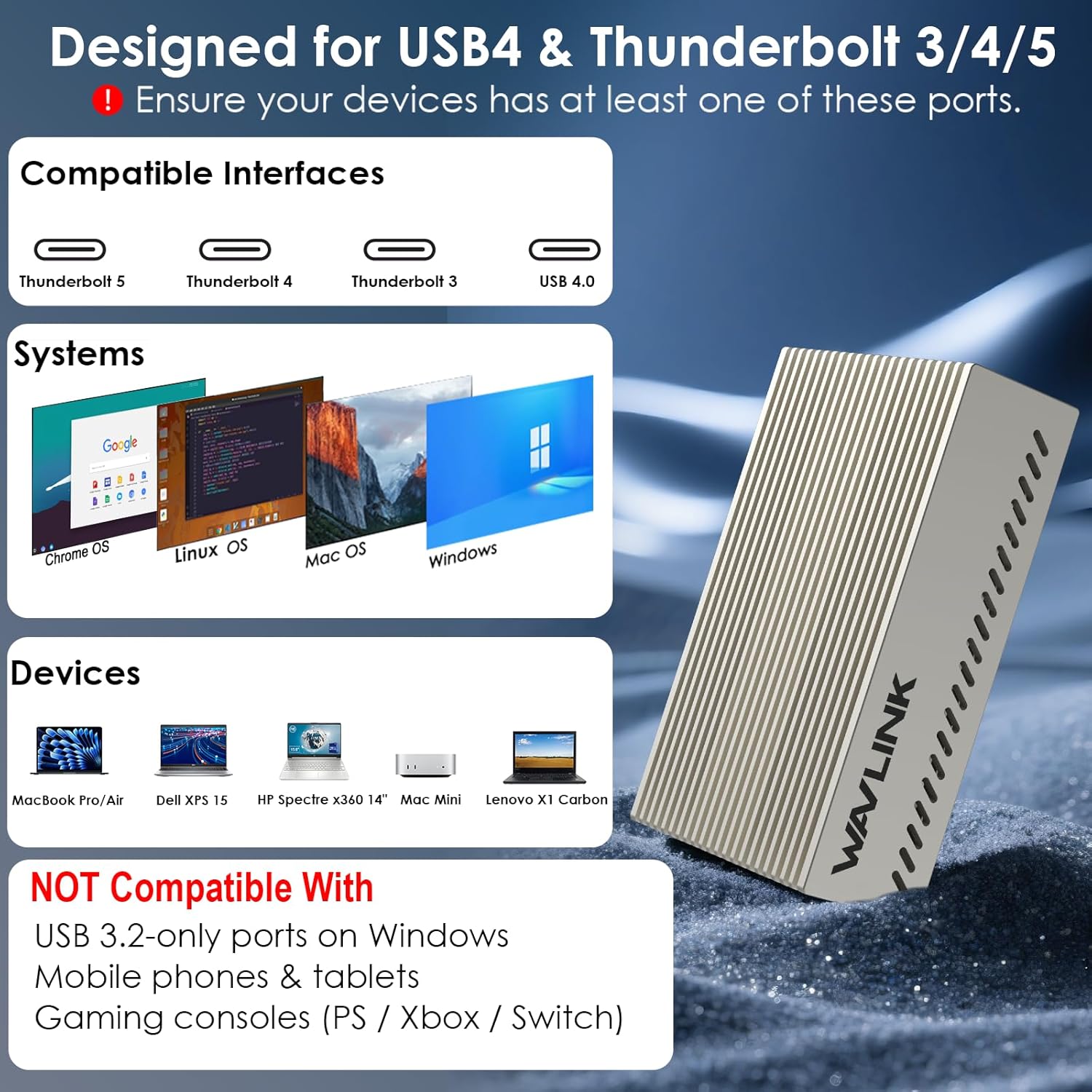
Image: A visual guide to compatible interfaces, operating systems, and example devices.
6.2 Not Compatible With
- Windows with USB 3.2 ports only
- Mobile phones or tablets
- Windows RT và Windows Mobile dựa trên kiến trúc ARM
- Nintendo Switch, TiVo Series 2, Wii, or other non-PC/Mac platforms
- Not recommended for use with FreeBSD or pfSense
KHAI THÁC. Xử lý sự cố
- Không có kết nối mạng:
- Ensure the adapter is securely connected to both your computer's USB-C port and the Ethernet cable.
- Verify that the necessary drivers are installed for Windows or Linux operating systems.
- Check your network router/switch and internet connection.
- Confirm that your computer's USB-C port supports USB4 or Thunderbolt.
- Tốc độ mạng chậm:
- Ensure all components in your network chain (broadband, modem/router/switch, Ethernet cable) support 10Gbps speeds.
- Use a Cat6A or higher grade Ethernet cable.
- Check your internet service plan for maximum supported speeds.
- Confirm that your computer's USB4/Thunderbolt port is operating correctly.
- Adapter is Warm:
It is normal for the aluminum housing to become warm during sustained high-speed data transfers due to its passive cooling design. This does not indicate a malfunction.
8. Thông số kỹ thuật
| Tính năng | Đặc điểm kỹ thuật |
|---|---|
| Số hiệu mẫu | WL-NWU342G |
| Giao diện phần cứng | Ethernet, USB Type C |
| Giao thức liên kết dữ liệu | Gigabit Ethernet, USB |
| Tốc độ truyền dữ liệu | 10 Gigabits mỗi giây (10Gbps) |
| Tốc độ tương thích | 10Gbps / 5Gbps / 2.5Gbps / 1Gbps / 100Mbps / 10Mbps |
| Bộ vi mạch | AQC113-B1 |
| Kích thước sản phẩm | 3.5 x 2.4 x 0.9 inch (8.9 x 6.1 x 2.3 cm) |
| Trọng lượng sản phẩm | 7 ounce (199 g) |
| Màu sắc | Bạc |
| Yêu cầu hệ điều hành tối thiểu | Linux Mint 16, Windows 10 |
9. Bảo hành và Hỗ trợ
WAVLINK products come with a standard manufacturer's warranty. For detailed warranty information, technical support, or customer service inquiries, please refer to the documentation included in your package or visit the official WAVLINK website. You may also contact WAVLINK customer support directly through their provided contact channels.


