1. Hướng dẫn an toàn quan trọng
Please read all instructions carefully before using your Olvy Contact Grill. Keep this manual for future reference.
- An toàn điện: Đảm bảo voltage matches your power supply. Do not immerse the appliance, cord, or plug in water or other liquids. Unplug from the outlet when not in use and before cleaning.
- Nguy cơ bỏng do nhiệt: Surfaces of the grill become hot during use. Use oven mitts or a cool-touch handle. Do not touch hot surfaces directly. Allow the appliance to cool completely before cleaning or storing.
- Trẻ em và người dễ bị tổn thương: Thiết bị này không dành cho người khuyết tật về thể chất, giác quan hoặc tinh thần, hoặc thiếu kinh nghiệm và kiến thức, trừ khi họ được người có trách nhiệm về sự an toàn của họ giám sát hoặc hướng dẫn về cách sử dụng thiết bị. Trẻ em cần được giám sát để đảm bảo chúng không nghịch thiết bị.
- Sử dụng đúng cách: Use the appliance only for its intended household purpose. Do not use outdoors. Do not operate with a damaged cord or plug.
- Thông gió: Ensure adequate ventilation around the grill during operation. Do not place near flammable materials.
2. Sản phẩm hếtview
The Olvy H2010 Contact Grill is designed for versatile cooking, featuring a touch screen interface and 7 automatic programs. Its 1800W power ensures fast heating, and the PFAS-free non-stick plates make cooking and cleaning easy.
Thành phần
- Tấm nướng trên
- Tấm nướng dưới
- Tay cầm cảm ứng mát mẻ
- Bảng điều khiển màn hình cảm ứng
- Khay hứng nước
- Dây nguồn
Các tính năng chính
- 7 chương trình tự động: Pre-set programs for various foods like meat, fish, paninis, and vegetables.
- Công suất 1800W: For rapid heating and efficient cooking.
- PFAS-Free Non-Stick Plates: Ensures healthy cooking and easy food release.
- Mở 180°: Allows the grill to be used as an open table grill for a larger cooking surface.
- Hẹn giờ tích hợp: Up to 30 minutes with automatic shut-off.
- Tay cầm cảm ứng mát mẻ: Để vận hành an toàn.
- Khay nhỏ giọt có thể tháo rời: Collects excess fat for healthier cooking and easy disposal.
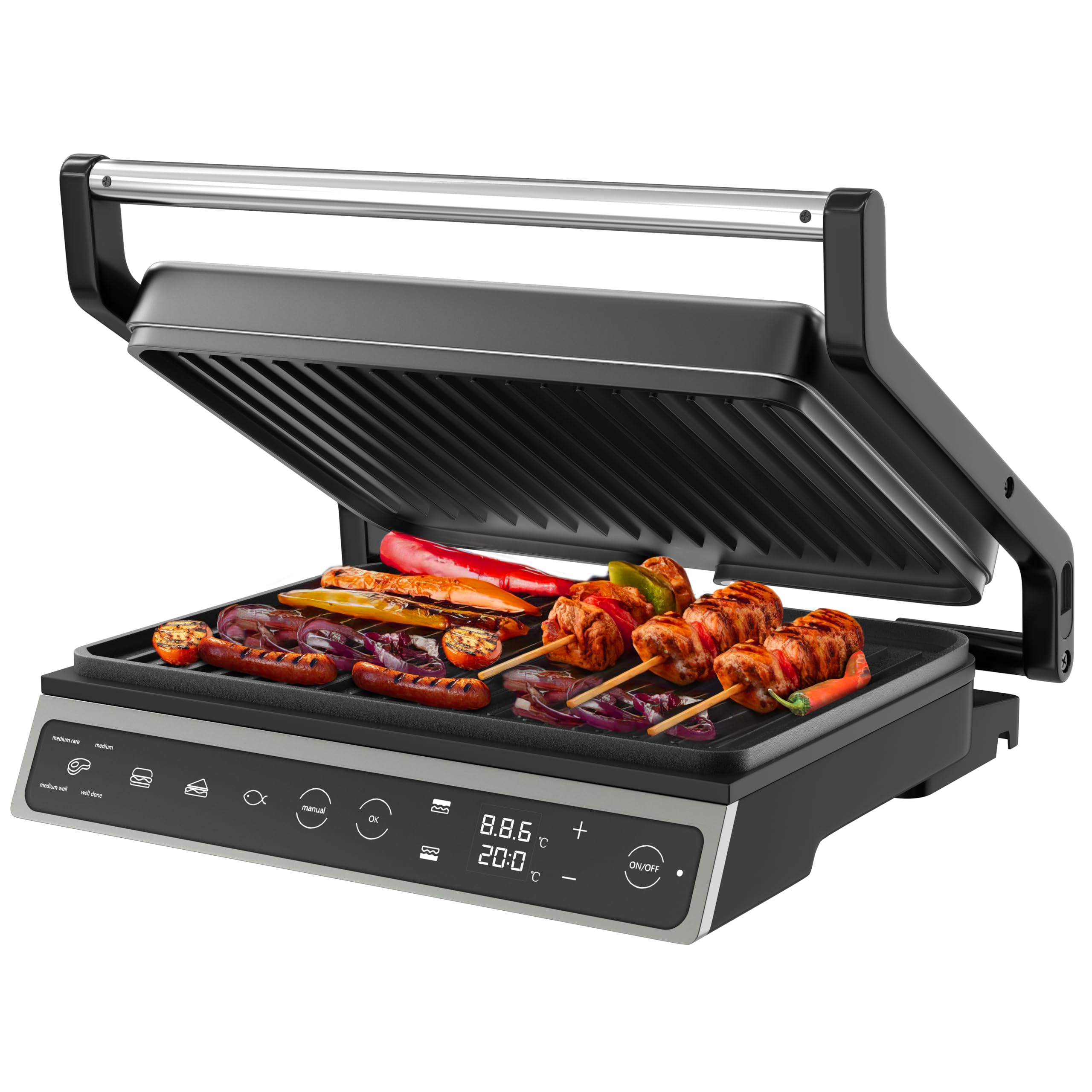
Image: The Olvy H2010 Contact Grill in its closed position, showcasing its sleek design and touch screen control panel.

Hình ảnh: Cận cảnh view of the Olvy H2010 Contact Grill's smart LED touch screen, highlighting its intuitive controls and digital display.
3. Setup and Before First Use
- Giải nén: Cẩn thận lấy vỉ nướng và tất cả phụ kiện ra khỏi bao bì. Giữ lại bao bì để bảo quản hoặc xử lý sau này.
- Lau dọn: Lau sạch các tấm nướng bằng adamp cloth or sponge. Ensure they are completely dry before use. Wash the drip tray with warm, soapy water and dry thoroughly.
- Chức vụ: Place the grill on a stable, heat-resistant, and flat surface. Ensure there is sufficient space around the appliance for ventilation.
- Làm nóng ban đầu: Plug the grill into a grounded electrical outlet. The display will light up. Allow the grill to preheat for approximately 5-10 minutes without food. A slight odor or smoke may occur during the first use; this is normal and will dissipate. Unplug and allow to cool.
4. Hướng dẫn vận hành
Hoạt động chung
- Plug the appliance into a suitable power outlet. The touch screen will illuminate.
- Nhấn nút BẬT/TẮT button to turn on the grill.
- Select your desired cooking method: Automatic Program or Manual Mode.
Sử dụng chương trình tự động
The Olvy H2010 offers 7 pre-set programs for optimal cooking results. The grill automatically adjusts time and temperature based on the selected program.

Image: The Olvy H2010 Contact Grill displaying its 7 automatic programs for various food types like steak, chicken, fish, bacon, sausage, hamburger, and a manual option.
- Nhấn nút Lựa chọn chương trình button (often represented by an icon like a chef's hat or menu).
- Tap the icon corresponding to the food you are cooking (e.g., Steak, Chicken, Fish, Panini, Vegetables, Bacon, Sausage, Hamburger).
- The grill will begin preheating to the optimal temperature for the selected program. Wait for the 'Ready' indicator (or audible signal) before placing food.
- Place your food on the lower grill plate and close the lid. The grill will automatically detect the thickness and adjust cooking time.
- Monitor the cooking progress on the display. The grill may indicate different doneness levels (e.g., rare, medium, well-done) for certain programs.
- Once cooking is complete, carefully remove the food using heat-resistant utensils.

Image: Visual representation of different doneness levels (rare, medium, well-done) for grilled meat, indicating the grill's ability to achieve desired results.
Manual Mode, Temperature, and Timer Adjustment
For custom cooking, use the manual mode to set your preferred temperature and time.
- Nhấn nút Thủ công nút trên màn hình cảm ứng.
- Sử dụng + Và - buttons to adjust the desired temperature. The temperature can be set for each plate independently if the feature is available.
- Nhấn nút Bộ đếm thời gian button (often represented by a clock icon) and use the + Và - buttons to set the cooking time (up to 30 minutes).
- Nhấn OK hoặc Bắt đầu button to begin cooking. The grill will automatically shut off when the timer expires.

Image: A hand adjusting the integrated timer function on the Olvy H2010 Contact Grill's control panel, showing the digital display for time and temperature settings.
Using as an Open Grill (180° Function)
The grill can be fully opened to a 180-degree flat position, providing a larger cooking surface for simultaneous grilling of different foods.

Image: The Olvy H2010 Contact Grill fully opened to a 180-degree flat position, showcasing its expanded cooking surface with various foods being grilled.
- Ensure the grill is unplugged and cool before attempting to open it fully.
- Grasp the handle and gently pull the upper plate upwards until it locks into the 180-degree open position.
- Plug in the grill and select your desired temperature or program. Both plates will heat up.
- Place food on both the upper and lower plates.
- To close, gently lift the upper plate slightly and push it back into the closed position.
5. Bảo trì và vệ sinh
Regular cleaning ensures optimal performance and extends the life of your Olvy Contact Grill.
- Luôn rút phích cắm: Trước khi vệ sinh, luôn rút phích cắm của vỉ nướng khỏi ổ điện và để nguội hoàn toàn.
- Đĩa nướng sạch: Lau sạch các tấm nướng chống dính bằng khăn mềm.amp cloth or sponge. For stubborn food residue, use a plastic scraper or a small amount of mild dish soap. Do not use abrasive cleaners, metal scouring pads, or sharp objects, as these can damage the non-stick coating.
- Khay nhỏ giọt trống: Remove the drip tray from the front of the grill. Empty any collected fat or liquids. Wash the drip tray with warm, soapy water and dry thoroughly before reinserting.

Image: A hand removing the practical drip tray from the front of the Olvy H2010 Contact Grill, designed to collect fat and juices for easy disposal.

Image: A hand cleaning the non-stick grill plates of the Olvy H2010 Contact Grill with a soft cloth, demonstrating the ease of maintenance.
- Ngoại thất sạch sẽ: Lau bên ngoài vỉ nướng bằng quảng cáoamp vải. Không sử dụng hóa chất mạnh hoặc vật liệu mài mòn.
- Kho: Once clean and completely dry, store the grill in a cool, dry place. The compact design allows for easy storage.
KHAI THÁC. Xử lý sự cố
If you encounter any issues with your Olvy Contact Grill, please refer to the following common problems and solutions:
| Vấn đề | Nguyên nhân có thể | Giải pháp |
|---|---|---|
| Nướng không bật. | Không cắm điện; sự cố ổ cắm điện; lỗi thiết bị. | Ensure the grill is properly plugged into a working outlet. Check your circuit breaker. If the problem persists, contact customer support. |
| Thức ăn không chín đều. | Grill not preheated; uneven food thickness. | Always allow the grill to fully preheat before placing food. Ensure food items are of similar thickness for even cooking. |
| Có khói hoặc mùi khi sử dụng lần đầu. | Đốt cháy chất thải sản xuất. | This is normal for the first use. Ensure good ventilation. It should dissipate quickly. |
| Thức ăn dính vào đĩa. | Plates not clean; insufficient oil/fat; damaged non-stick coating. | Ensure plates are clean before use. Lightly brush plates with cooking oil if needed. Avoid using metal utensils that can damage the coating. |
7. Thông số kỹ thuật
| Đặc điểm kỹ thuật | Chi tiết |
|---|---|
| Số hiệu mẫu | H2010 |
| Thương hiệu | Olvy |
| Quyền lực | 1800 Watt |
| Kích thước (Đã đóng) | 31 x 12 x 31 cm (Dài x Rộng x Cao) |
| Bề mặt nấu ăn | Approximately 27 x 22 cm per plate |
| Cân nặng | 3.15kg |
| Vật liệu | Stainless Steel (Body) |
| Tính năng đặc biệt | Cool-Touch Handle, 7 Automatic Programs, Touch Screen, 180° Opening, PFAS-free Non-stick Coating, Integrated Timer |
8. Bảo hành và Hỗ trợ Khách hàng
Olvy products are manufactured to high-quality standards. This product is covered by a standard manufacturer's warranty against defects in materials and workmanship from the date of purchase.
For warranty claims, technical assistance, or any questions regarding your Olvy Contact Grill, please contact our customer support team. Please have your model number (H2010) and proof of purchase ready when contacting support.
Thông tin liên lạc:
Please refer to the contact details provided on your purchase receipt or the official Olvy webTrang web này cung cấp thông tin hỗ trợ khách hàng cập nhật nhất.


