1. Giới thiệu
The VEVOR Emergency Weather Radio MD-091 is a multi-functional device designed for emergency preparedness, outdoor activities, and daily use. It integrates FM/AM/WB/NOAA radio reception, multiple power sources, a powerful flashlight, a reading light, and an SOS alarm. This manual provides detailed instructions for the safe and effective operation of your radio.

Một quaview of the VEVOR Emergency Weather Radio, showcasing its compact design, integrated flashlight, reading light, and connectivity options for charging a smartphone and using headphones.
2. Hướng dẫn an toàn
- Không để thiết bị ở nơi có nhiệt độ quá cao, ánh nắng trực tiếp hoặc độ ẩm cao.
- Tránh làm rơi hoặc để radio chịu những va đập mạnh.
- Keep the device away from water. While it has an IPX3 rating for damp conditions, it is not waterproof for submersion.
- Do not attempt to disassemble or modify the radio. This will void the warranty and may cause damage or injury.
- Chỉ sử dụng cáp USB được cung cấp hoặc cáp tương đương đã được chứng nhận để sạc.
- Vứt bỏ pin và thiết bị theo quy định của địa phương.
3. Sản phẩm hếtview
Familiarize yourself with the various components and controls of your VEVOR Emergency Weather Radio.

A comprehensive diagram labeling the key features of the radio, such as the emergency power bank, Type-C input, reading light, survival bracelet with compass, headphone jack, dual USB output, flashlight, battery indicator, FM/AM/WB radio, weather alert radio, and SOS alarm.
Điều khiển và chức năng:
- Núm nguồn / âm lượng: Turn clockwise to power on and adjust volume.
- Bộ chọn băng tần: Switch between FM, AM, and WB (Weather Band).
- Núm điều chỉnh: Adjust frequency to find radio stations.
- Nút SOS: Press and hold to activate the emergency alarm and flashing light.
- Nút đèn pin: Activate the front flashlight.
- Reading Light Switch: Turn on/off the top reading light.
- Cổng đầu ra USB: Dùng để sạc các thiết bị ngoại vi.
- Cổng đầu vào loại C: For charging the radio's internal battery.
- Giắc cắm tai nghe: Để nghe riêng tư.
- Ăng-ten kính thiên văn: Extend for better radio reception.
- Tấm pin mặt trời: For supplementary charging.
- Tay quay: Dùng để tạo ra điện thủ công.
4. Thiết lập
4.1 Sạc ban đầu
Before first use, fully charge the radio's internal 8000mAh battery using the provided USB-C cable. Connect the cable to the Type-C input port on the radio and a standard USB power adapter (not included) or a computer USB port. The battery indicator lights will show charging progress.
4.2 Mở rộng ăng-ten
For optimal radio reception, fully extend the telescopic antenna when listening to FM or Weather Band (WB) broadcasts.
5. Hướng dẫn vận hành
5.1 Powering On/Off and Volume Control
Xoay Núm nguồn/âm lượng clockwise to turn on the radio and increase the volume. Rotate counter-clockwise to decrease volume and turn off the radio.
5.2 Radio Operation (FM/AM/WB)
- Select the desired band (FM, AM, or WB) using the Bộ chọn băng tần công tắc.
- Extend the telescopic antenna for better reception, especially for FM and WB.
- Xoay Núm điều chỉnh to scan for stations. The frequency will be displayed on the screen.
- For Weather Band (WB), tune to one of the 7 NOAA channels (162.400 MHz to 162.550 MHz).
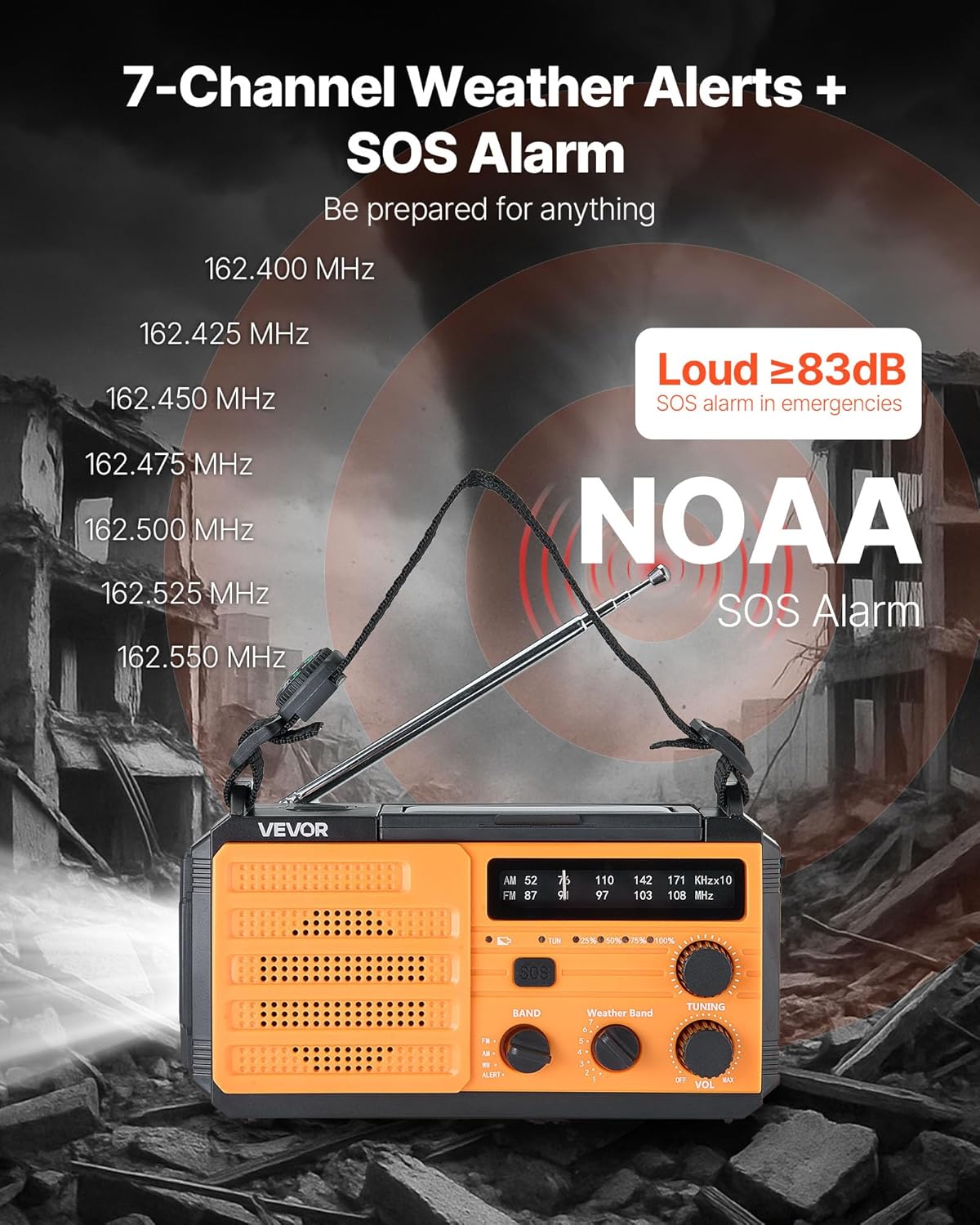
This image illustrates the radio's capability to receive 7 NOAA weather channels and activate a loud SOS alarm (over 83dB) during emergencies, with frequencies listed for reference.
5.3 NOAA Weather Alert Function
When the radio is set to the WB band, it can automatically detect and alert you to severe weather warnings from NOAA. A green light indicates normal operation, while a yellow light flashing with an alert sound warns of an impending weather event.
5.4 Báo động SOS
Trong trường hợp khẩn cấp, hãy nhấn và giữ Nút SOS to activate a loud alarm (≥83dB) and a flashing light. This feature is designed to attract attention and signal for help. Press the button again briefly to deactivate.
5.5 Chức năng chiếu sáng

This image displays the radio's versatile lighting features, including a soft 6500K reading light for tasks and a powerful flashlight for long-range illumination, suitable for various emergency and outdoor scenarios.
- Đèn pin: Nhấn nút Nút đèn pin on the side to turn on the 1W high-beam LED flashlight. Press again to cycle through modes (high, low, off).
- Đèn đọc sách: Flip up the solar panel to reveal the reading light. Use the Công tắc đèn đọc to turn on/off the 6 COB LEDs for soft area lighting.
5.6 Sạc các thiết bị ngoại vi (Pin dự phòng)
The radio can act as a power bank to charge your mobile devices. Connect your device's USB charging cable to one of the Cổng ra USB on the radio. Ensure the radio has sufficient battery charge for this function.
5.7 Multiple Power Sources

A visual guide to the various power sources available for the radio, including USB charging, solar panel, hand crank, built-in lithium battery, and Type-C input, ensuring continuous operation in diverse situations.
- Sạc USB-C: Kết nối cáp USB-C được cung cấp với Cổng đầu vào Type-C and a power source. This is the primary method for a full charge.
- Sạc năng lượng mặt trời: Place the radio with the solar panel facing direct sunlight. This method is primarily for maintaining the battery charge or for emergency trickle charging, not for a full charge from empty.
- Tay quay: Rotate the hand crank clockwise or counter-clockwise at a steady pace (approximately 130-150 RPM) to generate power. Cranking for 1 minute can provide several minutes of radio use or flashlight operation.
- Pin bên trong: The built-in 8000mAh battery powers all functions. Monitor the battery indicator for charge level.
6. Bảo trì
- Vệ sinh: Lau đài bằng mềm, damp vải. Không sử dụng chất tẩy rửa có tính mài mòn hoặc dung môi.
- Kho: Store the radio in a cool, dry place away from direct sunlight and extreme temperatures. If storing for extended periods, charge the battery to at least 50% every 3-6 months to prolong battery life.
- Chăm sóc pin: Avoid fully discharging the battery frequently. Regular partial charges are better for lithium-ion battery longevity.
KHAI THÁC. Xử lý sự cố
| Vấn đề | Nguyên nhân có thể | Giải pháp |
|---|---|---|
| Đài phát thanh không bật được. | Pin đã hết. | Charge the radio using USB-C, solar, or hand crank. |
| Bắt sóng vô tuyến kém. | Ăng-ten không mở rộng; tín hiệu yếu. | Kéo dài hoàn toàn ăng-ten dạng ống lồng. Thử điều chỉnh vị trí của radio. |
| Thiết bị ngoại vi không sạc được. | Radio battery too low; incorrect cable. | Ensure radio battery is sufficiently charged. Use a compatible USB cable. |
| Hand crank is stiff or not generating power. | Improper cranking speed; internal issue. | Crank at a steady, moderate pace. If issue persists, contact support. |
8. Thông số kỹ thuật

This image provides the physical dimensions of the radio (6.89 x 3.15 x 3.86 inches) and a summary of its technical specifications, including model number, power, battery capacity, waterproof rating, and materials.
| Tính năng | Chi tiết |
|---|---|
| Số hiệu mẫu | MD-091 |
| Dung lượng pin | 8000mAh |
| Băng tần radio được hỗ trợ | FM, AM, WB (7-Band NOAA) |
| Nguồn điện | Battery Powered (Internal), USB, Solar, Hand Crank |
| Công nghệ kết nối | USB (Type-C input, Dual USB output) |
| Tính năng đặc biệt | Portable, SOS Alarm, Flashlight (1W), Reading Light (6 COB LEDs), Compass |
| Xếp hạng chống thấm nước | IPX3 |
| Kích thước sản phẩm | 6.89"D x 3.15"R x 3.86"C (175 x 80 x 98 mm) |
| Trọng lượng sản phẩm | 1.2 pound (0.545 kg) |
| Vật liệu chính của vỏ | ABS |
| Các thành phần bao gồm | 1 x Emergency Weather Radio, 1 x USB Cable, Owner's Manual |
9. Bảo hành và Hỗ trợ
For warranty information, technical support, or any questions regarding your VEVOR Emergency Weather Radio MD-091, please refer to the official VEVOR webtrang web hoặc liên hệ trực tiếp với bộ phận dịch vụ khách hàng của họ. Giữ lại biên lai mua hàng để yêu cầu bảo hành.
VEVOR chính thức Webđịa điểm: www.vevor.com


