1. Giới thiệu
Cảm ơn bạn đã muaasing the LG 43-Inch Class QNED AI 4K Smart TV. This manual provides essential information for the safe and efficient operation of your television. Please read it thoroughly before use and keep it for future reference.
The LG QNED AI 4K TV offers vivid, immersive color with its wide color gamut technology, enhanced by the α7 AI Processor Gen8. It intelligently optimizes picture and sound based on content. Powered by LG webOS 24, it provides a streamlined streaming experience with customizable Quick Cards and the Magic Remote. Enjoy virtual 5.1 surround sound, FILMMAKER MODE, and advanced gaming features like FreeSync, VRR, and GeForce NOW.
2. Thông tin an toàn
Luôn tuân thủ các biện pháp an toàn cơ bản khi sử dụng sản phẩm này để giảm nguy cơ cháy nổ, điện giật hoặc thương tích.
- Không để TV tiếp xúc với mưa hoặc nơi ẩm ướt.
- Không mở TV casing; chuyển mọi dịch vụ bảo dưỡng cho nhân viên có trình độ.
- Ensure proper ventilation and do not block ventilation openings.
- Chỉ sử dụng dây nguồn được cung cấp kèm theo TV.
- Để TV tránh xa nguồn nhiệt và ánh nắng trực tiếp.
- Avoid placing heavy objects on the power cord or TV.
3. Có gì trong hộp
Xác minh rằng tất cả các thành phần đều có mặt:
- Tivi thông minh LG 43 inch Class QNED AI 4K
- Cáp nguồn
- Điều khiển từ xa (bao gồm 2 pin AAA)
- Thành phần chân đế
- Hướng dẫn sử dụng (tài liệu này)
4. Thiết lập
4.1 Gắn chân đế
Carefully place the TV screen-down on a soft, flat surface. Attach the stand components to the designated slots on the bottom of the TV using the provided screws. Ensure the stand is securely fastened before placing the TV upright.
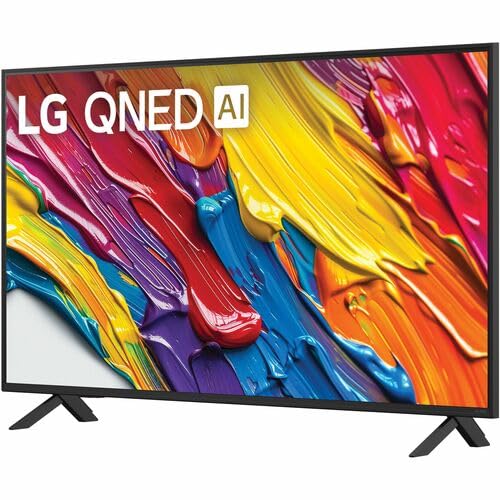
Hình ảnh: Phía sau view of the LG 43QNED82AUA TV with its stand.
4.2 Lắp trên tường (Tùy chọn)
This TV supports VESA mount standard 200 x 200 mm. For wall mounting, remove the stand and use a compatible wall mount bracket (sold separately). Follow the instructions provided with your wall mount.
4.3 Kết nối thiết bị
Connect your external devices (cable box, Blu-ray player, gaming console, etc.) to the appropriate ports on the TV. The TV features 3 HDMI ports, 1 USB port, Ethernet, and S/PDIF (Optical) for audio output.

Image: Connectivity ports on the back of the LG 43QNED82AUA TV.
4.4 Bật nguồn
Plug the power cable into the TV and then into a wall outlet. Press the power button on the remote control or on the TV to turn it on. Follow the on-screen instructions for initial setup, including network connection and channel scanning.
5. Vận hành TV của bạn
5.1 Điều khiển từ xa
The included Magic Remote allows for intuitive control with point-and-click functionality, voice commands, and a scroll wheel. Insert the two AAA batteries (included) into the remote control.
5.2 WebNền tảng thông minh OS 24
Tivi của bạn sử dụng hệ điều hành của LG. webOS 24 operating system. Navigate through apps, settings, and inputs using the customizable Quick Cards. Access popular streaming services like Netflix, Prime Video, Disney Plus, HBO Max, and Apple TV directly from the home screen.
5.3 Cài đặt hình ảnh và âm thanh
Access the settings menu to adjust picture modes (e.g., Standard, Vivid, Cinema, Filmmaker Mode) and sound modes (e.g., AI Sound Pro, Standard, Cinema). The α7 AI Processor Gen8 automatically optimizes these settings based on the content being viewbiên tập.

Image: Dynamic QNED Color representation.
6. Smart Features and AI
6.1 AI Picture and Sound
The α7 AI Processor Gen8 enhances brightness, improves sound, and refines picture detail with 4K upscaling and Dynamic Tone Mapping. AI Sound Pro provides virtual 5.1 surround sound, and WOW Orchestra integrates TV speakers with compatible LG soundbars for an enhanced audio experience.
6.2 Voice Assistance and AI Search
Your TV has Alexa Built-in. Press the Alexa button on your remote to activate voice commands. Utilize AI Tìm kiếm personalized recommendations and to find content quickly. The TV also supports Google Assistant, Apple AirPlay 2, and Google Cast for seamless integration with your smart home ecosystem.

Image: LG AI Search interface.
7. Tính năng chơi game
The LG QNED AI 4K TV is designed for an optimal gaming experience with a 60 Hz native refresh rate, which can be boosted up to 144 Hz with VRR (Variable Refresh Rate) enabled. It supports FreeSync and features LG Game Optimizer and Game Dashboard for quick access to gaming settings.
- FreeSync & VRR: Giảm hiện tượng xé hình và giật hình, mang lại trải nghiệm chơi game mượt mà hơn.
- Trình tối ưu hóa trò chơi & Bảng điều khiển: Centralized hub for adjusting game settings, including genre-specific picture modes.
- Trò chơi trên nền tảng đám mây: Access GeForce NOW and Xbox Cloud Gaming (subscriptions and compatible controllers required).
- ALLM (Chế độ tự động có độ trễ thấp): Tự động chuyển sang chế độ độ trễ thấp khi phát hiện thấy máy chơi game.

Image: Gaming experience on the LG 43QNED82AUA TV.
8. Kết nối
Your LG QNED AI 4K Smart TV offers a variety of connectivity options:
- HDMI: 3 ports for connecting external devices.
- USB: 1 port for media playback or connecting USB devices.
- Mạng Ethernet: Dành cho kết nối internet có dây.
- Wi-Fi: Tích hợp sẵn kết nối internet không dây.
- Bluetooth 5.0: Dùng để kết nối tai nghe không dây, loa thanh hoặc các thiết bị Bluetooth khác.
- Quang học (S/PDIF): Dùng để xuất tín hiệu âm thanh kỹ thuật số cho hệ thống âm thanh.
- Phản chiếu màn hình: Supports AirPlay 2 and Google Cast for casting content from mobile devices.
9. Bảo trì
9.1 Vệ sinh TV
Unplug the TV before cleaning. Use a soft, dry cloth to wipe the screen and exterior. For stubborn marks, lightly dampLau khăn bằng nước hoặc chất tẩy rửa màn hình chuyên dụng. Tránh sử dụng hóa chất mạnh hoặc vật liệu mài mòn.
9.2 Cập nhật phần mềm
Ensure your TV's software is up to date for optimal performance and new features. Software updates auto-download when connected to the internet. If "auto-update" is disabled, you will receive a prompt to update manually.
KHAI THÁC. Xử lý sự cố
Nếu bạn gặp sự cố với TV, hãy tham khảo các giải pháp phổ biến sau:
| Vấn đề | Giải pháp |
|---|---|
| Không có điện | Check power cable connection, wall outlet, and remote batteries. |
| Không có hình ảnh, nhưng có âm thanh | Verify input source, check cable connections, try a different HDMI port. |
| Không có âm thanh, nhưng hình ảnh vẫn hiện diện | Check volume, mute status, audio output settings, and external audio device connections. |
| Điều khiển từ xa không hoạt động | Replace batteries, ensure no obstructions between remote and TV, re-pair Magic Remote if necessary. |
| Chất lượng hình ảnh kém | Adjust picture settings, check source resolution, ensure strong signal for broadcast channels. |
| Không thể kết nối với Wi-Fi | Restart router, check Wi-Fi password, ensure TV is within range, try wired Ethernet connection. |
For further assistance, please refer to the full electronic manual available on the LG support webTruy cập trang web hoặc liên hệ bộ phận hỗ trợ khách hàng của LG.
11. Thông số kỹ thuật
| Tính năng | Chi tiết |
|---|---|
| Kích thước màn hình | 43 inch |
| Công nghệ hiển thị | Đèn LED (QNED) |
| Nghị quyết | 4K (3840 x 2160) |
| Tốc độ làm mới | 60 Hz (Native), up to 144 Hz (VRR) |
| Bộ xử lý | Bộ xử lý a7 AI Gen8 |
| Hỗ trợ HDR | HDR10, HLG |
| Hệ điều hành | webHệ điều hành 24 |
| Kết nối | Wi-Fi, Bluetooth 5.0, Ethernet, 3x HDMI, 1x USB, Optical (S/PDIF) |
| Trợ lý giọng nói | Alexa Built-in, Google Assistant compatible |
| Kích thước (có chân đế) | 10.1"D x 38.1"W x 25"H |
| Trọng lượng (không có chân đế) | 20.7 Bảng Anh |
| Tiêu chuẩn gắn kết VESA | 200 x 200mm |
| Tiêu thụ điện năng | 82 Watt |
| Tiêu thụ năng lượng hàng năm | 152 kilowatt giờ mỗi năm |

Image: LG 43QNED82AUA TV dimensions.
12. Bảo hành và Hỗ trợ
12.1 Thông tin bảo hành
This LG TV comes with a 1 Year Parts & Labor Limited Warranty. Please retain your proof of purchase for warranty claims. For full warranty terms and conditions, refer to the warranty card included with your product or visit the official LG webđịa điểm.
12.2 Hỗ trợ khách hàng
For technical support, product registration, or service inquiries, please visit the LG support website or contact their customer service hotline. Contact information can be found on the LG official webtrang web hoặc trong tài liệu hướng dẫn đi kèm với TV của bạn.