1. Giới thiệu
Cảm ơn bạn đã muaasing the Moukey MAMP3 kênh âm thanh nổi 2.0 AmpSách hướng dẫn này cung cấp thông tin cần thiết để vận hành thiết bị một cách an toàn và hiệu quả. Vui lòng đọc kỹ trước khi sử dụng và giữ lại để tham khảo trong tương lai.
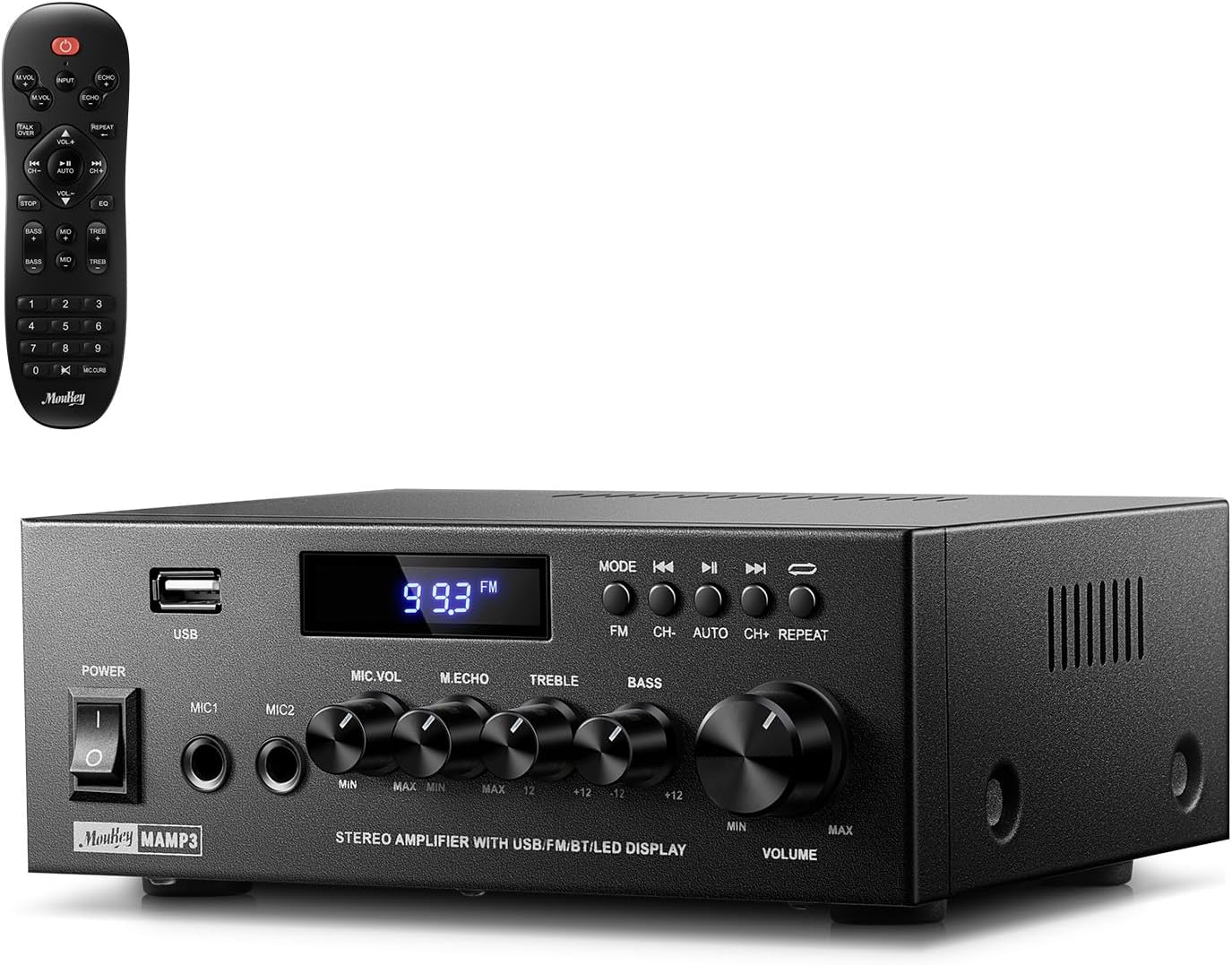
Image 1.1: The Moukey MAMP3 amplifier and its remote control.
2. Hướng dẫn an toàn
- Đọc tất cả các hướng dẫn trước khi vận hành ampchất lót.
- Giữ lại amplifier away from water, moisture, and extreme temperatures.
- Không được bịt kín các lỗ thông gió. Đảm bảo luồng không khí lưu thông tốt xung quanh thiết bị.
- Chỉ sử dụng bộ đổi nguồn được cung cấp kèm theo thiết bị.
- Không tự ý sửa chữa hoặc thay đổi thiết bị. Vui lòng liên hệ nhân viên có trình độ để được bảo dưỡng.
- Disconnect the power cord from the outlet if the unit will be unused for extended periods.
3. Sản phẩm hếtview
3.1 Các tính năng chính
- 2.0 Channel Stereo Audio Output
- Bluetooth 5.3 for stable wireless connection
- Multiple Audio Inputs: RCA, USB, FM Radio, 2 Microphone Inputs
- Full-function Remote Control with EQ adjustments
- Customizable Treble, Midrange, and Bass controls
- Memory function for mode, volume, and EQ settings
- 300 Watts Peak Power Output
3.2 Các chỉ báo và điều khiển bảng điều khiển phía trước

Hình 3.1: Bố cục bảng điều khiển phía trước
- Công tắc điện: Bật hoặc tắt thiết bị.
- MIC1/2: Giắc cắm đầu vào micrô 6.35 mm.
- Núm âm lượng micrô: Điều chỉnh âm lượng của micrô được kết nối.
- Núm Echo: Điều chỉnh hiệu ứng tiếng vang cho micrô.
- Núm Treble: Điều chỉnh đầu ra âm thanh tần số cao.
- Núm trầm: Điều chỉnh đầu ra âm thanh tần số thấp.
- Núm điều chỉnh âm lượng nhạc: Main volume control for all audio sources.
- Khe cắm USB: Dùng để kết nối các thiết bị lưu trữ USB để phát lại âm thanh.
- Màn hình LED: Hiển thị chế độ hiện tại, thông tin bài hát hoặc tần số FM.
- Nút MODE: Switches between input sources (BT, Aux, CD, USB, FM).
- Nút trước: Skips to the previous track (USB/BT) or FM station.
- Nút Phát/Tạm dừng: Plays or pauses audio (USB/BT).
- Nút tiếp theo: Skips to the next track (USB/BT) or FM station.
- Nút Lặp lại: Repeats current track or all tracks (USB).
3.3 Kết nối bảng điều khiển phía sau

Image 3.2: Rear Panel Connections
- Đầu vào ăng-ten FM: Kết nối ăng-ten FM đi kèm để thu sóng radio.
- ĐẦU VÀO ÂM THANH (RCA): Connect external audio sources like CD/DVD players using RCA cables.
- AUDIO OUTPUT (Speaker Terminals): Connect passive speakers. Ensure correct polarity (+ to + and - to -).
- POWER AC INPUT: Kết nối dây nguồn với ổ cắm AC.
4. Thiết lập
4.1 Tháo dỡ
Cẩn thận loại bỏ amplifier and all accessories from the packaging. Verify that all items listed in the 'What's in the Box' section are present.
4.2 Kết nối loa
HọAMP3 amplifier supports two passive speakers. Connect your speakers to the ĐẦU RA ÂM THANH terminals on the rear panel. Ensure that the positive (+) terminal on the amplifier connects to the positive (+) terminal on your speaker, and the negative (-) terminal on the amplifier connects to the negative (-) terminal on your speaker. Incorrect polarity can affect sound quality.

Image 4.1: Speaker Connection Diagram
4.3 Kết nối nguồn âm thanh
Các ampBộ khuếch đại cung cấp nhiều tùy chọn đầu vào:
- Đầu vào RCA: Use RCA cables to connect devices such as CD players, DVD players, or other audio equipment to the ĐẦU VÀO ÂM THANH giắc cắm ở bảng điều khiển phía sau.
- Đầu vào USB: Lắp ổ flash USB vào Khe usb on the front panel for direct audio playback.
- Bluetooth: Pair your Bluetooth-enabled device (smartphone, tablet, laptop) wirelessly.
- Đài FM: Kết nối ăng-ten FM đi kèm với Đầu vào ăng-ten FM on the rear panel for radio reception. Extend the antenna for optimal signal.
- Đầu vào micrô: Kết nối tối đa hai micrô với MIC1/2 jacks on the front panel for karaoke or public address.

Image 4.2: Available Signal Inputs
4.4 kết nối nguồn
Kết nối dây nguồn với POWER AC INPUT on the rear panel and then plug it into a standard AC power outlet.
5. Hướng dẫn vận hành
5.1 Bật/Tắt nguồn
Nhấn nút Công tắc nguồn trên bảng điều khiển phía trước để xoay amplifier on or off. The LED display will illuminate when the unit is powered on.
5.2 Lựa chọn đầu vào
Nhấn nút CÁCH THỨC button on the front panel or the remote control to cycle through the available input sources: Bluetooth (BT), Auxiliary (Aux), CD, USB, and FM radio. The selected mode will be shown on the LED display.
5.3 Điều khiển âm lượng
Xoay lớn Music Volume Knob on the front panel clockwise to increase volume and counter-clockwise to decrease it. Volume can also be adjusted using the remote control.
5.4 Điều chỉnh bộ cân bằng âm thanh (EQ)
Adjust the sound characteristics using the Núm Treble Và Núm trầm on the front panel. The remote control also provides dedicated buttons for Treble, Midrange, and Bass adjustments. The amplifier will automatically save your preferred EQ settings.
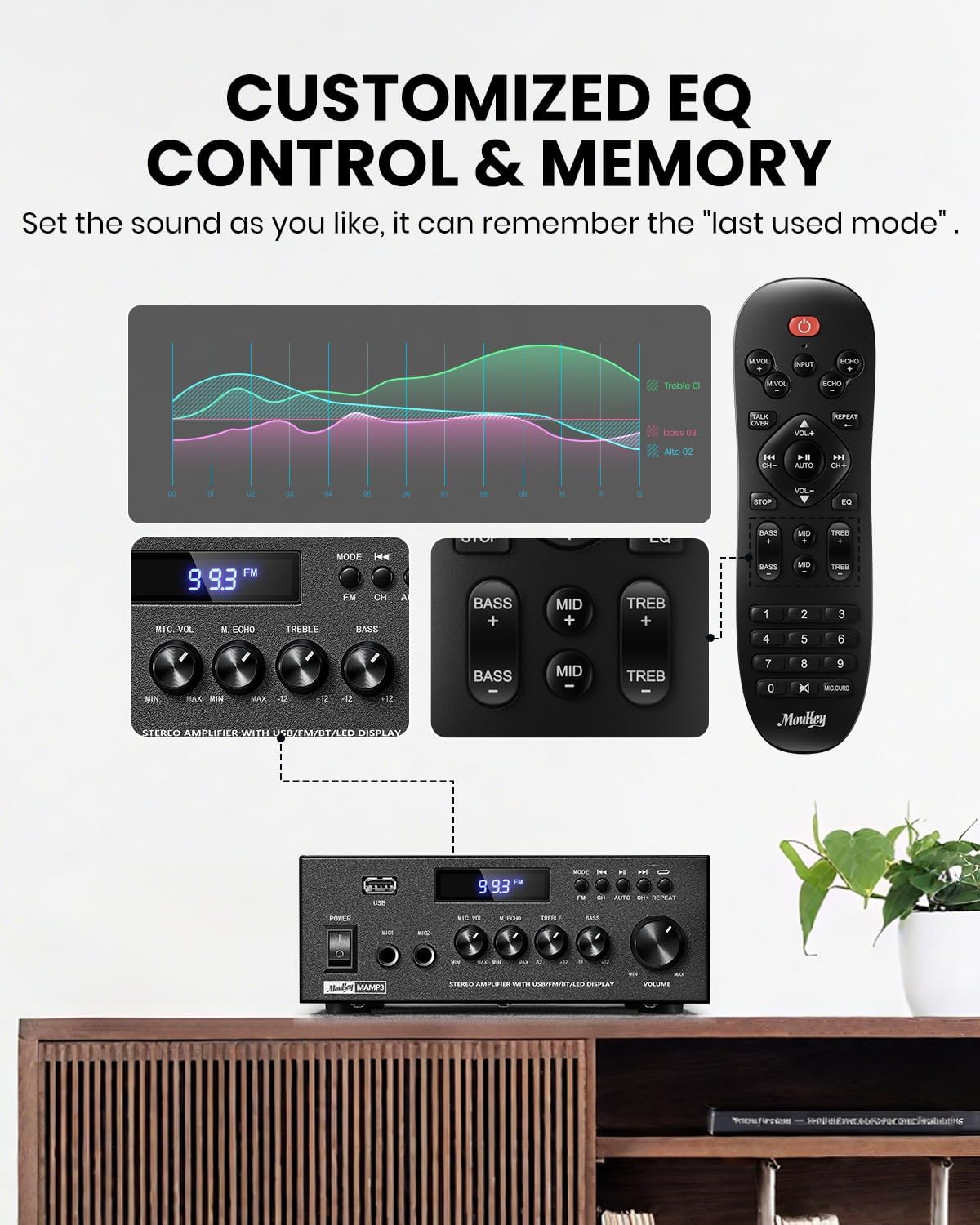
Image 5.1: Customizable EQ Control
5.5 Điều khiển micrô
If microphones are connected, use the Núm điều chỉnh âm lượng micrô to adjust their output level and the Núm vang to add an echo effect. The remote control also features a 'Talkover' function.
5.6 Hoạt động Bluetooth
- Nhấn nút CÁCH THỨC button until "BT" appears on the LED display. The ampBộ khuếch đại hiện đang ở chế độ ghép nối Bluetooth.
- On your mobile device, enable Bluetooth and search for "Moukey MAMP3".
- Select "Moukey MAMP3" to pair. Once connected, you will hear a confirmation tone.
- Bây giờ bạn có thể phát âm thanh từ thiết bị của mình thông qua ampchất lót.

Image 5.2: Bluetooth Pairing
Hoạt động của đài phát thanh FM 5.7
- Nhấn nút CÁCH THỨC Nhấn nút cho đến khi chữ "FM" xuất hiện trên màn hình LED.
- Tự động quét: Press the "AUTO" button on the remote to automatically scan and save available FM stations.
- Điều chỉnh thủ công: Use the number pad on the remote control to directly enter the desired FM frequency (e.g., for 101.1 MHz, enter 1011).
- Sử dụng Trước Và Kế tiếp buttons to navigate between saved stations or fine-tune frequencies.
5.8 Phát lại USB
Chèn ổ đĩa flash USB chứa âm thanh MP3 hoặc WAV files vào Khe usb. Các amplifier will automatically switch to USB mode and begin playback. Use the Trước, Phát/Tạm dừng, Và Kế tiếp buttons to control playback. The Lặp lại Nút này cho phép bạn lặp lại bản nhạc hiện tại hoặc tất cả các bản nhạc.
5.9 Điều khiển từ xa
The included full-function remote control allows for convenient operation from a distance. It provides control over input selection, volume, EQ settings (treble, midrange, bass), microphone echo, and talkover functions across all input modes.

Image 5.3: Upgraded Remote Control Functionality
6. Bảo trì
- Vệ sinh: Dùng vải mềm, khô để lau sạch bên ngoài máy ampchất tẩy rửa. Không sử dụng chất tẩy rửa dạng lỏng hoặc dung môi.
- Thông gió: Ensure that the ventilation openings are free from dust and debris to prevent overheating.
- Kho: Khi không sử dụng trong thời gian dài, hãy cất giữ ampĐặt amply ở nơi khô ráo, thoáng mát, tránh ánh nắng trực tiếp và nhiệt độ quá cao hoặc quá thấp.
KHAI THÁC. Xử lý sự cố
| Vấn đề | Nguyên nhân có thể | Giải pháp |
|---|---|---|
| Không có điện | Dây nguồn chưa được kết nối; Ổ cắm điện bị hỏng; Công tắc nguồn đã tắt. | Ensure power cord is securely connected; Test outlet with another device; Turn power switch on. |
| Không có âm thanh phát ra | Volume too low; Incorrect input selected; Speaker wires loose/incorrectly connected; Audio source issue. | Increase volume; Select correct input mode; Check speaker wire connections and polarity; Verify audio source is playing. |
| Bluetooth không kết nối | Amplifier not in BT mode; Device too far; Device already connected to another unit; Interference. | Công tắc amplifier to BT mode; Move device closer; Disconnect from other devices; Reduce interference. |
| Bắt sóng FM kém | Ăng-ten không được kết nối hoặc đặt sai vị trí; Tín hiệu yếu. | Connect and adjust FM antenna position; Try auto-scan or manual tuning for stronger stations. |
| Sự cố phát lại USB | Không được hỗ trợ file format; USB drive not formatted correctly; USB drive capacity too large. | Đảm bảo files are MP3/WAV; Format USB drive to FAT32; Use USB drives 32GB or less. |
8. Thông số kỹ thuật
| Tính năng | Đặc điểm kỹ thuật |
|---|---|
| Số hiệu mẫu | MAMP3 |
| Công suất đầu ra | 300 Watts (Cao điểm) |
| Kênh | Âm thanh nổi 2.0 |
| Công nghệ kết nối | Auxiliary, Bluetooth 5.3, FM, USB |
| Thiết bị tương thích | Smartphone, Tablet, Laptop, Computer, Speakers, CD/DVD Player |
| Loại đầu nối | RCA, USB, 2 Mic input |
| Chế độ đầu ra âm thanh | Âm thanh nổi |
| Kích thước sản phẩm | 6.1"D x 7.1"W x 2.8"H (15.5 x 18.0 x 7.1 cm) |
| Trọng lượng sản phẩm | 2.14 pound (0.97 kg) |
| Màu sắc | Đen |
8.1 Có gì trong hộp
- chuột MAMP3 Ampngười nói dối
- Bộ điều khiển từ xa
- Ăng ten FM
- Hướng dẫn sử dụng
- Bộ đổi nguồn
9. Bảo hành và Hỗ trợ
9.1 Thông tin bảo hành
Moukey products are designed and manufactured to the highest quality standards. This product is covered by a limited warranty against defects in materials and workmanship. Please refer to the warranty card included with your purchase for specific terms and conditions, or visit the official Moukey webtrang web để biết thông tin bảo hành chi tiết.
9.2 Hỗ trợ khách hàng
If you encounter any issues or have questions regarding your Moukey MAMP3 amplifier, please contact our customer support team. You can find contact information on the official Moukey webtrang web hoặc thông qua nền tảng mua hàng của bạn.
Webđịa điểm: www.moukey.com (Bán tạiamp(Liên kết này có vẻ không chính xác, vui lòng tham khảo tài liệu sản phẩm thực tế)
E-mail: support@moukey.com (Bán tạiamp(Vui lòng tham khảo tài liệu sản phẩm thực tế qua email)


