Giới thiệu
This manual provides detailed instructions for the setup, operation, and maintenance of your SPYPOINT FORCE-PRO 30 Megapixel 4K Trail Camera. Designed for outdoor monitoring, this camera captures high-resolution photos and videos, making it ideal for wildlife observation and security. Please read this manual thoroughly to ensure proper use and optimal performance of your device.
Nội dung gói
Verify that all items listed below are present in your package. If any items are missing or damaged, please contact SPYPOINT customer support.
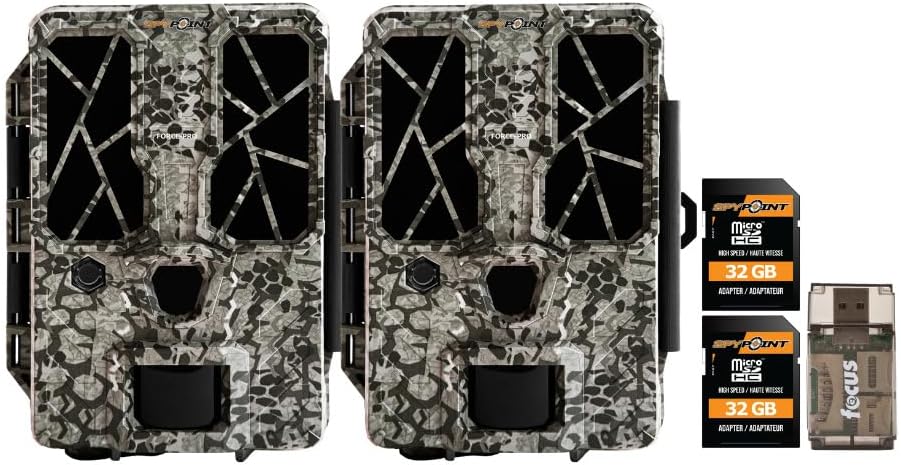
- 2 x SPYPOINT FORCE-PRO 30 Megapixel Trail Camera
- 2 x SPYPOINT MicroSD 32GB Ultra High Speed Class 10 Memory Card
- 1 x Focus All-In-One High Speed Card Reader

Sản phẩm trênview
The SPYPOINT FORCE-PRO is a robust trail camera designed for reliable performance in outdoor environments. It features advanced imaging capabilities and user-friendly controls.
Các tính năng chính
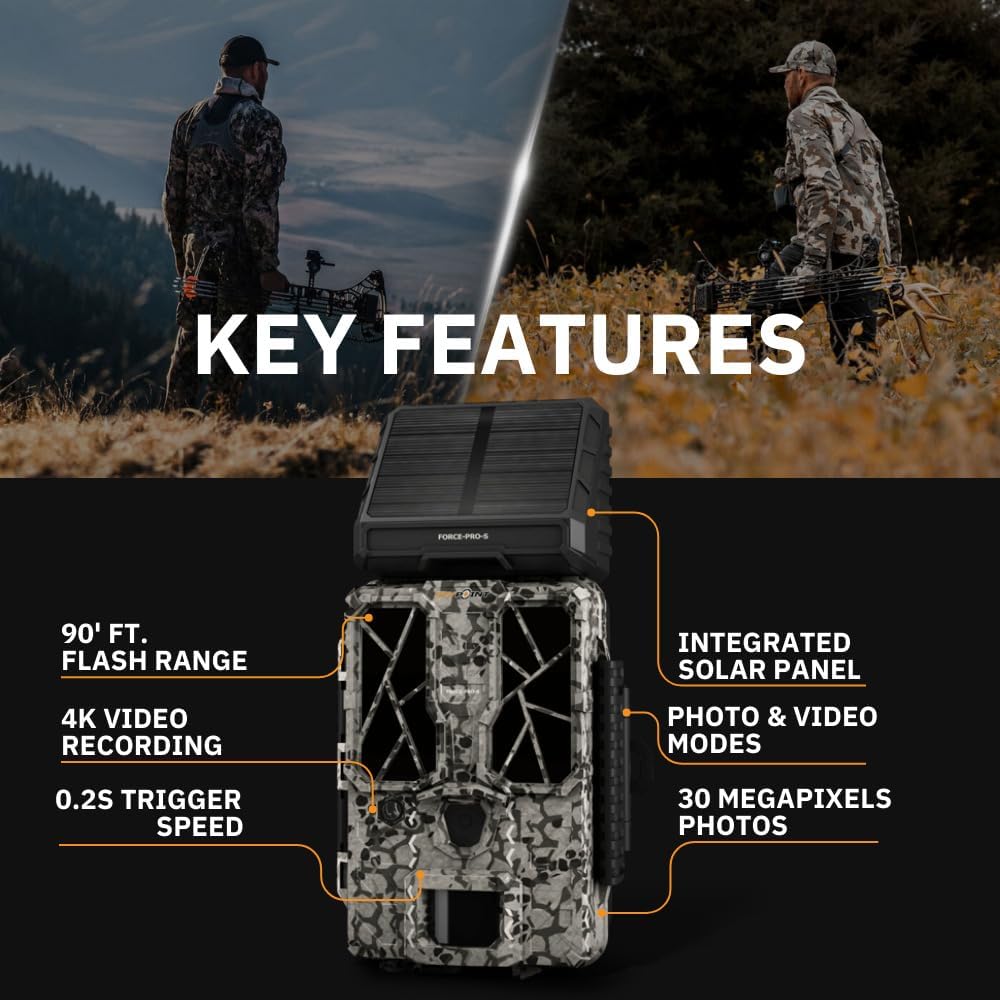
- Độ phân giải cao: 30 Megapixel photos and 4K video recording with sound.
- Tốc độ kích hoạt nhanh: Tốc độ kích hoạt cực nhanh 0.2 giây để bắt trọn những chuyển động nhanh.
- Phạm vi phát hiện rộng: 110-foot detection range.
- Powerful Flash: 90-foot flash range with 54 LEDs for clear night images.
- Tấm pin mặt trời tích hợp: For extended battery life and reduced maintenance.
- Dual-SIM Cellular: Automatically connects to the best available network for reliable transmission (if cellular model).



Cài đặt
1. Lắp đặt nguồn điện
The FORCE-PRO camera is equipped with an integrated solar panel for charging its internal battery. For initial setup or extended use without sufficient sunlight, an external power source can be used.
- Pin bên trong: Ensure the camera's internal battery is charged. The integrated solar panel will charge it during daylight hours.
- Nguồn điện ngoài (Tùy chọn): If using an external 12V power source (not included), connect it to the camera's 12V jack.
2. Lắp thẻ MicroSD
A MicroSD card is required to store photos and videos. Two 32GB MicroSD cards are included in this bundle.
- Tìm khe cắm thẻ MicroSD trên máy ảnh.
- Lắp thẻ MicroSD vào sao cho các điểm tiếp xúc màu vàng hướng về phía sau máy ảnh cho đến khi thẻ khớp vào đúng vị trí.
- Để tháo ra, hãy ấn nhẹ thẻ cho đến khi nó bật ra.
3. Bật nguồn ban đầu và cấu hình cơ bản
- Bật máy ảnh bằng công tắc nguồn.
- Follow the on-screen prompts (if available) or refer to the camera's menu for initial settings such as date, time, and language.
- Format the MicroSD card through the camera's menu for optimal performance.
4. Gắn máy ảnh
The camera can be mounted using a strap, tripod, or other compatible mounting accessories. While specifications mention 'Tabletop Mount', for outdoor use, secure mounting is crucial.
- Chọn một vị trí có tầm nhìn rõ ràng. view của khu vực giám sát mong muốn.
- Ensure the camera is securely fastened to prevent movement from wind or animals.
- Position the camera to avoid direct sunlight into the lens, which can cause overexposure.
Hướng dẫn sử dụng
Chế độ máy ảnh
- Chế độ ảnh: Chụp ảnh tĩnh khi được kích hoạt.
- Chế độ Video: Ghi lại các đoạn video khi được kích hoạt.
- Chế độ ảnh + video: Captures a photo followed by a video clip.
Điều chỉnh cài đặt
Access the camera's menu using the built-in screen and navigation buttons to customize settings:
- Nghị quyết: Select desired photo (up to 30MP) and video (up to 4K) resolution. Higher resolutions consume more storage.
- Kích hoạt độ trễ: Thiết lập độ trễ giữa các lần kích hoạt liên tiếp.
- Độ nhạy: Adjust the motion sensor sensitivity to suit the environment and avoid false triggers.
- Giờ làm việc: Define specific times the camera should be active.
- Ngày/Giờ Stamp: Enable or disable the date and time overlay on images/videos.
Truy xuất dữ liệu
- Thẻ MicroSD: Remove the MicroSD card from the camera and insert it into the included Focus All-In-One High Speed Card Reader. Connect the card reader to a computer to access files.
- SPYPOINT App: For cellular models, use the SPYPOINT mobile application to view and manage captured media remotely. The app also allows for camera settings adjustments and firmware updates.
BẢO TRÌ
- Vệ sinh: Regularly clean the camera lens and housing with a soft, dry cloth. Avoid abrasive materials or harsh chemicals.
- Kiểm tra pin: Monitor battery levels, especially during periods of low sunlight. The integrated solar panel helps maintain charge, but supplemental charging may be needed.
- Cập nhật chương trình cơ sở: Periodically check for and install firmware updates via the SPYPOINT app or webtrang web để đảm bảo hiệu suất tối ưu và truy cập vào các tính năng mới.
- Kho: When not in use, store the camera in a cool, dry place away from direct sunlight.
Xử lý sự cố
- Máy ảnh không hoạt động: Check motion sensor sensitivity, ensure no obstructions, and verify battery level.
- Chất lượng hình ảnh/video kém: Clean the lens, check resolution settings, and ensure proper lighting conditions.
- Các vấn đề về nguồn điện: Ensure the internal battery is charged or an external power source is properly connected. Check for any damage to power cables.
- Lỗi thẻ MicroSD: Reformat the MicroSD card (backing up data first) or try a different card. Ensure the card is properly inserted.
- Connectivity Problems (Cellular Models): Verify cellular signal strength in the camera's location. Check your SPYPOINT app for data plan status.
Thông số kỹ thuật
| Tính năng | Đặc điểm kỹ thuật |
|---|---|
| Người mẫu | FORCE-PRO |
| Độ phân giải ảnh | 30 Megapixel |
| Độ phân giải video | 4K |
| Tốc độ kích hoạt | 0.2 giây |
| Phạm vi phát hiện | 110 feet |
| Phạm vi đèn flash | 90 feet |
| Đèn LED | 54 |
| Nguồn điện | Integrated Solar Panel, Corded Electric (external 12V option) |
| Kết nối | USB, Wired (for data transfer), Cellular (for remote management) |
| Vật liệu | Nhựa |
| Chống nước | Chống nước |
| Loại tiêu điểm | Tự động lấy nét |
| Mã số UPC | 196271434986 |
Bảo hành và Hỗ trợ
For warranty information, technical support, or service inquiries, please refer to the official SPYPOINT webhoặc liên hệ trực tiếp với bộ phận chăm sóc khách hàng. Hãy giữ lại hóa đơn mua hàng để yêu cầu bảo hành.
ĐIỂM GIÁN ĐI Webđịa điểm: www.spypoint.com