1. Giới thiệu
The NANLITE Pico Portable LED Fill Light is a compact and versatile lighting tool designed for content creators, photographers, and videographers. Weighing only 130g, this full-color RGB light offers intuitive controls, a bright display, and flexible mounting options, making it ideal for various shooting scenarios from phone photography to live streaming.
2. Có gì trong hộp
- Pico Pocket Light x1
- Attachable Magnetic Diffuser x1
- Cold Shoe Adapter x1

Figure 1: Included items with the NANLITE Pico Portable LED Fill Light.
3. Sản phẩm hếtview
The Pico light features a compact, square design with rounded corners, making it easy to handle and transport. It incorporates a single knob and double button design for intuitive one-handed operation.
3.1 Kích thước và trọng lượng
- Kích thước: 2.82 x 1.33 x 1.33 inch (67.3 x 71.6 x 33.7 mm)
- Item Weight: 5.9 ounces (130g)

Figure 2: The compact size of the Pico light, fitting comfortably in one hand.
3.2 Điều khiển và Màn hình
The device features a 1.28-inch round color screen that displays all essential parameters clearly. Control is managed via a multi-function knob and two buttons, allowing for quick adjustments and mode switching.

Hình 3: Chi tiết view of the intuitive round display screen.
3.3 Tùy chọn gắn kết
The Pico light is equipped with a versatile U-shaped frame that includes a magnetic base and a 1/4"-20 mounting thread. This allows for attachment to various surfaces and accessories.
Figure 4: Magnetic base and 1/4"-20 mount for flexible positioning.
3.4 Adjustable U-Frame
The U-shaped frame allows for stepped adjustment in 30° increments, providing 12 pitch adjustment angles for flexible light positioning.
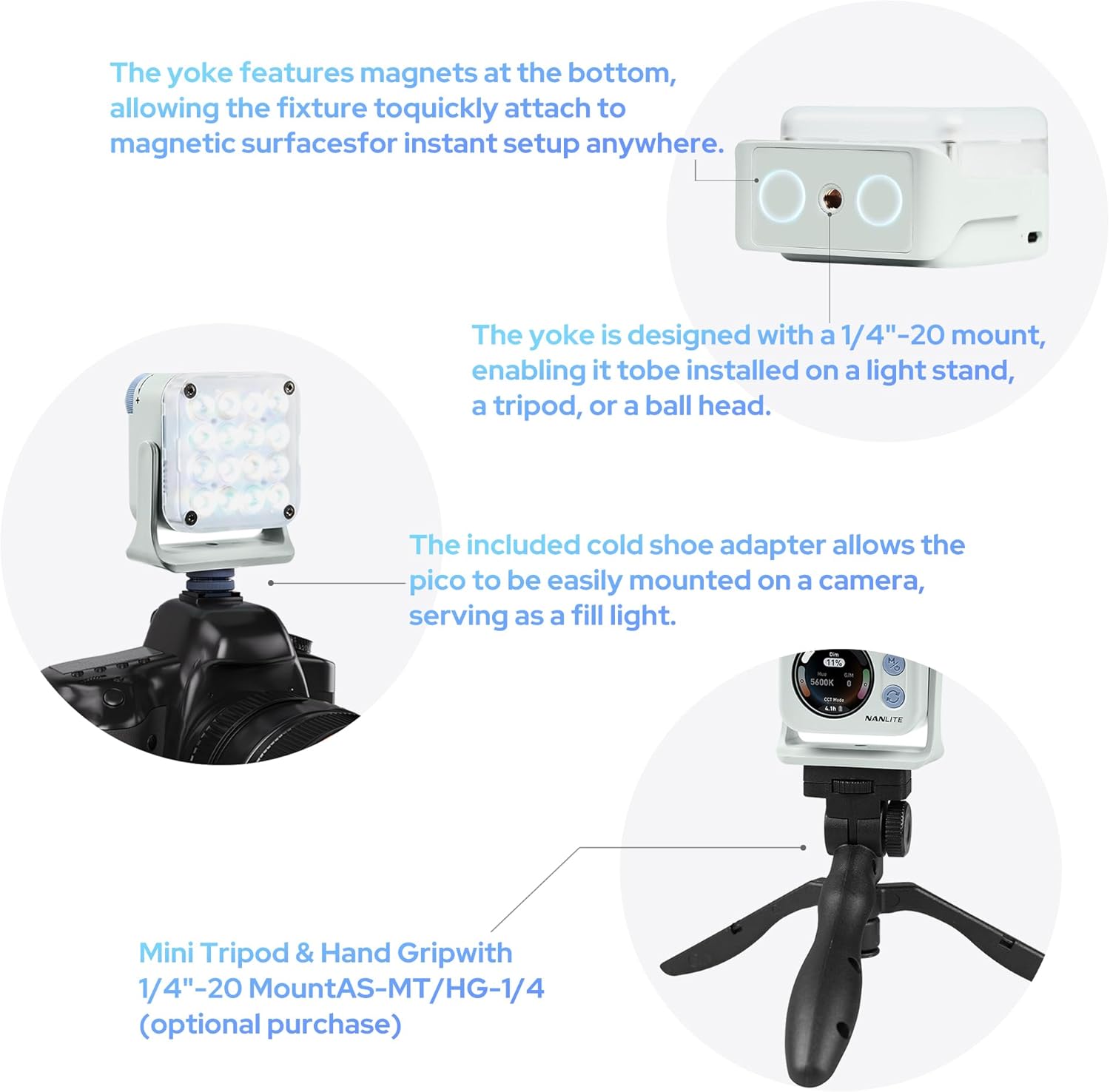
Figure 5: Flexible U-frame with 12 pitch adjustment angles.
4. Thiết lập
4.1 Sạc thiết bị
The Pico light has a built-in 1500mAh lithium battery. Connect a USB-C cable (not included) to the USB-C port on the side of the device to charge. The screen will display the charging status and estimated remaining runtime.
4.2 Gắn bộ khuếch tán
The included magnetic diffuser can be easily attached to the front of the light. It snaps securely into place, softening the light output.
4.3 Lắp đèn
- Bộ chuyển đổi đế gắn phụ kiện: Attach the cold shoe adapter to the 1/4"-20 thread on the U-frame, then slide it onto a camera's hot shoe or a cold shoe mount on a rig.
- Chân máy/Giá đỡ đèn: Directly mount the Pico light onto any tripod or light stand with a 1/4"-20 screw.
- Đính kèm từ tính: Utilize the magnetic base of the U-frame to attach the light to any metallic surface.

Figure 6: Charging port, physical controls, and battery life display.
5. Hướng dẫn vận hành
5.1 Bật / Tắt nguồn
To power on the Pico light, press and hold the 'M' (Mode/Power) button for a few seconds, then rotate the large dial to confirm. To power off, press and hold the 'M' button again.
5.2 Navigating Menus and Adjusting Settings
- Nút chế độ (M): Short press to cycle through the main operating modes: CCT Mode, HSI Mode, Effect Mode, and Settings.
- Switch Button (Circular Arrows): In each mode, short press this button to switch between different adjustable parameters (e.g., Dim, CCT, G/M in CCT Mode; Hue, Saturation, Intensity in HSI Mode).
- Quay số kiểm soát: Rotate the large dial to adjust the value of the currently selected parameter.
5.3 CCT Mode (Correlated Color Temperature)
In CCT Mode, you can adjust the color temperature from 2700K (warm) to 7500K (cool) and fine-tune the green/magenta balance (G/M) to match ambient lighting or achieve specific creative looks. The dimming percentage can also be adjusted from 0-100%.
5.4 Chế độ HSI (Màu sắc, Độ bão hòa, Cường độ)
HSI Mode allows for full-color control. Adjust the Hue (0-360°) to select any color in the spectrum, Saturation (0-100%) to control the color's intensity, and Dimming (0-100%) for overall brightness.
Chế độ 5.5 hiệu ứng
The Pico light includes 14 built-in special effects to enhance your creative projects. These effects include: Hue Loop, CCT Flash, Hue Flash, CCT Pulse, Hue Pulse, Storm, Police Car, TV, Paparazzi, Candle/Fire, Disco, Bad Bulb, Fireworks, and Explosion. Use the control dial to select and adjust parameters for each effect.
5.6 Kiểm soát ứng dụng (Bluetooth)
The Pico light supports Bluetooth connectivity, allowing you to control all settings and modes remotely via the NANLINK app on your smartphone. This is particularly useful for adjusting the light when it's placed in hard-to-reach locations or for synchronizing multiple Pico lights.
6. Tính năng
- Siêu nhỏ gọn & Trọng lượng nhẹ: Weighs only 130g, easily fits into a pocket for on-the-go shooting.
- Điều khiển trực quan: Single knob and double button design for effortless one-handed parameter adjustment.
- Hiển thị sống động: 1.28-inch round color screen for clear and intuitive parameter display.
- Tuổi thọ pin dài: Built-in 1500mAh lithium battery provides 1.3 to 6.5 hours of runtime depending on brightness.
- Gắn linh hoạt: U-shaped frame with magnetic base and 1/4"-20 thread, offering 12 pitch adjustment angles.
- Độ sáng cao: Delivers up to 4211 lux at 0.3m/5600K (bare light).
- Magnetic Diffuser: Standard inclusion for instant soft light.
- Full Color & Effects: 36,000 rich colors and 14 special effects for creative lighting.
- Professional Color Reproduction: High CRI (Average 95) and TLCI (Average 95) for accurate colors.

Figure 7: High illumination output of the Pico light.

Figure 8: Magnetic diffuser for soft light in a second.

Figure 9: 36,000 colors for diverse lighting needs.

Figure 10: 14 built-in effects to unlock creativity.

Figure 11: Professional-grade color reproduction for accurate lighting.
7. Bảo trì
- Vệ sinh: Use a soft, dry cloth to clean the exterior of the light. Avoid using harsh chemicals or abrasive materials.
- Kho: Bảo quản đèn ở nơi khô ráo, thoáng mát, tránh ánh nắng trực tiếp và nhiệt độ cao.
- Chăm sóc pin: Để tối ưu hóa tuổi thọ pin, hãy sạc thiết bị thường xuyên và tránh để pin cạn kiệt trong thời gian dài.
KHAI THÁC. Xử lý sự cố
- Đèn không sáng: Ensure the battery is charged. Press and hold the 'M' button, then rotate the dial to confirm power-on.
- Pin không sạc: Check the USB-C cable and power adapter. Ensure they are properly connected and functional.
- Sự cố kết nối ứng dụng: Reset Bluetooth on the device via the settings menu and restart the NANLINK app. Ensure the device is within Bluetooth range.
- Màu sắc hiển thị không chính xác: Perform a factory reset via the settings menu or recalibrate using the NANLINK app.
9. Thông số kỹ thuật
| Thuộc tính | Giá trị |
|---|---|
| Kích thước sản phẩm | 2.82 x 1.33 x 1.33 inch |
| Trọng lượng sản phẩm | 5.9 ounce |
| Số hiệu mẫu sản phẩm | Pico Light |
| Pin | Cần có 1 pin Lithium Ion. |
| Thương hiệu | NANLITE |
| Công nghệ kết nối | Bluetooth |
| Giao diện phần cứng | USB Loại C |
10. Bảo hành & Hỗ trợ
For warranty information and technical support, please refer to the official NANLITE webtrang web hoặc liên hệ với bộ phận chăm sóc khách hàng của họ. Giữ lại hóa đơn mua hàng để yêu cầu bảo hành.
Webđịa điểm: www.nanlite.com
Dịch vụ khách hàng: Tham khảo phần liên hệ trên trang web chính thức webtrang web để biết thông tin chi tiết về hỗ trợ khu vực.


