Giới thiệu
The Nanlite Pico Portable LED Fill Light is a compact and versatile lighting solution designed for photographers, videographers, and content creators. Weighing only 130g, its palm-sized design allows for easy portability, fitting into a pocket for on-the-go shooting. This light offers full-color RGB capabilities, adjustable color temperature, and various special effects to enhance your creative projects. Its intuitive controls and multiple mounting options make it an essential tool for diverse lighting needs.
Có gì trong hộp
- Pico Portable LED Fill Light x1
- Magnetic Attraction Diffuser x1
- Cold Shoe Adapter x1

Image: The Nanlite Pico Portable LED Fill Light, a magnetic diffuser, and a cold shoe adapter are included in the product packaging.
Các tính năng chính
- Nhỏ gọn và nhẹ: Weighs only 130g, making it highly portable for outdoor shooting and easy to carry in a pocket.
- Điều khiển trực quan: Features a single knob and double button design for one-handed parameter adjustment and mode switching.
- 1.28-inch Round Screen: Provides a clear and intuitive display for monitoring settings and battery life.
- Đế từ tính: Allows for convenient magnetic adsorption to metal surfaces for flexible placement.
- Flexible Flipping U-Frame: Offers 12 pitch adjustment angles (30° increments) for precise light positioning.
- Pin tích hợp: Integrated 1500mAh lithium battery provides 1.3 to 6.5 hours of battery life depending on brightness.
- Full Color RGB: Supports 0-360 hues and 0-100% saturation adjustment with 36,000 rich colors.
- Hiệu ứng đặc biệt: Includes 14 built-in effects to unlock creative lighting possibilities.
Cài đặt
Sạc thiết bị
The Nanlite Pico features a built-in 1500mAh lithium battery. To charge, connect a USB Type-C cable (not included) to the charging port on the side of the device. The 1.28-inch round screen will display the charging status and estimated battery life. For continuous power during extended shoots, the device can be powered via USB-C.
Gắn bộ khuếch tán
The included magnetic diffuser can be easily attached to the front of the light. Simply align the diffuser with the light panel, and the magnets will secure it in place. This diffuser helps to soften the light output, providing a more even and flattering illumination.

Image: The Nanlite Pico LED light with its magnetic diffuser attached, demonstrating how the diffuser softens the light output.
Tùy chọn lắp đặt
The Pico light offers multiple mounting solutions:
- Bộ chuyển đổi đế gắn phụ kiện: Attach the included cold shoe adapter to the 1/4"-20 mount on the light's base. This allows you to mount the Pico directly onto a camera's hot shoe or any accessory with a cold shoe receiver.
- Ren 1/4"-20: The light features a standard 1/4"-20 thread on its base, enabling direct attachment to tripods, light stands, or ball heads.
- Hấp thụ từ tính: The light's base is magnetic, allowing it to be securely attached to any suitable metal surface for quick and flexible positioning.
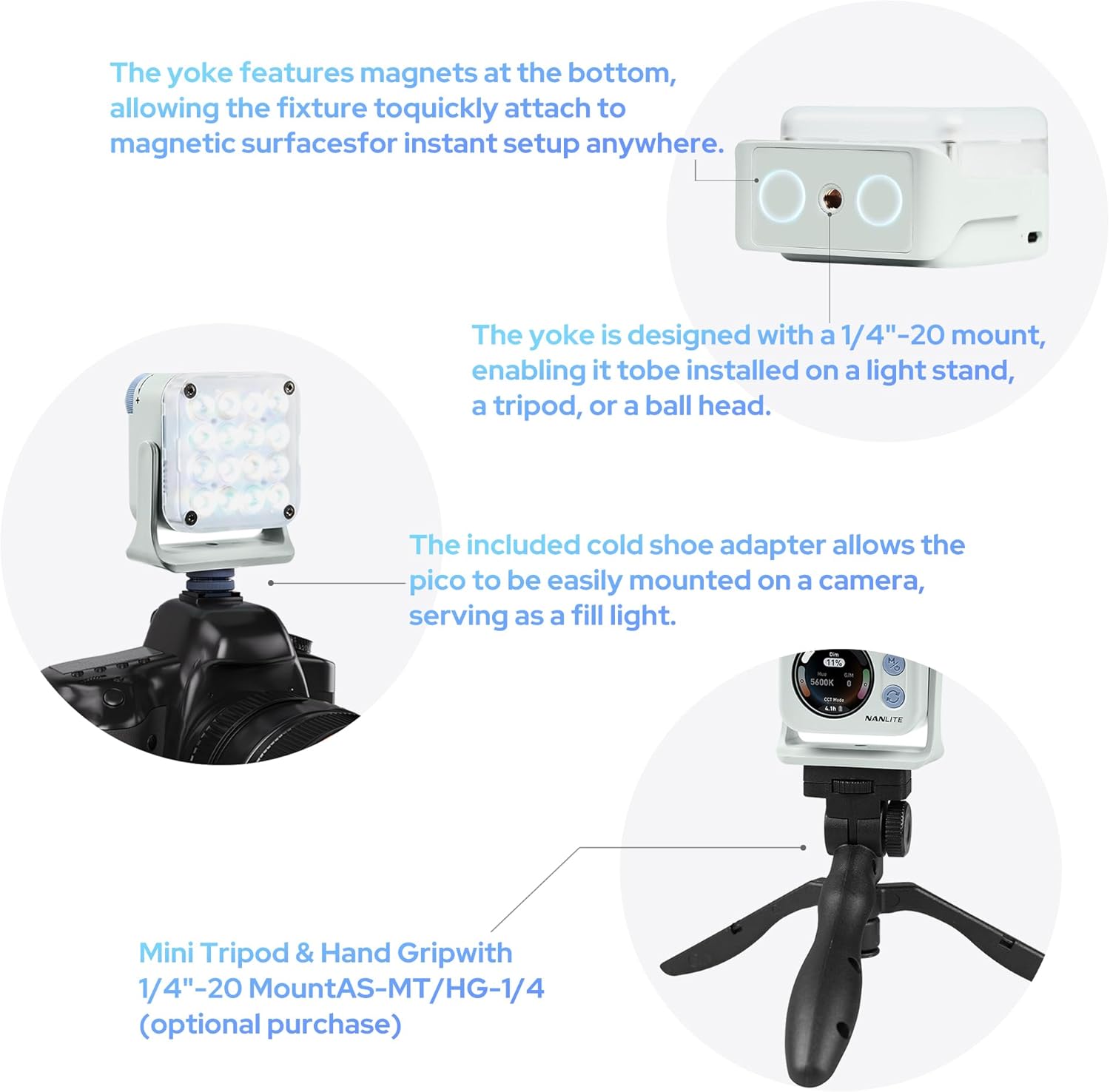
Image: The Nanlite Pico light shown mounted on a camera using the cold shoe adapter and also on a mini tripod, illustrating its versatile attachment options.
Hướng dẫn sử dụng
Bật/Tắt nguồn
To power on the device, press and hold the power button (usually combined with the 'M' mode button) for a few seconds until the screen illuminates. To power off, repeat the process.
Lựa chọn chế độ
The Nanlite Pico offers multiple operating modes:
- Chế độ CCT: Adjusts color temperature from 2700K to 7500K, allowing for warm to cool lighting.
- RGB/HSI Mode: Provides full control over hue (0-360°), saturation (0-100%), and intensity for custom color lighting.
- Chế độ FX: Access 14 built-in special effects like Police Car, Fire, Lightning, Paparazzi, and more.
Use the mode button to cycle through these main modes. The 1.28-inch round screen will display the current mode and settings.
Điều chỉnh cài đặt
Use the control knob to adjust parameters within each mode. For example, in CCT mode, rotate the knob to change the color temperature. In RGB/HSI mode, rotate to adjust hue, saturation, or intensity after selecting the parameter with the secondary button.
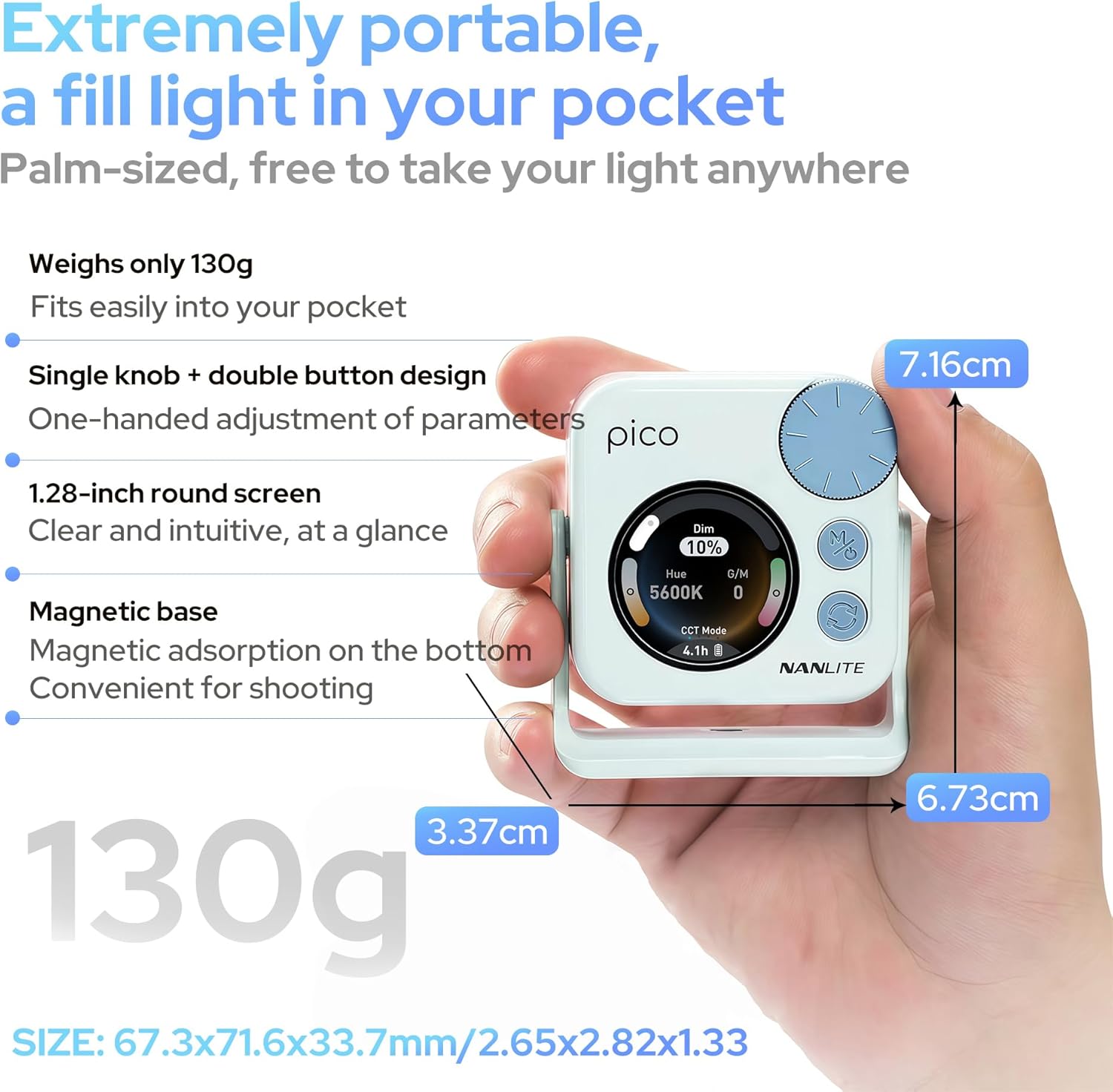
Image: A hand holding the Nanlite Pico light, with a clear view of its 1.28-inch round screen displaying current settings and the control knob for adjustments.
Kiểm soát ứng dụng di động
The Nanlite Pico supports Bluetooth connectivity for control via a mobile application. Download the official Nanlite app to access advanced features, remote control, and precise adjustments from your smartphone or tablet.
Video: A demonstration of the Nanlite Pico LED Video Light, highlighting its pocket-sized design, ease of use, and bright output for various creative applications.
Thông số kỹ thuật
| Thương hiệu | NANLITE |
| Số hiệu mẫu | Pico Light |
| Kích thước gói hàng | 3.94 x 2.76 x 1.93 inch |
| Trọng lượng sản phẩm | 5.9 ounce |
| Pin | Cần có 1 pin Lithium Ion (bao gồm) |
| Công nghệ kết nối | Bluetooth |
| Giao diện phần cứng | USB Loại C |
BẢO TRÌ
- Giữ thiết bị sạch sẽ bằng cách lau bằng vải khô, mềm.
- Tránh để ánh sáng tiếp xúc với nhiệt độ hoặc độ ẩm quá cao.
- Bảo quản thiết bị ở nơi khô ráo, thoáng mát khi không sử dụng.
- Không được tự ý tháo rời hoặc sửa chữa thiết bị vì điều này có thể làm mất hiệu lực bảo hành.
Xử lý sự cố
- Đèn không sáng: Ensure the battery is charged. Connect to a USB-C power source to check.
- Các nút điều khiển không phản hồi: Try powering the device off and on again. If using the app, ensure Bluetooth is enabled and the device is paired.
- Độ sáng không ổn định: Check for any obstructions on the light panel or diffuser. Ensure the device is not overheating.
Bảo hành và Hỗ trợ
For warranty information, technical support, or service inquiries, please refer to the official Nanlite webhoặc liên hệ trực tiếp với bộ phận chăm sóc khách hàng của họ. Hãy giữ lại hóa đơn mua hàng để được bảo hành.