Giới thiệu
The EROK Digital Metronome & Tuner (Model EK-AMT-600) is a versatile 3-in-1 device combining a digital metronome, chromatic tuner, and tone generator. This compact, rechargeable unit features a clear, full-color display and supports various instruments including guitar, bass, violin, ukulele, viola, cello, and wind instruments. It offers voice counting for metronome beats and comes with a contact clip-on microphone for accurate tuning.
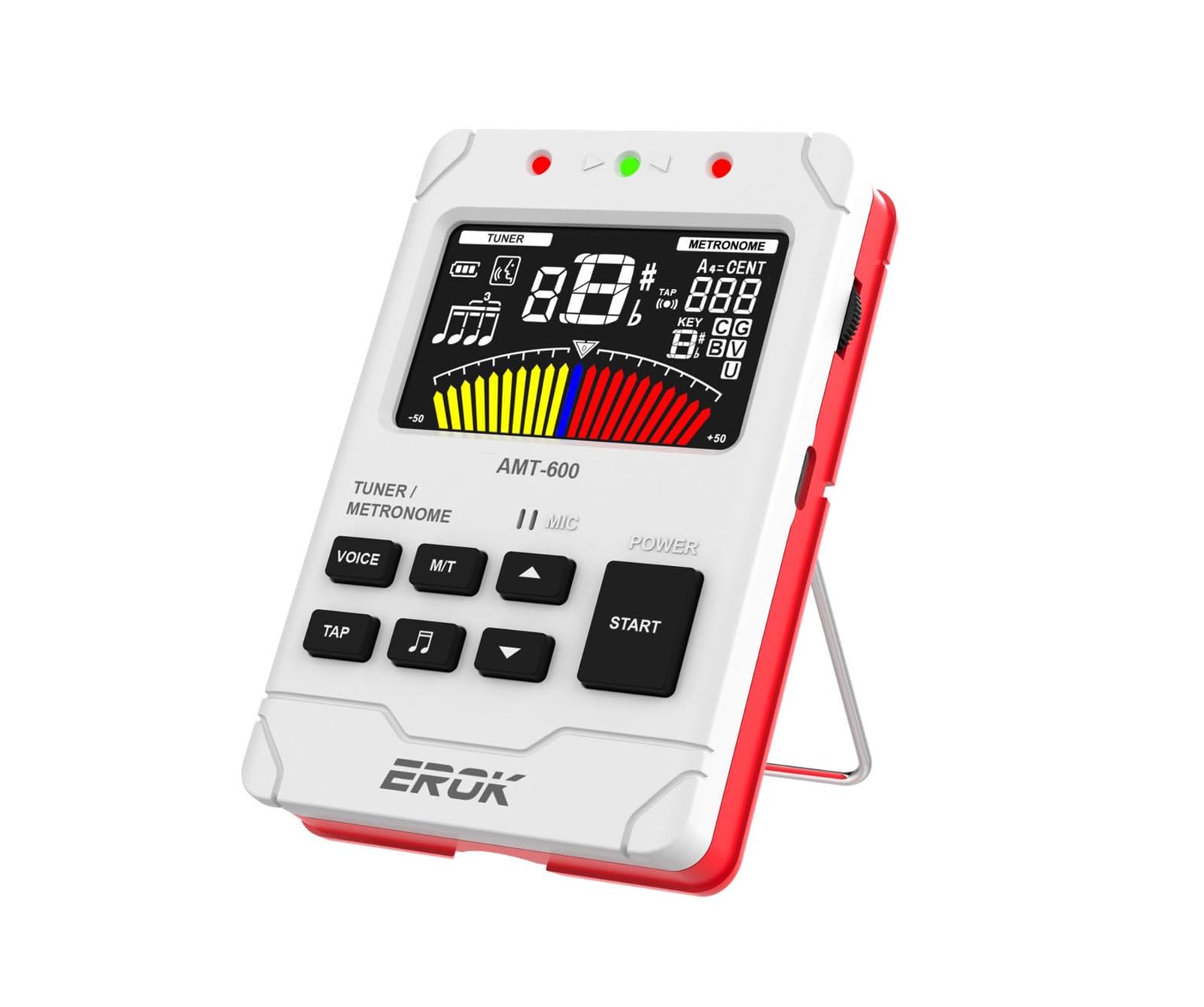
Image: The EROK Digital Metronome and Tuner (Model EK-AMT-600) in white, showcasinVới màn hình hiển thị và thiết kế nhỏ gọn.
Có gì trong hộp
- 1x EROK Digital Metronome & Tuner (Model EK-AMT-600)
- 1x Hướng dẫn sử dụng
- 1x Cáp sạc USB Type-C
- 1x Pickup Clip
Tính năng sản phẩm
- Chức năng 3 trong 1: Combines a metronome, tuner, and tone generator in one portable device.
- Pin sạc: Built-in 600mAh Lithium Polymer battery provides over 5 hours of continuous use after a 2-hour charge.
- Hiển thị rõ ràng: Large, full-color LCD screen for easy readability.
- Versatile Metronome: Wide tempo range (30-260 BPM), 10 beat subdivisions (0-9), 8 rhythm patterns, voice beat counting, and tap tempo function.
- Multi-Function Chromatic Tuner: Supports various instruments (Guitar, Bass, Violin, Ukulele, Chromatic, Wind Instruments) with a detection range of A0-C8 and pitch calibration (410-450Hz).
- Multiple Tuning Input Methods: Built-in microphone, included pickup clip, or 1/4-inch input jack (cable not included).
- Bộ tạo giai điệu: Produces precise reference tones for tuning by ear.
- Thiết kế thân thiện với người dùng: Features adjustable volume, built-in speaker, headphone output, and a foldable stand.

Image: Key features of the EROK Digital Metronome and Tuner, including its chromatic tuner, tap tempo metronome, tone generator, and intuitive user interface.
Controls and Functions Overview

Image: Labeled diagram of the EROK Digital Metronome and Tuner, showing the location and function of each button, jack, and indicator.
- Đèn báo LED: Displays status (e.g., charging, tuning accuracy).
- Giắc cắm tai nghe (3.5mm): Dành cho việc luyện tập cá nhân với tai nghe.
- Metronome/Tuner Switch (M/T): Long press to toggle between metronome and tuner modes.
- Voice Beat Button (VOICE): Activates or deactivates voice counting in metronome mode.
- Rhythm Button (Music Note Icon): Cycles through different rhythm patterns in metronome mode.
- Nút TAP: Allows manual setting of tempo by tapping.
- Bánh xe âm lượng: Điều chỉnh âm lượng đầu ra.
- USB Type-C Jack: Để sạc thiết bị.
- Micrô: Built-in microphone for tuning and sound detection.
- On/Off/Play Button (START): Long press to power on/off; short press to start/stop metronome.
- Tempo/Beat Select Buttons (Up/Down Arrows): Adjust tempo, beat, or tuning parameters.
- Pickup Jack (6.35mm): Input for external pickup clip or instrument cable.
Cài đặt
Sạc thiết bị
The EK-AMT-600 features a built-in rechargeable Lithium Polymer battery. To charge:
- Connect the provided USB Type-C cable to the USB Type-C Jack on the side of the device.
- Kết nối đầu còn lại của cáp với bộ chuyển đổi nguồn USB tiêu chuẩn (không kèm theo) hoặc cổng USB của máy tính.
- The LED indicator will show charging status. A full charge typically takes approximately 2 hours and provides over 5 hours of continuous use.

Image: The EROK Digital Metronome and Tuner highlighting its long-lasting rechargeable battery, Type-C charging port, and estimated usage time.
Bật/Tắt nguồn
To power on the device, nhấn lâu cái BẮT ĐẦU button. To power off, nhấn lâu cái BẮT ĐẦU nút một lần nữa.
Operating the Metronome
The metronome function helps musicians maintain a steady tempo. Ensure the device is powered on.
- Switch to Metronome Mode: If not already in metronome mode, long press the M / T button to switch from tuner to metronome.
- Máy đếm nhịp Bắt đầu/Dừng: Nhấn nhanh vào BẮT ĐẦU button to begin the metronome beat. Short press again to stop.
- Điều chỉnh nhịp độ (BPM): Sử dụng Mũi tên lên / xuống buttons to increase or decrease the tempo (beats per minute) from 30 to 260 BPM.
- Nhấn vào Tempo: Nhấn nút VỖ NHẸ button repeatedly at your desired tempo. The device will calculate and set the BPM.
- Change Beat Subdivisions: Sử dụng Mũi tên lên / xuống buttons to change the beat subdivision (0-9).
- Change Rhythm Pattern: Nhấn nút Biểu tượng nốt nhạc button to cycle through 8 different rhythm patterns.
- Enable Voice Counting: Nhấn nút TIẾNG NÓI button to activate or deactivate human voice counting for the beats.
- Điều chỉnh âm lượng: Sử dụng Bánh xe âm lượng ở mặt bên của thiết bị.
- Sử dụng tai nghe: Cắm tai nghe 3.5 mm vào Jack cắm tai nghe for private practice.
Video: Demonstrates powering on the device, enabling voice counting, changing beat patterns, and manually setting tempo in metronome mode.

Hình ảnh: Chi tiết view of the metronome display, indicating voice beat, battery status, beat count, rhythm pattern, tempo, and metronome meters.
Operating the Tuner
The tuner function allows for accurate instrument tuning. Ensure the device is powered on.
- Switch to Tuner Mode: Nhấn và giữ M / T button to switch from metronome to tuner mode.
- Select Tuning Input Method:
- Micrô tích hợp: For acoustic instruments, simply play a note near the device's microphone.
- Đoạn clip thu thập: Connect the included pickup clip to the Pickup Jack (6.35mm) and attach the clip to your instrument's headstock or soundboard. This is ideal for noisy environments.
- 1/4-Inch Input Jack: Connect an instrument cable (not included) from your instrument to the Pickup Jack (6.35mm).
- Chọn Chế độ Điều chỉnh: Sử dụng Mũi tên lên / xuống buttons to cycle through tuning modes: Chromatic (C), Guitar (G), Bass (B), Violin (V), Ukulele (U), and Wind Instruments.
- Điều chỉnh nhạc cụ của bạn: Play a single note on your instrument. The display will show the note name, string number, and a tuning meter.
- If the needle is to the left, the note is flat. Tighten the string.
- If the needle is to the right, the note is sharp. Loosen the string.
- When the needle is centered and the display turns green, the note is in tune.
- Adjust Pitch Calibration (A4): In tuner mode, you can adjust the A4 reference frequency (typically 440Hz) using specific button combinations (refer to on-screen prompts or detailed manual for exact steps if not intuitive). The device supports 410-450Hz.
Video: Demonstrates switching to tuner mode, using the pickup clip for guitar tuning, and interpreting the tuning display.

Image: The EROK Digital Metronome and Tuner showing its three sound input methods for tuning: built-in microphone, pickup clip, and 6.35mm instrument cable input.

Image: The EROK Digital Metronome and Tuner connected to a guitar headstock using the included pickup clip for accurate tuning.
Máy phát âm thanh
The tone generator function allows the device to produce precise reference tones, similar to a pitch pipe. This is useful for tuning instruments by ear or for practicing pitch recognition.
- Activate Tone Generator: While in Tuner mode, press a specific button (often the TIẾNG NÓI or Nhịp điệu button, depending on the model's specific interface) to activate the tone generator. The display will typically show the note being generated.
- Select Note/Mode: Sử dụng Mũi tên lên / xuống buttons to select the desired note or tuning mode (Chromatic, Guitar, Bass, Violin, Ukulele) for the reference tone.
- Điều chỉnh âm lượng: Sử dụng Bánh xe âm lượng to control the output level of the generated tone.
BẢO TRÌ
- Vệ sinh: Lau thiết bị bằng vải mềm, khô. Không sử dụng chất tẩy rửa có tính mài mòn hoặc dung môi.
- Kho: Bảo quản thiết bị ở nơi khô ráo, thoáng mát, tránh ánh nắng trực tiếp và nhiệt độ cao.
- Chăm sóc pin: Để kéo dài tuổi thọ pin, tránh xả pin thường xuyên. Hãy sạc thiết bị thường xuyên, ngay cả khi không sử dụng trong thời gian dài.
- Tránh độ ẩm: Tránh để thiết bị tiếp xúc với nước và độ ẩm cao để ngăn ngừa hư hỏng các linh kiện bên trong.
Xử lý sự cố
- Thiết bị không bật nguồn: Ensure the battery is charged. Connect the device to a power source using the USB Type-C cable and try again after a few minutes.
- Tuner not detecting notes accurately:
- Check the input method: Ensure the built-in microphone is unobstructed, the pickup clip is securely attached, or the instrument cable is fully inserted.
- Verify the tuning mode: Make sure the correct instrument mode (e.g., Guitar, Bass) or Chromatic mode is selected.
- Minimize background noise: For microphone tuning, ensure a quiet environment. The pickup clip is recommended for noisy settings.
- Check instrument intonation: If individual strings consistently tune incorrectly despite proper technique, your instrument's intonation may need adjustment by a professional.
- Metronome sound is too low or absent: Check the volume wheel on the side of the device. Ensure headphones are not plugged in if you expect sound from the built-in speaker.
- Tuổi thọ pin ngắn hơn dự kiến: Ensure the device is fully charged (approx. 2 hours). Extreme temperatures can affect battery performance.
- Các nút không phản hồi: Try powering the device off and on again. If the issue persists, ensure no debris is obstructing the buttons.
Thông số kỹ thuật
| Số hiệu mẫu | EK-AMT-600 |
| Kích thước | 4.17 x 2.91 x 0.79 inch (10.6 x 7.4 x 2.0 cm) |
| Trọng lượng sản phẩm | 6.4 ounce (181 gram) |
| Loại pin | 1 pin Lithium Polymer (đi kèm) |
| Thời gian sạc | Xấp xỉ 2 giờ |
| Thời gian sử dụng liên tục | Over 5 hours (after full charge) |
| Dải nhịp điệu nhịp điệu | 30-260 nhịp/phút |
| Metronome Beat Subdivisions | 0-9 |
| Tuning Detection Range | A0 (27.5Hz) - C8 (4186Hz) |
| Pitch Calibration (A4) | 410-450Hz |
| Chế độ điều chỉnh | Chromatic, Guitar, Bass, Violin, Ukulele, Wind Instruments |

Image: Dimensions of the EROK Digital Metronome and Tuner, showing its compact size.
Bảo hành và Hỗ trợ
EROK products are designed for reliability and performance. This product is covered by a standard manufacturer's warranty against defects in materials and workmanship. For detailed warranty information, technical support, or service inquiries, please refer to the contact information provided with your purchase or visit the official EROK webđịa điểm.
Vui lòng giữ lại bằng chứng mua hàng của bạn để yêu cầu bảo hành.


