Giới thiệu
This manual provides instructions for the Karlsson KA6039GY LED Retro Flat Alarm Clock. Please read this manual carefully before use and retain it for future reference. This alarm clock combines a slim design with warm wooden details and an LED display, suitable for various environments.
Sản phẩm trênview
The Karlsson KA6039GY LED Retro Flat Alarm Clock is constructed from durable MDF material and features an integrated wireless charging pad.
Đằng trước View
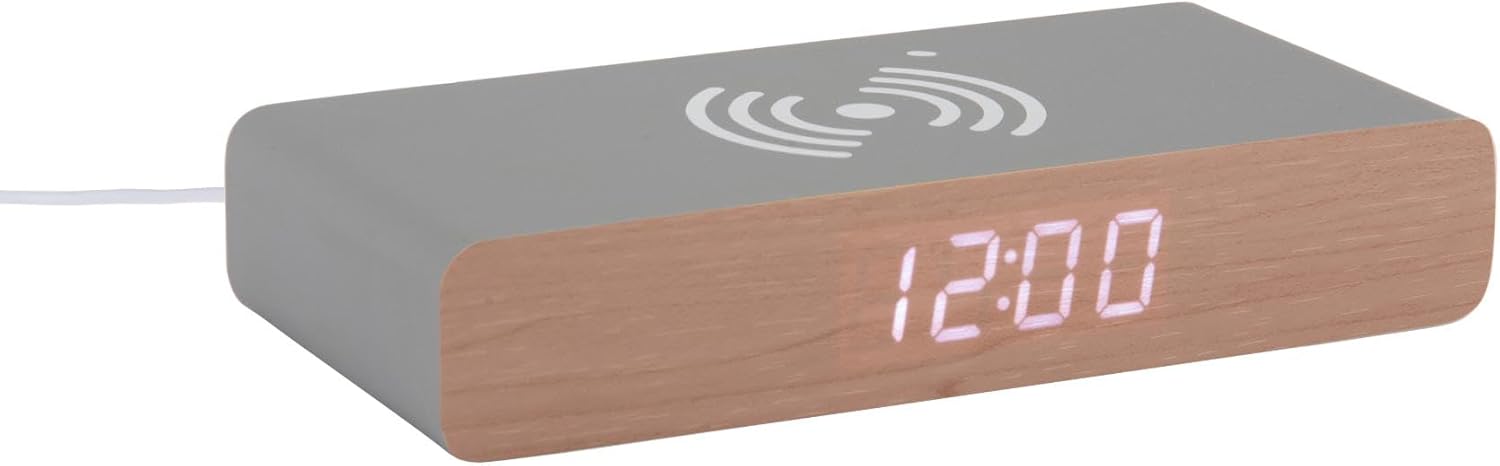
This image displays the front of the Karlsson KA6039GY alarm clock, highlighting its LED time display and the integrated wireless charging pad symbol on the top surface.
Góc cạnh View

This image provides an angled perspective of the alarm clock, showcasing the LED display, the wireless charging icon, and the "KARLSSON" brand name printed on the side.
Ở phía sau View và Kiểm soát

This image shows the back panel of the alarm clock, detailing the control buttons for settings and the power input port.
Cài đặt
Kết nối nguồn điện
- Connect the provided power cable to the power input port on the rear of the alarm clock.
- Cắm đầu còn lại của cáp nguồn vào ổ cắm điện phù hợp.
- The LED display will illuminate, indicating the device is powered on.
Hướng dẫn sử dụng
Thiết lập thời gian
- Locate the time setting button on the rear panel.
- Press and hold the time setting button until the hour digits begin to flash.
- Use the adjustment buttons (e.g., Up/Down or +/-) to set the correct hour.
- Press the time setting button again to switch to minute adjustment.
- Use the adjustment buttons to set the correct minutes.
- Press the time setting button one more time to confirm and exit time setting mode.
Cài đặt báo thức
- Locate the alarm setting button on the rear panel.
- Press and hold the alarm setting button until the alarm hour digits begin to flash.
- Use the adjustment buttons to set the desired alarm hour.
- Press the alarm setting button again to switch to alarm minute adjustment.
- Use the adjustment buttons to set the desired alarm minutes.
- Press the alarm setting button one more time to confirm and exit alarm setting mode.
- To activate or deactivate the alarm, press the alarm setting button briefly. An indicator (e.g., a small icon) on the display will show if the alarm is active.
Using the Wireless Charging Function
The top surface of the alarm clock features an integrated wireless charging pad.
- Ensure the alarm clock is powered on.
- Place your Qi-compatible device (e.g., smartphone) directly onto the wireless charging symbol on the top surface.
- Thiết bị sẽ hiển thị trạng thái đang sạc. Nếu không, hãy điều chỉnh vị trí của thiết bị trên đế sạc.
BẢO TRÌ
Chăm sóc và vệ sinh
To ensure the longevity and proper function of your alarm clock, follow these maintenance guidelines:
- Ngắt nguồn điện trước khi vệ sinh.
- Lau bề mặt bằng khăn mềm, khô hoặc hơi ẩmamp Lau bằng vải. Không sử dụng chất tẩy rửa có tính mài mòn, dung môi hoặc hóa chất dạng xịt.
- Avoid exposing the device to excessive moisture or direct sunlight.
- Không cố tháo rời thiết bị.
Xử lý sự cố
Các vấn đề thường gặp và giải pháp
| Vấn đề | Nguyên nhân có thể | Giải pháp |
|---|---|---|
| Màn hình tắt | Không có kết nối nguồn | Ensure the power cable is securely connected to the clock and the power outlet. |
| Time/Alarm cannot be set | Các nút được nhấn không chính xác | Refer to the "Setting the Time" or "Setting the Alarm" sections and ensure buttons are pressed and held as instructed. |
| Sạc không dây không hoạt động | Device not Qi-compatible or misaligned | Ensure your device supports Qi wireless charging. Reposition the device on the charging pad. Check if the clock is powered on. |
| Báo thức không kêu | Báo thức chưa được kích hoạt | Ensure the alarm is activated (check for alarm indicator on display). |
Thông số kỹ thuật
Thông số kỹ thuật sản phẩm
- Người mẫu: KA6039GY
- Thương hiệu: Karlsson
- Vật liệu: Gỗ MDF
- Màu sắc: Chuột Xám
- Kích thước (Rộng x Cao): 7.6cm x 3cm
- Cân nặng: 486 gam
- Nguồn điện: Nguồn cung cấp
- Đặc trưng: LED display, Wireless charging pad
Bảo hành và Hỗ trợ
Thông tin bảo hành
This product comes with a standard manufacturer's warranty. For specific warranty terms and conditions, please refer to the documentation included with your purchase or contact Karlsson customer support.
Hỗ trợ khách hàng
For technical assistance, troubleshooting, or warranty claims, please contact your retailer or visit the official Karlsson webđịa điểm:


