1. Sản phẩm hếtview
The JJC HB-102 Reversible Lens Hood is designed to replace the Nikon HB-102 lens hood, offering enhanced protection and improved image quality for compatible Nikon Nikkor Z lenses. This lens hood effectively blocks stray light from entering the lens, thereby minimizing lens flare and ghosting in your photographs. Its robust construction also provides physical protection against accidental impacts and scratches.
Các tính năng chính:
- Stray Light Reduction: Effectively prevents unwanted light from causing flare and ghosting.
- Bảo vệ ống kính: Shields the front element of your lens from accidental bumps, drops, and scratches.
- Thiết kế có thể đảo ngược: Can be mounted in reverse on the lens for compact storage when not in use.
- Không có hiệu ứng tối góc: Engineered to avoid vignetting, even with wide-angle settings.
- Filter & Cap Compatible: Allows the attachment of a 77mm filter and original lens cap while the hood is in place.
Khả năng tương thích:
- Nikon Nikkor Z 24-120mm f/4 S Lens
- Nikon Nikkor Z 28-400mm f/4-8 VR Lens

Image: The JJC HB-102 lens hood is compatible with Nikon Nikkor Z 24-120mm f/4 S and Nikkor Z 28-400mm f/4-8 VR lenses, as indicated by checkmarks next to images of both lenses.
2. Thiết lập và Cài đặt
Follow these steps to properly attach the JJC HB-102 lens hood to your compatible Nikon Nikkor Z lens.
- Chuẩn bị ống kính: Ensure your camera and lens are powered off. If a lens cap or filter is currently attached, remove it.
- Align the Hood: Locate the alignment mark on the lens hood (a small white dot or line) and align it with the corresponding mark on your lens barrel.
- Attach the Hood: Gently push the lens hood onto the lens and rotate it clockwise until it clicks into place. You should feel a secure lock, indicating it is correctly attached.
- Xác minh tệp đính kèm: Lightly try to rotate the hood counter-clockwise without pressing the release button. If it does not rotate, it is securely attached.
- Attach Filter/Cap (Optional): If desired, you can now attach a 77mm filter and your original lens cap to the front of the lens hood.
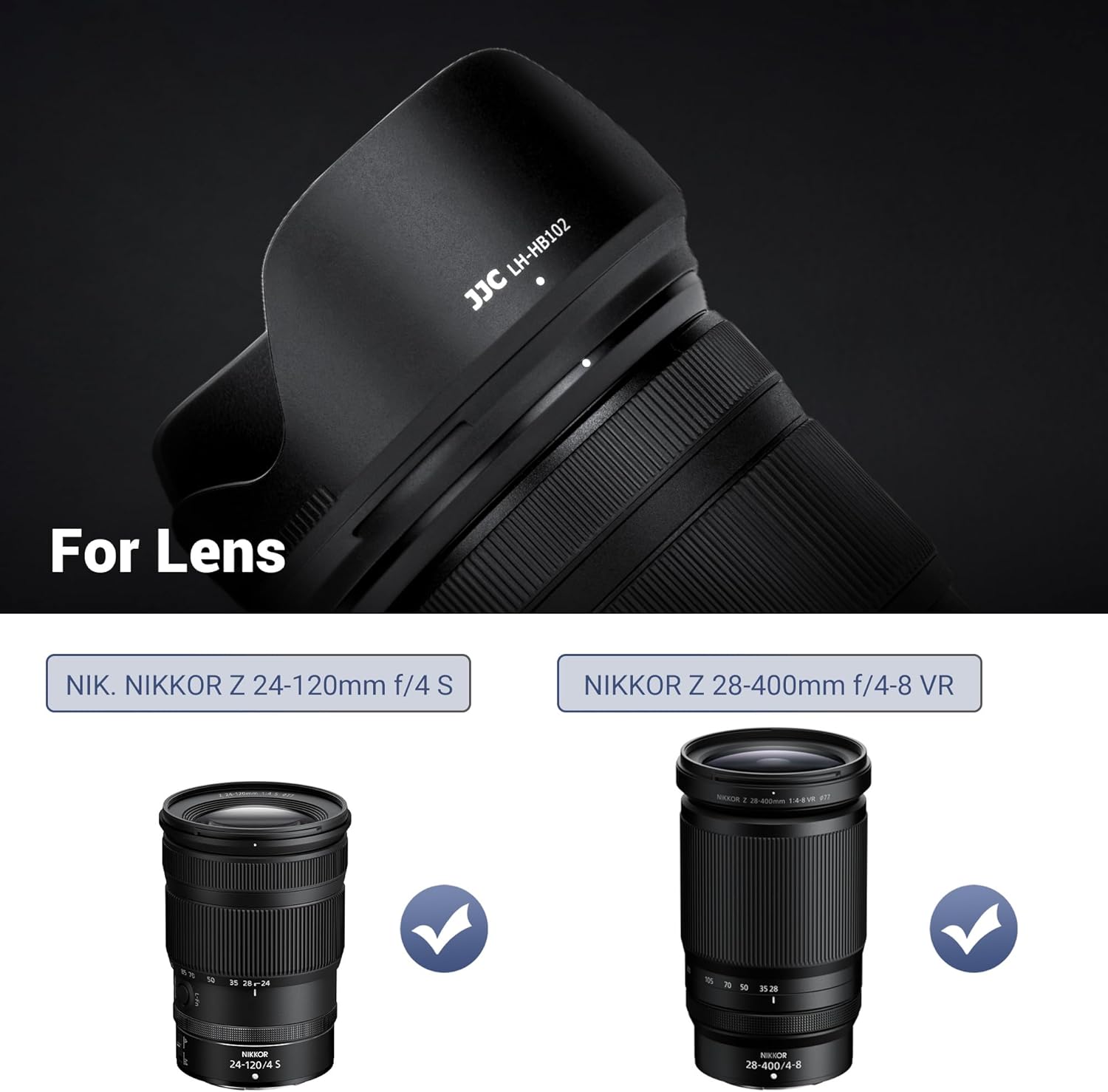
Image: A sequence demonstrating how to attach a 77mm filter, then the JJC HB-102 lens hood, and finally the lens cap onto a Nikon Nikkor Z lens.
3. Hướng dẫn vận hành
The JJC HB-102 lens hood serves two primary functions: reducing unwanted light and protecting your lens.
3.1. Reducing Lens Flare and Ghosting
When shooting in bright conditions or with strong light sources (like the sun) near or within the frame, the lens hood extends beyond the front element of the lens to block stray light. This prevents light from directly hitting the lens surface at oblique angles, which can cause undesirable flare and ghosting in your images.

Image: A visual comparison showing how the lens hood blocks stray light, preventing lens flare, contrasted with an image taken without a lens hood where light hits the lens directly.
3.2. Bảo vệ ống kính
The rigid ABS material of the lens hood acts as a buffer, absorbing impacts from accidental bumps or drops. It also helps protect the front lens element from scratches, dust, and moisture.

Image: A person holding a camera with the lens hood attached, illustrating how the hood protects the lens from accidental impact.
3.3. Reversible Storage
For convenient storage and transport, the lens hood can be reversed and mounted onto the lens. This reduces the overall length of the lens assembly, making it easier to fit into camera bags.

Image: A diagram highlighting the non-glare matte finish of the lens hood and its reversible design for easy, compact storage on the lens.
3.4. Video trình diễn
Video: A demonstration of attaching and reversing the JJC HB-102 lens hood on a Nikon camera, showcasing its functionality and compact storage.
4. Bảo trì
Proper maintenance ensures the longevity and effectiveness of your lens hood.
- Vệ sinh: Use a soft, clean cloth to wipe the lens hood. For stubborn dirt, a slightly damp Có thể dùng vải. Tránh sử dụng hóa chất mạnh hoặc vật liệu mài mòn.
- Kho: When not in use, store the lens hood in a dry, cool place. The reversible design allows for compact storage on your lens, protecting both the hood and the lens.
- Điều tra: Periodically check the mounting mechanism for any signs of wear or damage to ensure a secure fit.
KHAI THÁC. Xử lý sự cố
If you encounter any issues with your JJC HB-102 lens hood, refer to the following common problems and solutions.
- Vấn đề: The lens hood does not attach securely or falls off easily.
Giải pháp: Ensure the lens hood is correctly aligned with the lens mounting marks and rotated until it clicks firmly into place. Check for any debris or damage on the mounting bayonet of either the lens or the hood that might prevent a secure connection. - Vấn đề: Images show dark corners (vignetting) when the hood is attached.
Giải pháp: The JJC HB-102 is designed to prevent vignetting on compatible lenses. Ensure you are using the correct lens hood for your specific lens model. If vignetting occurs, verify the hood is fully seated and not misaligned. If the issue persists, contact customer support. - Vấn đề: Difficulty reversing the hood for storage.
Giải pháp: Ensure you are applying even pressure and rotating the hood correctly. The reversible mounting mechanism is the same as the forward mounting. If it feels stiff, check for any obstructions.

Image: A camera with the JJC HB-102 lens hood attached, shown alongside a scenic photograph, confirming that no vignetting is present in the image.
6. Thông số kỹ thuật
| Người mẫu | JJC HB-102 |
| Vật liệu | Premium ABS |
| Khả năng tương thích | Nikon Nikkor Z 24-120mm f/4 S, Nikon Nikkor Z 28-400mm f/4-8 VR |
| Kích thước ren lọc | 77mm (allows attachment of 77mm filter) |
| Cân nặng | 1.41 ounce (khoảng 40 gram) |
| Kích thước (Gói) | 4.21 x 4.17 x 2.05 inch |
| Thay thế | Nikon HB-102 Lens Hood |
7. Có gì trong hộp
- JJC HB-102 Lens Hood x 1
8. Bảo hành và Hỗ trợ
JJC products are manufactured to high-quality standards. This product is covered by a standard manufacturer's warranty against defects in materials and workmanship. Please refer to the warranty information provided with your purchase or visit the official JJC webtrang web để biết các điều khoản và điều kiện chi tiết.
For technical assistance, troubleshooting, or warranty claims, please contact JJC customer support through their official webtrang web hoặc nhà bán lẻ nơi bạn mua sản phẩm.


