1. Giới thiệu
The Roland DJ-202 is a two-channel, four-deck DJ controller designed for Serato DJ Lite, offering a comprehensive solution for DJs of all levels. This manual provides essential information for setting up, operating, and maintaining your DJ-202 controller to ensure optimal performance and longevity.

Image: Roland DJ-202 DJ Controller Bundle, including the controller, a protective case, headphones, and a polishing cloth.
2. Các tính năng chính
- Performance & Control: Two-channel, four-deck DJ controller for Serato DJ Lite, enabling precise mixing and creative track manipulation.
- Scratching & Precision: Large, low-latency platters optimized for scratching, providing ultra-responsive control for seamless cuts, scratches, and beat juggling.
- Legendary Drum Sounds: Built-in Roland TR-series drum kits (TR-909, TR-808, TR-707, TR-606) with advanced ACB technology for iconic rhythm sounds.
- Creativity & Live Performance: Onboard sequencer integrates with Serato DJ Lite’s sampler for real-time beat creation and hands-on remixing.
- Thiết kế nhỏ gọn và bền chắc: Lightweight and durable construction, ideal for both practice and live events.

Image: An illustrative diagram of the Roland DJ-202, detailing its two-channel, four-deck capabilities, large platters, TR drum kits, mic input, USB connectivity, RCA stereo outputs, and performance pads.
3. Thiết lập
3.1 Tháo dỡ và kiểm tra ban đầu
Carefully remove all components from the packaging. Ensure all items listed in the bundle are present and free from damage. The bundle includes the Roland DJ-202 controller, a protective case, headphones, and an Austin Bazaar polishing cloth.
3.2 Kết nối bộ điều khiển
- Quyền lực: Connect the USB cable from the DJ-202's PC port (USB Type B) to your computer. The unit is USB powered.
- Đầu ra âm thanh: Connect the MASTER OUT jacks (RCA phono type) to your amploa kéo hoặc loa có công suất.
- Tai nghe: Plug your headphones into the PHONES jack (stereo 1/4 inch phone type) for monitoring.
- Micrô: If using a microphone, connect it to the MIC IN jack (1/4 inch phone type).
- Thiết bị MIDI: Use the MIDI OUT connector to connect to external MIDI-compatible devices.
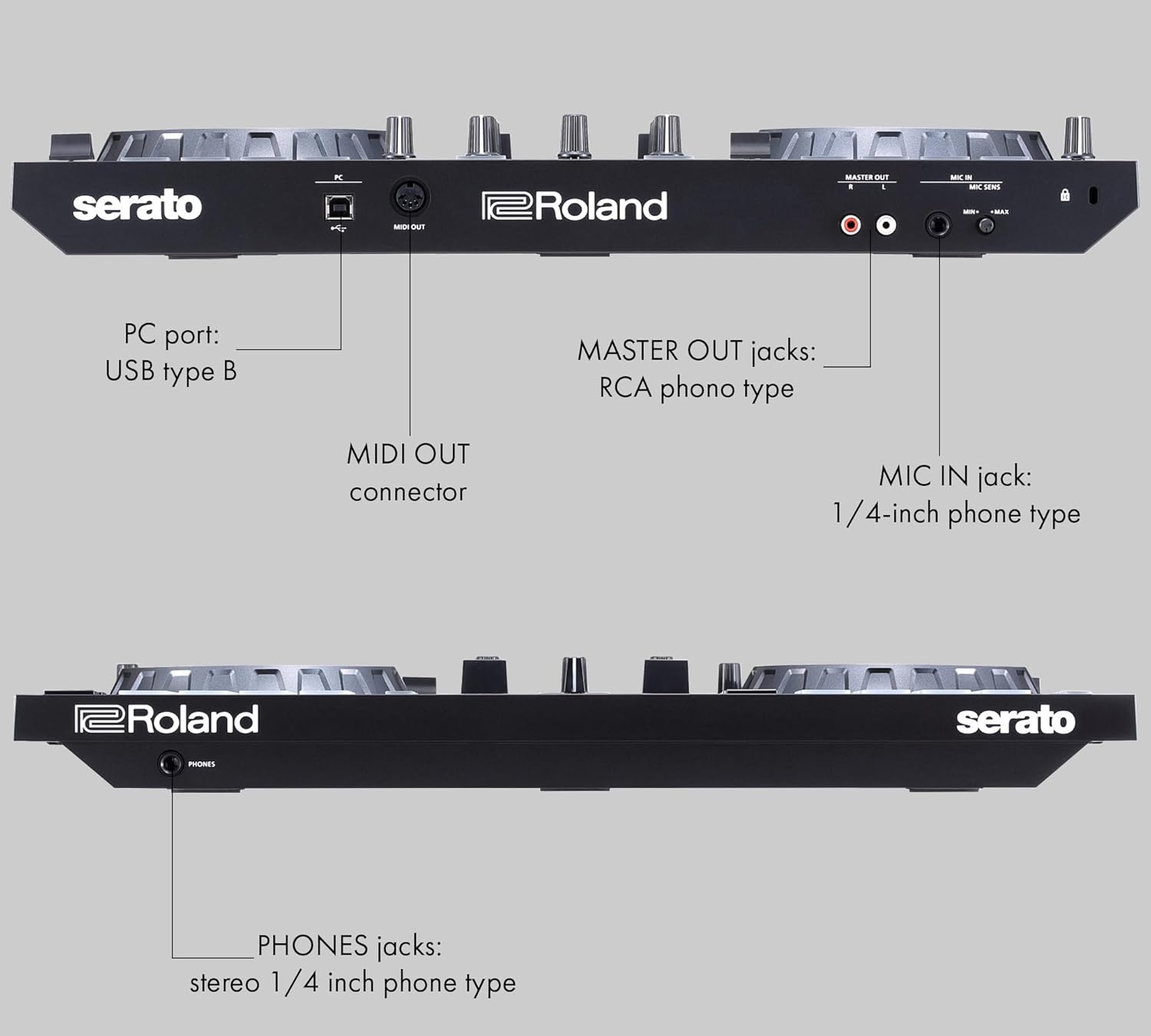
Hình ảnh: Chi tiết view of the Roland DJ-202's rear panel, showing the PC port (USB Type B), MIDI OUT connector, MASTER OUT jacks (RCA phono type), and MIC IN jack (1/4 inch phone type).
3.3 Cài đặt phần mềm
The Roland DJ-202 is designed for seamless integration with Serato DJ Lite. Download and install Serato DJ Lite from the official Serato website. The controller is also Serato DJ Pro upgrade ready, allowing for expanded features and capabilities.
4. Operating the DJ-202
4.1 Pha trộn cơ bản
Load tracks onto Deck 1 and Deck 2 using the software. Use the jog wheels for precise control over playback, scratching, and cueing. Adjust volume levels with the channel faders and crossfader for smooth transitions between tracks.
4.2 Sử dụng miếng đệm hiệu năng
The performance pads offer various modes for creative expression:
- Gợi ý hấp dẫn: Instantly jump to preset cue points in your tracks.
- Vòng lặp: Create and trigger loops of various lengths.
- Trình tự tuần tự: Program drum patterns using the built-in TR-series drum sounds.
- Sampngười nói: Gây nênamples loaded into Serato DJ Lite's sampler.
4.3 TR-Series Drum Machine
Access the legendary TR-909, TR-808, TR-707, and TR-606 drum sounds directly from the controller. Use the sequencer mode to create dynamic drum patterns and integrate them into your mixes. Adjust parameters like volume and tone for each drum sound to customize your beats.

Hình ảnh: Cận cảnh view of the Roland DJ-202's right jog wheel and performance pads, illuminated with green lights, indicating active functions like Hot Cue, Loop, Sequencer, and Sampler.
5. Bảo trì
- Vệ sinh: Use the provided Austin Bazaar polishing cloth to gently wipe down the controller's surface. Avoid abrasive cleaners or solvents.
- Kho: When not in use, store the controller in its protective case to shield it from dust, spills, and physical damage.
- Quản lý cáp: Ensure all cables are neatly organized and not under tension to prevent wear and tear.
- Cập nhật phần mềm: Regularly check the Roland and Serato websites for firmware and software updates to ensure optimal performance and access to new features.

Image: High-quality headphones and an Austin Bazaar polishing cloth are shown next to the Roland DJ-202 controller on a wooden desk, emphasizing the importance of proper audio monitoring and equipment care.
KHAI THÁC. Xử lý sự cố
- Không có điện: Hãy đảm bảo cáp USB được kết nối chắc chắn với cả bộ điều khiển và máy tính của bạn. Thử sử dụng cổng USB hoặc cáp khác.
- Không có âm thanh: Check all audio connections (MASTER OUT, headphones). Verify volume levels on the controller, software, and connected audio system. Ensure the correct audio output device is selected in your computer's sound settings and Serato DJ Lite.
- Phần mềm không nhận dạng được bộ điều khiển: Confirm Serato DJ Lite is updated to the latest version. Reinstall the software if necessary. Ensure your computer's operating system is compatible and up-to-date.
- Vấn đề về độ trễ: Adjust the buffer size in Serato DJ Lite's audio settings. Close other demanding applications on your computer.
7. Thông số kỹ thuật
| Thuộc tính | Giá trị |
|---|---|
| Số hiệu mẫu | DJ-202 |
| Trọng lượng sản phẩm | 4.63 pound |
| Kích thước sản phẩm | 11.69 x 18.82 x 2.44 inch |
| Tên màu | DJ-202 |
| Kích cỡ | Bundle w/ Case |
8. Bảo hành và Hỗ trợ
The Roland DJ-202 DJ Controller Bundle comes with a standard manufacturer's warranty. For specific warranty details, please refer to the documentation included with your product or visit the official Roland website. For technical support, troubleshooting assistance, or service inquiries, please contact Roland customer support through their official channels.


