1. Giới thiệu
This manual provides detailed instructions for the installation, operation, and maintenance of your Xigmatek Aqua V AIR Arctic Mid-Tower PC Case. Please read this manual thoroughly before beginning any installation to ensure proper setup and safe operation. Retain this manual for future reference.
2. Thông tin an toàn
Hãy tuân thủ các biện pháp an toàn sau đây trong quá trình lắp đặt và vận hành:
- Luôn ngắt nguồn điện khỏi ổ cắm trên tường trước khi lắp đặt hoặc tháo bất kỳ linh kiện nào.
- Hãy đeo dây đeo cổ tay chống tĩnh điện để ngăn ngừa hư hỏng do phóng điện tĩnh (ESD) gây ra cho các linh kiện nhạy cảm.
- Handle components carefully. Avoid touching pins or circuit boards directly.
- Đảm bảo thông gió tốt xung quanh thùng máy tính để tránh quá nhiệt.
- Giữ các bộ phận nhỏ và dụng cụ tránh xa trẻ em.
- Không được tự ý sửa đổi vỏ máy hoặc các bộ phận bên trong, vì điều này có thể làm mất hiệu lực bảo hành và gây ra rủi ro về an toàn.
3. Nội dung gói hàng
Xác minh rằng tất cả các mục đều có trong gói hàng:
- Xigmatek Aqua V AIR Arctic Mid-Tower PC Case
- Bộ phụ kiện (ốc vít, trụ đỡ, dây buộc cáp)
- Hướng dẫn sử dụng (tài liệu này)
If any items are missing or damaged, contact your retailer or Xigmatek support.
4. Sản phẩm hếtview
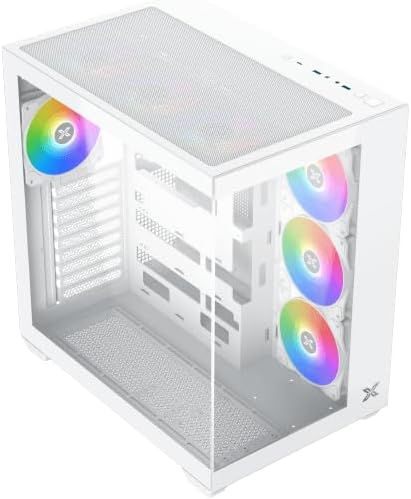
The Xigmatek Aqua V AIR Arctic is a mid-tower PC case designed for high-performance gaming configurations. It features tempered glass panels for component visibility and optimized airflow with pre-installed ARGB fans.

Hình 4.1: Phía trước bên trái view of the Xigmatek Aqua V AIR Arctic PC case, showcasing the tempered glass front and side panels, and the pre-installed ARGB fans.

Hình 4.2: Phía sau view of the PC case, showing the I/O shield cutout, expansion slots, and rear fan mount.
Hình 4.3: Góc nhìn từ trên xuống view, highlighting the top mesh panel for additional cooling and the internal layout.
5. Thiết lập và Cài đặt
Follow these steps to install your PC components into the Xigmatek Aqua V AIR Arctic case.
5.1. Chuẩn bị hồ sơ vụ án
- Đặt hộp đựng lên một bề mặt phẳng và chắc chắn.
- Remove the tempered glass side panel by unscrewing the thumb screws at the rear and carefully sliding it off. Place it on a soft, non-abrasive surface to prevent scratches.
- Remove the opposite steel side panel by unscrewing the thumb screws and sliding it off.
5.2. Lắp đặt bo mạch chủ
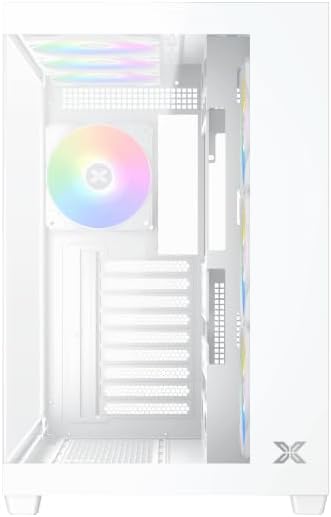
Hình 5.1: Nội thất view of the case, illustrating the motherboard mounting area and cable routing cutouts.
- Lắp tấm chắn I/O vào phần khoét ở phía sau vỏ máy.
- Align your motherboard with the pre-installed standoffs. Ensure the standoffs match your motherboard's form factor (ATX, Micro ATX).
- Secure the motherboard using the provided screws from the accessory kit. Do not overtighten.
5.3. Lắp đặt bộ nguồn (PSU)
- Locate the PSU mounting bracket at the bottom rear of the case.
- Trượt bộ nguồn (PSU) vào ngăn chứa được chỉ định từ phía sau thùng máy.
- Cố định bộ nguồn vào vỏ máy bằng các ốc vít được cung cấp kèm theo bộ nguồn.
5.4. Cài đặt ổ đĩa lưu trữ
The case supports multiple storage drives:
- Ổ SSD 2.5": Mount directly to the SSD trays located behind the motherboard tray. Secure with screws.
- Ổ cứng 3.5": Install into the drive cage located beneath the PSU shroud. Slide the drive into the tray and secure with screws.
5.5. Cài đặt card đồ họa (GPU) và card mở rộng
- Tháo các nắp đậy khe cắm mở rộng cần thiết ở phía sau thùng máy.
- Hãy lắp card đồ họa hoặc các card mở rộng khác vào các khe PCIe thích hợp trên bo mạch chủ.
- Secure the cards with the provided screws.
5.6. Quản lý cáp
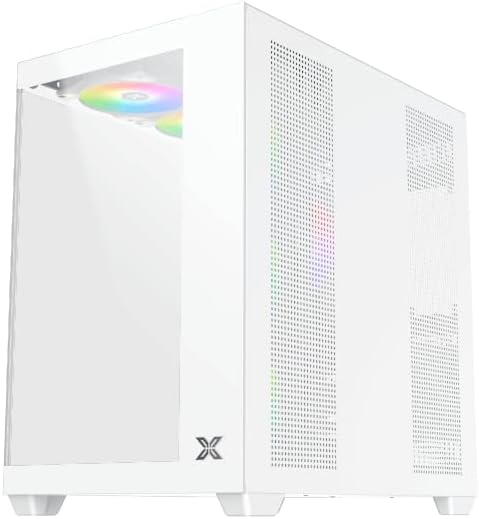
Hình 5.2: View behind the motherboard tray, illustrating the ample space and tie-down points for effective cable management.
Tận dụng các lỗ thoát dây cáp và điểm buộc dây phía sau khay bo mạch chủ để sắp xếp dây cáp. Điều này giúp cải thiện luồng khí và tính thẩm mỹ.
- Kết nối tất cả các dây nguồn cần thiết từ bộ nguồn (PSU) đến bo mạch chủ, card đồ họa (GPU) và ổ cứng.
- Connect front panel cables (USB, audio, power/reset switches, LED indicators) to the corresponding headers on your motherboard. Refer to your motherboard manual for specific header locations.
- Connect the ARGB fan cables to the integrated fan controller or directly to your motherboard's ARGB headers if available.
5.7. Hỗ trợ quạt và bộ tản nhiệt
The Xigmatek Aqua V AIR Arctic comes with 7 pre-installed 120mm ARGB fans. Additional cooling options are available:
- Đằng trước: Supports up to 3 x 120mm or 2 x 140mm fans / 240mm, 280mm, 360mm radiators.
- Đứng đầu: Supports up to 3 x 120mm or 2 x 140mm fans / 240mm, 280mm, 360mm radiators.
- Ở phía sau: Hỗ trợ 1 quạt 120mm.
- Đáy: Supports up to 3 x 120mm fans.
Ensure proper fan orientation for optimal airflow (intake at front/bottom, exhaust at rear/top).
6. Hoạt động
Once all components are installed and cables are connected, replace the side panels. Connect your monitor, keyboard, mouse, and power cable. Press the power button on the front panel to start your system.
The pre-installed ARGB fans can be controlled via the integrated controller (if present) or through compatible motherboard software, allowing customization of lighting effects and fan speeds.
7. Bảo trì
Bảo trì thường xuyên giúp đảm bảo hiệu suất tối ưu và tuổi thọ của các thành phần máy tính.
- Vệ sinh bụi: Periodically clean dust filters (top, front, bottom) to maintain good airflow. Use compressed air to remove dust from inside the case and components.
- Vệ sinh bên ngoài: Lau các bề mặt bên ngoài bằng giẻ mềm, damp vải. Tránh sử dụng chất tẩy rửa hoặc dung môi có tính mài mòn.
- Kiểm tra quản lý cáp: Occasionally check cable routing to ensure no cables are obstructing fans or airflow.
KHAI THÁC. Xử lý sự cố
Nếu bạn gặp sự cố, hãy tham khảo các bước khắc phục sự cố phổ biến sau:
- Hệ thống không khởi động:
- Hãy đảm bảo bộ nguồn đã được bật và kết nối đúng cách với ổ cắm điện.
- Verify all power cables (24-pin ATX, 8-pin CPU, PCIe, SATA) are securely connected.
- Kiểm tra các kết nối của công tắc nguồn mặt trước với bo mạch chủ.
- Không có tín hiệu hiển thị:
- Ensure the monitor cable is connected to the graphics card (not the motherboard I/O if using a dedicated GPU).
- Tháo lắp lại card đồ họa và các mô-đun RAM.
- Fans not spinning or ARGB not working:
- Kiểm tra các kết nối nguồn của quạt với bo mạch chủ hoặc bộ điều khiển quạt.
- Verify ARGB connections to the controller or motherboard headers.
- Ensure any fan control software or BIOS settings are correctly configured.
For more complex issues, consult your component manuals or contact Xigmatek technical support.
9. Thông số kỹ thuật
| Tính năng | Chi tiết |
|---|---|
| Tên mẫu | Aqua V AIR Arctic |
| Số hiệu mẫu | EN45837 |
| Loại trường hợp | Tháp giữa |
| Khả năng tương thích của bo mạch chủ | ATX, MicroATX |
| Vật liệu | Steel Alloy, Tempered Glass |
| Màu sắc | Trắng |
| Quạt được cài đặt sẵn | Quạt ARGB 7 x 120mm |
| Độ dài GPU tối đa | 410mm |
| Cổng USB | 3 |
| Cân nặng | 8.8 Kilôgam |
10. Bảo hành và Hỗ trợ
Xigmatek products are manufactured to high quality standards. For warranty information, please refer to the warranty card included with your product or visit the official Xigmatek website. For technical support or inquiries, please contact Xigmatek customer service through their official channels.
Chính thức Webđịa điểm: www.xigmatek.com


