1. Giới thiệu
This manual provides detailed instructions for the setup, operation, and maintenance of your THOMSON 8-inch Digital Photo Frame (Model: TRDF-8001C). Please read this manual thoroughly before using the device to ensure proper functionality and to maximize your enjoyment of its features. This digital photo frame is designed to display your cherished photos and videos with an 8-inch IPS HD screen, offering a clear and vibrant viewkinh nghiệm.
2. Có gì trong hộp
Khi mở hộp, vui lòng đảm bảo tất cả các mục được liệt kê dưới đây đều có mặt và trong tình trạng tốt:
- THOMSON 8-inch Digital Photo Frame
- Điều khiển từ xa
- Bộ đổi nguồn
- Photo Frame Stand
- Hướng dẫn sử dụng

Figure 2.1: Contents of the THOMSON Digital Photo Frame package.
3. Thiết lập
3.1 kết nối nguồn
- Connect the power adapter to the DC-IN port on the back of the digital photo frame.
- Cắm bộ đổi nguồn vào ổ cắm điện tiêu chuẩn.
- Khung ảnh sẽ tự động bật nguồn.
3.2 Thiết lập ban đầu
- Upon first startup, you will be prompted to select your preferred language. Use the navigation buttons on the remote control or the physical buttons on the back of the frame to select and confirm.
- Đặt ngày và giờ hiện tại.
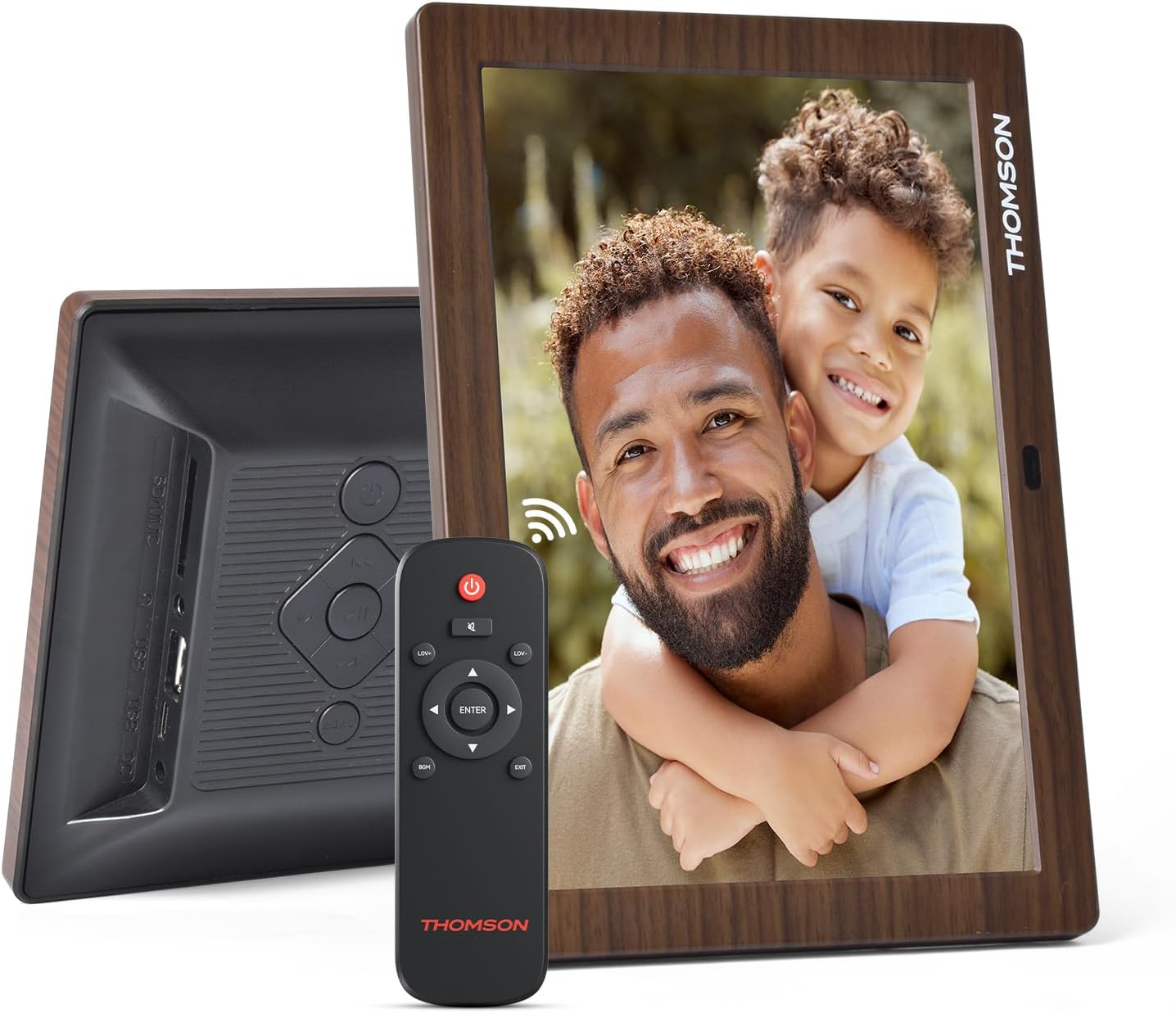
Hình 3.1: Phía sau view of the frame with power input and physical controls.
3.3 Lắp đặt chân đế
The digital photo frame can be placed on a flat surface using the included stand. Insert the stand into the designated slot on the back of the frame. The frame also supports wall mounting using the integrated mounting holes.
4. Hướng dẫn vận hành
4.1 Tính năng hiển thị
- 8-inch IPS HD Screen: Enjoy clear and vibrant images with a 1280x800 resolution from various viewgóc nghiêng.
- Xoay tự động: The built-in gravity sensor automatically adjusts the photo orientation (landscape or portrait) for optimal viewđang.

Figure 4.1: The 8-inch IPS HD screen provides a high-quality display for your memories.
4.2 Phát lại phương tiện
The frame supports playback of photos, music, and videos. You can navigate through your media using the remote control or the physical buttons.
- Photo Slideshow: Configure slideshow intervals and transition effects in the settings.
- Phát nhạc: Phát nhạc nền trong khi viewảnh ing.
- Xem lại video: Enjoy your favorite video clips directly on the frame.

Figure 4.2: User interface for media selection and playback options.
4.3 Remote Control and Physical Buttons
Control your digital photo frame conveniently using the included remote control or the physical buttons located on the back of the frame.
- Chức năng điều khiển từ xa: Power on/off, adjust volume, navigate images, control background music, and access menus.
- Các nút vật lý: Provide direct control for essential functions, useful for elderly users.

Figure 4.3: Remote control for convenient operation of the frame.
4.4 Expansion Modes
The frame supports various expansion options for storing your media:
- SD/SDHC/MMC Card: Expand storage up to 32 GB.
- USB-A/Type-C/U-disk: Connect USB drives for additional media.
- Ghi chú: This frame does not have built-in storage. An external memory card or USB drive is required for media storage.

Figure 4.4: Memory expansion slots on the back of the frame.
4.5 Tự động bật/tắt nguồn
You can set a customized automatic start and stop time for the frame to conserve energy and manage display times.

Figure 4.5: Setting automatic power on/off times for convenience.
5. Bảo trì
- Làm sạch màn hình: Use a soft, dry, lint-free cloth to gently wipe the screen. For stubborn marks, slightly dampLau sạch khăn bằng nước hoặc dung dịch vệ sinh màn hình. Tránh sử dụng hóa chất mạnh.
- Làm sạch khung: Wipe the frame with a soft, dry cloth.
- Kho: When not in use for extended periods, disconnect the power adapter and store the frame in a cool, dry place away from direct sunlight.
KHAI THÁC. Xử lý sự cố
| Vấn đề | Nguyên nhân có thể | Giải pháp |
|---|---|---|
| Khung không bật được nguồn. | Bộ đổi nguồn không được kết nối hoặc bị lỗi. | Đảm bảo bộ đổi nguồn được kết nối chắc chắn với khung và ổ cắm điện đang hoạt động. Hãy thử ổ cắm khác. |
| Không có hình ảnh/video nào được hiển thị. | No memory card/USB drive inserted or media files are corrupted/unsupported. | Insert a memory card or USB drive with supported media files. Kiểm tra file formats (JPEG for photos, MP4 for videos). Ensure the memory card/USB drive is properly inserted. |
| Điều khiển từ xa không hoạt động. | Pin yếu hoặc bị vật cản. | Replace the remote control battery. Ensure there are no obstructions between the remote and the frame's IR receiver. |
| Images are distorted or incorrect orientation. | Incorrect display settings or disabled auto-rotation. | Check display settings in the menu. Ensure the auto-rotation feature is enabled if desired. |
7. Thông số kỹ thuật
- Số hiệu mẫu: TRDF-8001C
- Kích thước màn hình: 8 inch
- Nghị quyết: 1280x800 (WXGA)
- Tỷ lệ khung hình: 16:10
- Công nghệ hiển thị: IPS HD
- Kết nối: DC-4.0, USB-A, Type-C, SD Card, 3.5MM earphone jack
- Mở rộng bộ nhớ: SD/SDHC/MMC card up to 32GB, U-disk
- Nguồn điện: Điện có dây
- User Interface Input: Buttons, Remote Control
- Chất liệu khung: Nhựa
- Kích thước sản phẩm: 24.4 x 18 x 2.51cm
- Trọng lượng sản phẩm: 240 gram
8. Bảo hành và Hỗ trợ
For warranty information and customer support, please refer to the documentation included in your product packaging or visit the official Thomson webtrang web. Giữ lại biên lai mua hàng làm bằng chứng mua hàng cho bất kỳ khiếu nại bảo hành nào.


