Giới thiệu
Thank you for choosing the Casio G-Shock GA-110 watch. This manual provides essential information regarding the setup, operation, and maintenance of your new timepiece. Designed for durability and precision, the GA-110 offers a range of features including world time, stopwatch, countdown timer, and multiple alarms, all housed in a robust, water-resistant casing.
Please read this manual carefully to ensure proper use and to maximize the lifespan of your watch. Keep this manual for future reference.
Dõi theoview

Figure 1: The Casio G-Shock GA-110 watch worn on a wrist. This image provides a real-world perspective of the watch's size and appearance, featuring its black resin construction and white dial.
The Casio G-Shock GA-110 features a combination analog and digital display. It is equipped with four buttons for various operations:
- ĐIỀU CHỈNH (Trên cùng bên trái): Được sử dụng để vào và thoát chế độ cài đặt và để xác nhận cài đặt.
- CHẾ ĐỘ (Góc dưới bên trái): Cycles through different modes (Timekeeping, World Time, Stopwatch, Countdown Timer, Alarm).
- REVERSE (Top Right): Used to scroll backward through settings or increase values.
- FORWARD (Bottom Right): Used to scroll forward through settings or decrease values.

Hình 2: Mặt trước chi tiết view of the Casio G-Shock GA-110 watch. This image displays the watch's overall design, highlighting the black resin band and case, and the distinctive white analog-digital dial with multiple sub-dials and digital displays.

Hình 3: Mặt bên view of the Casio G-Shock GA-110 watch. This image illustrates the robust casing and the placement of the ADJUST and MODE buttons on the left side of the watch.
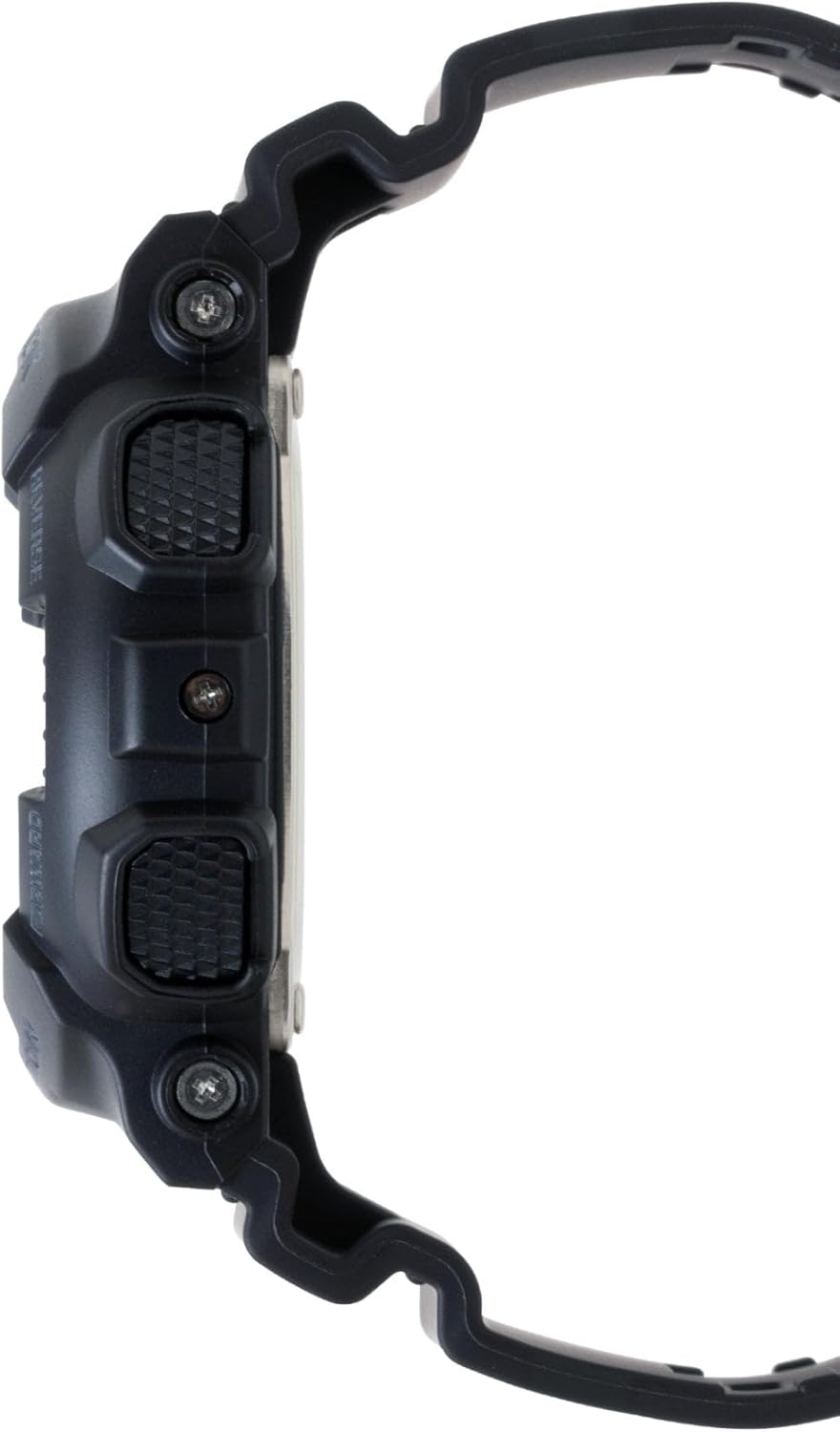
Hình 4: Mặt đối diện view of the Casio G-Shock GA-110 watch. This image shows the placement of the REVERSE and FORWARD buttons on the right side of the watch, along with the textured grip.
Cài đặt
1. Thiết lập thời gian ban đầu
- Ở Chế độ chấm công, hãy giữ nút ĐIỀU CHỈNH Nhấn nút cho đến khi mã thành phố bắt đầu nhấp nháy. Điều này cho biết chế độ cài đặt.
- Sử dụng ĐẢO NGƯỢC Và PHÍA TRƯỚC buttons to select your desired Home City code.
- Nhấn nút CÁCH THỨC button to cycle through the settings: City Code → DST (Daylight Saving Time) → 12/24-hour format → Seconds → Hour → Minute → Year → Month → Day → Illumination Duration.
- Sử dụng ĐẢO NGƯỢC Và PHÍA TRƯỚC các nút để thay đổi giá trị nhấp nháy.
- Sau khi thiết lập tất cả các giá trị, nhấn nút ĐIỀU CHỈNH nút để thoát khỏi chế độ cài đặt.
2. Điều chỉnh kim chỉ giờ
If the analog hands do not match the digital time, you may need to adjust them manually.
- Ở chế độ đo thời gian, giữ phím ĐIỀU CHỈNH nhấn nút cho đến khi mã thành phố nhấp nháy.
- Nhấn nút CÁCH THỨC button repeatedly until "H.SET" appears on the digital display.
- Sử dụng ĐẢO NGƯỢC Và PHÍA TRƯỚC buttons to move the analog hands to the 12 o'clock position.
- Nhấn nút ĐIỀU CHỈNH button to confirm and exit. The hands will automatically move to match the digital time.
3. Thông tin về pin
The watch is powered by one LR44 battery, which is included and pre-installed. The battery life varies depending on usage of features like the backlight and alarms. When the display becomes dim or functions become erratic, it may be time for a battery replacement. Refer to the Maintenance section for more details.
Vận hành đồng hồ
1. Chế độ điều hướng
Nhấn nút CÁCH THỨC button to cycle through the different modes in the following order:
Timekeeping Mode → World Time Mode → Stopwatch Mode → Countdown Timer Mode → Alarm Mode
2. Chế độ giữ giờ
This is the default mode, displaying the current time and date. You can switch between 12-hour and 24-hour formats by pressing the PHÍA TRƯỚC button in Timekeeping Mode (when not in setting mode).
3. Chế độ Giờ Thế giới
Ở chế độ Giờ Thế giới, hãy sử dụng ĐẢO NGƯỢC Và PHÍA TRƯỚC các nút để view the current time in 48 cities (29 time zones) around the world. Press the ĐIỀU CHỈNH button to toggle Daylight Saving Time (DST) on or off for the currently displayed city.
4. Chế độ bấm giờ
The stopwatch measures elapsed time, split times, and two finishes. The measuring capacity is 1/1000 second for the first hour, then 1/10 second for up to 100 hours.
- Nhấn PHÍA TRƯỚC để bắt đầu/dừng đồng hồ bấm giờ.
- Nhấn ĐẢO NGƯỢC Đặt lại đồng hồ bấm giờ về 0 khi nó đang dừng.
- During measurement, press ĐẢO NGƯỢC để ghi lại thời gian chia đoạn. Nhấn ĐẢO NGƯỢC again to release the split and continue measurement.
5. Chế độ hẹn giờ đếm ngược
The countdown timer can be set from 1 minute to 24 hours. An alarm sounds when the countdown reaches zero.
- In Countdown Timer Mode, hold down the ĐIỀU CHỈNH Nhấn nút cho đến khi thời gian bắt đầu đếm ngược hiện tại nhấp nháy.
- Sử dụng CÁCH THỨC Nút này dùng để chuyển đổi chế độ nhấp nháy giữa giờ và phút.
- Sử dụng ĐẢO NGƯỢC Và PHÍA TRƯỚC các nút để thay đổi giá trị nhấp nháy.
- Nhấn ĐIỀU CHỈNH để thoát khỏi chế độ cài đặt.
- Nhấn PHÍA TRƯỚC để bắt đầu hoặc dừng đếm ngược.
- Nhấn ĐẢO NGƯỢC to reset the countdown to its start time while it is stopped.
6. Chế độ báo thức
The watch has 5 daily alarms (AL1 to AL4, and SNZ for snooze alarm) and an hourltín hiệu thời gian y (SIG).
- Ở chế độ báo động, hãy sử dụng ĐẢO NGƯỢC Và PHÍA TRƯỚC buttons to scroll through the alarms (AL1, AL2, AL3, AL4, SNZ, SIG).
- Để đặt báo thức, hãy nhấn giữ nút ĐIỀU CHỈNH button when the desired alarm (e.g., AL1) is displayed. The hour setting will flash.
- Sử dụng CÁCH THỨC Nút này dùng để chuyển đổi chế độ nhấp nháy giữa giờ và phút.
- Sử dụng ĐẢO NGƯỢC Và PHÍA TRƯỚC các nút để thay đổi giá trị nhấp nháy.
- Nhấn ĐIỀU CHỈNH để thoát khỏi chế độ cài đặt.
- Nhấn PHÍA TRƯỚC to toggle the alarm (and SIG) on or off. An indicator will appear on the display when an alarm or the hourlTín hiệu thời gian y đang hoạt động.
7. Illumination (LED Light)
Nhấn nút ĐẢO NGƯỢC button in any mode (except when setting) to illuminate the display. The illumination duration can be set in Timekeeping Mode settings (refer to Initial Time Setting, step 3).
BẢO TRÌ
1. Vệ sinh đồng hồ
- Thường xuyên lau đồng hồ bằng vải mềm, khô để loại bỏ bụi bẩn và hơi ẩm.
- For resin bands and cases, a mild soap solution and a soft brush can be used, followed by rinsing with clean water and thorough drying.
- Avoid using harsh chemicals, solvents, or abrasive cleaners, as these can damage the watch's materials.
2. Khả năng chống nước
The GA-110 is water-resistant to 200 meters (20 BAR). This means it is suitable for showering, swimming, and diving. However, please observe the following precautions:
- Không được thao tác các nút khi đồng hồ bị ướt hoặc ngâm trong nước.
- Avoid exposing the watch to hot water or steam (e.g., hot showers, saunas), as this can compromise the water resistance seals.
- Nếu đồng hồ bị tiếp xúc với nước mặn, hãy rửa sạch kỹ bằng nước ngọt và lau khô hoàn toàn.
- Have the water resistance seals checked periodically (e.g., every 2-3 years) by an authorized service center, especially after battery replacement.
3. Thay thế pin
The watch uses one LR44 battery. When the battery runs low, the display may dim or functions may become unreliable. Battery replacement should ideally be performed by an authorized Casio service center or a qualified watch technician to ensure proper sealing and maintain water resistance. Attempting to replace the battery yourself may void the warranty and compromise the watch's water resistance.
Xử lý sự cố
| Vấn đề | Nguyên nhân có thể | Giải pháp |
|---|---|---|
| Kim chỉ giờ trên đồng hồ kim không khớp với giờ trên đồng hồ điện tử. | Hai tay đặt không thẳng hàng. | Thực hiện điều chỉnh kim chỉ giờ (tham khảo phần Cài đặt). |
| Màn hình kỹ thuật số mờ hoặc không hiển thị gì. | Pin yếu. | Replace the battery (refer to Maintenance section). |
| Các nút không phản hồi. | Đồng hồ có thể ở trạng thái đóng băng hoặc pin rất yếu. | Try pressing all four buttons simultaneously for a few seconds to reset. If unresponsive, replace battery. |
| Thời gian không chính xác. | Incorrect city code, DST setting, or manual adjustment error. | Re-set the Home City, DST, and time settings (refer to Setup section). |
| Water inside the watch or fogging. | Khả năng chống nước bị suy giảm do va đập, gioăng bị lão hóa hoặc do thao tác nút bấm dưới nước. | Immediately take the watch to an authorized Casio service center for inspection and repair. Do not attempt to dry it yourself. |
Thông số kỹ thuật
- Số hiệu mẫu: GA-110
- Chất liệu vỏ/dây đeo: Nhựa
- Pha lê: Kính khoáng
- Trưng bày: Analog-Digital
- Sự chuyển động: thạch anh
- Khả năng chống nước: 200 mét (20 bar)
- Ắc quy: 1 x LR44 (bao gồm)
- Tuổi thọ pin: Approximately 2 years (varies with usage of power-intensive functions)
- Sự chính xác: ±15 seconds per month (without time signal calibration)
- Watch Dimensions (H×W×D): Khoảng 55 × 51.2 × 16.9 mm
- Trọng lượng đồng hồ: Khoảng 72 gram
- Chức năng: World Time (48 cities + UTC), 1/1000-second Stopwatch, Countdown Timer, 5 Daily Alarms (1 Snooze Alarm), Hourly Time Signal, Full Auto-calendar, 12/24-hour format, LED light with Afterglow.
Note: Product package dimensions and weight (e.g., 5 x 4.5 x 3.25 inches; 5.6 ounces) refer to the shipping package, not the watch itself.
Thông tin bảo hành
Your Casio G-Shock GA-110 watch comes with a Bảo hành có giới hạn. The terms and duration of the warranty may vary by region and retailer. Please refer to the warranty card included with your purchase or visit the official Casio webVui lòng truy cập trang web để biết thông tin chi tiết về phạm vi bảo hành, điều khoản và điều kiện.
Giữ lại bằng chứng mua hàng (biên lai) vì bạn sẽ cần nó khi yêu cầu bảo hành.
Hỗ trợ khách hàng
For further assistance, technical support, or service inquiries, please contact Casio customer support through their official website or the contact information provided in your warranty documentation. You can typically find support resources, FAQs, and service center locations on the official Casio webđịa điểm:


