Giới thiệu
Thank you for choosing the TECKNET Wireless Doorbell TK-WD004. This manual provides detailed instructions for the installation, operation, and maintenance of your new doorbell system. Please read this manual thoroughly before use to ensure proper functionality and safety.
The TECKNET Wireless Doorbell offers a reliable and convenient solution for your home or office. Key features include a long wireless range of up to 400 meters, IP65 waterproof rating for outdoor use, 60 selectable melodies, 5 adjustable volume levels, and RGB indicators for visual alerts.
Nội dung gói
Vui lòng kiểm tra gói hàng để biết các mục sau:
- 1 bộ phát tín hiệu chuông cửa không dây (nút nhấn)
- 1 bộ thu chuông cửa không dây (bộ phận phát chuông)
- 1 x CR2032 Lithium Battery (pre-installed in transmitter)
- Phụ kiện lắp đặt (ốc vít, neo, băng dính hai mặt)
- Hướng dẫn sử dụng

Image: The package contents, showing the doorbell transmitter, receiver, and installation accessories.
Sản phẩm trênview
The TECKNET Wireless Doorbell system consists of two main components: the transmitter (push button) and the receiver (chime unit).
Bộ phát tín hiệu (Nút nhấn)
- Nút ấn: Activates the doorbell chime.
- Đèn báo LED: Illuminates when the button is pressed.
- Ngăn chứa pin: Chứa pin CR2032.
- Chống nước Casing: IP65 rated for outdoor durability.
Bộ thu (Bộ phận chuông)
- Người nói: Emits the selected melody.
- Nút âm lượng: Adjusts the chime volume (5 levels, 0-120 dB).
- Melody Selection Button: Cycles through 60 available melodies.
- Nút chế độ: Selects between LED flash, chime, or both.
- Chỉ báo RGB: Provides visual alerts with customizable lighting modes.
- Phích cắm điện: Plugs directly into a standard electrical outlet.

Hình ảnh: Một chi tiết view of the doorbell receiver and transmitter, highlighting the RGB indicator, melody selection buttons, volume control, and the push button.
Thiết lập và cài đặt
The TECKNET Wireless Doorbell is designed for easy installation. Follow these steps to set up your doorbell system.
Step 1: Install the Receiver
- Cắm bộ thu vào ổ cắm điện tiêu chuẩn ở vị trí bạn muốn. Đảm bảo ổ cắm dễ tiếp cận và nằm trong phạm vi phủ sóng không dây của bộ phát.
- The receiver does not require batteries.
Step 2: Install the Transmitter (Push Button)
Bộ phát có thể được lắp đặt bằng băng dính hoặc ốc vít.
Option A: Adhesive Mounting
- Làm sạch kỹ bề mặt lắp đặt để đảm bảo khô ráo và không bám bụi bẩn hoặc dầu mỡ.
- Bóc một mặt của băng dính hai mặt và dán chặt vào mặt sau của bộ phát.
- Peel off the other side of the tape and press the transmitter firmly onto the desired location (e.g., door frame or wall). Hold for at least 30 seconds.
Tùy chọn B: Lắp vít
- Mở bộ phát casing cẩn thận.
- Mark the positions for the screw holes on your desired mounting surface.
- Nếu cần, hãy khoan lỗ mồi và lắp neo tường.
- Secure the transmitter base to the wall using the provided screws.
- Reattach the transmitter casing.

Image: Visual guide for installing the doorbell transmitter using either adhesive tape or screws.
Note: The transmitter comes with a pre-installed CR2032 lithium battery, offering a lifespan of up to 3 years.
Hướng dẫn sử dụng
1. Những giai điệu thay đổi
- Press the "Melody Selection" button on the receiver to cycle through the 60 available melodies.
- Once you hear your desired melody, stop pressing the button. The receiver will automatically save your selection.

Image: The doorbell receiver displaying musical notes, illustrating the selection of 60 different melodies.
2. Điều chỉnh âm lượng
- Press the "Volume" button on the receiver to adjust the sound level.
- Có 5 mức âm lượng điều chỉnh được, từ 0 dB (tắt tiếng) đến 120 dB.
- The mute mode (0 dB) is useful for quiet environments or when visual alerts are preferred.
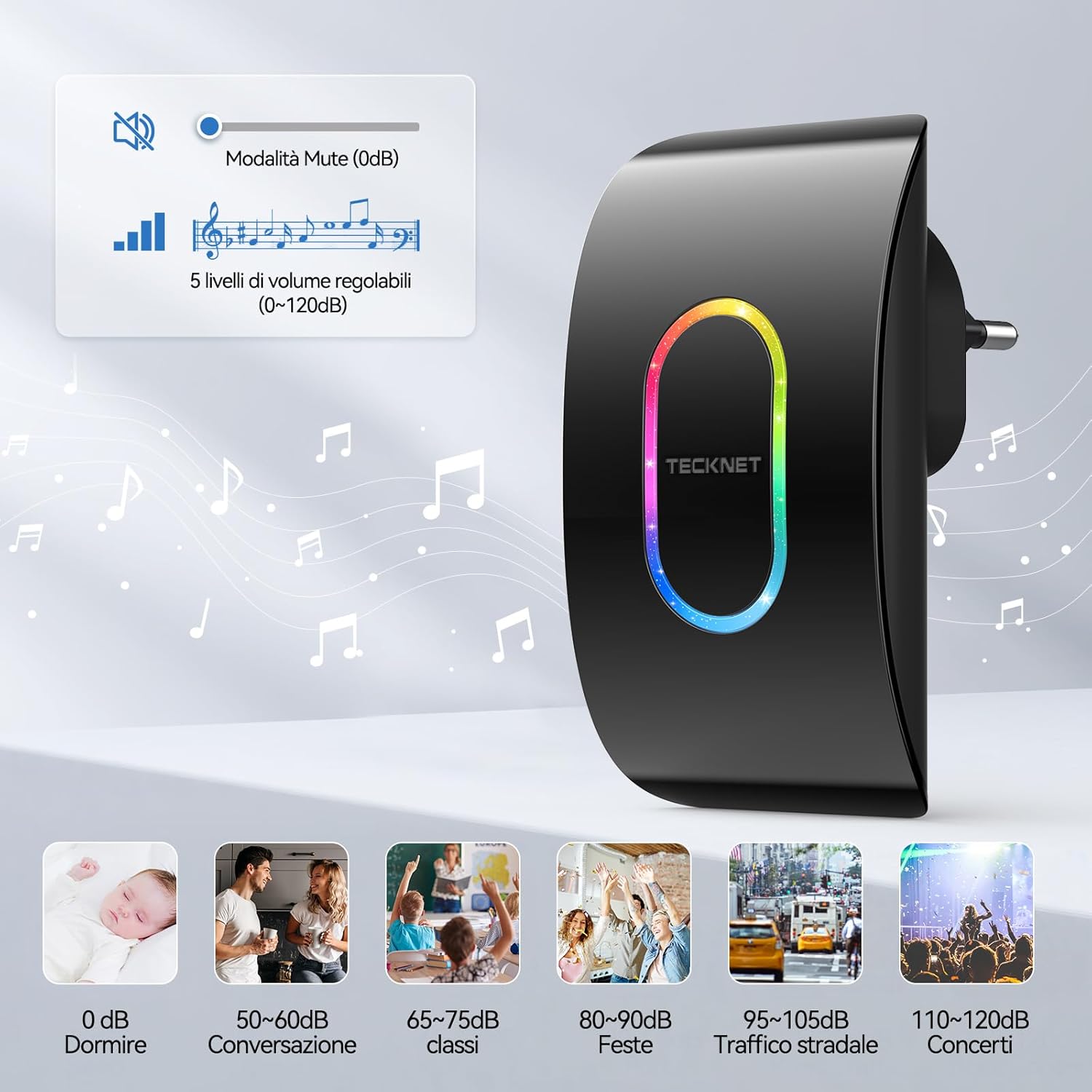
Image: A visual representation of the 5 volume levels, from silent (0 dB) to loud (120 dB), with corresponding typical sound environments.

Image: The doorbell receiver in silent mode, ideal for environments like a baby's room.
3. Selecting Lighting Modes (RGB Indicators)
- Press the "Mode" button on the receiver to switch between different notification modes.
- Các chế độ khả dụng thường bao gồm:
- LED and Chime: Both sound and visual alert.
- Only LED: Visual alert only (silent mode).
- Only Chime: Sound alert only (no LED flash).
- The RGB indicator also offers various flash patterns such as "Ghost Flash", "Marching Flash", and "Breathing Flash" for visual distinction.

Image: Illustration of the three distinct RGB flash modes: Ghost Flash, Marching Flash, and Breathing Flash, providing visual cues for doorbell activation.

Image: The doorbell receiver's side view with labeled buttons for mode, melody, and volume, alongside visual examples of the three working modes: LED and chime, LED only, and chime only.
4. Chức năng bộ nhớ
The doorbell receiver features a memory function that retains your last selected melody and volume level even after a power outaghoặc nếu bị ngắt kết nối.

Image: A graphic illustrating the doorbell's memory function, which saves your preferred melody and volume settings.
BẢO TRÌ
Thay pin (bộ phát)
The transmitter uses a CR2032 lithium battery with an estimated lifespan of up to 3 years. When the transmitter's LED indicator no longer lights up or the range decreases significantly, it's time to replace the battery.
- Cẩn thận mở bộ phát casing.
- Tháo pin CR2032 cũ ra.
- Lắp pin CR2032 mới vào sao cho cực dương (+) hướng lên trên.
- Đóng casing một cách an toàn.
Vệ sinh
Wipe the doorbell units with a soft, dry cloth. Do not use abrasive cleaners or solvents, as these may damage the surface or internal components.
Khả năng chống chịu thời tiết
The transmitter is IP65 rated, meaning it is protected against dust ingress and low-pressure water jets from any direction. It is designed to withstand various weather conditions, including temperatures from -20°C (-4°F) to 60°C (140°F).

Image: The doorbell transmitter demonstrating its IP65 waterproof and dustproof capabilities, along with its operational temperature range.
Xử lý sự cố
| Vấn đề | Nguyên nhân có thể | Giải pháp |
|---|---|---|
| Chuông cửa không kêu. |
|
|
| Phạm vi kết nối không dây ngắn. |
|
|
| Chime sounds intermittently. |
|
|
Thông số kỹ thuật
| Tính năng | Chi tiết |
|---|---|
| Số hiệu mẫu | TK-WD004 |
| Wireless Dải | Lên đến 400 mét (1300 feet) |
| Giai điệu | 60 kiểu chuông có thể lựa chọn |
| Mức âm lượng | 5 adjustable levels (0 dB to 120 dB) |
| Khả năng chống nước (Bộ phát) | IP65 |
| Nhiệt độ hoạt động | -20°C đến 60°C (-4°F đến 140°F) |
| Pin máy phát | 1 pin lithium CR2032 (đã bao gồm) |
| Nguồn thu | AC powered (plugs into outlet) |
| Kích thước sản phẩm | Receiver: 8.7 x 7.5 x 11.2 cm; Transmitter: 5.8 x 4.1 x 7.5 cm (approximate, based on image) |
| Cân nặng | 160 grams (total package weight) |

Image: Visual representation of the dimensions for both the receiver and the transmitter units.
Bảo hành và Hỗ trợ
TECKNET provides a 36-month support period for this product. If you encounter any issues during the use of the product, please contact the professional TECKNET customer service team for assistance.
For further support or warranty claims, please refer to the contact information provided on the TECKNET official webtrang web hoặc tài liệu mua hàng của bạn.


