1. Giới thiệu
This manual provides detailed instructions for setting up, operating, and maintaining your Mercusys MR27BE BE3600 Dual-Band Wi-Fi 7 Router. The MR27BE is designed to deliver high-speed wireless connectivity with Wi-Fi 7 technology, featuring dual-band operation and multiple high-speed Ethernet ports for a robust home or small office network.
2. Nội dung gói hàng
Xác minh rằng gói của bạn chứa các mục sau:
- Mercusys MR27BE Wi-Fi 7 Router
- Bộ đổi nguồn
- Cáp Ethernet
- Hướng dẫn cài đặt nhanh

This image displays the retail packaging for the Mercusys MR27BE BE3600 Dual Band Wi-Fi 7 Router, highlighting key features and branding.
3. Vật lý trênview
3.1 Bảng điều khiển phía sau
The rear panel of the MR27BE router features various ports and buttons for connectivity and control.
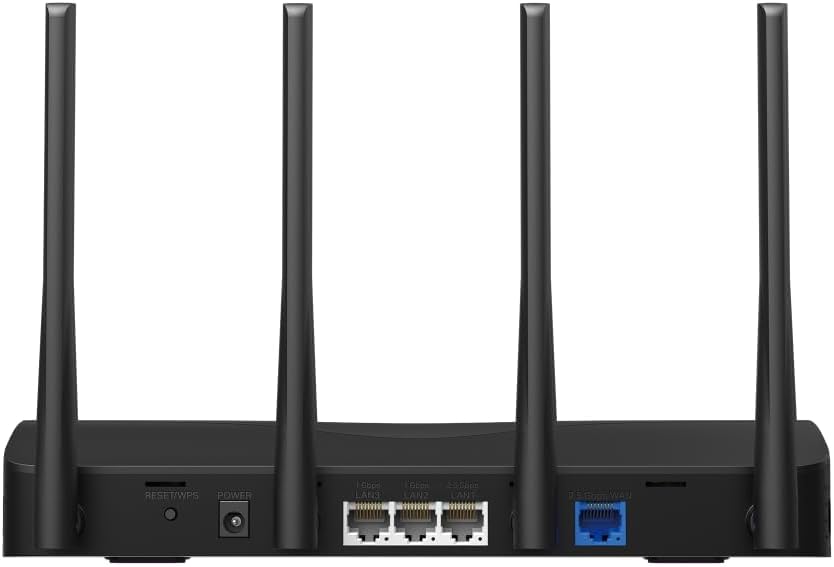
This image displays the rear panel of the MR27BE router, highlighting the 2.5 Gbps WAN port (blue), 2.5 Gbps LAN port, two 1 Gbps LAN ports, the Reset/WPS button, and the power input.
- Cổng điện: Kết nối bộ chuyển đổi nguồn được cung cấp tại đây.
- Nút Đặt lại/WPS: Press and hold for 1 second to activate WPS. Press and hold for more than 5 seconds to factory reset the router.
- LAN Ports (1 Gbps): Two Gigabit Ethernet ports for connecting wired devices.
- LAN Port (2.5 Gbps): One 2.5 Gigabit Ethernet port for high-speed wired connections.
- WAN Port (2.5 Gbps): One 2.5 Gigabit Ethernet port for connecting to your modem or internet service provider's (ISP) network.
3.2 Các tính năng chính
The MR27BE router incorporates advanced features for enhanced network performance.

This graphic illustrates key features of the MR27BE, including its Wi-Fi 7 capabilities, the presence of 2x 2.5 Gbps ports and 2x Gigabit ports, four omni-directional high-gain antennas, EasyMesh compatibility, and easy app control.

This image demonstrates the speed performance of the MR27BE router, indicating up to 2880 Mbps on the 5 GHz band and 688 Mbps on the 2.4 GHz band, showcasing its Wi-Fi 7 capabilities.
4. Thiết lập
4.1 Kết nối phần cứng
- Tắt nguồn: Ngắt nguồn điện khỏi modem (nếu có).
- Kết nối cổng WAN: Connect one end of the Ethernet cable to your modem's Ethernet port and the other end to the blue 2.5 Gbps WAN port on your MR27BE router.
- Kết nối nguồn: Connect the power adapter to the router's Power port and plug it into an electrical outlet.
- Bật nguồn: Wait for the router to power on completely. The LED indicator should turn solid green.
- Kết nối thiết bị (Tùy chọn): For wired devices, connect an Ethernet cable from your computer or other device to one of the yellow LAN ports on the router.

This image shows the 2.5 Gbps ports of the MR27BE router in use, illustrating connections for 2.5 Gbps wired devices and multi-gig internet access, emphasizing high-performance networking.
4.2 Cấu hình ban đầu
You can configure your router using the MERCUSYS app or a web trình duyệt.
Using the MERCUSYS App:
- Tải ứng dụng MERCUSYS từ App Store hoặc Google Play.
- Kết nối điện thoại thông minh của bạn với mạng Wi-Fi mặc định của bộ định tuyến (SSID và mật khẩu được in trên nhãn ở mặt dưới của bộ định tuyến).
- Open the MERCUSYS app and follow the on-screen instructions to complete the setup.
Sử dụng một Web Trình duyệt:
- Connect your computer to the router via an Ethernet cable or the default Wi-Fi network.
- Mở một web trình duyệt và loại
mwlogin.netor192.168.1.1vào thanh địa chỉ. - Hãy tạo mật khẩu đăng nhập khi được yêu cầu.
- Follow the Quick Setup wizard to configure your internet connection and Wi-Fi settings.
5. Vận hành bộ định tuyến
5.1 Kết nối thiết bị
- Các thiết bị không dây: Tìm kiếm your Wi-Fi network name (SSID) on your device and enter the Wi-Fi password you set during setup.
- Thiết bị có dây: Connect an Ethernet cable from your device to any available LAN port on the router.
5.2 Khả năng tương thích với EasyMesh
The MR27BE router supports EasyMesh, allowing you to create a seamless whole-home Wi-Fi network by adding compatible EasyMesh range extenders or other routers.

This diagram visually explains how the EasyMesh system, compatible with the MR27BE router, can expand Wi-Fi coverage throughout an entire home, ensuring seamless connections.
To set up an EasyMesh network, refer to the instructions provided with your EasyMesh compatible devices or the MERCUSYS app.
5.3 Cài đặt nâng cao (qua Web Giao diện)
Truy cập vào web giao diện (mwlogin.net) to configure advanced settings such as:
- Mạng khách: Tạo một mạng Wi-Fi riêng biệt dành cho khách.
- Kiểm soát của phụ huynh: Quản lý quyền truy cập internet cho các thiết bị cụ thể.
- Bảo mật mạng: Configure firewall rules and access control.
- Chế độ hoạt động: Switch between Router, Access Point, or Range Extender modes.
6. Bảo trì
6.1 Cập nhật chương trình cơ sở
Regularly updating the router's firmware ensures optimal performance and security. You can check for updates via the MERCUSYS app or the web interface under System Tools > Firmware Upgrade.
6.2 Khởi động lại bộ định tuyến
If you experience network issues, a simple restart can often resolve them. You can restart the router via the MERCUSYS app, the web interface, or by unplugging and replugging the power adapter.
6.3 Khôi phục cài đặt gốc
A factory reset will restore the router to its default settings. This can be done by pressing and holding the Reset/WPS button on the rear panel for more than 5 seconds until the LED blinks rapidly, or via the web interface under System Tools > Factory Defaults.
KHAI THÁC. Xử lý sự cố
7.1 Không có quyền truy cập Internet
- Check all cable connections, especially the WAN port connection to your modem.
- Hãy đảm bảo modem của bạn hoạt động bình thường.
- Khởi động lại cả modem và bộ định tuyến của bạn.
- Kiểm tra lại cài đặt internet trong bộ định tuyến của bạn. web giao diện.
7.2 Sự cố tín hiệu Wi-Fi
- Ensure the router is placed in a central location, away from obstructions and interference sources (e.g., microwaves, cordless phones).
- Điều chỉnh ăng-ten của bộ định tuyến để có vùng phủ sóng tối ưu.
- Consider using EasyMesh compatible devices to extend coverage in larger homes.
7.3 Forgotten Wi-Fi Password or Login Password
- The default Wi-Fi password is on the label at the bottom of the router.
- If you changed it and forgot, you will need to perform a factory reset to restore default settings, then reconfigure the router.
8. Thông số kỹ thuật
| Tên mẫu | MR27BE |
| chuẩn không dây | 802.11be (Wi-Fi 7) |
| Lớp băng tần | Băng tần kép |
| Cổng WAN | 1x 2.5 Gbps WAN Port |
| Cổng LAN | 1x 2.5 Gbps LAN Port, 2x 1 Gbps LAN Ports |
| Tính năng đặc biệt | Tương thích EasyMesh |
| Kích thước sản phẩm | 7.87 x 5.91 x 3.94 inch |
| Trọng lượng sản phẩm | 2.23 pound |
| Các thành phần bao gồm | MR27BE, Power Adapter, instruction manual |
9. Hỗ trợ
For technical support, warranty information, or further assistance, please visit the official Mercusys website or contact Mercusys customer support.
- Mercusys Chính thức Webđịa điểm: www.mercusys.com
- Refer to the Quick Installation Guide for initial setup and contact details.


