1. Giới thiệu
Welcome to the user manual for your new ECHO Rainbow Pro S Smartwatch. This elegant and functional smartwatch is designed to enhance your daily life with integrated AI assistance, Bluetooth calling, comprehensive health sensors, and various sports modes. It comes with two interchangeable straps for maximum flexibility and is IP68 waterproof for worry-free use. This manual will guide you through the setup, operation, maintenance, and troubleshooting of your device.
2. Có gì trong hộp
Vui lòng kiểm tra nội dung gói hàng để đảm bảo có đầy đủ tất cả các mục:
- ECHO Rainbow Pro S Smartwatch (Rose Gold)
- Silicone Strap (Rose Gold)
- Nylon Strap (Bordeaux)
- Cáp sạc từ tính
- Hướng dẫn sử dụng (tài liệu này)
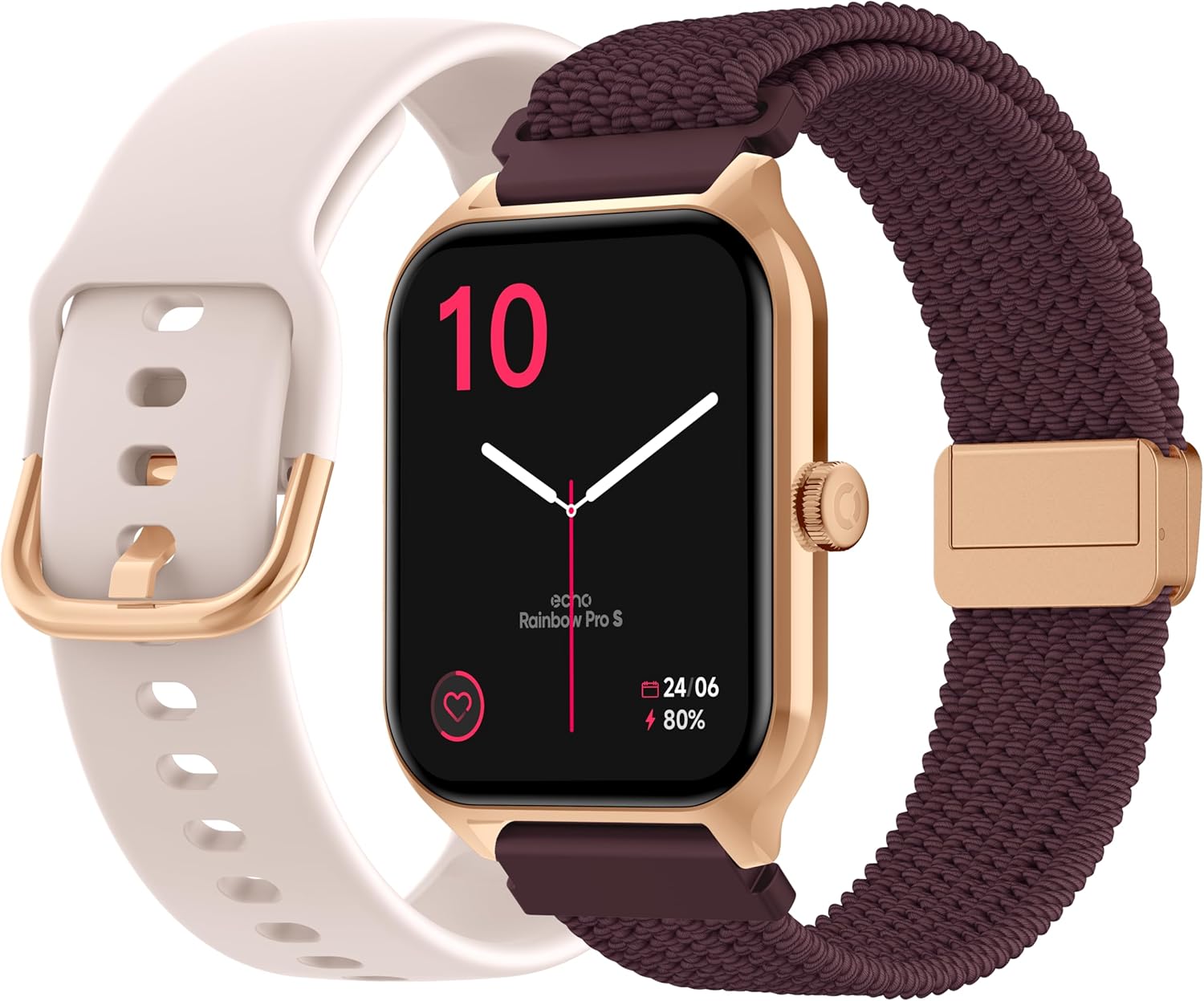
Image: The ECHO Rainbow Pro S Smartwatch, showcasing its rose gold finish, accompanied by both the rose gold silicone strap and the bordeaux nylon strap, along with the magnetic charging cable.
3. Thiết lập
3.1 Sạc thiết bị
Before first use, fully charge your smartwatch. Connect the magnetic charging cable to the charging points on the back of the watch and plug the USB end into a standard USB power adapter (not included) or a computer's USB port. A full charge takes approximately 2.5 hours.
3.2 Cài đặt ứng dụng Da Fit
The ECHO Rainbow Pro S Smartwatch works with the Da Fit application. Download the Da Fit app from the Apple App Store (for iOS devices) or Google Play Store (for Android devices).
- Scan the QR code in the watch's manual or on the watch screen (if available) or search for "Da Fit" in your app store.
- Cài đặt ứng dụng trên điện thoại thông minh của bạn.
3.3 Ghép nối với điện thoại thông minh của bạn
To unlock the full potential of your smartwatch, pair it with the Da Fit app:
- Đảm bảo Bluetooth được bật trên điện thoại thông minh của bạn.
- Mở ứng dụng Da Fit.
- Follow the on-screen instructions to add a new device. The app will search for your ECHO Rainbow Pro S.
- Select your watch from the list of found devices. Confirm the pairing request on both your phone and the watch.
- Sau khi ghép nối, đồng hồ của bạn sẽ đồng bộ hóa dữ liệu với ứng dụng.

Image: The ECHO Rainbow Pro S Smartwatch, showing the watch body, both the silicone and nylon straps, and the magnetic charging cable, illustrating the components for setup.
4. Vận hành đồng hồ thông minh của bạn
4.1 Điều hướng Giao diện
The ECHO Rainbow Pro S features an intuitive 1.96-inch touchscreen. Swipe left, right, up, or down to access different functions and menus. The side button typically serves as a power button or a return-to-home screen button.
4.2 Theo dõi sức khỏe
Your smartwatch is equipped with advanced sensors to track your well-being:
- Nhịp tim: Liên tục theo dõi nhịp tim của bạn suốt cả ngày.
- Oxy trong máu (SpO2): Đo độ bão hòa oxy trong máu của bạn.
- Huyết áp: Cung cấp ước tính về huyết áp của bạn.
- Theo dõi giấc ngủ: Phân tích kiểu ngủ của bạn, bao gồm cả giấc ngủ sâu và giấc ngủ nông.tagnghĩa là
Tất cả dữ liệu sức khỏe đều có thể được viewed in detail within the Da Fit app, allowing you to track trends and progress over time.

Hình ảnh: Phía sau view of the ECHO Rainbow Pro S Smartwatch, highlighting the optical sensors used for heart rate, SpO2, and blood pressure monitoring.

Image: The ECHO Rainbow Pro S Smartwatch screen showing various health metrics, including heart rate (BPM), SpO2 percentage, and activity data, demonstrating its health tracking capabilities.
4.3 Tính năng giao tiếp
Luôn kết nối trực tiếp từ cổ tay của bạn:
- Cuộc gọi Bluetooth: Thực hiện và nhận cuộc gọi trực tiếp từ đồng hồ khi được kết nối với điện thoại thông minh.
- Thông báo: Receive alerts for calls, messages, and app notifications from your paired smartphone.

Image: The ECHO Rainbow Pro S Smartwatch displaying incoming call and message notifications, illustrating its communication features when paired with a smartphone.
4.4 Trợ lý AI
The ECHO Rainbow Pro S integrates an AI assistant for convenient voice commands and information retrieval. Simply activate the AI feature on your watch and speak your query or command.

Image: The ECHO Rainbow Pro S Smartwatch screen showing the AI assistant interface, ready to receive voice commands or queries.
4.5 Sports Modes & Coaching
With over 100 sports modes and integrated training programs, your smartwatch is an ideal companion for your fitness journey. Select your activity from the watch's menu to track performance metrics such as calories burned, distance, and duration. The Da Fit app provides personalized tracking and allows you to follow your course using your smartphone's GPS.

Image: The ECHO Rainbow Pro S Smartwatch displaying various sports modes and training exercises, with accompanying smartphone app screenshots showing detailed workout plans and GPS tracking.
KHÔNG BAO GIỜ Tùy biến
Tùy chỉnh trải nghiệm đồng hồ thông minh của bạn:
- Mặt đồng hồ: Choose from over 100 downloadable watch faces via the Da Fit app to match your style.
- Dây đeo có thể thay thế: Easily swap between the included silicone and nylon straps to suit your activity or outfit.
Image: The ECHO Rainbow Pro S Smartwatch, showcasing its rose gold finish, accompanied by both the rose gold silicone strap and the bordeaux nylon strap, highlighting the interchangeable design.
5. Bảo trì
5.1 Vệ sinh
To keep your smartwatch in optimal condition, clean it regularly. Wipe the screen and body with a soft, lint-free cloth. For stubborn smudges, slightly dampLau vải bằng nước. Tránh sử dụng hóa chất mạnh hoặc vật liệu mài mòn.
5.2 Khả năng chống nước (IP68)
The ECHO Rainbow Pro S is IP68 rated, meaning it is resistant to water up to 1 meter deep for 30 minutes. This makes it suitable for daily activities like hand washing, rain, or accidental splashes. However, it is not recommended for swimming, diving, or high-pressure water activities. Avoid exposing the watch to hot water, steam, or corrosive liquids.
5.3 Tuổi thọ pin
The smartwatch offers up to 5 days of battery life with typical usage. To optimize battery performance:
- Giảm độ sáng màn hình.
- Tắt chức năng theo dõi nhịp tim liên tục nếu không cần thiết.
- Giới hạn số lượng thông báo ứng dụng.
KHAI THÁC. Xử lý sự cố
If you encounter any issues with your ECHO Rainbow Pro S Smartwatch, please refer to the following common problems and solutions:
| Vấn đề | Giải pháp |
|---|---|
| Đồng hồ không bật | Hãy đảm bảo đồng hồ đã được sạc đầy. Kết nối đồng hồ với cáp sạc từ tính và nguồn điện trong ít nhất 30 phút. |
| Không thể ghép nối với điện thoại thông minh | 1. Đảm bảo Bluetooth đã được bật trên điện thoại của bạn. 2. Make sure the watch is within range of your phone. 3. Khởi động lại cả đồng hồ và điện thoại của bạn. 4. Xóa bộ nhớ đệm Bluetooth trên điện thoại của bạn (Android) hoặc xóa thiết bị và ghép nối lại (iOS/Android). 5. Ensure the Da Fit app has necessary permissions. |
| Chỉ số sức khỏe không chính xác | 1. Hãy đảm bảo đồng hồ được đeo vừa khít trên cổ tay, không quá chật cũng không quá lỏng. 2. Clean the sensors on the back of the watch. 3. Avoid excessive movement during measurements. 4. Note that these readings are for reference and not for medical diagnosis. |
| Chưa nhận được thông báo | 1. Ensure the watch is paired and connected to your phone. 2. Check notification settings in the Da Fit app and on your phone (e.g., app permissions, DND mode). 3. Make sure the Da Fit app is running in the background. |
| Tuổi thọ pin ngắn | 1. Giảm độ sáng màn hình. 2. Disable continuous heart rate monitoring if not needed. 3. Limit background app refresh for the Da Fit app. 4. Ensure no apps are constantly running on the watch. |
7. Thông số kỹ thuật
| Tính năng | Chi tiết |
|---|---|
| Thương hiệu | TIẾNG VANG |
| Người mẫu | Cầu Vồng Pro S |
| Số hiệu mẫu | bd279646-58a1-4a95-ab0c-0847dc2ca4e6 |
| Màu sắc | Vàng hồng |
| Kích thước màn hình | 1.96 inch |
| Kiểu hiển thị | OLED or LED |
| Kết nối | Bluetooth |
| Thiết bị tương thích | Điện thoại thông minh, Máy tính bảng |
| Thành phần pin | Lithium-polymer |
| Thời lượng pin (Thông thường) | 5 Ngày |
| Thời gian sạc | 2.5 giờ |
| Chống nước | IP68 (lên đến 1 mét trong 30 phút) |
| GPS | Không có GPS |
| Hình dạng | Tròn |
| Khả năng tương thích ứng dụng | Phù hợp |
| Nước xuất xứ | Trung Quốc |
8. Bảo hành và Hỗ trợ
8.1 Bảo hành sản phẩm
Your ECHO Rainbow Pro S Smartwatch is covered by a standard manufacturer's warranty against defects in materials and workmanship. The specific duration and terms of the warranty may vary based on your region and point of purchase. Please refer to your purchase documentation or contact your retailer for detailed warranty information.
8.2 Hỗ trợ khách hàng
For technical assistance, troubleshooting beyond this manual, or warranty claims, please contact the retailer or manufacturer directly. Have your product model number (bd279646-58a1-4a95-ab0c-0847dc2ca4e6) and proof of purchase ready when contacting support.


