Giới thiệu
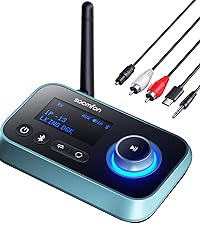
Cảm ơn bạn đã muaasing the SOOMFON Aux Bluetooth 5.4 Transmitter Receiver. This device offers a versatile 2-in-1 solution, functioning as both a Bluetooth transmitter and receiver. It enables wireless audio streaming for a wide range of devices, from non-Bluetooth TVs and audio players to wired headphones and speakers. Please read this manual carefully to ensure proper use and optimal performance.
Sản phẩm trênview
Nội dung gói

The package includes the SOOMFON Bluetooth 5.4 Transmitter Receiver, a USB-C charging cable, a 3.5mm AUX audio cable, a 3.5mm audio adapter, and the user manual.
- SOOMFON Bluetooth 5.4 Transmitter Receiver x1
- Cáp sạc USB-C x1
- 3.5mm AUX Audio Cable x1
- 3.5mm Audio Adapter x1
- Hướng dẫn sử dụng x1
Các tính năng chính

This image summarizes the device's features, including its 10-meter wireless range, integrated microphone for calls, automatic reconnection capability, and portable, compact design.
- Bluetooth 5.4 + EDR: Equipped with the latest Bluetooth technology for faster, more stable transmission and reduced power consumption. Supports signal transmission up to 10 meters.
- Chức năng 2 trong 1: Easily switch between Transmitter (TX) and Receiver (RX) modes with a slide switch.
- Gọi rảnh tay: Built-in microphone with CVC 8.0 noise cancellation for clear calls in RX mode.
- Tuổi thọ pin dài: Integrated large-capacity battery provides up to 8 hours of playback and talk time.
- Tự động kết nối lại: Supports automatic reconnection in RX mode for convenience.
- Thiết kế nhỏ gọn: Small and lightweight for portability.
Bố trí thiết bị

This diagram identifies the AUX 3.5mm port, microphone, multi-function button (MFB), volume/track control buttons, Type-C charging port, and the TX/RX mode switch.
- Cổng AUX 3.5mm
- Micrô
- Nút đa chức năng (MFB)
- Nút Tăng âm lượng / Bản nhạc tiếp theo
- Nút Giảm âm lượng / Bản nhạc trước
- Cổng sạc Type-C
- Chuyển đổi chế độ TX / RX
Cài đặt
Sạc thiết bị
Before first use, fully charge the device. Connect the included USB-C charging cable to the Type-C charging port on the device and the other end to a USB power source (e.g., wall adapter, computer USB port). The indicator light will show charging status.
Bật/Tắt nguồn
- Bật nguồn: Long-press the Multi-function Button (MFB) for approximately 3 seconds until the indicator light illuminates.
- Tắt nguồn: Long-press the Multi-function Button (MFB) for approximately 3 seconds until the indicator light turns off.
Hướng dẫn sử dụng
Mode Switching (TX/RX)

This diagram illustrates the versatility of the 2-in-1 device, showing how it can transmit audio from computers/TVs to Bluetooth headphones/speakers (TX mode) or receive audio from smartphones/laptops to car stereos/speakers (RX mode).
The device features a slide switch on its side to easily toggle between Transmitter (TX) and Receiver (RX) modes. Ensure the device is in the correct mode for your intended use.
Chế độ máy phát (TX)
In TX mode, the device transmits audio from a non-Bluetooth source to a Bluetooth-enabled receiving device (e.g., Bluetooth headphones, Bluetooth speaker).

In Transmitter (TX) mode, the device connects to a TV, allowing audio to be streamed wirelessly to Bluetooth headphones.
- Trượt nút chuyển chế độ sang TX.
- Connect the SOOMFON device to your audio source (e.g., TV, PC, MP3 player) using the 3.5mm AUX audio cable.
- Place your Bluetooth receiving device (e.g., headphones, speaker) into pairing mode.
- The SOOMFON device will automatically search for and connect to nearby Bluetooth devices. The indicator light will flash during pairing and become solid upon successful connection.
A visual guide demonstrating the pairing process for TX mode: power on the receiving device, long-press the MFB button on the SOOMFON device, slide to TX mode, and observe the indicator lights for successful connection.
Chế độ máy thu (RX)
In RX mode, the device receives Bluetooth audio from a source (e.g., smartphone, tablet, laptop) and outputs it to a non-Bluetooth audio device (e.g., wired headphones, car stereo, home stereo system).

In Receiver (RX) mode, the device connects to a wired speaker, enabling it to receive audio wirelessly from a Bluetooth-enabled smartphone.
- Trượt nút chuyển chế độ sang RX.
- Connect the SOOMFON device to your audio output device (e.g., wired speaker, car stereo) using the 3.5mm AUX audio cable.
- On your Bluetooth audio source (e.g., smartphone), enable Bluetooth and search for available devices. Select "SOOMFON" from the list to pair.
- Once paired, the indicator light will become solid, and audio will stream wirelessly to your connected device.

The device can be used in Receiver (RX) mode to add Bluetooth audio streaming capabilities to car stereos via the AUX input.
Hands-free Calling (RX Mode Only)
When in RX mode and connected to a smartphone, the built-in microphone allows for hands-free calling. The device features CVC 8.0 noise cancellation for clear communication.

This image illustrates the hands-free calling feature with CVC 8.0 noise cancellation, ensuring clear communication even in noisy environments like a car.
- Trả lời/Kết thúc cuộc gọi: Nhấn nút đa chức năng (MFB) một lần.
- Từ chối cuộc gọi: Long-press the Multi-function Button (MFB) for 2 seconds.
- Gọi lại số cuối cùng: Double-press the Multi-function Button (MFB).
Music Controls (RX Mode Only)
- Phát/Tạm dừng: Nhấn nút đa chức năng (MFB) một lần.
- Bài hát tiếp theo: Nhấn nút Tăng âm lượng / Bài hát tiếp theo một lần.
- Bản nhạc trước: Nhấn giữ nút Giảm âm lượng / Bài hát trước một lần.
- Tăng âm lượng: Long-press the Volume Up / Next Track button.
- Giảm âm lượng: Long-press the Volume Down / Previous Track button.
BẢO TRÌ
- Giữ thiết bị khô ráo. Tránh tiếp xúc với hơi ẩm hoặc chất lỏng.
- Không cố tháo rời hoặc sửa đổi thiết bị.
- Vệ sinh thiết bị bằng vải mềm, khô. Không sử dụng hóa chất mạnh hoặc chất tẩy rửa có tính mài mòn.
- Bảo quản thiết bị ở nơi khô ráo, thoáng mát khi không sử dụng.
Xử lý sự cố
Lưu ý quan trọng trước khi sử dụng
- TX Mode Interference: In Transmitter (TX) mode, the device is susceptible to interference. Please turn off the Bluetooth function of other nearby devices to ensure a stable connection.
- Audio Delay (SBC Decoding): This product uses SBC decoding, which results in an audio delay of approximately 220ms. This delay makes the device unsuitable for applications requiring precise real-time audio, such as musical instrument performance.
- TX Mode Limitations: Voice calls and volume adjustment features are supported only in Receiver (RX) mode. Neither function is available when the device is operating in Transmitter (TX) mode.
Các vấn đề thường gặp
| Vấn đề | Giải pháp |
|---|---|
| Thiết bị không bật nguồn. | Ensure the device is fully charged. Long-press the MFB button for 3 seconds. |
| Không thể ghép nối với thiết bị Bluetooth. | Ensure the SOOMFON device is in the correct TX or RX mode. Place the other Bluetooth device in pairing mode. Keep devices within 10 meters. Turn off other Bluetooth devices nearby (especially in TX mode). |
| Không có âm thanh hoặc chất lượng âm thanh kém. | Check all cable connections. Ensure volume is turned up on both the SOOMFON device and the connected audio device. Verify the SOOMFON device is in the correct mode (TX/RX). Ensure no interference from other Bluetooth devices. |
| Hands-free calling not working in TX mode. | Hands-free calling is only supported in RX mode. Switch the device to RX mode for call functionality. |
| Audio delay during use. | This device uses SBC decoding, which has an inherent delay of approximately 220ms. This is normal operation and cannot be eliminated. It is not suitable for real-time applications like musical instrument performance. |
Thông số kỹ thuật
| Tính năng | Chi tiết |
|---|---|
| Phiên bản Bluetooth | 5.4 + EDR |
| Chế độ hoạt động | Máy phát (TX), Máy thu (RX) |
| Kết nối | AUX 3.5mm, Bluetooth |
| Wireless Dải | Lên đến 10 mét (33 feet) |
| Tuổi thọ pin | Up to 8 hours (playback/talk time) |
| Cổng sạc | USB loại C |
| Giải mã âm thanh | SBC (with ~220ms delay) |
| Gọi điện thoại rảnh tay | Supported in RX mode (with CVC 8.0 noise cancellation) |
| Kích thước sản phẩm | Xấp xỉ 16.3 x 6.9 x 2.1 cm |
| Trọng lượng sản phẩm | 70 gram |
Bảo hành và Hỗ trợ
SOOMFON provides a Bảo hành 24 tháng for this product from the date of purchase. We are committed to ensuring the quality and performance of our products. If you encounter any issues or have questions regarding your SOOMFON Aux Bluetooth 5.4 Transmitter Receiver, please do not hesitate to contact our customer support. We will assist you promptly.
For warranty claims or technical support, please refer to the contact information provided with your purchase or visit the official SOOMFON webđịa điểm.


