1. Giới thiệu
This manual provides essential information for the safe and efficient installation, operation, and maintenance of your TCP Economy LED UFO High Bay Luminaire. Please read this manual thoroughly before installation and retain it for future reference.
The TCP Economy LED UFO High Bay Luminaire is designed for commercial and industrial applications, offering high efficacy and a long operational lifespan. It features a robust design suitable for various environments, including warehouses, retail spaces, and gymnasiums.

Hình 1: Mặt trước view of the TCP Economy LED UFO High Bay Luminaire, showing the LED array and clear lens.
2. Thông tin an toàn
- An toàn điện: Installation must be performed by a qualified electrician in accordance with all national and local electrical codes. Always disconnect power at the circuit breaker before installing, servicing, or cleaning the fixture.
- Tiếp đất: Ensure the fixture is properly grounded to prevent electrical shock.
- Xử lý: Do not handle the fixture with wet hands. Avoid touching the LED array directly.
- Môi trường hoạt động: This luminaire is rated IP65 for outdoor use and protection against dust and water jets. Do not submerge the fixture in water. Ensure the operating temperature is within the specified range.
- Lắp đặt: The mounting structure must be capable of supporting the weight of the fixture.
- Sửa đổi: Do not attempt to modify or disassemble the fixture. This will void the warranty and may create safety hazards.
3. Nội dung gói hàng
Upon unpacking, verify that all components are present and undamaged. The package should contain:
- 1 x TCP Economy LED UFO High Bay Luminaire
- 1 x Eyebolt for suspended mounting
Note: Additional mounting hardware (e.g., chains, hooks) may be required and is sold separately.
4. Thông số kỹ thuật
| Tính năng | Đặc điểm kỹ thuật |
|---|---|
| Số hiệu mẫu | 762148336747 |
| Thương hiệu | Giao thức TCP |
| Cái gì?tage Tùy chọn | 115W / 160W / 200W |
| Hiệu quả | Lên đến 145 LPW |
| Nhiệt độ màu (CCT) | 4000K/5000K |
| Làm mờ | Làm mờ 0-10V |
| Xếp hạng IP | IP65 (Chống bụi, chống tia nước) |
| Tuổi thọ | 50,000 giờ |
| Đầu vào Voltage | 120-277V AC (Typical, verify product label) |
| Loại nguồn sáng | DẪN ĐẾN |
| Loại cài đặt | Suspended (Eyebolt included) |
| Mẫu đồ đạc | Trần nhà |
| Sử dụng trong nhà/ngoài trời | Ngoài trời |
| Vật liệu che nắng | Acrylic |
| Trọng lượng sản phẩm | 6.44 pound |
| Kích thước gói hàng | 12.48 x 12.44 x 5.87 inch |
| Fixture Dimensions (approx.) | 11" Diameter x 5.9" Height (with eyebolt) |
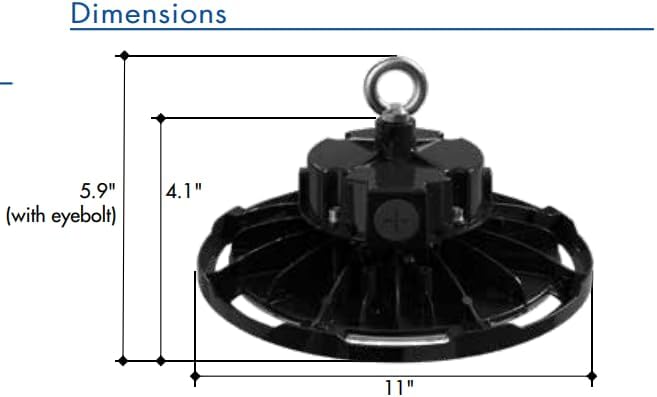
Figure 2: Approximate dimensions of the luminaire, including height with eyebolt and diameter.
5. Hướng dẫn cài đặt (Thiết lập)
This luminaire is designed for suspended mounting. Follow these steps for proper installation:
- An toàn là trên hết: Ensure power to the installation area is turned OFF at the circuit breaker before beginning any work.
- Kiểm tra đồ đạc: Carefully remove the luminaire from its packaging and inspect for any damage. Do not install if damaged.
- Chuẩn bị điểm gắn: Identify a suitable structural mounting point capable of safely supporting the luminaire's weight (6.44 lbs). Install appropriate mounting hardware (e.g., chain, hook) if not already present.
- Attach Eyebolt: Securely thread the provided eyebolt into the top of the luminaire housing.
- Suspend Fixture: Carefully lift the luminaire and attach the eyebolt to your chosen mounting hardware. Ensure the fixture is stable and level.
- Dây điện:
- Open the wiring compartment on the top of the fixture.
- Connect the AC input wires (Line, Neutral, Ground) from your power supply to the corresponding wires on the luminaire. Refer to local electrical codes for proper wiring practices.
- For 0-10V dimming functionality, connect the purple (DIM+) and gray (DIM-) wires from your 0-10V dimmer to the corresponding dimming wires on the luminaire. If dimming is not desired, cap these wires individually.
- Đảm bảo tất cả các kết nối được an toàn và cách điện.
- Đóng ngăn: Securely close the wiring compartment cover.
- Khôi phục điện: Sau khi quá trình lắp đặt hoàn tất và tất cả các kết nối đã được kiểm tra, hãy cấp lại nguồn điện tại cầu dao.
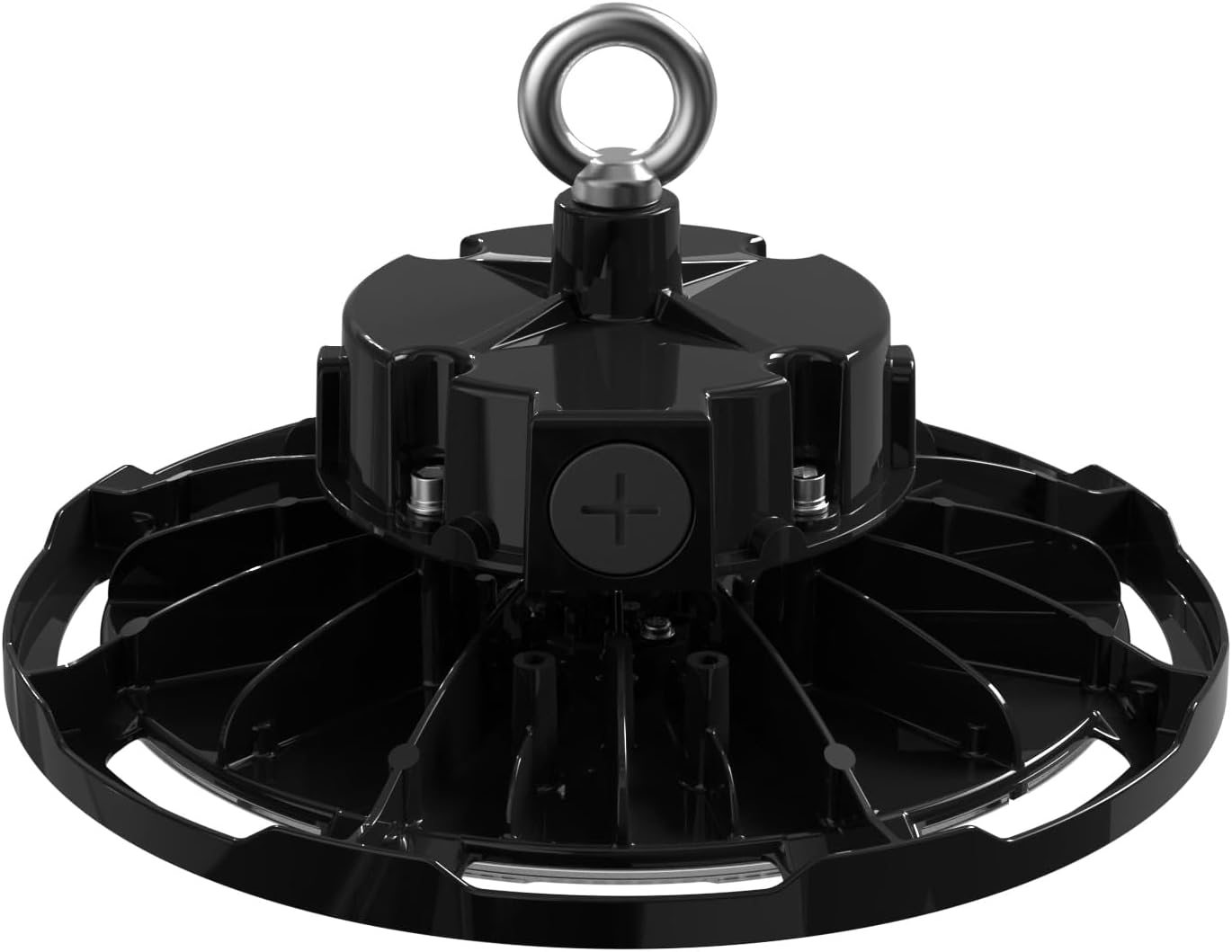
Hình 3: Trên cùng view of the luminaire, illustrating the eyebolt for suspension and the location of the wiring compartment.
6. Hoạt động
The TCP Economy LED UFO High Bay Luminaire operates immediately upon receiving power.
- Bật/Tắt nguồn: Control the luminaire's power supply via the connected wall switch or circuit breaker.
- Làm mờ: If connected to a compatible 0-10V dimmer, adjust the light output by manipulating the dimmer control. The luminaire will respond to the 0-10V signal to vary its brightness.
7. Bảo trì
The TCP Economy LED UFO High Bay Luminaire requires minimal maintenance.
- Vệ sinh: Ensure power is disconnected before cleaning. Use a soft, damp cloth to wipe the exterior of the fixture. Do not use abrasive cleaners or solvents, as these may damage the finish or optical components.
- Điều tra: Periodically inspect the fixture and its mounting hardware for any signs of damage, loose connections, or wear. Address any issues promptly.
- Không có bộ phận nào người dùng có thể tự sửa chữa: There are no user-serviceable parts inside the luminaire. Do not attempt to open or repair the unit.
KHAI THÁC. Xử lý sự cố
If the luminaire is not functioning as expected, perform the following basic checks:
- Không có ánh sáng:
- Verify that the power supply to the fixture is active at the circuit breaker and wall switch.
- Check all wiring connections for proper contact and insulation.
- Chức năng điều chỉnh độ sáng không hoạt động:
- Ensure the 0-10V dimmer is compatible and correctly wired to the luminaire's dimming leads (purple and gray).
- Verify the dimmer is functioning correctly.
- Nhấp nháy:
- Kiểm tra xem kết nối dây điện có bị lỏng không.
- Đảm bảo âm lượng đầu vàotage ổn định và nằm trong phạm vi quy định.
If these steps do not resolve the issue, contact customer support for assistance. Do not attempt further repairs yourself.
9. Bảo hành và Hỗ trợ
This TCP Economy LED UFO High Bay Luminaire is covered by a Bảo hành có giới hạn năm năm against defects in manufacturing. Please retain your proof of purchase for warranty claims.

Figure 4: Warranty statement and product listings (UL and cUL listed, IP65 Rated).
For technical support, warranty inquiries, or replacement parts, please contact TCP customer service:
- Webđịa điểm: www.tcpi.com
- Điện thoại: Refer to TCP's official webtrang web để biết số điện thoại liên lạc hiện tại.


