Giới thiệu
The Stinger HORIZON10 is a state-of-the-art 10.1-inch universal car stereo designed to enhance your in-vehicle entertainment and connectivity. Featuring a 1280x800 HD weather-resistant touchscreen, wireless Apple CarPlay and Android Auto, advanced audio controls, and multiple camera inputs, the HORIZON10 provides a comprehensive and intuitive user experience. This manual provides detailed instructions for setting up, operating, maintaining, and troubleshooting your new car stereo.

Image: The Stinger HORIZON10 Infotainment System, showcasinVới thiết kế đẹp mắt và giao diện người dùng thân thiện.
Có gì trong hộp
Upon unboxing your Stinger HORIZON10, please verify that all the following components are included:
- 10.1" Multimedia Touchscreen Display
- Mô-đun vô tuyến
- Giá đỡ màn hình
- Nose Bracket - Radio Bracket
- Nắp sau đầu nối LVDS
- Vít
- Ổ cắm chống nước
- Dây AV 16 chân
- Dây nịt 12 chân Pre-out
- Bộ khai thác dữ liệu 14 chân
- 26 Pin Power Harness LVDS Display Cable
- Micrô ngoài
- Ăng-ten GPS
- GPS Mounting Plate
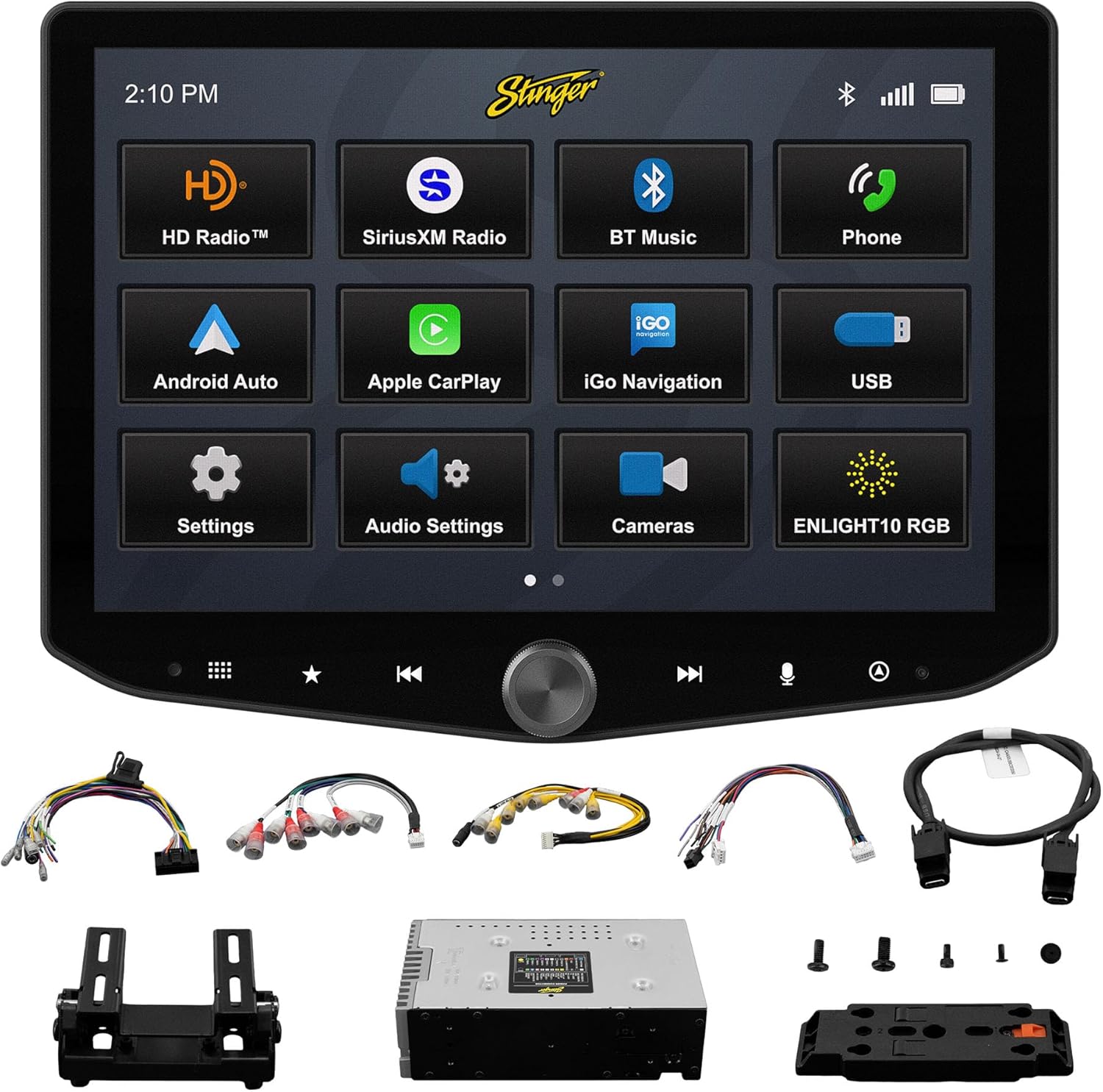
Image: All components included with the Stinger HORIZON10 car stereo system.
Thiết lập và cài đặt
Professional installation is highly recommended for the Stinger HORIZON10 to ensure proper functionality and integration with your vehicle's electrical system. This unit is designed for universal compatibility, but specific vehicle dash kits, wiring harness interfaces, or antenna adapters may be required and are sold separately.
Các bước thiết lập ban đầu:
- Lắp đặt: Securely mount the display and radio module using the provided brackets and screws. Ensure proper ventilation around the unit.
- Dây điện: Connect the 16-pin AV harness, 12-pin pre-out harness, 14-pin data harness, and 26-pin power harness LVDS display cable to the corresponding ports on the radio module and your vehicle's wiring system. Refer to your vehicle's specific wiring diagram if necessary.
- Kết nối bên ngoài: Connect the external microphone for hands-free calling and the GPS antenna for navigation functionality.
- Bật nguồn: Once all connections are secure, power on your vehicle to initiate the stereo. The unit should boot up and display the Stinger logo.
- Cấu hình ban đầu: Follow any on-screen prompts for initial setup, such as language selection and time zone.
Hướng dẫn sử dụng
Giao diện màn hình cảm ứng
The HORIZON10 features a large 10.1" 1280x800 HD floating touchscreen with anti-glare and anti-fingerprint film protection. Navigate through menus and applications by tapping, swiping, and pinching on the screen. The capacitive touch panel buttons and machined aluminum anodized knob provide additional tactile control.

Hình ảnh: Chi tiết view of the Stinger HORIZON10 touchscreen, highlighting its capacitive touch buttons and anodized knob.
Apple CarPlay & Android Auto không dây
Connect your iPhone or Android phone wirelessly to access navigation, calls, messages, music, and more directly on the HORIZON10 display. Wired connections are also supported via the USB-C input, which also provides fast 3A phone charging.

Image: The Stinger HORIZON10 displaying the Apple CarPlay interface wirelessly connected to an iPhone.

Image: The Stinger HORIZON10 displaying the Android Auto interface wirelessly connected to an Android phone.
Bluetooth 5.1 & Wi-Fi Connectivity
The unit supports dual phone connections for fast hands-free calling and music streaming via Bluetooth 5.1 A2DP. Wi-Fi connectivity enables additional features and updates.
Tính năng âm thanh nâng cao
Customize your sound experience with the 15-band adjustable EQ, 6 user EQ presets, and built-in crossover with HPF & LPF. The system offers 4.5 Vrms & 8ch RCA outputs with subwoofer control, and a Toslink (optical) audio output (48 kHz variable) for high-fidelity sound.

Image: Screenshot of the Stinger HORIZON10's advanced audio settings, showing the 15-band equalizer.
Đầu vào máy ảnh
Integrate up to four cameras (front/rear dashcam, blind spot cameras, backup camera) for enhanced safety and visibility. The system supports both AHD 720p and CVBS 480p camera inputs.

Image: The Stinger HORIZON10 displaying multiple camera views, illustrating its 4 camera input capability.
Bộ dò đài phát thanh
Enjoy a wide variety of audio content with the built-in HD AM/FM radio tuner. The unit is also SiriusXM-Ready (SiriusXM Tuner Sold Separately).

Image: The Stinger HORIZON10 displaying the HD Radio interface, showing available stations.
USB & HDMI Inputs
The unit includes two USB-A inputs, one USB-C input (with 3A charging), and one HDMI input for media playback or mirroring.
Tùy chỉnh
Personalize your experience by changing the background image and rearranging Home screen icons for easier access to your most used features.
onX Offroad App
The HORIZON10 includes a free 3-month trial of the onX GPS navigation off-roading map app. Register on the Stinger website to activate your trial.
Video sản phẩm trênview
Video: Một quan chức trênview of the Stinger HORIZON10's key features and capabilities.
BẢO TRÌ
To ensure the longevity and optimal performance of your Stinger HORIZON10, follow these maintenance guidelines:
- Vệ sinh màn hình: Dùng vải mềm, không xơ để lau nhẹ màn hình cảm ứng. Đối với các vết bẩn cứng đầu, hãy lau nhẹ.ampLau khăn bằng nước hoặc chất tẩy rửa an toàn cho màn hình. Tránh các vật liệu mài mòn hoặc hóa chất mạnh.
- Khả năng chống chịu thời tiết: While the display is IP65 weather-resistant, the radio chassis is not. Avoid direct exposure of the main unit to water or excessive moisture.
- Quan tâm chung: Giữ cho thiết bị luôn sạch sẽ, không bám bụi bẩn. Đảm bảo tất cả các kết nối đều chắc chắn.

Image: The Stinger HORIZON10 display with water droplets, demonstrating its IP65 weather-resistant feature.
Xử lý sự cố
If you encounter issues with your Stinger HORIZON10, refer to the following common problems and solutions:
| Vấn đề | Nguyên nhân có thể | Giải pháp |
|---|---|---|
| Không có điện | Kết nối nguồn lỏng, cầu chì bị đứt, ắc quy xe có vấn đề. | Kiểm tra tất cả các kết nối nguồn điện. Kiểm tra cầu chì xe. Đảm bảo ắc quy xe đã được sạc đầy. |
| Không có đầu ra âm thanh | Incorrect audio settings, loose speaker wires, ampvấn đề lifier. | Verify audio settings (volume, mute, source). Check speaker wire connections. Consult an audio specialist if using an external ampchất lót. |
| CarPlay/Android Auto không kết nối | Bluetooth/Wi-Fi off on phone, incorrect pairing, phone software issue. | Ensure Bluetooth and Wi-Fi are enabled on your phone. Re-pair the device. Restart both the phone and the HORIZON10 unit. Update phone OS. |
| Màn hình cảm ứng không phản hồi | Temporary software glitch, excessive dirt/moisture on screen. | Perform a soft reset (refer to device settings for reset option). Clean the screen thoroughly. If persistent, contact support. |
| Thu sóng radio kém | Ăng-ten không được kết nối, ăng-ten bị hỏng, khu vực tín hiệu yếu. | Check antenna connection. Consider a signal booster if in a weak reception area. |
If the problem persists after attempting these solutions, please contact Stinger customer support.
Thông số kỹ thuật
| Tính năng | Chi tiết |
|---|---|
| Số hiệu mẫu | 10.1" - IX210 |
| Kích thước sản phẩm | 12.75 x 7.5 x 9.75 inch |
| Trọng lượng sản phẩm | 6.98 pound |
| Kích thước hiển thị | 10.1 inch |
| Độ phân giải màn hình | Độ phân giải 1280x800 |
| Khả năng chống chịu thời tiết | IP65 (Display only) |
| Công nghệ kết nối | Bluetooth 5.1 A2DP, Wi-Fi |
| Loại bộ điều khiển | Smartphone, Touchscreen |
| Đầu vào USB | 2x USB-A, 1x USB-C (3A charging) |
| Cổng HDMI | 1 |
| Đầu vào máy ảnh | 4 (AHD 720p / CVBS 480p compatible) |
| Chế độ đầu ra âm thanh | Âm thanh nổi |
| Cấu hình kênh âm thanh vòm | 7.1 |
| Số lượng kênh | 8 |
| EQ | 15-band adjustable EQ, 6 user presets |
| Đầu ra RCA | 4.5 Vrms & 8ch with subwoofer control |
| Đầu ra âm thanh quang học | Toslink (48 kHz variable) |
Thông tin bảo hành
For detailed warranty information regarding your Stinger HORIZON10, please refer to the warranty card included with your product or visit the official STINGER webĐiều khoản và điều kiện bảo hành có thể khác nhau và tùy thuộc vào chính sách của nhà sản xuất.
Hỗ trợ khách hàng
Should you require further assistance, technical support, or have questions not covered in this manual, please contact STINGER customer service through their official webtrang web hoặc thông tin liên hệ được cung cấp kèm theo tài liệu sản phẩm của bạn.
STINGER Official Webđịa điểm: www.stinger.com


