Giới thiệu
Thank you for choosing the iTOMA 515 Alarm Clock. This device combines an alarm clock with an FM radio, a dimmable LED display, and dual alarm functionality, designed for convenience and reliability. This manual provides detailed instructions for setup, operation, and maintenance to ensure optimal performance.
Nội dung gói
- 1 x iTOMA 515 Alarm Clock
- 1 x Hướng dẫn sử dụng
Lưu ý: Bộ chuyển đổi nguồn không được bao gồm và phải mua riêng.
Sản phẩm trênview
Familiarize yourself with the main components and controls of your iTOMA 515 Alarm Clock.
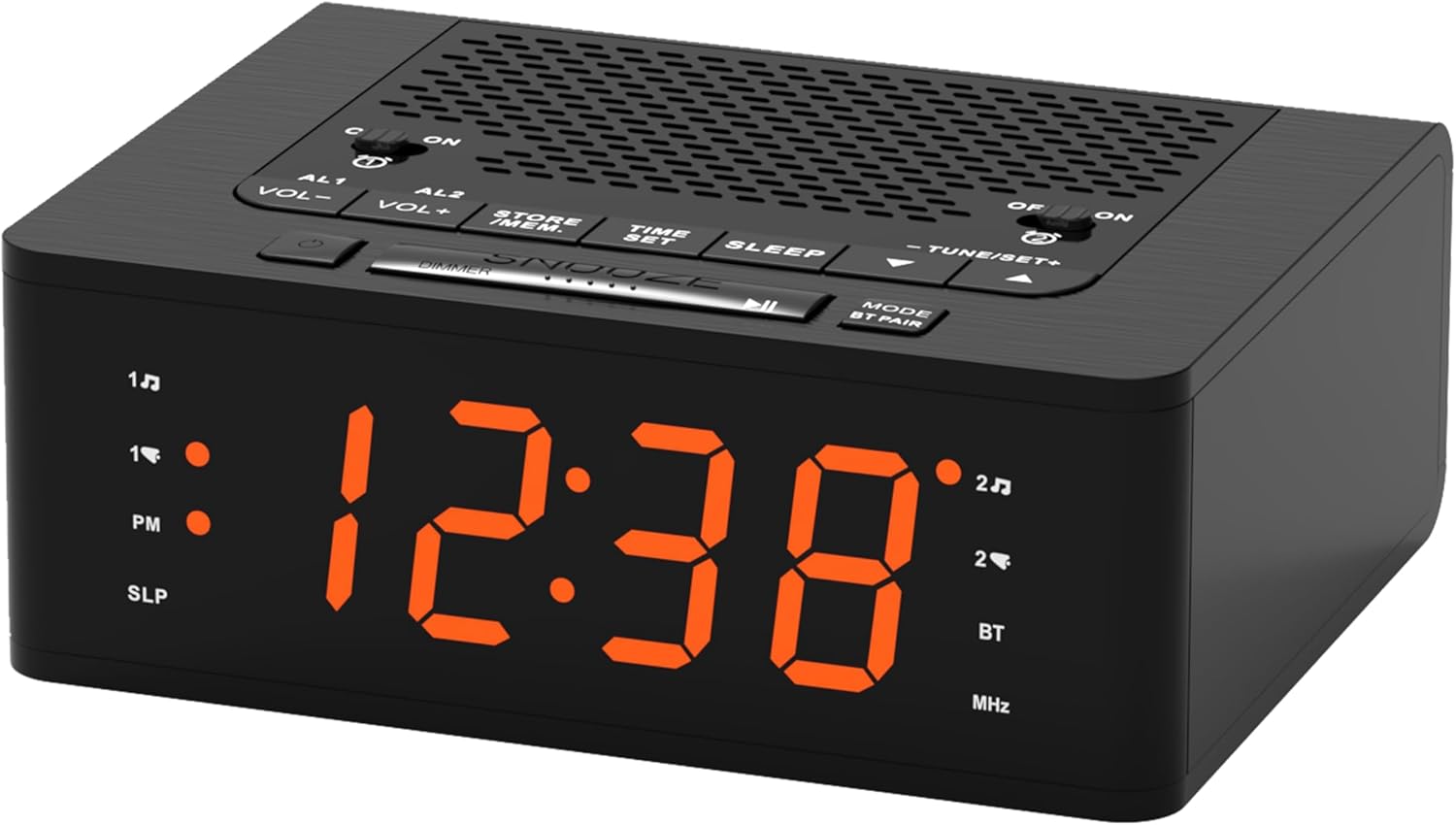
Hình ảnh: Đằng trước view of the iTOMA 515 Alarm Clock, showcasing the orange LED display and top-mounted control buttons.

Hình ảnh: Đứng đầu view of the alarm clock, highlighting the various control buttons for volume, alarm settings, time, sleep, and tuning.
Các nút điều khiển:
- AL1 / AL2: Alarm 1 / Alarm 2 setting buttons.
- VOL + / VOL-: Điều chỉnh âm lượng.
- STORE / MEM: Saves and recalls FM radio presets.
- ĐẶT THỜI GIAN: Vào chế độ cài đặt thời gian.
- NGỦ: Activates sleep timer for FM radio.
- TUNE+ / TUNE-: Adjusts FM radio frequency.
- Chức năng báo lại/Điều chỉnh độ sáng: Snoozes alarm; adjusts display brightness.
- MODE / BT PAIR: Switches between modes (FM, Bluetooth); initiates Bluetooth pairing.
- ON / OFF (for AL1/AL2): Toggles alarms on or off.
Cài đặt
1. Kết nối nguồn điện
- Connect a compatible DC 5V power adapter (not included) to the DC IN port on the back of the alarm clock.
- Cắm bộ chuyển đổi vào ổ cắm điện tiêu chuẩn. Màn hình sẽ sáng lên.
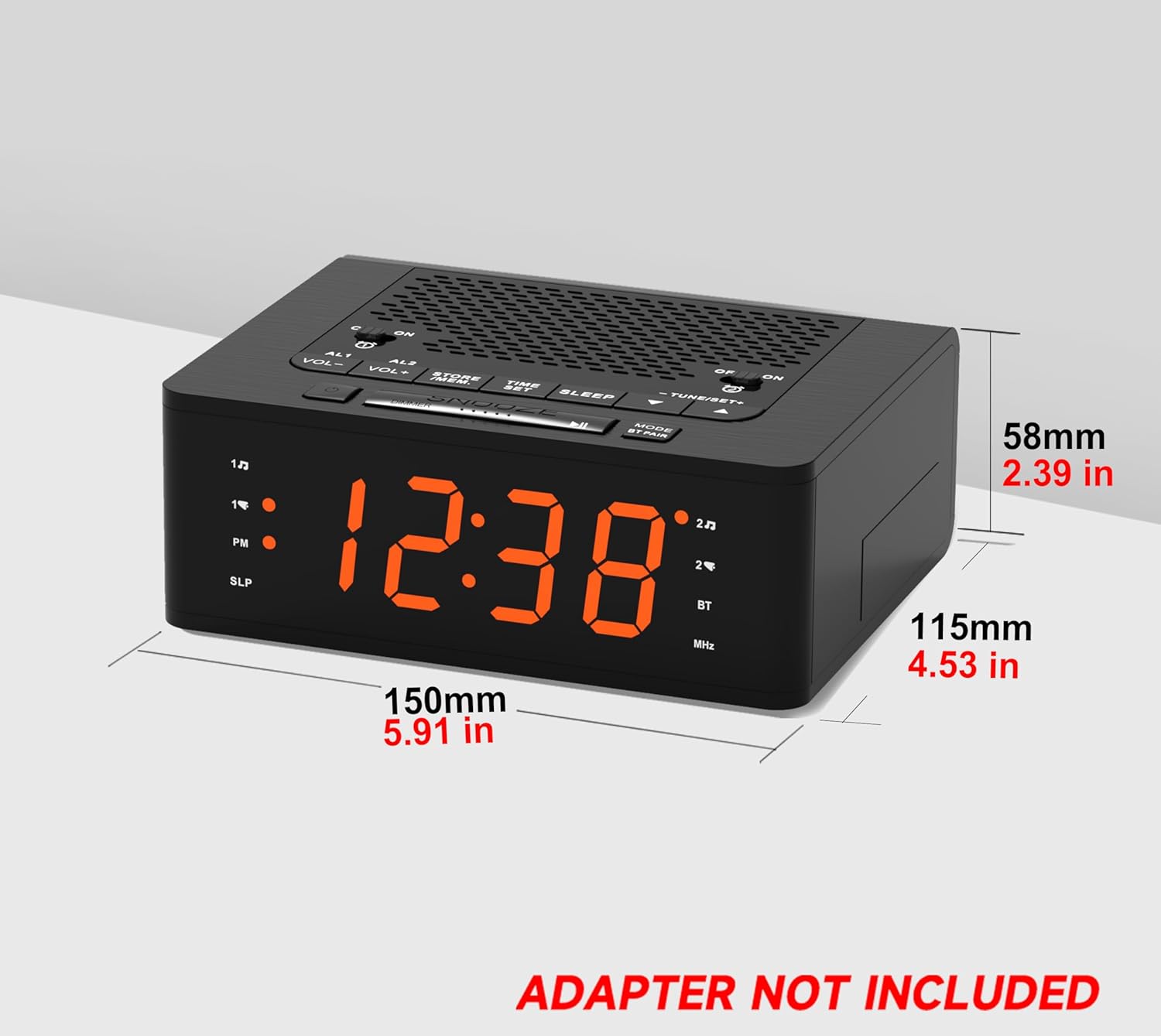
Hình ảnh: Bên view of the iTOMA 515 Alarm Clock with dimensions indicated, and a clear note stating "ADAPTER NOT INCLUDED".
2. Thiết lập thời gian ban đầu
- Nhấn và giữ ĐẶT THỜI GIAN nhấn nút cho đến khi chữ số giờ bắt đầu nhấp nháy.
- Sử dụng TUNE + or TUNE- buttons to adjust the hour. Pay attention to the PM indicator if using 12-hour format.
- Nhấn ĐẶT THỜI GIAN again to confirm the hour and move to minute adjustment.
- Sử dụng TUNE + or TUNE- các nút để điều chỉnh phút.
- Nhấn ĐẶT THỜI GIAN once more to confirm the minutes and exit time setting mode.
3. Lựa chọn định dạng 12/24 giờ
While the time is flashing during setup, press the CÁCH THỨC nút để chuyển đổi giữa định dạng hiển thị 12 giờ và 24 giờ.
Hướng dẫn sử dụng
1. Display Brightness Control (Dimmer)
The iTOMA 515 features a 4-level dimmable LED display.
- Nhấn nút TẠM NGỪNG / MỜ button repeatedly to cycle through the brightness levels: Level 3 (brightest), Level 2, Level 1, and OFF.
- Select the brightness level that suits your preference for optimal visibility without disturbance.

Hình ảnh: The alarm clock display transitioning through four brightness levels (L3, L2, L1, OFF) to illustrate the dimmer function.
2. Setting Alarms (AL1 & AL2)
The clock supports two independent alarms. You can set the alarm time, sound source (buzzer or FM radio), and alarm week mode.
- Nhấn và giữ AL1 or AL2 nhấn nút cho đến khi chữ số giờ báo thức nhấp nháy.
- Sử dụng TUNE + or TUNE- các nút điều chỉnh giờ báo thức.
- Nhấn tương ứng AL1 or AL2 button again to confirm the hour and move to minute adjustment.
- Sử dụng TUNE + or TUNE- các nút để điều chỉnh số phút báo thức.
- Nhấn nút AL1 or AL2 button again to select the alarm sound source: còi báo động or Đài phát thanh FM.
- Nhấn nút AL1 or AL2 button again to select the alarm week mode: d1-7 (every day), d1-5 (weekdays only), or d6-7 (weekends only).
- Nhấn nút AL1 or AL2 button one last time to save the settings and exit.

Hình ảnh: The alarm clock display with indicators for two separate alarms, showing AM 7:00 (Wake Up Time) and PM 7:00 (Coffee Time) as exampđồng nghiệp.
3. Turning Alarms ON/OFF
To activate or deactivate an alarm, use the dedicated BẬT/TẮT buttons located on the top panel for AL1 and AL2.
4. Chức năng báo lại
Khi có tiếng báo thức, hãy nhấn nút lớn GIẤC NGŨ NGẮN button on the top of the clock to temporarily silence the alarm for an additional 9 minutes of sleep. The alarm will sound again after this period.

Hình ảnh: A hand reaching to press the large SNOOZE button on the top of the alarm clock, indicating its function for an extra 9 minutes of sleep.
5. Hoạt động của đài FM
The iTOMA 515 features an FM radio with 20 preset stations and adjustable volume.
- Nhấn nút CÁCH THỨC button to switch to FM radio mode. The frequency will appear on the display.
- Quét tự động: Nhấn và giữ TUNE + or TUNE- button to automatically scan for the next available station.
- Dò thủ công: Nhấn nhanh nút TUNE + or TUNE- button to manually adjust the frequency in small increments.
- Điều chỉnh âm lượng: Sử dụng TẦM+ or vol- buttons to adjust the radio volume (16 levels).
- Lưu cài đặt trước: To save a station, tune to your desired frequency, then press and hold the STORE / MEM button until a preset number flashes. Use TUNE + or TUNE- to select the preset number (P01-P20), then press STORE / MEM một lần nữa để tiết kiệm.
- Nhớ lại cài đặt trước: In FM mode, briefly press the STORE / MEM button to cycle through your saved preset stations.

Hình ảnh: The alarm clock displaying an FM radio frequency (87.5 MHz), with icons indicating sleep timer, presets, and volume levels.
6. FM Radio Sleep Timer
Chức năng hẹn giờ ngủ cho phép bạn chìm vào giấc ngủ với âm thanh của đài phát thanh, và đài sẽ tự động tắt sau một khoảng thời gian đã định.
- While the FM radio is playing, press the NGỦ button repeatedly to cycle through the sleep timer options (e.g., 90, 80, 70... 10 minutes, OFF).
- Đài sẽ phát nhạc trong khoảng thời gian đã chọn và sau đó tự động tắt.
7. Ghép nối Bluetooth
The iTOMA 515 supports Bluetooth connectivity for audio streaming.
- Nhấn nút MODE / BT PAIR button to switch to Bluetooth mode. The display will show "BT" and flash, indicating it's in pairing mode.
- Trên thiết bị di động của bạn, bật Bluetooth và tìm kiếm các thiết bị có sẵn.
- Chọn "iTOMA 515" từ danh sách các thiết bị cần ghép nối.
- Once paired, the "BT" indicator on the clock will stop flashing and remain solid. You can now stream audio from your device to the alarm clock.
Hình ảnh: The iTOMA 515 Alarm Clock positioned next to a smartphone, illustrating its capability to play music via Bluetooth connection.
BẢO TRÌ
To ensure the longevity and proper functioning of your iTOMA 515 Alarm Clock, follow these simple maintenance guidelines:
- Vệ sinh: Use a soft, dry cloth to wipe the exterior of the clock. Avoid using abrasive cleaners, waxes, or solvents as they may damage the finish.
- Vị trí: Đặt đồng hồ trên bề mặt phẳng, ổn định, tránh ánh nắng trực tiếp, nguồn nhiệt và độ ẩm cao.
- Thông gió: Ensure the ventilation openings on the top and sides of the unit are not blocked to prevent overheating.
- Ngắt kết nối nguồn: If the clock will not be used for an extended period, unplug it from the power outlet.
Xử lý sự cố
If you encounter issues with your iTOMA 515 Alarm Clock, refer to the following common problems and solutions:
| Vấn đề | Nguyên nhân có thể | Giải pháp |
|---|---|---|
| Màn hình đồng hồ tắt hoặc không hoạt động. | Không có kết nối nguồn điện hoặc bộ chuyển đổi bị lỗi. | Ensure the power adapter is securely plugged into the clock and a working wall outlet. Verify the adapter is functional. |
| Không thể cài đặt giờ hoặc báo thức. | Incorrect button sequence or not in setting mode. | Nhấn và giữ ĐẶT THỜI GIAN or respective BÁO THỨC button until digits flash. Follow the instructions carefully. |
| Khả năng thu sóng radio FM kém. | Tín hiệu yếu hoặc nhiễu. | Adjust the position of the clock. Extend the FM antenna fully if available (not explicitly mentioned but common for radios). Try scanning for stations again. |
| Chuông báo động không kêu. | Alarm is off or volume is too low. | Ensure the alarm's BẬT/TẮT button is set to ON. Check the alarm volume setting. |
| Cannot switch off military time (24-hour format). | Incorrect setting during time adjustment. | During time setting (when hour digits flash), press the CÁCH THỨC Nút để chuyển đổi giữa định dạng 12 giờ và 24 giờ. |
| Thiết bị Bluetooth không thể ghép nối. | Clock not in pairing mode or device too far. | Ensure the clock is in Bluetooth pairing mode (BT flashing). Move your device closer to the clock. Try restarting both devices. |
Thông số kỹ thuật
- Thương hiệu: iTOMA
- Người mẫu: 515
- Kiểu hiển thị: LED (Cam)
- Độ sáng màn hình: 4 levels (L3, L2, L1, OFF)
- Nguồn điện: Mains powered (DC 5V adapter, not included)
- Kích thước sản phẩm: 15 cm (Dài) x 11.5 cm (Rộng) x 5.8 cm (Cao) / 5.91 in (Dài) x 4.53 in (Rộng) x 2.39 in (Cao)
- Trọng lượng sản phẩm: 420 gam
- Tần số vô tuyến FM: 87.5 - 108 MHz
- Cài đặt trước FM: Tối đa 20 trạm
- Radio Volume: 16 mức điều chỉnh
- Hẹn giờ ngủ: 10-90 phút
- Các loại báo động: Chuông báo, Đài FM
- Chế độ báo thức theo tuần: Every day (d1-7), Weekdays (d1-5), Weekends (d6-7)
- Kết nối: Bluetooth
Thông tin bảo hành
iTOMA products are manufactured to high-quality standards. For specific warranty details, please refer to the warranty card included with your purchase or contact iTOMA customer support. Keep your purchase receipt as proof of purchase for any warranty claims.
Ủng hộ
For further assistance, technical support, or inquiries regarding your iTOMA 515 Alarm Clock, please visit the official iTOMA webBạn có thể truy cập trang web hoặc liên hệ với bộ phận chăm sóc khách hàng của họ. Thông tin liên hệ thường có thể được tìm thấy trên bao bì sản phẩm hoặc trang web chính thức của thương hiệu.


