Giới thiệu
This manual provides essential information for setting up, operating, maintaining, and troubleshooting your Alienware X16 Gaming Laptop. Designed for high-performance gaming, this laptop features cutting-edge components and advanced cooling solutions to deliver an immersive experience.

Figure 1: Alienware X16 Gaming Laptop, showcasing its high-refresh-rate display and powerful graphics capabilities.
Có gì trong hộp
Upon unboxing your Alienware X16 Gaming Laptop, verify that all components are present:
- Máy tính xách tay Alienware X16 R2
- Power Adapter (330W Small Form Factor)
- Dây nguồn
- Tài liệu (bao gồm cả hướng dẫn này)
Cài đặt
Bật nguồn ban đầu
- Kết nối bộ đổi nguồn: Plug the power adapter into the Power/DC-in Port on the rear of the laptop. Connect the power cord to the adapter and then to a wall outlet.
- Mở máy tính xách tay: Nhấc nhẹ nắp màn hình lên.
- Bật nguồn: Nhấn nút nguồn, thường nằm trên thân bàn phím.
- Thực hiện theo hướng dẫn trên màn hình: The laptop will guide you through the initial Windows 11 Pro setup process, including language selection, network connection, and user account creation.
Kết nối thiết bị ngoại vi
The Alienware X16 offers a variety of ports for connecting external devices:
- Cổng USB 3.2 Gen 1 (x2): Dùng cho các thiết bị USB tiêu chuẩn như chuột, bàn phím hoặc ổ cứng ngoài.
- USB-C 3.2 Gen 2 Port with DisplayPort: For modern USB-C devices and external displays.
- Thunderbolt 4 Port with Power Delivery and DisplayPort: High-speed connectivity for advanced peripherals, external GPUs, and charging.
- Cổng HDMI 2.1: Dùng để kết nối với màn hình hoặc TV ngoài.
- Headset (Headphone and Microphone Combo) Port: Dùng để nhập/xuất âm thanh.
- Khe cắm thẻ nhớ microSD: Để mở rộng lưu trữ hoặc chuyển giao files từ thẻ nhớ.

Figure 2: Rear port configuration of the Alienware X16, detailing connectivity options.
Vận hành máy tính xách tay
Hiển thị và Hình ảnh
The Alienware X16 features a 16.0" QHD+ (2560 x 1600) display with a 240Hz refresh rate and 3ms response time, ensuring smooth and vibrant visuals. It supports 100% DCI-P3 color gamut, ComfortView Plus for reduced blue light, and NVIDIA G-SYNC + Advanced Optimus for tear-free gaming.

Figure 3: The integrated FHD HDR IR Camera supports facial recognition and provides clear video quality.
Bàn phím và nhập liệu
The English US AlienFX RGB backlit (per-key) Alienware X Series keyboard offers a responsive typing and gaming experience. The AlienFX lighting zones are programmable with up to 16.8 million distinct colors, allowing for extensive customization.
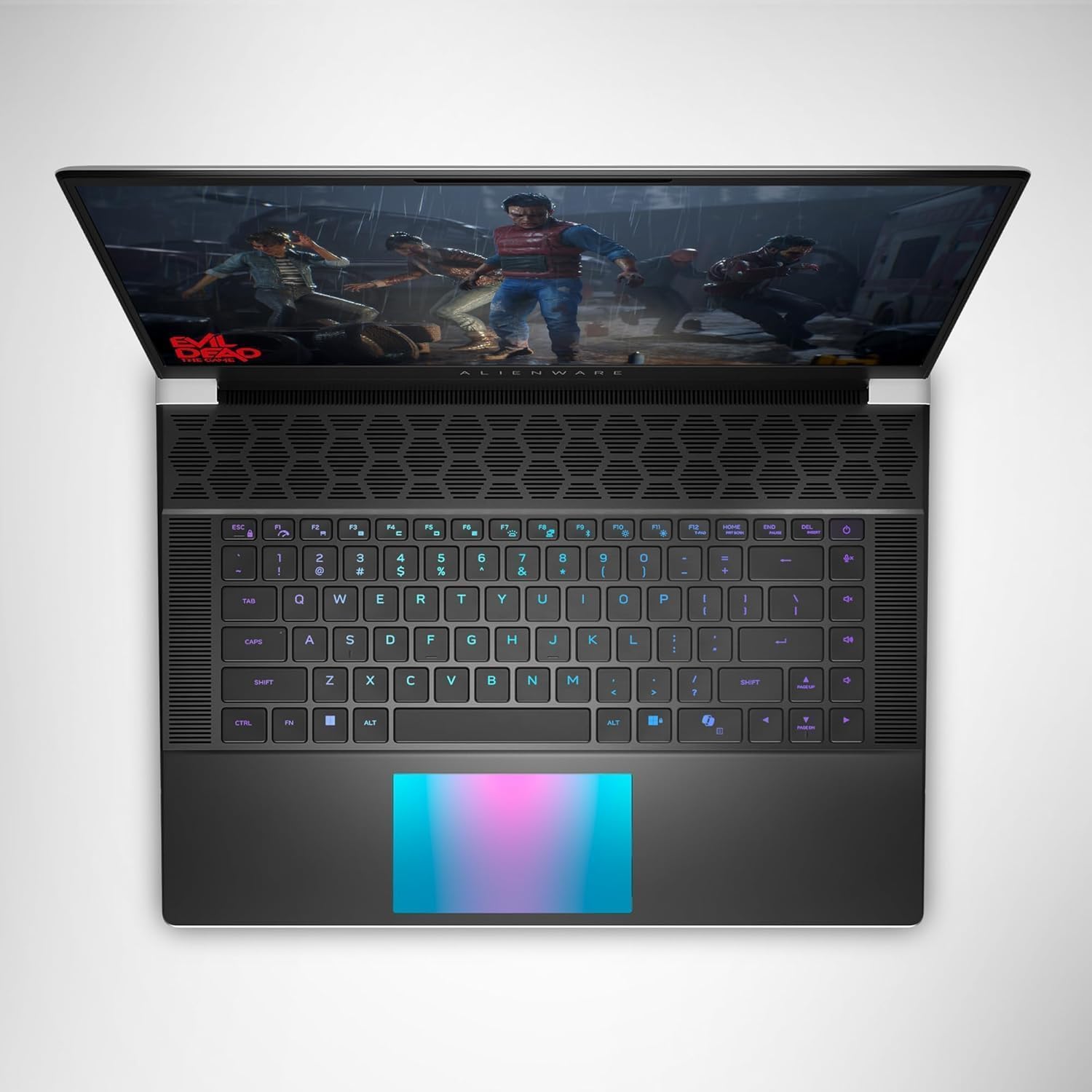
Hình 4: Trên cùng view of the Alienware X16, highlighting the customizable RGB keyboard and touchpad.
Trung tâm chỉ huy Alienware
Utilize the Alienware Command Center software to customize your gaming experience. This application allows you to manage performance presets, monitor system vitals, and configure AlienFX lighting effects and combinations for a personalized setup.

Figure 5: Alienware Command Center interface for system control and customization.
BẢO TRÌ
Hệ thống làm mát
The Alienware X16 incorporates advanced Alienware Cryo-tech™ cooling technology, featuring six laser-welded flat end heat pipes. To ensure optimal performance and longevity, regularly check and clean the ventilation grilles to prevent dust accumulation, which can impede airflow.
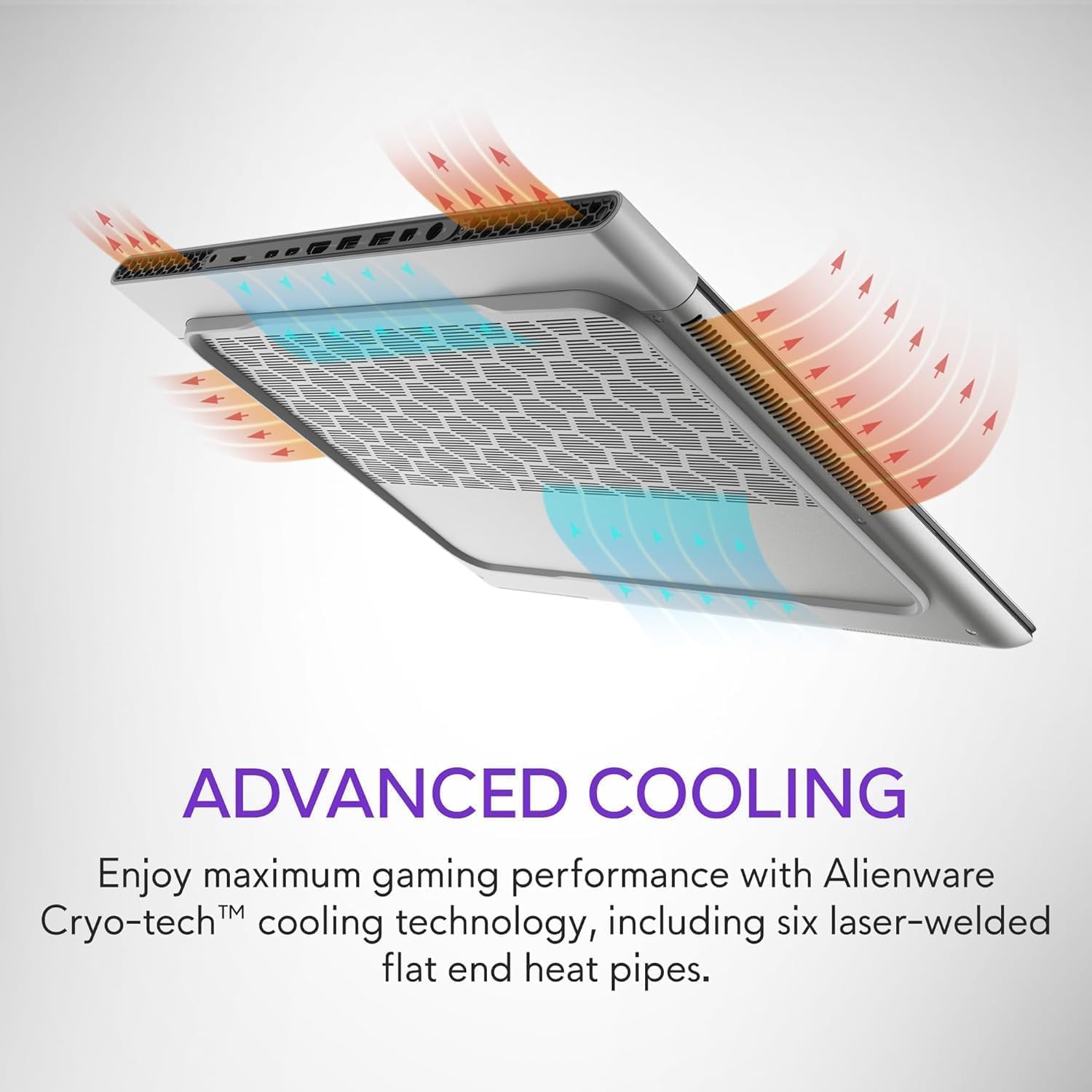
Figure 6: Illustration of the Alienware Cryo-tech™ advanced cooling system.
Chăm sóc chung
- Keep the laptop on a flat, stable surface to ensure proper ventilation.
- Tránh để máy tính xách tay tiếp xúc với nhiệt độ quá cao, ánh nắng trực tiếp hoặc độ ẩm cao.
- Clean the screen with a soft, lint-free cloth specifically designed for electronics.
- Use compressed air to clear dust from keyboard keys and ports.
Xử lý sự cố
Các vấn đề thường gặp và giải pháp
| Vấn đề | Nguyên nhân có thể | Giải pháp |
|---|---|---|
| Máy tính xách tay không bật được nguồn. | Không có nguồn điện, bộ chuyển đổi bị lỗi hoặc vấn đề về pin. | Ensure power adapter is securely connected to laptop and wall outlet. Check wall outlet with another device. Try a different power outlet. |
| Màn hình trống hoặc nhấp nháy. | Incorrect display settings, driver issue, or hardware problem. | Restart the laptop. Update graphics drivers. If using an external monitor, check cable connections. |
| Poor performance during gaming. | Overheating, outdated drivers, or background applications. | Ensure proper ventilation. Update graphics and chipset drivers. Close unnecessary background applications. Adjust power settings to high performance. |
| Sự cố kết nối Wi-Fi. | Driver issue, router problem, or interference. | Restart the laptop and router. Update wireless drivers. Check router settings. |
Đối với các vấn đề phức tạp hơn, vui lòng tham khảo bộ phận hỗ trợ chính thức của Alienware. webtrang web hoặc liên hệ với dịch vụ khách hàng.
Thông số kỹ thuật
| Thành phần | Chi tiết |
|---|---|
| Bộ xử lý | Intel® Core™ Ultra 9 processor 185H (24MB cache, 16 cores, 2.30 to 5.10 GHz P-Core) |
| Hệ điều hành | Windows 11 Pro |
| Card đồ họa | Card đồ họa NVIDIA GeForce RTX 4090 16GB GDDR6 |
| Trưng bày | 16.0" QHD+ (2560 x 1600) 240Hz 3ms, 100% DCI-P3, ComfortView Plus, NVIDIA G-SYNC + Advanced Optimus |
| Ký ức | 32GB, 2x16GB, LPDDR5X, 7467MT/s |
| Kho | 2 TB, M.2, PCIe NVMe, SSD |
| Bàn phím | English US AlienFX RGB backlit (per-key) Alienware X Series keyboard |
| Không dây | Intel Killer™ 1750 2x2 and Bluetooth 5.4 Wireless Card with Wifi 7 Ready |
| Máy ảnh | 1080p at 30fps, FHD HDR RGB+IR camera; Dual-array microphones |
| Âm thanh | Tweeter speaker: 2W x 2; Woofer speaker: 3W x 4 |
| Cổng | 2 USB 3.2 Gen 1, 1 USB-C 3.2 Gen 2 (DP), 1 Thunderbolt 4 (PD, DP), 1 Headset, 1 HDMI 2.1, 1 microSD-card slot |
| Ắc quy | 6 Cell, 90 Wh |
| Kích thước (CxRxS) | 18.57 mm (0.73 in.) x 364.81 mm (14.36 in.) x 289.98 mm (11.41 in.) |
| Trọng lượng (tối thiểu) | 2.66 kg (5.86 pound) |
Bảo hành và Hỗ trợ
Your Alienware X16 Gaming Laptop comes with a standard manufacturer's warranty. For detailed warranty terms and conditions, please refer to the documentation included in the box or visit the official Alienware support webđịa điểm.
Để được hỗ trợ kỹ thuật, tải xuống trình điều khiển hoặc hỗ trợ thêm, vui lòng truy cập Alienware Official Store hoặc cổng hỗ trợ chuyên dụng của họ.


