1. Giới thiệu
This manual provides detailed instructions for the installation, operation, and maintenance of your BOTSLAB G980H 4K Dual Dash Cam and G300H 2.5K Front Dash Cam. Please read this manual thoroughly before using the device to ensure proper functionality and safety. Keep this manual for future reference.
2. Nội dung gói hàng
Vui lòng xác minh rằng tất cả các mục được liệt kê dưới đây đều có trong gói hàng của bạn:
- BOTSLAB G980H 4K Dual Dash Cam Unit
- BOTSLAB G300H 2.5K Front Dash Cam Unit
- Hardwire Kit (Included as per product specifications)
- Cáp nguồn
- Rear Camera Cable (for G980H)
- Giá đỡ lắp
- Hướng dẫn sử dụng (Tài liệu này)
3. Sản phẩm hếtview
The BOTSLAB G980H and G300H dash cams are designed to provide high-quality video recording for vehicle safety and security. The G980H offers true 4K resolution for the front camera and 1080P for the rear, while the G300H provides 2.5K front recording. Both models incorporate advanced features for an enhanced driving experience.
Các tính năng chính:
- True 4K Front Recording (G980H): Utilizes a Sony IMX 415 sensor for superior clarity.
- 2.5K Front Recording (G300H): Provides enhanced clarity at 30 frames per second.
- Advanced Driver-Assistance Systems (ADAS): Powered by a 1.5TOPS AI NPU chip, offering real-time alerts for pedestrian collisions, vehicle movement ahead, lane departure, and headway monitoring.
- GPS tích hợp: Records journey details including speed and location, viewable on Google Maps via your phone.
- Chế độ đỗ xe 24/7: Provides theft and vandalism protection when the vehicle is off (requires dedicated hardwire kit, ASIN: B0D3QK86TQ).
- Cảm biến G: Tự động khóa video footage during collisions or sudden movements to prevent overwriting.
- Tầm nhìn ban đêm: Enhanced clarity in low-light conditions.
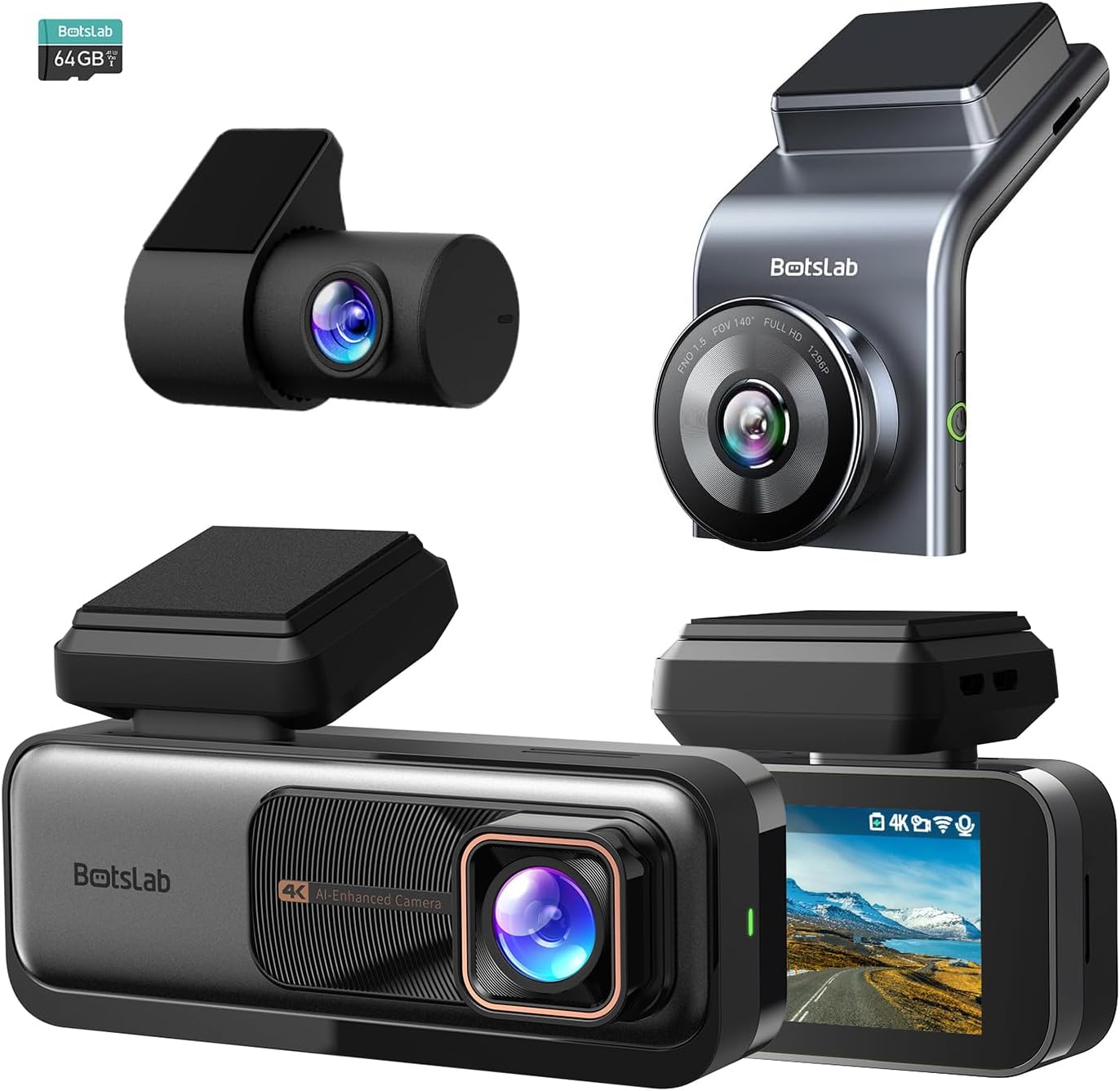
Hình 3.1: Hếtview of the BOTSLAB G980H and G300H dash cam units.

Figure 3.2: Illustration of the Sony IMX 415 sensor and the 6-layer lens with F1.5 aperture for enhanced clarity.
4. Thiết lập và Cài đặt
Proper installation is crucial for optimal performance of your dash cam. Follow these steps carefully:
4.1 Chuẩn bị cài đặt
- Chọn vị trí: Chọn một vị trí trên kính chắn gió sao cho không gây cản trở tầm nhìn của bạn. view, thường ở phía sauview gương.
- Vệ sinh kính chắn gió: Ensure the mounting area is clean and dry for secure adhesion.
- Lắp thẻ SD: Insert a compatible microSD card (not included, unless specified) into the dash cam's card slot. Ensure the card is formatted before first use (refer to Section 6.1).
4.2 Lắp đặt Camera hành trình
- Gắn giá đỡ vào thiết bị camera hành trình.
- Remove the protective film from the adhesive pad on the bracket.
- Firmly press the dash cam with the bracket onto the chosen windshield location for at least 30 seconds.
- For the G980H, install the rear camera on the rear windshield, ensuring a clear view.
4.3 kết nối nguồn
- Kết nối cáp nguồn vào cổng nguồn của camera hành trình.
- Route the power cable along the edge of the windshield and dashboard to the vehicle's 12V power outlet (cigarette lighter socket) or fuse box.
- For 24/7 Parking Mode functionality, connect the included hardwire kit to your vehicle's fuse box according to the hardwire kit's specific instructions. This allows the dash cam to receive continuous power even when the vehicle is off.
- Connect the rear camera cable to the G980H main unit and route it to the rear camera.

Figure 4.1: Recommended installation position for a wide, unobstructed view (170°).
5. Hướng dẫn vận hành
5.1 Hoạt động cơ bản
- Bật/Tắt nguồn: The dash cam will automatically power on and begin recording when the vehicle's ignition is turned on. It will power off automatically when the ignition is turned off (unless hardwired for parking mode).
- Ghi âm: Loop recording is enabled by default. Older fileCác tệp tin cũ sẽ bị ghi đè bởi các tệp tin mới khi thẻ nhớ đầy.
- Ghi hình khẩn cấp (Cảm biến G): In the event of a collision or sudden braking, the built-in G-Sensor will automatically detect the event and lock the current video segment, preventing it from being overwritten.
5.2 Hệ thống hỗ trợ lái xe nâng cao (ADAS)
The dash cam features an AI NPU chip that provides real-time ADAS alerts to enhance driving safety:
- Cảnh báo va chạm với người đi bộ: Alerts you to potential pedestrian collisions.
- Vehicle Movement Ahead: Thông báo cho bạn khi xe phía trước bắt đầu di chuyển.
- Cảnh báo chệch làn đường: Alerts you if you unintentionally drift out of your lane.
- Headway Monitoring: Helps maintain a safe distance from the vehicle ahead.
- Driver Fatigue Alerts: Provides alerts every 2 hours to remind you to take a break.

Figure 5.1: Visual representation of ADAS alerts and the AI NPU chip.

Hình 5.2: Ví dụample of a timely alert for front vehicle departure.

Hình 5.3: Ví dụample of pedestrian recognition with voice reminders.
5.3 Built-in GPS Functionality
The integrated GPS module records your driving data, including speed and location. This data can be viewed on Google Maps via a connected smartphone application, ensuring your travel data remains private and secure.

Figure 5.4: Visualization of GPS route recording and data display.
5.4 Chế độ đỗ xe
When connected with the dedicated hardwire kit (ASIN: B0D3QK86TQ), the dash cam can continue to monitor your vehicle even when it is turned off. This mode provides protection against theft and vandalism by recording events while parked.
5.5 Night Vision and Clarity
Both dash cam models are equipped with advanced sensors and optics (like the Sony IMX 415 in G980H) to ensure clear video capture even in low-light conditions or at night, without relying on streetlights.

Hình 5.5: Ví dụample of clear video capture in dark road conditions.

Figure 5.6: Comparison showing enhanced clarity with the G300H's 2.5K resolution.
6. Bảo trì
6.1 Quản lý thẻ SD
- Định dạng: It is recommended to format the microSD card regularly (e.g., once a month) to prevent data corruption and ensure optimal recording performance. This can usually be done through the dash cam's settings menu.
- Thay thế thẻ: MicroSD cards have a limited lifespan. If you experience frequent recording errors or corrupted files, consider replacing the card.
6.2 Vệ sinh thiết bị
- Use a soft, dry cloth to clean the dash cam's lens and body.
- Không sử dụng chất tẩy rửa hóa học hoặc dung môi vì chúng có thể làm hỏng thiết bị.
KHAI THÁC. Xử lý sự cố
Nếu bạn gặp sự cố với camera hành trình, hãy tham khảo các vấn đề và giải pháp thường gặp sau đây:
| Vấn đề | Nguyên nhân có thể / Giải pháp |
|---|---|
| Camera hành trình không bật được. |
|
| Ghi âm dừng lại hoặc files bị hỏng. |
|
| GPS signal is weak or not found. |
|
| ADAS alerts are not functioning. |
|
8. Thông số kỹ thuật
| Tính năng | Sự miêu tả |
|---|---|
| Tên mẫu | G980H (Dual), G300H (Front) |
| Thương hiệu | BOTSLAB |
| Độ phân giải quay video | 4K (G980H Front), 1080P (G980H Rear), 2.5K (G300H Front) |
| Tính năng đặc biệt | Built-In GPS, ADAS, G-Sensor, 24/7 Parking Mode (with hardwire kit) |
| Công nghệ kết nối | USB, Wireless (Wi-Fi for app connectivity) |
| Màu sắc | Đen |
| Định hướng | Front and Inside (G980H), Front (G300H) |
| Các thành phần bao gồm | Bộ Hardwire |
| Nhà sản xuất | BOTSLAB |
9. Bảo hành và Hỗ trợ
For warranty information and technical support, please contact BOTSLAB customer service directly. Details can typically be found on the official BOTSLAB website or through the contact information provided with your purchase documentation.


