1. Giới thiệu
This manual provides detailed instructions for the installation, operation, and maintenance of your Reobiux D20-1P 2K Outdoor Surveillance Camera. Please read this manual thoroughly before using the product to ensure proper functionality and safety.
2. Nội dung gói hàng
Kiểm tra xem tất cả các mặt hàng được liệt kê dưới đây có trong gói hàng của bạn không. Nếu có bất kỳ mặt hàng nào bị thiếu hoặc hư hỏng, vui lòng liên hệ với bộ phận hỗ trợ khách hàng.
- 1x Reobiux D20-1P Solar PTZ Camera
- 1x Solar Collector
- 1x Hướng dẫn sử dụng
- 1x đế gắn
- 1x Power Supply (for initial charging)
- 1x Screws Bag (for installation)
- 1x Type-C Charging Line
3. Sản phẩm hếtview
The Reobiux D20-1P is a 2K outdoor surveillance camera designed for comprehensive home security. It features dual lenses, 360° Pan-Tilt-Zoom (PTZ) capabilities, and operates wirelessly via Wi-Fi. Key features include PIR motion detection, color night vision, two-way audio, and an IP66 weatherproof rating, powered by a solar panel and rechargeable battery.
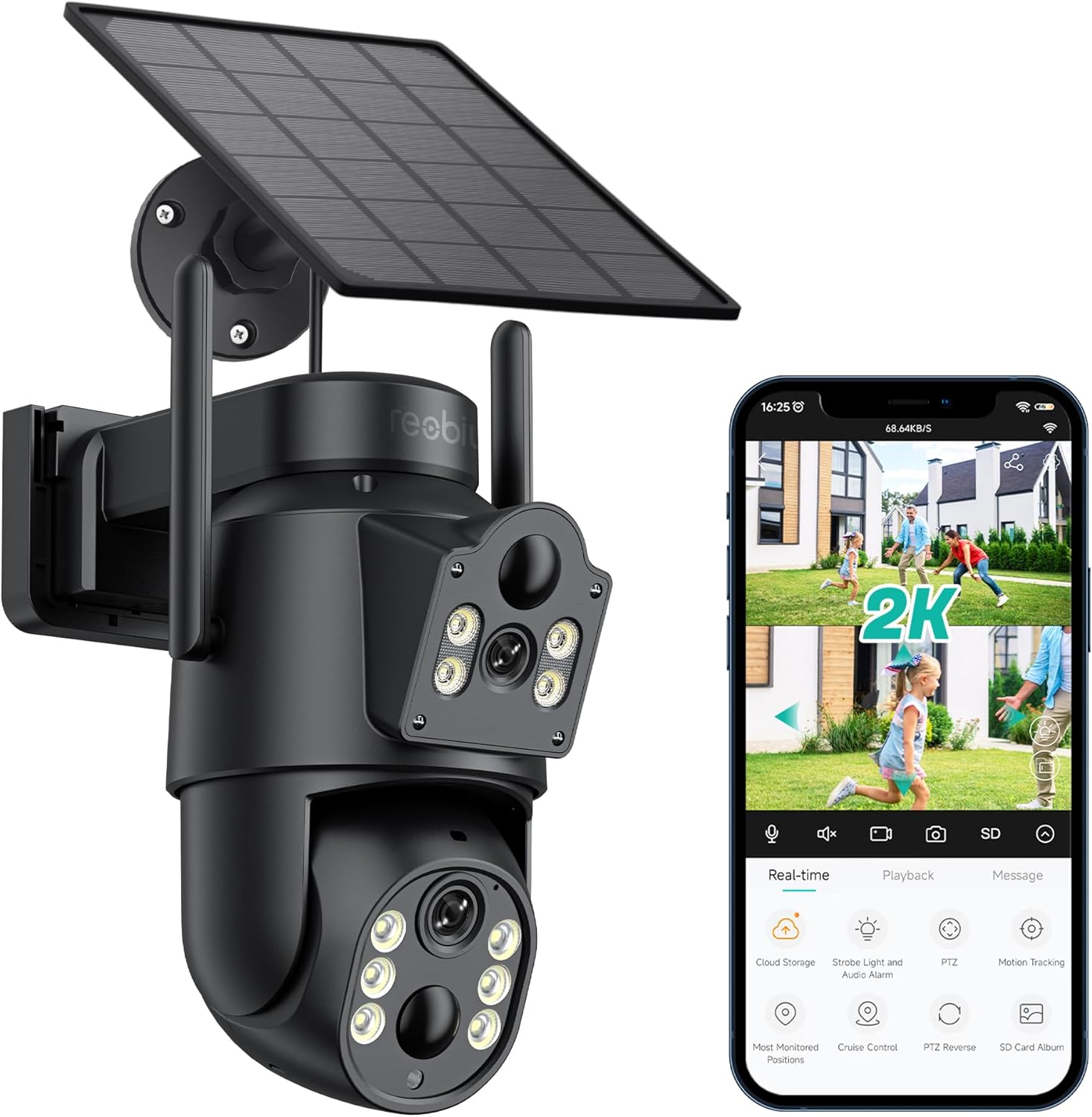
Hình 3.1: Reobiux D20-1P Solar PTZ Camera and its mobile application interface showing real-time monitoring, playback, and various control options.
Các tính năng chính:
- 2K QHD High Resolution: Cung cấp video rõ ràng và chi tiếttage.
- Thiết kế hai thấu kính: Combines a fixed lens with a rotating lens for comprehensive coverage.
- Chức năng PTZ 360°: Allows remote control of pan, tilt, and zoom for flexible viewgóc nghiêng.
- Solar Powered with Rechargeable Battery: Ensures continuous operation with minimal manual charging.
- Phát hiện chuyển động PIR: Intelligently detects human movement to reduce false alarms.
- Màu sắc nhìn ban đêm: Offers full-color video even in low-light conditions, alongside infrared night vision.
- Âm thanh hai chiều: Giúp giao tiếp với khách đến thăm hoặc ngăn chặn kẻ xâm nhập.
- Chống chịu thời tiết IP66: Được thiết kế để chịu được nhiều điều kiện thời tiết ngoài trời khác nhau.
- Wireless Wi-Fi Connectivity: Easy setup and remote access via smartphone.
4. Hướng dẫn cài đặt
4.1 Sạc ban đầu
Before first use, fully charge the camera's internal battery using the provided Type-C charging line and power supply. This ensures the camera has sufficient power for initial setup and operation, especially if solar charging conditions are not optimal immediately after installation.
4.2 Cài đặt ứng dụng và tạo tài khoản
- Tải xuống iCSee Tải ứng dụng từ cửa hàng ứng dụng trên điện thoại thông minh của bạn (iOS App Store hoặc Google Play Store).
- Cài đặt ứng dụng và mở nó.
- Follow the on-screen instructions to create a new account or log in if you already have one.
4.3 Camera Connection to Wi-Fi
- Ensure your camera is powered on.
- In the iCSee app, tap the "+" icon to add a new device.
- Select the option for "Wi-Fi Camera" or "Add Device by AP Hotspot" (refer to app for exact wording).
- Follow the app's instructions to connect the camera to your 2.4GHz Wi-Fi network. You may need to scan a QR code displayed on your phone with the camera, or listen for a sound prompt.
- Once connected, you can name your camera and begin monitoring.
4.4 Gắn máy ảnh
Choose a location that provides optimal surveillance coverage and receives direct sunlight for the solar panel. Ensure the camera is within range of your Wi-Fi network.
- Chọn địa điểm: Identify a suitable wall or surface for mounting. Consider the camera's viewing angle (355° pan, 90° tilt) and the solar panel's exposure to sunlight.
- Đánh dấu điểm khoan: Use the mounting base as a template to mark the screw holes on the wall.
- Lỗ khoan: Khoan các lỗ mồi tại các vị trí đã đánh dấu. Lắp đặt neo tường nếu cần.
- Gắn đế lắp đặt: Cố định đế gắn vào tường bằng các vít được cung cấp.
- Gắn Camera: Mount the camera onto the secured base.
- Điều chỉnh tấm pin mặt trời: Đặt tấm pin mặt trời ở vị trí tối ưu để thu được nhiều ánh sáng mặt trời nhất trong suốt cả ngày.

Hình 4.1: Illustration of the camera mounted with its solar panel, highlighting the fixed and rotating lenses and the benefit of continuous solar power.
5. Hướng dẫn vận hành
5.1 Trực tiếp View và Phát lại
Open the iCSee app and select your camera to access the live viewTừ đây, bạn có thể:
- Giám sát thời gian thực: View nguồn cấp video trực tiếp.
- Kiểm soát PTZ: Use the on-screen joystick to pan (355°) and tilt (90°) the camera.
- Thu phóng kỹ thuật số: Pinch to zoom on the live feed.
- Phát lại: Truy cập foo đã ghitage stored on the SD card or cloud storage.

Hình 5.1: Demonstrates the superior clarity of 2K QHD resolution compared to 1080P, providing more details for monitoring.
5.2 Phát hiện chuyển động và cảnh báo
The camera utilizes PIR (Passive Infrared) intelligent detection to identify human movement, minimizing false alarms from pets or swaying branches.
- Bật/Tắt: Kích hoạt hoặc tắt tính năng phát hiện chuyển động trong cài đặt ứng dụng.
- Điều chỉnh độ nhạy: Adjust the PIR sensor's sensitivity to suit your environment.
- Thông báo báo động: Nhận thông báo đẩy tức thì trên điện thoại thông minh khi phát hiện chuyển động.
- Báo động âm thanh và ánh sáng: Configure the camera to trigger a strobe light and audible alarm upon detection.

Hình 5.2: The camera's PIR intelligent detection distinguishes human movement from other objects, reducing unnecessary alerts.

Hình 5.3: When motion is detected, the camera can send real-time push notifications and activate a sound and light alarm to deter intruders.
5.3 Chế độ nhìn ban đêm
The camera offers two night vision modes for clear visibility in the dark:
- Spotlight Full Color Night Vision: Utilizes built-in spotlights to provide full-color video in low-light conditions.
- Spotlight Infrared Night Vision: Uses infrared LEDs for black-and-white video in complete darkness, with a range of up to 30 meters.
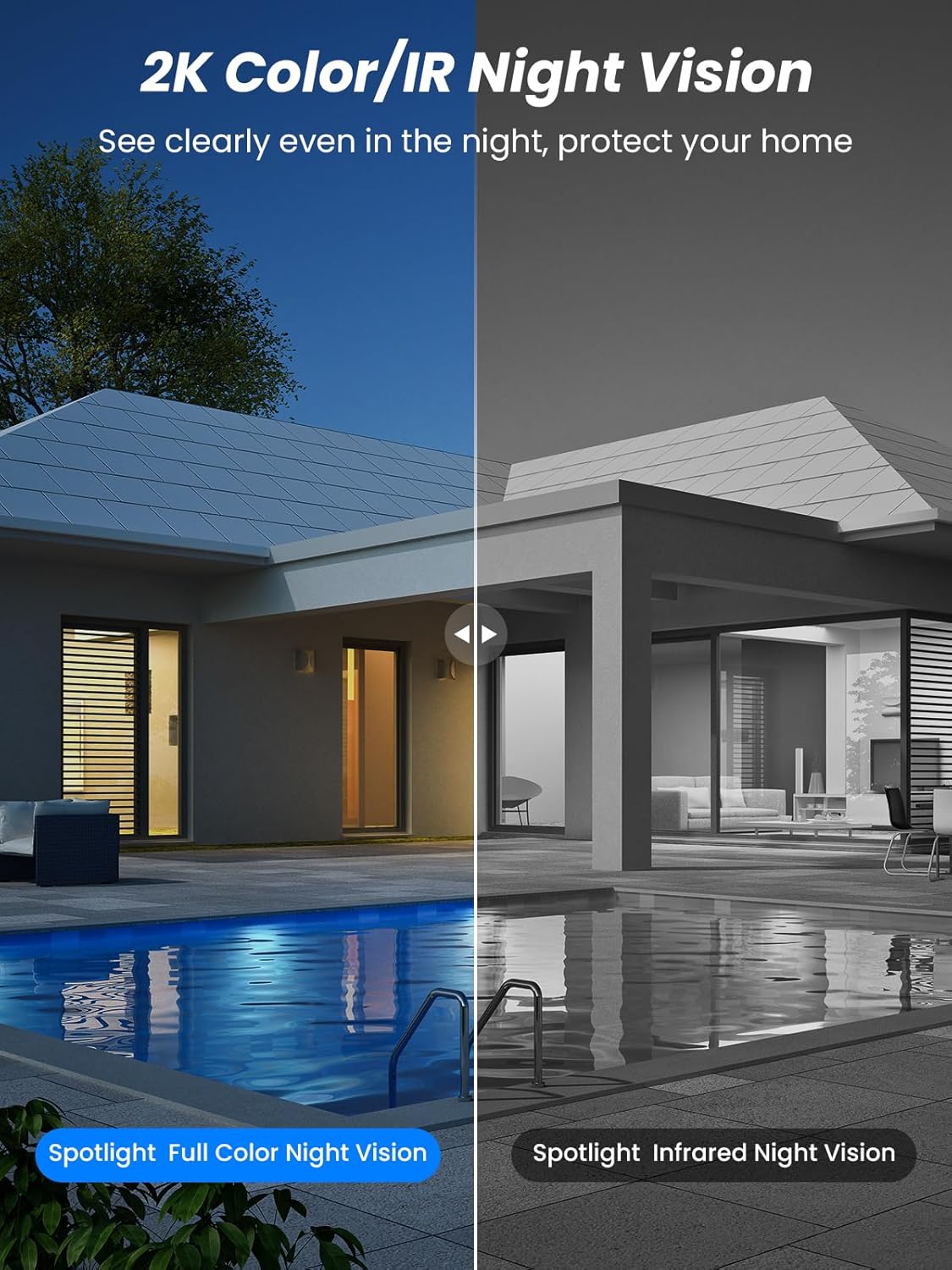
Hình 5.4: Illustrates the difference between full-color night vision, enabled by spotlights, and traditional infrared night vision.
5.4 Âm thanh hai chiều
Micrô và loa tích hợp cho phép giao tiếp hai chiều.
- Nói chuyện: Chạm vào biểu tượng micro trong ứng dụng để nói chuyện qua loa của camera.
- Nghe: The camera's microphone captures audio from its surroundings.

Hình 5.5: The two-way audio function allows for direct communication through the camera, useful for interacting with visitors or delivery personnel.
6. Bảo trì
- Vệ sinh: Thường xuyên lau sạch ống kính máy ảnh và tấm pin mặt trời bằng khăn mềm.amp cloth to ensure optimal performance and clear image quality. Avoid abrasive cleaners.
- Tình trạng pin: While solar-powered, extreme weather or prolonged periods of low sunlight may require manual charging. Monitor battery levels via the app.
- Cập nhật chương trình cơ sở: Check the iCSee app regularly for available firmware updates to ensure your camera has the latest features and security enhancements.
- Bảo vệ thời tiết: The camera is IP66 weatherproof, designed to withstand rain, snow, and sun. However, ensure all connections are secure to maintain water resistance.

Hình 6.1: The IP66 rating ensures the camera's durability and functionality in various outdoor weather conditions, including snow, rain, and direct sunlight.
KHAI THÁC. Xử lý sự cố
- Camera không kết nối được với Wi-Fi:
- Ensure the camera is within range of your 2.4GHz Wi-Fi network. 5GHz networks are not supported.
- Xác minh mật khẩu Wi-Fi của bạn là chính xác.
- Khởi động lại bộ định tuyến và camera.
- If issues persist, try resetting the camera (refer to app or product for reset button location).
- Pin không sạc được hoặc nhanh hết pin:
- Ensure the solar panel is clean and receives direct sunlight for several hours daily.
- Kiểm tra kết nối giữa tấm pin mặt trời và camera.
- If in a low-light environment, manually charge the camera using the Type-C cable.
- Các sự kiện phát hiện chuyển động thường xuyên hoặc trực tiếp view streaming can consume battery faster. Adjust settings if needed.
- False motion detection alarms:
- Adjust the PIR motion detection sensitivity in the iCSee app.
- Ensure the camera is not pointed at areas with constant movement (e.g., busy roads, swaying trees) if not intended for monitoring.
- Chất lượng hình ảnh kém:
- Vệ sinh ống kính máy ảnh.
- Ensure sufficient lighting for optimal image capture, especially at night.
- Hãy kiểm tra cường độ tín hiệu Wi-Fi; tín hiệu yếu có thể ảnh hưởng đến chất lượng phát video trực tuyến.
8. Thông số kỹ thuật
| Tính năng | Chi tiết |
|---|---|
| Tên mẫu | D20-1P |
| Độ phân giải quay video | 2.5K |
| Độ phân giải video hiệu quả | Độ phân giải 2K QHD |
| Công nghệ truyền thông không dây | Wi-Fi (2.4 GHz) |
| Yếu tố hình thức | mái vòm |
| Viewgóc ing | Xoay ngang 355 độ, xoay dọc 90 độ. |
| Loại cài đặt | Treo tường |
| Tầm nhìn ban đêm | 30 mét |
| Tốc độ khung hình | 25 khung hình/giây |
| Vật liệu | Nhựa |
| Tậptage | 12 Vôn (DC) |
| Cái gì?tage | 5 watt |
| Nguồn điện | Chạy bằng pin, chạy bằng năng lượng mặt trời |
| Pin | 3 pin Lithium Ion (đi kèm) |
| Giao thức kết nối | Wi-Fi |
| Loại bộ điều khiển | Ứng dụng iCSee |
| Tính năng đặc biệt | Night Vision (Color/IR), PIR Motion Detection, Two-Way Audio, IP66 Weatherproof |
| Trọng lượng sản phẩm | 1.06kg |
| Kích thước bưu kiện | 21.7 x 19.5 x 13.8cm |
9. Bảo hành và Hỗ trợ
Reobiux offers a Bảo hành 1 năm for this product. For any issues or inquiries, please do not hesitate to reach out to our customer service. We provide 20 hours of online service to assist you.
For support, please refer to the contact information provided with your purchase or within the iCSee application.


