1. Giới thiệu
The Eureka Forbes Smart Air Purifier 355 is designed to provide clean and healthy indoor air. This device features a 4-stage advanced purification system, including a True H13 HEPA filter, and offers smart control via Wi-Fi connectivity. It is capable of purifying air in spaces up to 480 sq. ft. by removing 99.97% of impurities as small as 0.1 µm.
This manual provides detailed instructions for the proper setup, operation, and maintenance of your air purifier to ensure optimal performance and longevity.
2. Thông tin an toàn quan trọng
Vui lòng đọc kỹ hướng dẫn trước khi sử dụng thiết bị. Giữ lại hướng dẫn này để tham khảo sau.
- Đảm bảo nguồn điện voltage phù hợp với nhãn đánh giá trên thiết bị.
- Không sử dụng thiết bị khi dây điện hoặc phích cắm bị hỏng.
- Giữ cho đầu vào và đầu ra của không khí không có vật cản.
- Không nhúng thiết bị vào nước hoặc chất lỏng khác.
- Rút phích cắm của thiết bị trước khi vệ sinh hoặc thực hiện bất kỳ bảo trì nào.
- Thiết bị này chỉ được sử dụng trong nhà.
3. Sản phẩm hếtview
The Eureka Forbes Smart Air Purifier 355 features a sleek design with 360° air intake for comprehensive purification. The top panel includes a digital display and touch controls for easy operation.
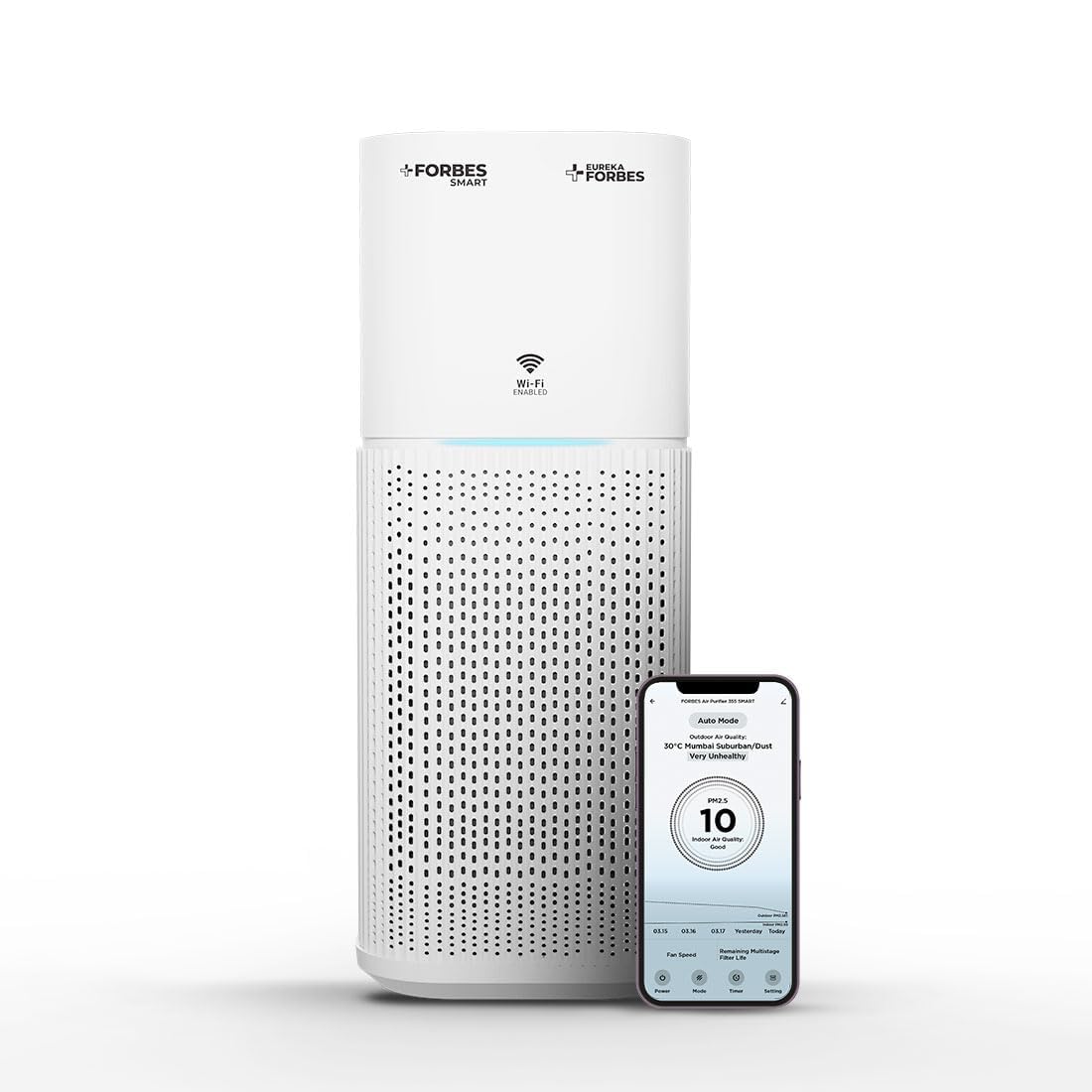
Figure 3.1: Main unit of the Eureka Forbes Smart Air Purifier 355.
Tính năng của bảng điều khiển:

Figure 3.2: Top control panel with digital display and touch buttons.
- Nút nguồn: Bật / tắt thiết bị.
- Nút chế độ: Cycles through Auto, Sleep, and Manual modes.
- Nút Tốc độ: Điều chỉnh tốc độ quạt (12 cấp độ).
- Nút hẹn giờ: Sets operation timer (1-12 hours).
- Plasma Button: Activates/deactivates plasma ion function.
- Nút điều chỉnh độ sáng: Điều chỉnh độ sáng màn hình.
- Chỉ báo Wi-Fi: Hiển thị trạng thái kết nối Wi-Fi.
- PM 2.5 Display: Real-time air quality indicator.
Hệ thống lọc:
The purifier utilizes a 4-stage advanced filtration system to capture various airborne particles and odors.

Hình 3.3: Phát nổ view của 4-staghệ thống lọc e.
- Bộ lọc trước: Captures large particles like dust, lint, and pet hair.
- Bộ lọc than hoạt tính: Absorbs odors, volatile organic compounds (VOCs), and harmful gases.
- True H13 HEPA Filter: Traps 99.97% of airborne particles as small as 0.3 microns, including pollen, dust mites, mold spores, and pet dander.
- Plasma Filtration: Generates positive and negative ions to eliminate microbial contaminants and enhance air freshness.
4. Thiết lập
4.1 Unboxing and Filter Installation
Before first use, ensure all packaging materials are removed and the filter is correctly installed.
- Cẩn thận lấy máy lọc không khí ra khỏi bao bì.
- Lật ngược thiết bị và xoay phần đế ngược chiều kim đồng hồ để mở khóa và tháo rời.
- Remove the integrated filter from its protective plastic bag.
- Insert the filter back into the unit, ensuring it is seated properly.
- Lắp lại đế và xoay theo chiều kim đồng hồ để khóa chặt.
Video 4.1: Demonstrates the unboxing and filter installation process for the air purifier.
4.2 kết nối nguồn
Place the air purifier on a flat, stable surface. Connect the power adapter to the unit and then plug it into a suitable electrical outlet.
5. Hướng dẫn vận hành
5.1 Hoạt động cơ bản
- Nhấn nút Quyền lực button to turn the air purifier on. The PM 2.5 display will show the current air quality.
- Nhấn nút Cách thức nút để chuyển đổi giữa các chế độ hoạt động:
- Chế độ tự động: The fan speed adjusts automatically based on the detected air quality (PM 2.5 levels) and ambient light.
- Chế độ ngủ: Operates at the lowest fan speed with dimmed lights for quiet operation during rest.
- Chế độ thủ công: Allows manual selection of fan speed.
- In Manual Mode, press the Tốc độ button to select from 12 fan speed levels.
- Nhấn nút Bộ đếm thời gian button to set the desired operating duration from 1 to 12 hours. The unit will automatically turn off after the set time.
- Nhấn nút Huyết tương button to activate or deactivate the plasma ion function for enhanced air purification.
- Nhấn nút mờ hơn button to adjust the brightness of the display lights.
Video 5.1: Tóm tắt nhanhview of key features and controls of the air purifier.
5.2 Wi-Fi Enabled Smart Control
The air purifier can be controlled remotely using a dedicated smartphone application.

Figure 5.1: Smart app interface showing air quality and control options.
- Download the Eureka Forbes Smart app from your smartphone's app store.
- Follow the in-app instructions to connect your air purifier to your home Wi-Fi network.
- Once connected, you can manage all settings, monitor real-time PM 2.5 levels, and adjust modes/speeds from anywhere.
6. Bảo trì
6.1 Thay thế bộ lọc
The air purifier is equipped with a filter replacement indicator. When the indicator lights up, it is time to replace the integrated filter to maintain optimal performance.
- Rút phích cắm máy lọc không khí ra khỏi ổ cắm điện.
- Lật ngược thiết bị và xoay phần đế ngược chiều kim đồng hồ để mở khóa.
- Tháo bỏ bộ lọc cũ và vứt bỏ đúng cách.
- Insert a new Eureka Forbes replacement filter into the unit.
- Đặt lại phần đế và xoay theo chiều kim đồng hồ để khóa lại.
- Plug in the unit. Reset the filter replacement indicator by pressing and holding the appropriate button (refer to the control panel diagram for specific button, usually the Timer or Mode button for a few seconds).
6.2 Vệ sinh thiết bị
- Luôn rút phích cắm của thiết bị trước khi vệ sinh.
- Lau các bề mặt bên ngoài bằng giẻ mềm, damp vải. Không sử dụng chất tẩy rửa có tính mài mòn hoặc dung môi.
- Làm sạch các lỗ thông gió hút và thoát khí bằng bàn chải mềm hoặc đầu hút của máy hút bụi để loại bỏ bụi bẩn tích tụ.
- Không rửa bộ lọc.
KHAI THÁC. Xử lý sự cố
| Vấn đề | Nguyên nhân có thể | Giải pháp |
|---|---|---|
| Thiết bị không bật. | No power supply; power cord not connected; unit damaged. | Check power outlet; ensure power cord is securely plugged in; contact customer support if damaged. |
| Hiệu suất lọc không khí kém. | Bộ lọc bị bẩn hoặc cần thay thế; các cửa hút/thoát khí bị tắc nghẽn. | Check filter replacement indicator and replace filter if necessary; clear any obstructions from vents. |
| Tiếng ồn bất thường trong quá trình hoạt động. | Foreign object inside; unit not on a stable surface. | Unplug and check for foreign objects; place unit on a flat, stable surface. |
| Sự cố kết nối Wi-Fi. | Incorrect Wi-Fi password; router too far; app not configured correctly. | Verify Wi-Fi password; move unit closer to router; reconfigure Wi-Fi settings in the app. |
8. Thông số kỹ thuật
| Tính năng | Chi tiết |
|---|---|
| Thương hiệu | Eureka Forbes |
| Số hiệu mẫu | GAPDF400Z1SM00 |
| Màu sắc | Trắng |
| Kích thước sản phẩm | 24.3D x 24.3W x 53.5H Centimet |
| Diện tích sàn bao phủ | 480 feet vuông |
| CADR | 355 m³/Hr |
| Loại lọc | 4-Stage (Pre-filter, Activated Carbon, True H13 HEPA, Plasma) |
| Kích thước giữ hạt | 0.1 micron |
| Mức độ tiếng ồn | 63 Decibel (Tối đa) |
| Loại bộ điều khiển | Mobile Application, Touch Control |
| Cái gì?tage | 35 Watt |
| Nguồn điện | Điện có dây |
| Trọng lượng sản phẩm | 4.3 Kilôgam |
| Các thành phần bao gồm | Air Purifier, Integrated Filter, Adapter |
9. Bảo hành và Hỗ trợ
Your Eureka Forbes Smart Air Purifier 355 comes with a Bảo hành toàn diện 1 năm. For any assistance or service requests, please contact Eureka Forbes customer support.
- Hỗ trợ khách hàng: Available for 12 hours daily.
- Mạng lưới dịch vụ: Presence in over 700 cities and 17,000+ pincodes.
- Bảo hành mở rộng: A 2-Year Extended Warranty Plan by Onsitego is available for purchase.

Figure 9.1: Information on Eureka Forbes' extensive service network and support.
For further details or to register your product, please visit the official Eureka Forbes website or refer to the product detail page on Amazon.