1. Giới thiệu
Thank you for choosing the BOTSLAB G980H 4K Dash Cam with Hardwire Kit. This manual provides detailed instructions for the installation, operation, and maintenance of your new dash camera system. Please read this manual thoroughly before using the product to ensure proper functionality and safety.
2. Sản phẩm hếtview
The BOTSLAB G980H is a high-performance dash camera system designed to capture clear video footage of your journeys. The front camera records in true 4K resolution, while the rear camera records in 1080P (optimized to approximately 2K via BOTSLAB algorithm). Both cameras utilize the Sony IMX 415 sensor, providing clear video capture, including in low-light conditions. The system includes advanced features such as 24/7 parking mode, ADAS (Advanced Driver-Assistance Systems), and built-in GPS for reliable recording and enhanced driving safety.
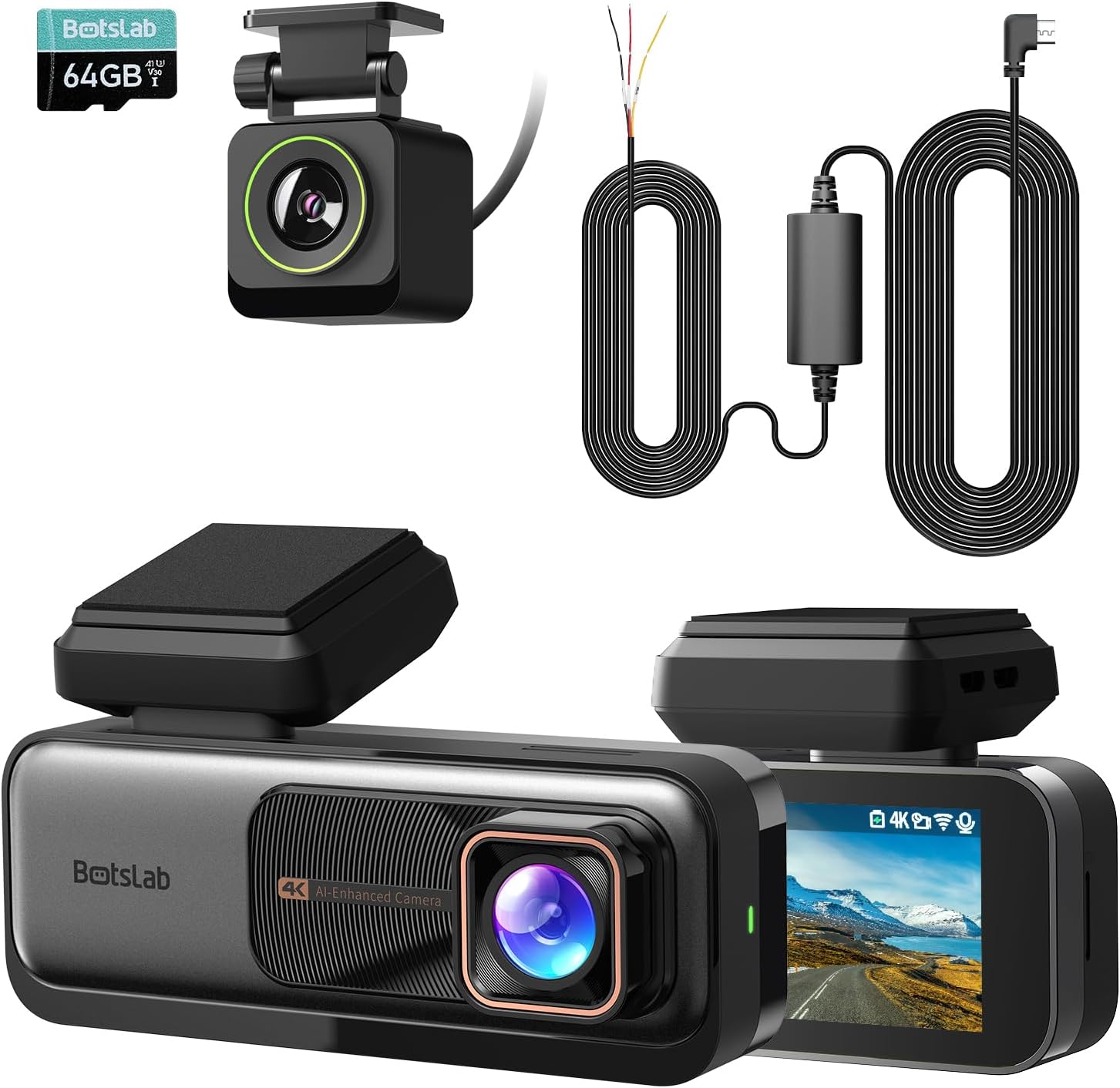
Image: The main components of the BOTSLAB G980H Dash Cam system, including the front camera, rear camera, and hardwire kit.
3. Có gì trong hộp
Khi mở hộp, vui lòng kiểm tra xem có đầy đủ các mục sau đây không:
- BOTSLAB G980H Dash Cam (Front Unit)
- Camera sau
- Bộ Hardwire
- ADAS (Advanced Driver-Assistance Systems) functionality
- Micro USB cable (integrated with hardwire kit)
- Hướng dẫn sử dụng
Hình ảnh: Minh họa trực quan các vật phẩm có trong bao bì sản phẩm.
4. Thiết lập và Cài đặt
Proper installation is crucial for optimal performance. The G980H dash cam is designed for windshield mounting.
4.1 Lắp đặt bộ dây dẫn cứng
The included hardwire kit enables 24/7 parking mode functionality. It requires connection to your vehicle's fuse box.
- Step 1: Test Power Sources
Use a multimeter to check for a 12V constant power source and an ACC (Accessory) power source in your car's fuse box. - Step 2: Set Up the Wires
Connect the Yellow Wire (ACC) to the accessory power, the Red Wire (VCC+) to the constant power, and the Black Wire (GND-) to a grounding point on the vehicle chassis. - Step 3: Connect the Dash Cam
Attach the micro USB port of the hardwire kit to your BOTSLAB G980H dash cam. Ensure the cable is routed neatly and securely.

Image: A multimeter being used to test fuse box connections for constant and ACC power.

Hình ảnh: Cận cảnh view of the hardwire kit's yellow, red, and black wires connected to the car's fuse box and ground.
Image: The micro USB connector of the hardwire kit ready to be plugged into the dash cam.

Image: A diagram showing the micro USB port, power conversion box, and the three wires (ACC, VCC+, GND-) of the hardwire kit.

Image: The 9ft long hardwire cable, designed for compatibility with various car models.
4.2 Dash Cam Mounting
Mount the front dash cam on your windshield, ideally behind the rearview gương, để đảm bảo nó không cản trở tầm nhìn của bạn view. Position the rear camera on the rear window for optimal coverage.
4.3 Lắp thẻ nhớ
Insert a high-quality U3 or V30 rated microSD card (not included) into the designated slot on the dash cam. Ensure it is inserted correctly until it clicks into place. The dash cam requires a memory card for recording footage.
5. Hướng dẫn vận hành
5.1 Hoạt động cơ bản
- Bật/Tắt nguồn: The dash cam will automatically power on and begin recording when your vehicle starts, and power off when the engine is turned off (if connected via ACC power).
- Ghi vòng lặp: The G980H features seamless loop recording, continuously overwriting the oldest footage khi thẻ nhớ đầy.
- Cảm biến G: In the event of a sudden impact or collision, the built-in G-Sensor will automatically lock the current video segment to prevent it from being overwritten.
- Chất lượng video: The front camera records in 4K resolution, providing a wide 170-degree view của con đường phía trước.

Image: Illustration of the dash cam's 4K resolution and 170-degree wide-angle recording capability.
5.2 ADAS Features (Advanced Driver-Assistance Systems)
The G980H is equipped with a 1.5TOPS AI NPU chip and BOTSLAB's AI algorithm to provide real-time driving alerts:
- Cảnh báo va chạm với người đi bộ: Alerts you to potential collisions with pedestrians.
- Front Vehicle Starts Moving: Notifies you when the vehicle ahead begins to move, useful in traffic.
- Cảnh báo chệch làn đường: Alerts if you unintentionally drift out of your lane.
- Headway Monitoring Warning: Helps maintain a safe distance from the vehicle in front.
- Driver Fatigue Alerts: Provides alerts every 2 hours to encourage breaks and prevent fatigue.

Image: Visual representation of the various ADAS warnings provided by the dash cam, along with illustrations of the AI NPU chip and built-in GPS.
5.3 24/7 Parking Mode
With the hardwire kit installed, the G980H can monitor your vehicle even when it's turned off, providing protection against theft and vandalism.
- The dash cam will automatically switch to parking mode when the vehicle is parked.
- It will record emergencies and suspicious activities around your car.

Image: The dash cam display showing options for Time-Lapse Recording (Parking Mode) and Normal Recording (Driving Mode), illustrating its 24-hour monitoring capability.
5.4 GPS Integration
The built-in GPS module integrates with Google Maps, allowing you to track your driving path. The dash cam's display will show your real-time speed, and recorded videos will include speed records.

Image: The dash cam screen showing real-time speed and GPS data, with a map overlay indicating the driving path.
6. Bảo trì
- Vệ sinh: Hãy dùng khăn mềm, khô để lau ống kính và màn hình máy ảnh. Tránh sử dụng chất tẩy rửa có tính ăn mòn hoặc dung môi.
- Thẻ nhớ: Regularly format the memory card (at least once a month) to ensure optimal performance and prevent data corruption. Use a high-quality U3 or V30 rated microSD card.
- Cập nhật chương trình cơ sở: Check the BOTSLAB official webHãy thường xuyên truy cập trang web để cập nhật phần mềm, đảm bảo camera hành trình của bạn luôn có các tính năng mới nhất và sửa lỗi.
KHAI THÁC. Xử lý sự cố
| Vấn đề | Nguyên nhân có thể / Giải pháp |
|---|---|
| Camera hành trình không bật được. |
|
| Chất lượng video kém hoặc mờ. |
|
| Chế độ đỗ xe không hoạt động. |
|
| GPS signal is weak or not found. |
|
8. Thông số kỹ thuật
| Tính năng | Chi tiết |
|---|---|
| Tên mẫu | G980H |
| Thương hiệu | BOTSLAB |
| Độ phân giải camera trước | True 4K (Sony IMX 415 sensor) |
| Độ phân giải camera sau | 1080P (optimized to near 2K) |
| Tính năng đặc biệt | Hardwire Kit, ADAS, 24/7 Parking Mode, Built-in GPS, Loop Recording, G-Sensor |
| Công nghệ kết nối | USB, Wireless (for display features) |
| Kiểu lắp đặt | Giá đỡ kính chắn gió |
| Màu sắc | Đen |
| Chip AI | 1.5TOPS AI NPU chip |
9. Bảo hành và Hỗ trợ
For warranty information and technical support, please refer to the official BOTSLAB webhoặc liên hệ trực tiếp với bộ phận chăm sóc khách hàng của họ. Hãy giữ lại hóa đơn mua hàng để làm bằng chứng bảo hành.
Nhà sản xuất: BOTSLAB
Ngày đầu tiên có sẵn: Ngày 25 tháng 2024 năm XNUMX


