Giới thiệu
The Dayton Audio M6 6-1/2" Powered Desktop Speakers are designed to deliver high-fidelity audio for various applications, including desktop use, music playback, and home audio systems. Featuring Bluetooth 5.0 with Qualcomm AptX, a built-in USB DAC, and multiple input options, these speakers offer versatile connectivity and rich stereo sound. This manual provides essential information for the proper setup, operation, and maintenance of your M6 speakers.
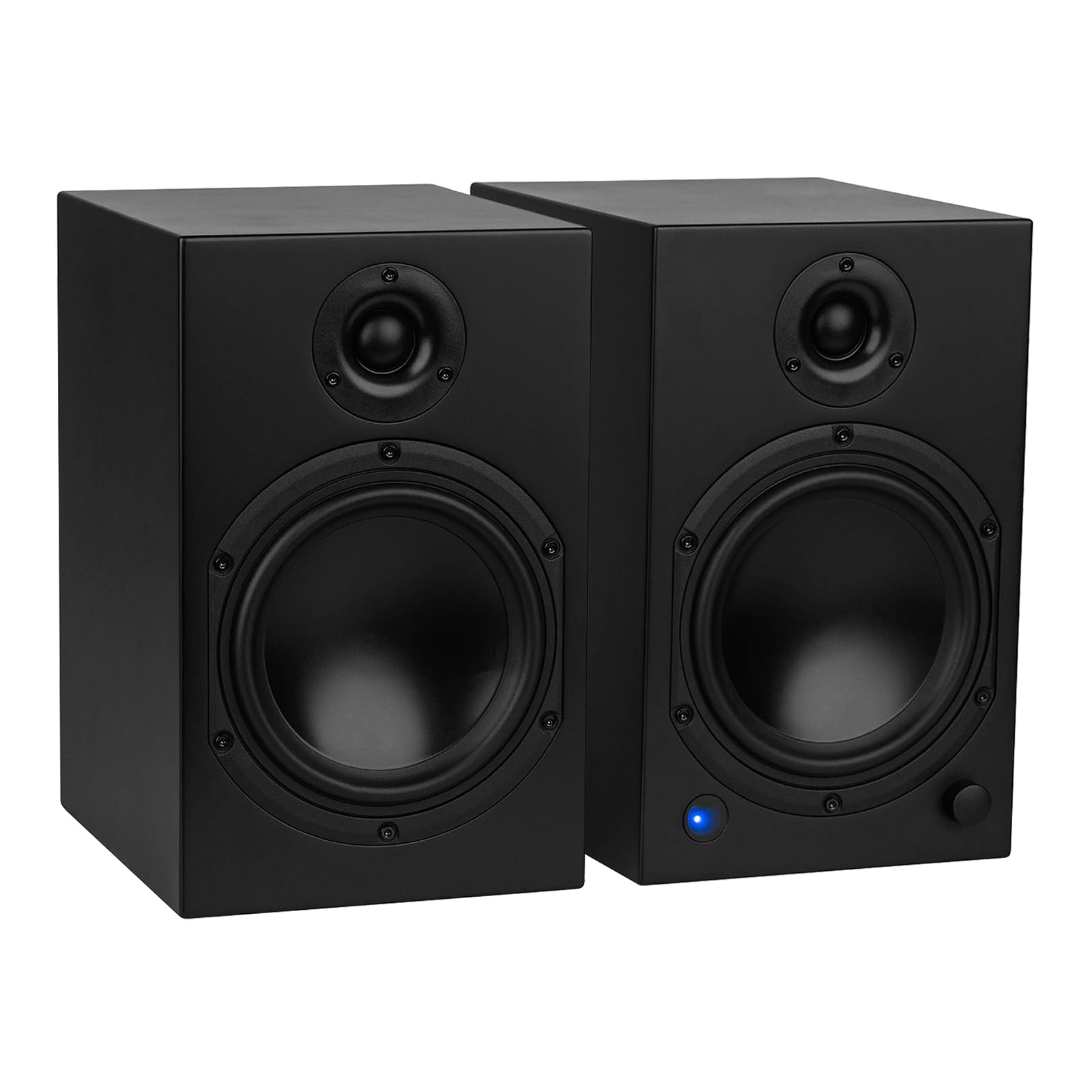
Có gì trong hộp
Carefully unpack your Dayton Audio M6 speakers and ensure all components are present:
- Dayton Audio M6 Powered Desktop Speakers (Pair)
- Cáp nguồn
- Cáp USB-C
- Speaker Cable (for connecting passive speaker)
- Cáp AUX sang RCA 3.5mm
- Điều khiển từ xa
- Chân cao su

Hướng dẫn thiết lập
1. Vị trí đặt loa
Position your M6 speakers on a stable, flat surface. The sealed cabinet design allows for flexible placement, including closer to walls, without significant changes in sound. For optimal stereo imaging, place the speakers equidistant from your listening position.
2. Kết nối loa
- Identify Active and Passive Speakers: One speaker is active (contains the amplifier and controls) and the other is passive.
- Connect Passive Speaker: Use the included speaker cable to connect the active speaker's "OUTPUT TO PASSIVE SPEAKER" terminals to the passive speaker's input terminals. Ensure correct polarity (red to red, black to black).
- Set Powered Speaker Position: On the rear of the active speaker, use the L/R switch to designate whether the active speaker will be on the left or right side of your setup.
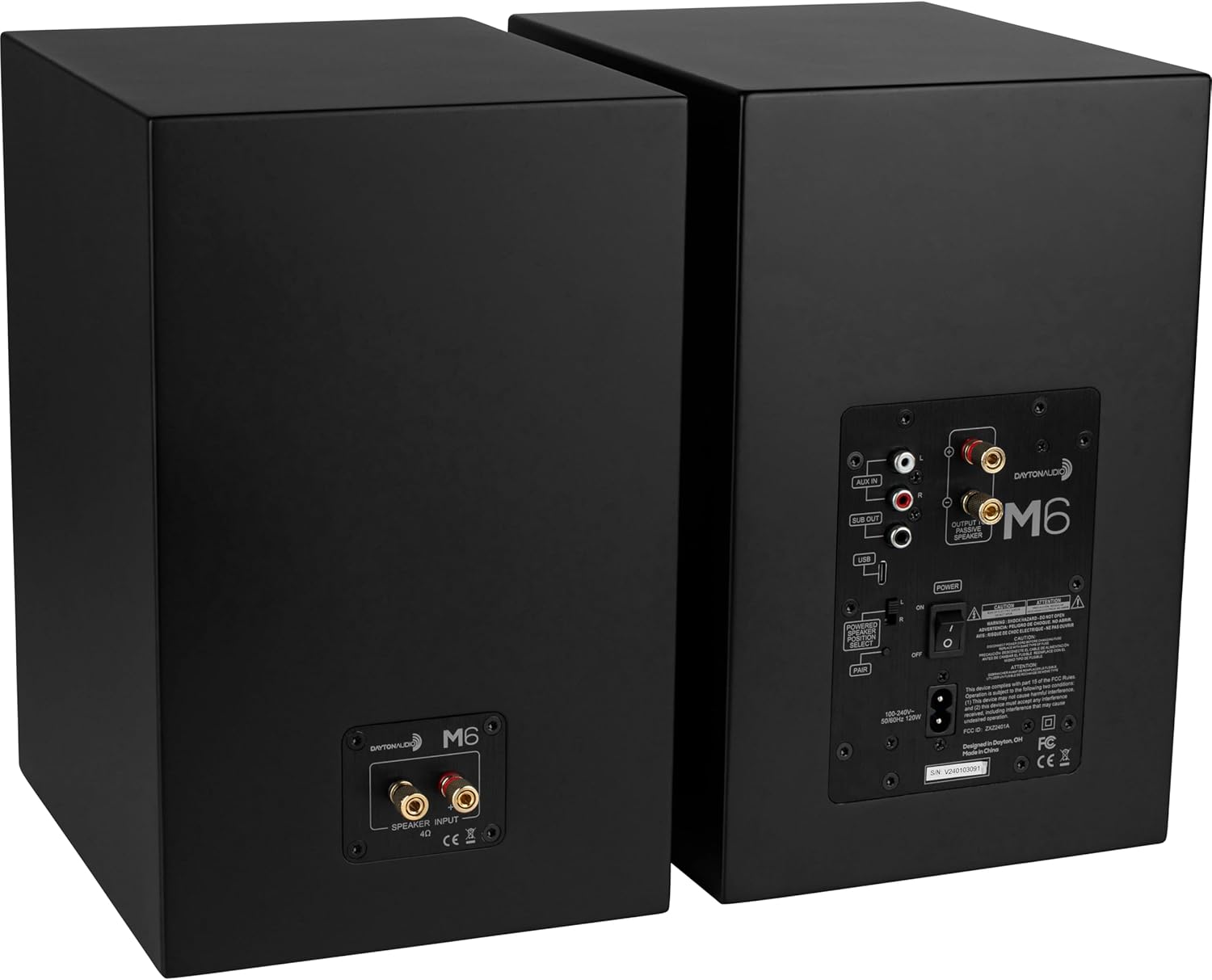
3. Kết nối nguồn âm thanh
The M6 speakers offer multiple input options:
- DAC USB: Connect the included USB-C cable from your computer to the USB input on the active speaker for high-resolution audio playback (up to 192 kHz/32 Bit).
- TRỢ VÀO: Use the included 3.5mm AUX to RCA cable to connect devices with a 3.5mm output (e.g., smartphones, tablets) to the RCA "AUX IN" ports.
- Bluetooth: For wireless audio streaming, pair your device via Bluetooth 5.0 with Qualcomm AptX.
- Đầu ra loa siêu trầm: An RCA "SUB OUT" port is available for connecting an optional powered subwoofer.

4. Kết nối nguồn điện
Connect the power cable to the active speaker's power input and then to a wall outlet. Ensure the power switch on the rear panel is in the OFF position before connecting to power.
Hướng dẫn sử dụng
1. Bật/Tắt nguồn
Use the main power switch on the rear panel of the active speaker to turn the unit ON or OFF. The speakers will retain the last selected input and volume setting when powered off and on via this switch.
2. Lựa chọn đầu vào
The multi-function knob on the front of the active speaker or the remote control can be used to cycle through inputs (Bluetooth, USB, Line In). The LED indicator on the front will change color to indicate the active input:
- Màu xanh da trời: Bluetooth
- Màu xanh lá: AUX In (Line)
- Quả cam: Chờ

3. Điều khiển âm lượng
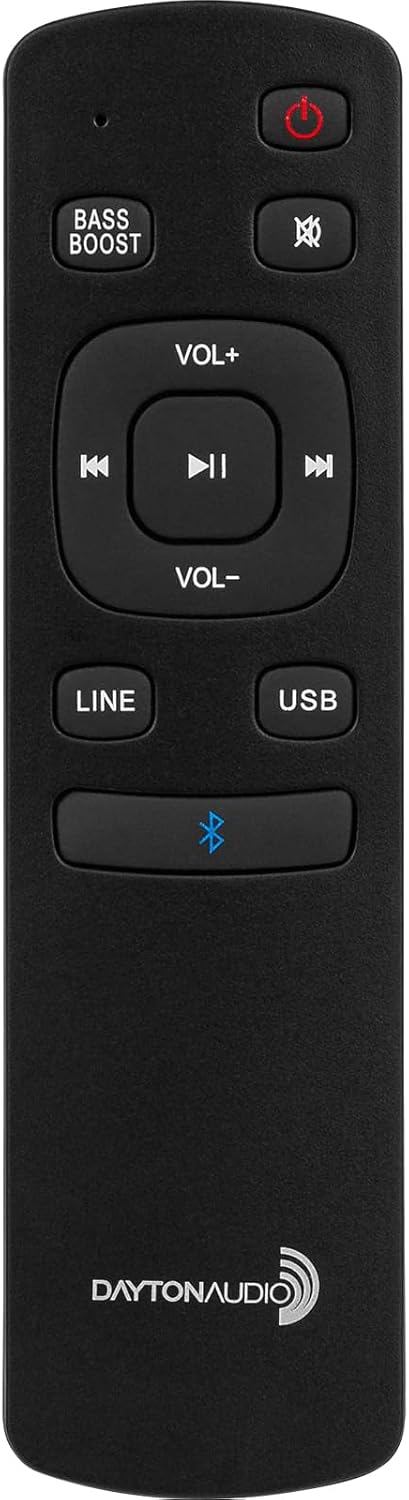
Rotate the multi-function knob on the front of the active speaker to adjust the volume. Alternatively, use the VOL+ and VOL- buttons on the remote control.
4. Ghép nối Bluetooth
- Select the Bluetooth input using the multi-function knob or the Bluetooth button on the remote. The LED will flash blue, indicating pairing mode.
- On your device (smartphone, tablet), search for Bluetooth devices and select "Dayton Audio M6".
- Once connected, the LED will glow solid blue.
5. Bass Boost Feature
To activate the bass boost, press the TĂNG CƯỜNG BASS button on the included remote. The indicator LED on the front of the speaker will flash twice to confirm bass boost is active. Press the TĂNG CƯỜNG BASS button again to return to the normal EQ setting; the LED will flash once to indicate bass boost is inactive. This setting will remain enabled after the speaker returns from standby.
6. Chức năng điều khiển từ xa
Điều khiển từ xa đi kèm giúp truy cập thuận tiện vào nhiều chức năng khác nhau:
- Bật nguồn / Chế độ chờ
- Tắt tiếng
- Tăng/Giảm âm lượng
- Track Skip (Previous/Next)
- Phát/Tạm dừng
- Input Selection (LINE, USB, Bluetooth)
- Bật/Tắt tăng âm trầm
7. Sleep/Standby
The speakers will automatically enter standby mode after 1 hour of inactivity. To manually put the speakers into standby, press the power button on the remote control. To wake from standby, press the power button on the remote or select an input.
BẢO TRÌ
To ensure the longevity and optimal performance of your Dayton Audio M6 speakers, follow these maintenance guidelines:
- Vệ sinh: Use a soft, dry cloth to wipe the speaker cabinets. Avoid abrasive cleaners or solvents.
- Bụi: Regularly dust the speaker grilles and surfaces to prevent buildup.
- Môi trường: Keep speakers away from direct sunlight, excessive heat, moisture, and extreme temperatures.
- Bảo vệ màng ngăn: The speaker diaphragms are exposed. Exercise caution to prevent physical damage, especially in environments with small children or pets.
- Kết nối cáp: Kiểm tra định kỳ tất cả các kết nối cáp để đảm bảo chúng an toàn.
Xử lý sự cố
If you encounter issues with your M6 speakers, refer to the following common problems and solutions:
| Vấn đề | Nguyên nhân có thể | Giải pháp |
|---|---|---|
| Không có âm thanh từ loa | Power off; incorrect input; loose cables; low volume. | Ensure power switch is ON. Select correct input. Check all audio and speaker cables. Increase volume on speakers and source device. |
| Bluetooth không kết nối | Not in pairing mode; device too far; interference. | Ensure speakers are in Bluetooth pairing mode (flashing blue LED). Move device closer. Disconnect other Bluetooth devices. Try re-pairing. |
| Âm thanh bị méo hoặc chất lượng kém | Poor source quality; damaged cables; incorrect settings. | Test with a different audio source. Replace damaged cables. Ensure source volume is not too high, causing clipping. |
| Speakers unresponsive (DSP freeze) | Sự cố phần mềm tạm thời. | Turn off the active speaker using the physical power switch on the rear panel, wait a few seconds, then turn it back on. |
| No dedicated light for Bass Boost | Misunderstanding of indicator. | The front LED indicator flashes twice for ON and once for OFF when the Bass Boost button is pressed on the remote. |
Thông số kỹ thuật
| Tính năng | Đặc điểm kỹ thuật |
|---|---|
| Tên mẫu | M6 |
| Loại loa | Bookshelf, Powered |
| Kích thước loa | 6.5 inch |
| Đường kính loa trầm | 6 inch |
| Công suất đầu ra tối đa của loa | 150 Watts (Cao điểm) |
| Đáp ứng tần số | 40 – 20,000Hz |
| Công nghệ kết nối | Bluetooth 5.0 with Qualcomm AptX, RCA, USB-C DAC |
| USB-C DAC Support | Up to 192 kHz/32 Bit |
| Chế độ đầu ra âm thanh | Âm thanh nổi (2.0) |
| Phương pháp kiểm soát | Remote, Multi-function Knob |
| Kích thước sản phẩm (mỗi loa) | 7.5"D x 11.75"W x 9"H |
| Trọng lượng sản phẩm (Cặp) | 35 pound |
| Vật liệu | Kim loại, Nhựa |
Video sản phẩm chính thức
For visual guidance on setup and features, please refer to the following official product videos:
Video 1: Dayton Audio M6 Product Overview (2:28)
Video này cung cấp một cái nhìn tổng quátview of the Dayton Audio M6 Powered Desktop Speakers, highlighting key features and design elements.
Video 2: M6 Connectivity and Features (1:46)
This video demonstrates the various connectivity options and operational features of the M6 speakers, including Bluetooth pairing and input selection.
Thông tin bảo hành
The Dayton Audio M6 Powered Desktop Speakers come with a Bảo hành 5 năm covering parts and labor. Please retain your proof of purchase for warranty claims. For detailed warranty terms and conditions, refer to the documentation included with your product or visit the official Dayton Audio webđịa điểm.
Ủng hộ
For further assistance, technical support, or service inquiries regarding your Dayton Audio M6 speakers, please visit the official Dayton Audio support webtrang web hoặc liên hệ với bộ phận dịch vụ khách hàng của họ. Thông tin liên hệ thường có thể được tìm thấy trên trang web của nhà sản xuất webtrang web hoặc trong bao bì sản phẩm.