1. Sản phẩm hếtview
The YOLIN LED Wall Light is a versatile, wireless, and rechargeable indoor lighting solution designed for various spaces such as bedrooms, study rooms, kitchens, living rooms, and hallways. It features a motion sensor, remote control, and offers a wide range of lighting options including 3 adjustable color temperatures and 10 RGB colors. Its 360° rotatable magnetic base allows for flexible positioning and easy removal for use as a portable light.
Các tính năng chính:
- Ánh sáng có thể điều chỉnh độ sáng: Offers 3 color temperatures (warm, cool, natural) and 10 vibrant RGB colors.
- Cảm biến chuyển động: Automatically lights up for 30 seconds when motion is detected within 2-3 meters.
- Kiểm soát kép: Operable via sensitive touch controls on the lamp and a comprehensive remote control.
- Chức năng bộ nhớ: Recalls the last used lighting state upon activation.
- Chức năng hẹn giờ: Set the light to turn off automatically after 0.5h, 1h, or 2h.
- Improved Magnetic Base: Strong magnetic attachment allows 360° rotation and easy detachment.
- Pin sạc: Built-in high-capacity battery, charged via Type-C cable.
Nội dung gói hàng:
- 1 x YOLIN LED Wall Light
- 1 x Điều khiển từ xa
- 1 x Adhesive Base
- 1 x Cáp sạc Type-C
- 1 x Hướng dẫn sử dụng (tài liệu này)
- 2 x Screws (for optional installation)
2. Thiết lập và Cài đặt
The YOLIN LED Wall Light offers flexible installation options to suit your needs.
2.1 Sạc thiết bị
Before first use, fully charge the wall light. Connect the provided Type-C charging cable to the lamp's charging port and to a standard USB power adapter (not included). The charging indicator will show the charging status. A full charge typically takes 3-4 hours.
- Lighting operation: 5-7 hours on a full charge.
- RGB light operation: 22-50 hours on a full charge.
2.2 Tùy chọn gắn kết
The wall light can be installed using either the adhesive base or screws.
- Cài đặt chất kết dính:
- Clean the desired wall surface thoroughly to ensure it is dry and free of dust or grease.
- Peel off the protective film from the adhesive side of the magnetic base.
- Press the adhesive base firmly onto the wall for at least 30 seconds.
- Attach the YOLIN LED Wall Light to the magnetic base. The strong magnet will securely hold the lamp.
- Screw Installation (Optional):
- Mark the desired mounting position on the wall.
- Drill two small holes at the marked positions, suitable for the provided screws.
- Insert wall anchors (if necessary, not included) into the drilled holes.
- Secure the magnetic base to the wall using the provided screws.
- Attach the YOLIN LED Wall Light to the magnetic base.
The improved magnetic holder allows the lamp to be rotated 360° to direct light as needed. The lamp can also be easily detached from the base for use as a portable torch or emergency light.
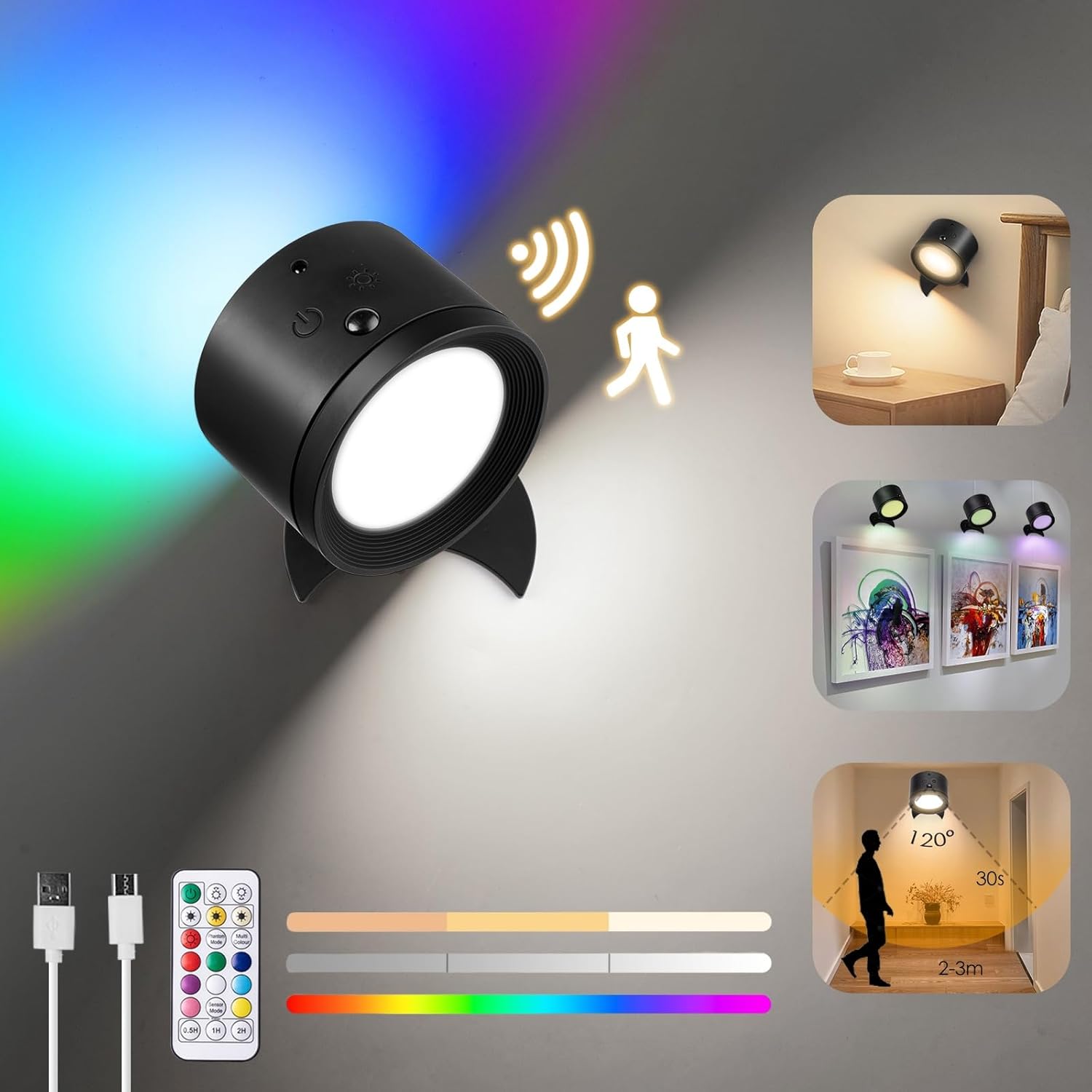
Hình 1: Hếtview of YOLIN LED Wall Light features and installation options.
3. Hướng dẫn vận hành
3.1 Power On/Off and Basic Lighting
- Điều khiển cảm ứng: Lightly touch the control area on the lamp to cycle through the 3 color modes (warm, cool, natural). Long press the touch control for 2 seconds to turn the light on or off.
- Điều khiển từ xa: Use the power button on the remote control to turn the lamp bật hoặc tắt.
3.2 Điều chỉnh độ sáng (Giảm độ sáng)
In any of the 3 color modes, long press the touch control area on the lamp to continuously dim the light from brightest to dimmest, and vice versa. Release when the desired brightness is reached.
3.3 Chế độ màu RGB
Cái lamp features 10 distinct RGB color options.
- Điều khiển từ xa: Use the dedicated RGB buttons on the remote control to select desired colors or cycle through them.
- Điều khiển cảm ứng: Long press the touch control for 2 seconds to activate RGB mode. Subsequent short touches may cycle through RGB colors (refer to remote for full control).
3.4 Motion Sensor Function (PIR Mode)
The motion sensor activates the light when movement is detected, providing convenience in dark areas.
- Kích hoạt: The motion detection function must be enabled when the light is off. Long press the switch on the lamp until the light flashes once to activate motion sensor mode.
- Chấm dứt hoạt: Nhấn và giữ công tắc trên lamp until the light flashes twice to deactivate motion sensor mode.
- Hoạt động: When activated, the light will turn on for 30 seconds if motion is detected within 2 to 3 meters.
- Điều khiển từ xa: The remote control also has a dedicated PIR mode button for easy activation/deactivation.

Figure 2: YOLIN LED Wall Light providing ambient lighting in a bedroom.
3.5 Chức năng hẹn giờ
Đặt lamp to automatically turn off after a specified duration.
- Sử dụng 0.5 giờ, 1h, hoặc 2h buttons on the remote control to set the desired timer.
- The light will automatically turn off after the selected time period.
3.6 Chức năng bộ nhớ
Cái lamp remembers the last used lighting mode (color temperature, brightness, or RGB setting) when it was turned off. Upon turning it back on, it will resume the previous setting.

Figure 3: Multiple YOLIN LED Wall Lights used to highlight wall art.
4. Bảo trì
Proper maintenance ensures the longevity and optimal performance of your YOLIN LED Wall Light.
4.1 Vệ sinh
- Đảm bảo lamp is turned off and disconnected from any charging cable before cleaning.
- Lau bề mặt của lamp với bề ngoài mềm, khô hoặc hơi...amp vải.
- Không sử dụng chất tẩy rửa có tính mài mòn, dung môi hoặc hóa chất mạnh, vì chúng có thể làm hỏng lớp sơn hoặc các bộ phận bên trong.
4.2 Chăm sóc pin
- Để tối đa hóa tuổi thọ pin, hãy tránh việc xả hết pin thường xuyên.
- nạp lại lamp when the light output becomes noticeably dim.
- Nếu lưu trữ lamp for an extended period, charge it to about 50% every few months to prevent deep discharge.
- Chỉ sử dụng cáp Type-C được cung cấp hoặc loại cáp tương đương đã được chứng nhận để sạc.
KHAI THÁC. Xử lý sự cố
If you encounter issues with your YOLIN LED Wall Light, please refer to the following common problems and solutions:
| Vấn đề | Nguyên nhân có thể | Giải pháp |
|---|---|---|
| Đèn không bật. | Pin đã hết. Lamp đã tắt. | Sạc lamp fully using the Type-C cable. Press the power button on the remote or long press the touch control to turn on. |
| Cảm biến chuyển động không hoạt động. | Motion sensor mode is not activated. Vật cản trên đường đi của cảm biến. Quá nhiều ánh sáng xung quanh. | Ensure the light is off, then long press the switch until it flashes once to activate PIR mode. Đảm bảo cảm biến không có vật cản. The sensor works best in low-light conditions. |
| Điều khiển từ xa không phản hồi. | Pin điều khiển từ xa yếu hoặc hết. Tắc nghẽn giữa điều khiển từ xa và lamp. | Thay pin điều khiển từ xa. Ensure direct line of sight or reduce distance. |
| Ánh sáng phát ra yếu hoặc không ổn định. | Pin yếu. Dimming setting is too low. | nạp lại lamp. Adjust brightness using touch control or remote. |
If the problem persists after trying these solutions, please contact YOLIN customer support for further assistance.
6. Thông số kỹ thuật sản phẩm
| Thuộc tính | Chi tiết |
|---|---|
| Thương hiệu | YOLIN |
| Số hiệu mẫu | B0D2NGYCSJ |
| Kích thước sản phẩm | 7.5 x 5.3 x 9.4cm |
| Trọng lượng sản phẩm | 170 gam |
| Màu sắc | Đen |
| Vật liệu | Nhựa, Kim loại |
| Nguồn điện | Chạy bằng pin (bao gồm 1 pin Lithium Polymer) |
| Tính năng đặc biệt | Cordless, Motion Sensor, Remote Control, Dimmable, RGB, 360° Rotatable |
| Sử dụng trong nhà/ngoài trời | Chỉ sử dụng trong nhà |
| Lớp học về hiệu quả năng lượng | F (as per EU energy label) |
| Liên kết cơ sở dữ liệu EPREL | https://eprel.ec.europa.eu/qr/1880900 |
7. Bảo hành và Hỗ trợ
YOLIN is committed to providing quality products and excellent after-sales service. If you encounter any problems with your YOLIN LED Wall Light, please do not hesitate to contact us.
For support, please refer to the contact information provided on the product packaging or the official YOLIN website. Our customer service team will assist you in resolving any issues in a timely manner.


