1. Giới thiệu
The ASMAX F1 Motorcycle Bluetooth Headset is an advanced communication system designed for motorcyclists. It features Bluetooth 5.3 technology, supporting up to 10 riders with a communication range of up to 1.8km. The F1 offers dual intercom modes (Free and Group Mesh), voice control, superior sound quality with ENC noise reduction, and an IP67 waterproof rating. Its magnetic mounting system and fast-charging capabilities ensure convenience and reliability for all your rides.
2. Thông tin an toàn
- Luôn ưu tiên an toàn giao thông. Không sử dụng thiết bị theo cách làm bạn mất tập trung khi lái xe.
- Hãy đảm bảo tai nghe được gắn chắc chắn vào mũ bảo hiểm trước khi lái xe.
- Adjust volume levels to ensure you can still hear ambient traffic sounds.
- Không được cố tháo rời hoặc sửa đổi thiết bị vì điều này có thể làm mất hiệu lực bảo hành và gây ra rủi ro về an toàn.
- Giữ thiết bị tránh xa nhiệt độ cao và ánh nắng trực tiếp.
- Charge the device using only the provided cable and a compatible power source.
3. Nội dung gói hàng
Xác minh rằng tất cả các mục đều có trong gói hàng của bạn:
- ASMAX F1 Bluetooth Headset Unit(s)
- Speaker and Microphone Kit(s)
- Magnetic Mounting Base(s)
- Cáp sạc USB
- Hướng dẫn sử dụng
- Mounting Accessories (e.g., adhesive pads, clips)

Image: ASMAX F1 Headset and included accessories.
4. Sản phẩm hếtview
4.1 Thành phần
The ASMAX F1 unit features a sleek design with an illuminated cross-shaped indicator. It is designed for easy attachment to most motorcycle helmets.

Image: ASMAX F1 Bluetooth Headset units.
4.2 Kiểm soát và Chỉ báo
The ASMAX F1 is equipped with intuitive controls and indicators for ease of use while riding.
- Nút liên lạc nội bộ: Initiates and manages intercom connections.
- Nút tăng/giảm âm lượng: Điều chỉnh âm lượng.
- Nút chức năng: Multi-purpose button for various operations.
- Đèn báo LED: Displays device status (e.g., power, pairing, charging).
- Điều khiển bằng giọng nói: Activates functions using voice commands (e.g., "Hi Max").

Image: ASMAX F1 controls and helmet compatibility.
5. Thiết lập
5.1 Lắp đặt trên mũ bảo hiểm
The ASMAX F1 features a magnetic mounting system for easy and secure attachment to your helmet.
- Choose a suitable location on the side of your helmet, typically on the left side, ensuring it does not obstruct your vision or helmet functionality.
- Clean the helmet surface thoroughly where the mounting base will be attached.
- Attach the magnetic mounting base to the helmet using the provided adhesive pad or clamp. Ensure it is firmly secured.
- Insert the speakers into the helmet's ear pockets. Ensure they are positioned directly over your ears for optimal sound.
- Route the microphone boom or wired microphone to a position near your mouth, ensuring clear voice pickup and minimal wind noise.
- Connect the speaker and microphone cables to the ASMAX F1 unit.
- Attach the ASMAX F1 unit to the magnetic mounting base. The strong magnet will secure it in place.
5.2 Sạc ban đầu
Before first use, fully charge the ASMAX F1 unit. The 1250mAh battery supports fast charging.
- Connect the provided USB charging cable to the ASMAX F1 unit's charging port.
- Kết nối đầu còn lại của cáp với bộ chuyển đổi nguồn USB (không kèm theo) hoặc cổng USB của máy tính.
- The LED indicator will show charging status. Once fully charged, the indicator will change (refer to specific LED behavior in the full manual).
- Thiết bị có thể được sạc khi đang sử dụng.
6. Hướng dẫn vận hành
6.1 Bật/Tắt nguồn
- Bật nguồn: Press and hold the Function Button for approximately 3 seconds until the LED indicator lights up and you hear a voice prompt.
- Tắt nguồn: Press and hold the Function Button for approximately 3 seconds until the LED indicator turns off and you hear a voice prompt.
6.2 Bluetooth Pairing with Mobile Device
The ASMAX F1 uses Bluetooth 5.3 for stable connections.
- With the ASMAX F1 powered off, press and hold the Function Button for approximately 5-7 seconds until the LED indicator flashes rapidly (usually blue/red alternating), indicating pairing mode.
- Trên điện thoại di động của bạn, hãy bật Bluetooth và tìm kiếm các thiết bị mới.
- Select "ASMAX F1" from the list of available devices.
- Once paired, the LED indicator will change (e.g., slow blue flashes) and you will hear a confirmation tone.

Image: Universal pairing capability of ASMAX F1.
6.3 Các chế độ liên lạc nội bộ
The ASMAX F1 supports various intercom modes for group communication.
- Chế độ miễn phí: For spontaneous connections within range. Up to 10 riders can join instantly.
- Group Mode (MESH Communication): For private conversations with a team of up to 10 riders. Supports 1-on-1 chats within the group.
- CloudTalk Mode: (Requires app update) Supports cross-brand cloud intercom for up to 50 people, anywhere with a mobile network.

Image: ASMAX F1 10-Rider Mesh Group Intercom.
6.4 Điều khiển bằng giọng nói
Activate voice commands by saying "Hi Max" followed by your command. This allows for hands-free operation.
- "Hi Max, Music On"
- "Hi Max, Next Track"
- "Hi Max, Volume Up/Down"
- "Hi Max, Answer The Phone"
- "Hi Max, End Intercom"
- "Hi Max, Phone Pairing"
- "Hi Max, Group Mesh"
- "Hi Max, Free Mode"

Image: ASMAX F1 Voice Control feature.
6.5 Đa nhiệm âm thanh
The ASMAX F1 allows for simultaneous audio streams, such as listening to music while receiving navigation instructions or participating in an intercom conversation.

Image: ASMAX F1 Audio Multitasking.
7. Bảo trì
- Vệ sinh: Lau thiết bị bằng vải mềm, damp vải. Không sử dụng hóa chất mạnh hoặc chất tẩy rửa mài mòn.
- Kho: Bảo quản thiết bị ở nơi khô ráo, thoáng mát khi không sử dụng.
- Chăm sóc pin: Để tối ưu hóa tuổi thọ pin, tránh xả hết pin thường xuyên. Hãy sạc pin định kỳ.
- Khả năng chống nước: The ASMAX F1 is IP67 waterproof. While it can withstand rain and splashes, avoid prolonged submersion.

Image: ASMAX F1 IP67 Waterproof feature.
KHAI THÁC. Xử lý sự cố
| Vấn đề | Nguyên nhân có thể | Giải pháp |
|---|---|---|
| Thiết bị không bật nguồn. | Pin yếu. | Sạc đầy thiết bị. |
| Không thể ghép nối với điện thoại. | Thiết bị không ở chế độ ghép nối; Bluetooth đã tắt trên điện thoại. | Ensure device is in pairing mode (flashing LED). Turn on phone's Bluetooth. Forget previous pairings on phone. |
| Sự cố kết nối hệ thống liên lạc nội bộ. | Out of range; interference; incorrect mode. | Ensure units are within range. Check for obstacles. Verify correct intercom mode (Free/Group). |
| Chất lượng âm thanh kém / Có tiếng ồn. | Microphone position; speaker placement; high speed. | Adjust microphone closer to mouth. Ensure speakers are aligned with ears. ENC noise reduction works best with visor closed at high speeds. |
| Lệnh thoại không phản hồi. | Microphone issue; noisy environment; incorrect command. | Ensure microphone is clear. Speak clearly. Try again in a quieter environment. Refer to voice command list. |
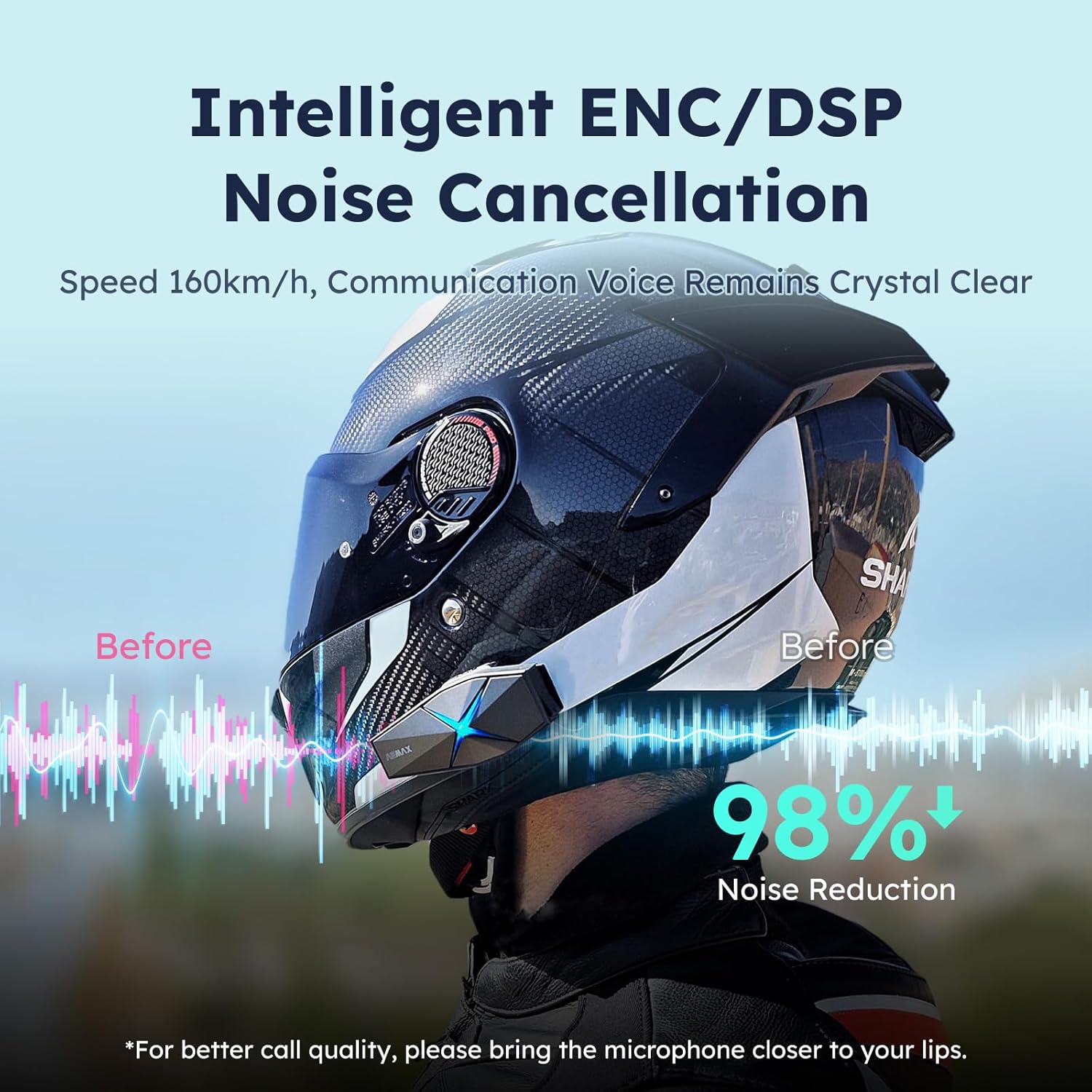
Image: ASMAX F1 Noise Cancellation technology.
9. Thông số kỹ thuật
| Tính năng | Chi tiết |
|---|---|
| Tên mẫu | ASMAX F1 (F1 DP) |
| Phiên bản Bluetooth | 5.3 |
| Phạm vi liên lạc nội bộ | Up to 1.8 km (10 riders) |
| Dung lượng pin | 1250mAh |
| Sạc | Fast Charging, USB |
| Xếp hạng chống thấm nước | IP67 |
| Kiểm soát tiếng ồn | Active Noise Cancellation (ENC/DSP) |
| Điều khiển bằng giọng nói | "Hi Max" commands |
| Tính năng âm thanh | Audio Multitasking, Superior Sound Quality |
| Kích thước | Approx. 86mm x 36mm x 23.6mm (unit) |
| Cân nặng | Approx. 50g (unit) |
| Vị trí tai | Trong tai |
| Trở kháng | 32 Ohm |
| Độ nhạy | 105 dB |
| Đáp ứng tần số | 20 Hz (tối thiểu) |

Image: ASMAX F1 Dual-Chip Octa-Core technology.
10. Bảo hành và Hỗ trợ
ASMAX products come with a standard manufacturer's warranty. For specific warranty terms and conditions, please refer to the warranty card included in your product packaging or visit the official ASMAX webđịa điểm.
For technical support, troubleshooting assistance, or any inquiries regarding your ASMAX F1 headset, please contact ASMAX customer service through their official channels. Contact information can typically be found on the ASMAX webtrang web hoặc trong bao bì sản phẩm.
Regularly check the ASMAX website or app for firmware updates to ensure optimal performance and access to new features, such as CloudTalk Mode.