1. Giới thiệu
Welcome to the DITONG HY300 Plus HD Projector user manual. This guide will help you set up, operate, and maintain your new projector. The HY300 Plus is a portable projector equipped with Android 11 and dual-band WiFi 6, offering a seamless and high-quality viewing experience for movies, presentations, and more, both indoors and outdoors.
2. Sản phẩm hếtview
2.1 Thành phần
The DITONG HY300 Plus projector package typically includes the following items:
- DITONG HY300 Plus Projector
- Bộ đổi nguồn
- Điều khiển từ xa

Image: The DITONG HY300 Plus projector in white, accompanied by its black remote control and a protective cover for the lens.
2.2 Các tính năng chính
- Hệ điều hành Android 11: Built-in smart operating system for direct access to streaming apps without external devices.
- Dual-band WiFi 6 (5G + 2.4G): Ensures faster and more reliable wireless connectivity for smooth streaming and screen mirroring.
- Tiêu điểm điện tử: Easily adjust image clarity using the remote control.
- 4K Decoding & 720P Native Resolution: Supports 4K video input with a native resolution of 1280x720P for clear images.
- Tự động sửa Keystone: Tự động điều chỉnh độ méo hình để có được bức ảnh hình chữ nhật hoàn hảo.
- 180° Flexible Projection Angle: Cho phép chiếu hình ảnh lên tường, trần nhà hoặc sàn nhà.
- Hoạt động ít tiếng ồn: Operates at less than 25dB for a quiet viewkinh nghiệm.
- Độ sáng cao: 8000 Lux (250 ANSI lumens) for vivid and bright images.
- Multiple Aspect Ratios: Supports 16:9, 4:3, and 16:10.
- Kết nối Bluetooth: Để kết nối các thiết bị âm thanh bên ngoài.

Hình ảnh: Một cái kếtview of the DITONG HY300 Plus features, including electronic focus, Bluetooth 5.0, 4K decoding, 720P native resolution, WiFi 5G/2.4G, and auto keystone correction.

Image: A demonstration of the electronic focus feature, showing a clear image projected onto a screen with the projector and remote control in the foreground.

Image: Illustrates the 180-degree flexible projection angle, showing the projector casting an image onto a wall and a ceiling in a bedroom setting.

Image: Depicts the dual-band WiFi 5G/2.4G capability, showing a fast connection for screen mirroring with a projected image of a car chase.

Image: Illustrates the low noise level of the projector, comparing its sound output to common ambient noises like whispering and a motorcycle passing.
3. Thiết lập
3.1 Mở hộp và kiểm tra
Carefully remove all components from the packaging. Inspect for any signs of damage. If any items are missing or damaged, contact customer support immediately.
3.2 kết nối nguồn
- Kết nối bộ chuyển đổi nguồn với cổng nguồn của máy chiếu.
- Cắm bộ đổi nguồn vào ổ cắm điện thích hợp.
3.3 Bật nguồn ban đầu
Press the power button on the projector or the remote control to turn on the device. The projector will boot up, displaying the Android 11 interface.
3.4 Vị trí và khoảng cách chiếu
Đặt máy chiếu trên bề mặt phẳng, ổn định. Để có chất lượng hình ảnh tối ưu viewing, consider the projection distance:
- For a 130-inch display, an optimal projection distance is approximately 1.68 meters.
- The projector supports various screen sizes from 40 inches to 130 inches depending on distance.

Image: A diagram illustrating optimal projection distances for different screen sizes, showing that 1.68 meters is ideal for a 130-inch display.
3.5 Tùy chọn gắn kết
The HY300 Plus is designed for versatile placement:
- Sử dụng di động: Place it on a table or flat surface.
- Gắn trần: The bottom of the projector features a 1/4-inch screw hole, compatible with standard ceiling mounts or camera tripods.
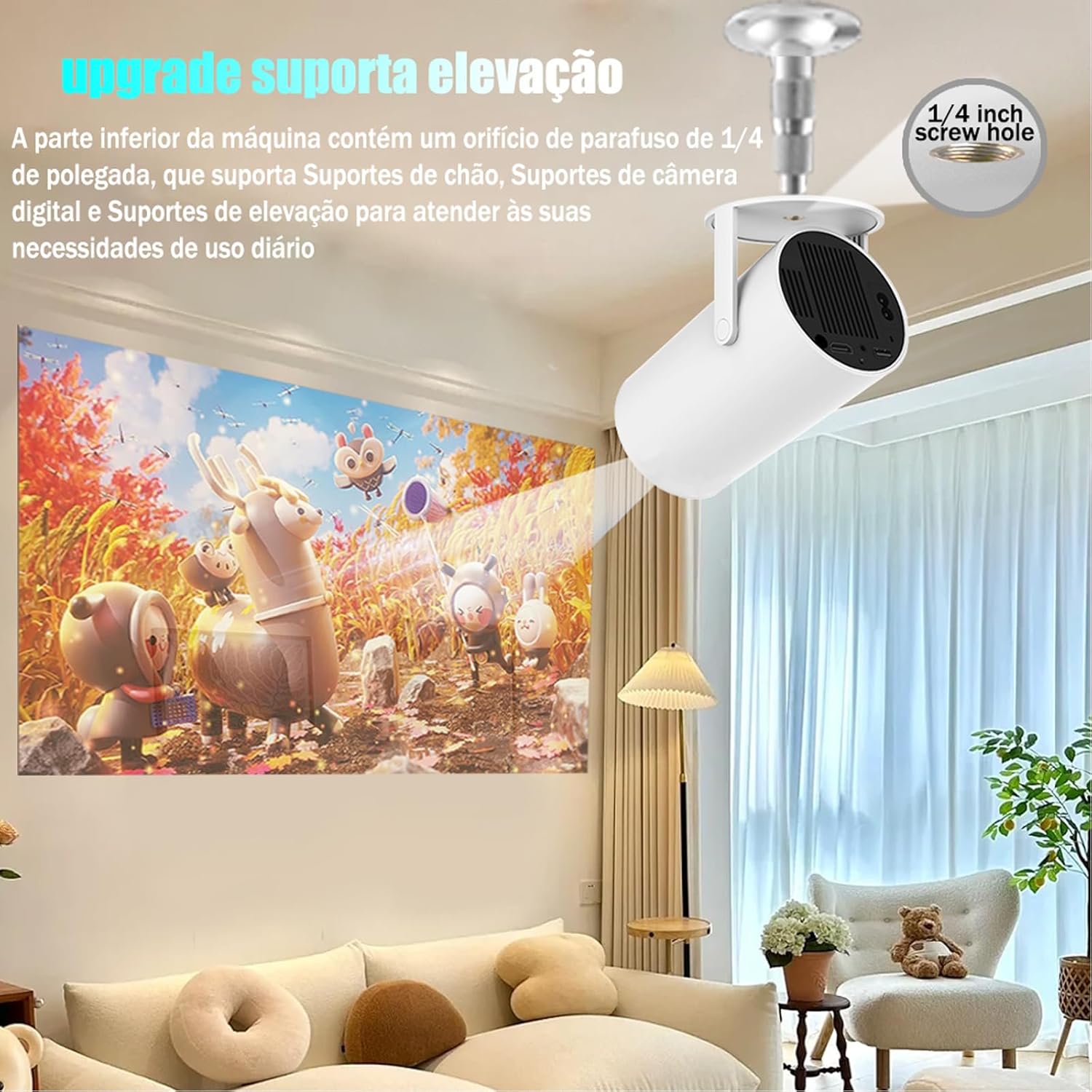
Image: The projector shown mounted to a ceiling, highlighting the 1/4-inch screw hole for various mounting solutions.
4. Hướng dẫn vận hành
4.1 Chức năng điều khiển từ xa
Use the included remote control to navigate the projector's interface. Key functions include:
- Bật/Tắt nguồn
- Điều hướng (Lên, Xuống, Trái, Phải, OK)
- Back/Home buttons
- Kiểm soát âm lượng
- Điều chỉnh tiêu điểm

Image: The DITONG HY300 Plus projector with its remote control, demonstrating the electronic focus feature.
4.2 Electronic Focus Adjustment
To adjust the image clarity:
- Hướng điều khiển từ xa về phía máy chiếu.
- Press the dedicated focus buttons (usually marked with a circle or 'F' icon) on the remote to sharpen the image.
4.3 Tự động điều chỉnh độ lệch trục
The HY300 Plus features automatic keystone correction. When the projector is moved or angled, it will automatically adjust the image to maintain a rectangular shape. Manual adjustments are typically not required.
4.4 Kết nối các thiết bị bên ngoài
- HDMI: Connect laptops, gaming consoles, or other HDMI-enabled devices using an HDMI cable.
- Screen Mirroring (WiFi): Connect your smartphone or tablet wirelessly via WiFi for screen mirroring. Ensure both devices are connected to the same WiFi network.
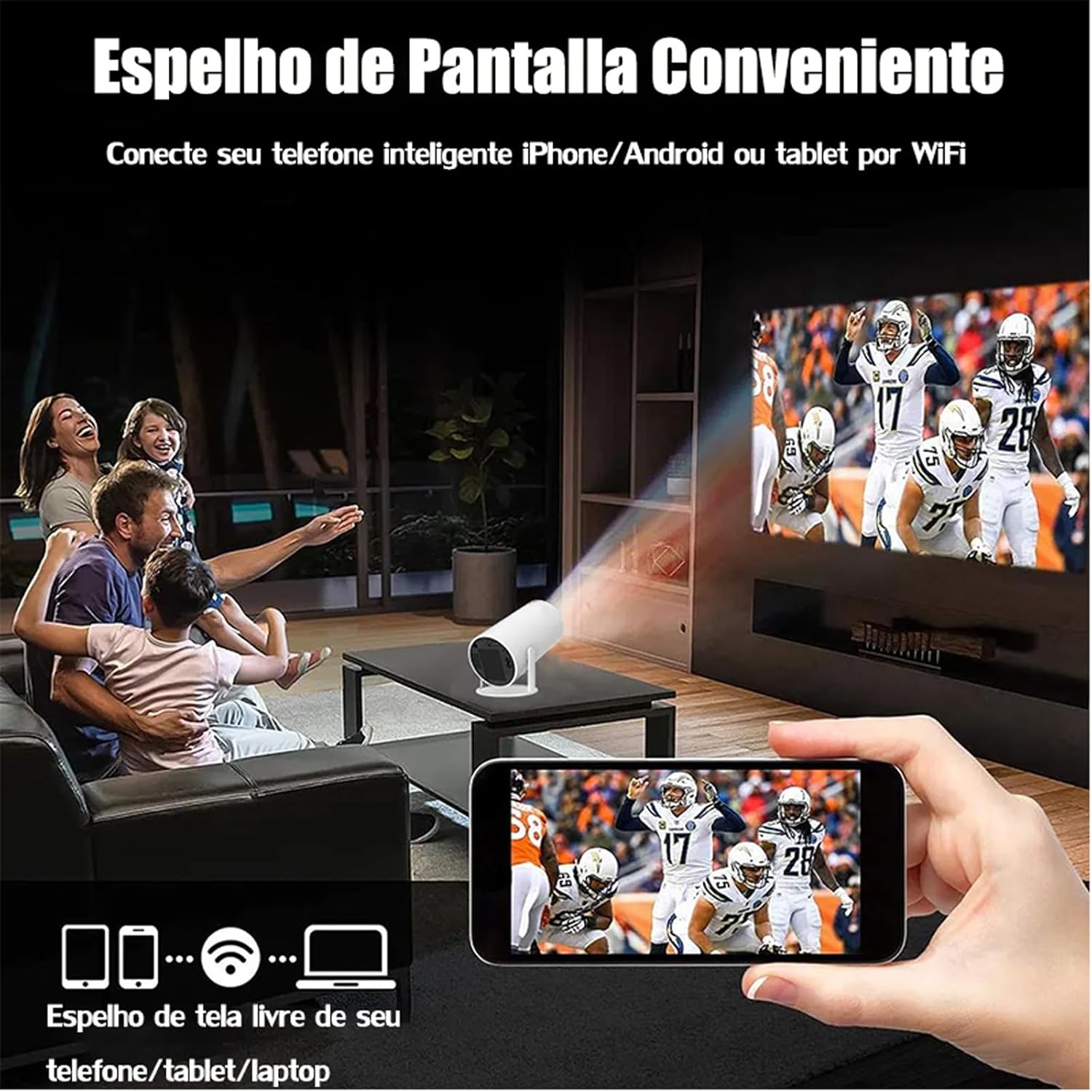
Image: A family watching a football game projected onto a screen, with a smartphone in the foreground demonstrating wireless screen mirroring.
4.5 Điều hướng Android 11
The projector's smart interface allows you to download and use various applications. Use the remote control to navigate through menus, select apps, and adjust settings. Connect to your home WiFi network to access online content.
4.6 Ngõ ra âm thanh
The projector has built-in speakers. For enhanced audio, you can connect external Bluetooth speakers or headphones via the Bluetooth interface.
5. Bảo trì
Bảo trì đúng cách sẽ đảm bảo độ bền và hiệu suất tối ưu cho máy chiếu của bạn.
- Vệ sinh ống kính: Gently wipe the projector lens with a soft, lint-free cloth or a lens cleaning brush. Avoid abrasive materials that could scratch the lens.
- Thông gió: Hãy đảm bảo các lỗ thông gió của máy chiếu không bị bụi bẩn hoặc vật cản che khuất để tránh quá nhiệt. Không được bịt kín các lỗ thông gió trong khi máy đang hoạt động.
- Kho: When not in use, store the projector in a cool, dry place, away from direct sunlight and extreme temperatures. Use the protective cover if provided.
KHAI THÁC. Xử lý sự cố
If you encounter issues with your DITONG HY300 Plus projector, refer to the following common problems and solutions:
- Không có hình ảnh:
- Ensure the power adapter is securely connected and the projector is powered on.
- Check the input source. Make sure the correct HDMI or mirroring input is selected.
- Hình ảnh mờ:
- Use the remote control to adjust the electronic focus.
- Hãy đảm bảo bề mặt chiếu phẳng và máy chiếu ổn định.
- Không có âm thanh:
- Kiểm tra mức âm lượng trên máy chiếu và thiết bị được kết nối.
- If using external speakers, ensure they are properly connected via Bluetooth.
- Sự cố kết nối WiFi:
- Hãy đảm bảo máy chiếu nằm trong phạm vi phủ sóng của bộ định tuyến WiFi.
- Restart the projector and your WiFi router.
- Hãy kiểm tra xem mật khẩu WiFi đã được nhập chính xác chưa.
If the problem persists, please contact DITONG customer support for further assistance.
7. Thông số kỹ thuật
Below are the detailed specifications for the DITONG HY300 Plus HD Projector:
| Tính năng | Đặc điểm kỹ thuật |
|---|---|
| Thương hiệu | DITONG |
| Người mẫu | HY300 PLUS |
| Hệ điều hành | Android 11 |
| Kết nối không dây | Dual-band WiFi 6 (5G + 2.4G) |
| Bluetooth | Đúng |
| Công nghệ hiển thị | Màn hình tinh thể lỏng |
| Độ sáng | 8000 Lux (250 ANSI lumens) |
| Độ phân giải gốc | 1280 x 720P |
| Độ phân giải được hỗ trợ | Lên đến 4K |
| Tỷ lệ khung hình | 16:9, 4:3, 16:10 |
| Tốc độ làm mới | 60Hz |
| Tập trung | Tập trung điện tử |
| Chỉnh sửa Keystone | Tự động |
| Thiết bị tương thích | Smartphones, devices with HDMI output |
| Loại đầu nối | Bluetooth, HDMI, Wifi |
| Yếu tố hình thức | Cầm tay |
| Kiểu lắp đặt | Gắn trần nhà |
| Trọng lượng sản phẩm | 2.27 gam |
| Tậptage | 1.2E+2 Vôn |
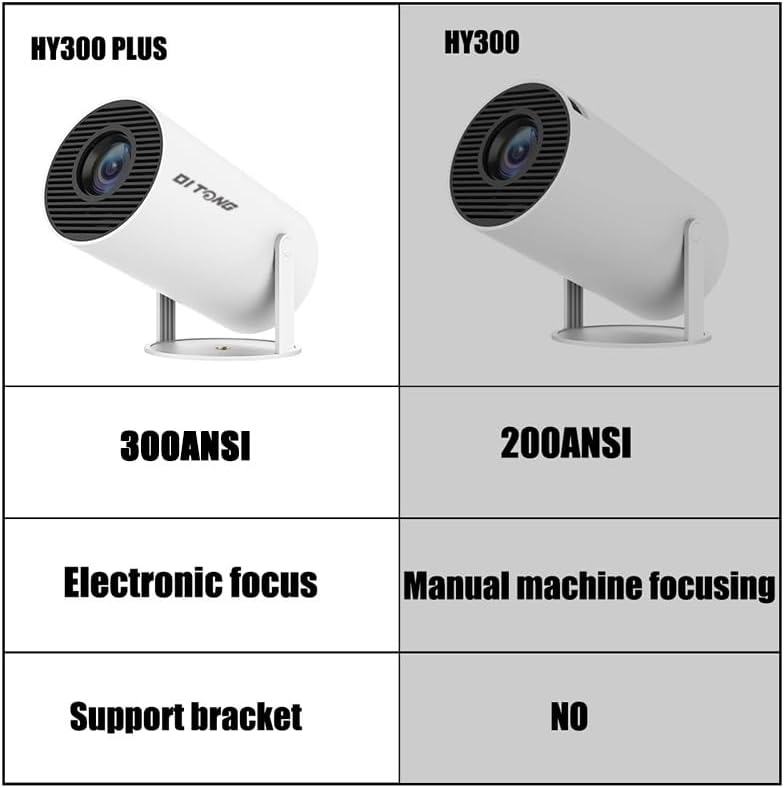
Image: A comparison table highlighting the differences between the HY300 Plus and the original HY300, showing the Plus model has 300 ANSI lumens, electronic focus, and a support bracket.
8. Bảo hành và Hỗ trợ
The DITONG HY300 Plus Projector comes with a manufacturer's warranty. Please refer to the product packaging or the official DITONG webtrang web để biết các điều khoản và điều kiện bảo hành cụ thể.
For technical support, troubleshooting assistance, or warranty claims, please contact DITONG customer service through the contact information provided with your purchase or on the official DITONG support channels.


