Giới thiệu
Cảm ơn bạn đã muaasing the Konix Hello Kitty Wireless Bluetooth 5.3 Headphones. This manual provides essential information for setting up, operating, maintaining, and troubleshooting your new headphones. Please read this manual thoroughly before use to ensure optimal performance and longevity of your device.

Hình ảnh: Mặt trước view of the Konix Hello Kitty Wireless Bluetooth 5.3 Headphones, showcasing the white and pink design with Hello Kitty graphics on the earcups.
Tính năng sản phẩm
- Thiết kế thoải mái: Lightweight construction with padded ear cushions and an adjustable headband for extended wear comfort.
- Kết nối không dây: Equipped with Bluetooth 5.3 for stable and efficient wireless connection to PC, smartphones, and tablets.
- Tuổi thọ pin dài: Enjoy up to 30 hours of music playback on a single charge.
- Micrô tích hợp: Facilitates clear communication for calls and voice commands.
- Kết nối đa năng: Includes a 3.5mm jack cable for wired audio connection, offering flexibility when wireless is not preferred or battery is low.
- Âm thanh chất lượng cao: Features 40mm speakers for an immersive listening experience.
- Điều khiển tích hợp: Direct controls on the headphone for volume adjustment, voice assistant activation (Siri/Android compatible), and call management.

Image: A person wearing the Konix Hello Kitty headphones, with icons illustrating key features such as Bluetooth 5.3 connectivity, a built-in microphone, and the inclusion of a 3.5mm audio jack and Type-C charging cable.
Nội dung gói
- Konix Hello Kitty Wireless Bluetooth 5.3 Headphones
- Cáp giắc cắm âm thanh 3.5 mm
- Cáp sạc USB Type-C
- Hướng dẫn sử dụng (tài liệu này)

Image: The front of the retail packaging for the Konix Hello Kitty Bluetooth headset, showing the product image and key features.
Cài đặt
1. Sạc tai nghe
Before first use, fully charge your headphones. Connect the USB Type-C charging cable to the charging port on the headphones and the other end to a USB power source (e.g., computer USB port, wall adapter). The charging indicator light will show the charging status.
- Thời gian sạc: Khoảng 2.5 giờ.
- Battery Life: Up to 30 hours of playtime on a full charge.
- Standby Time: Up to 200 hours.

Image: The Konix Hello Kitty headphones with an overlay indicating a 30-hour playtime, 200-hour standby time, and 2.5-hour charging time.
2. Ghép nối Bluetooth
- Đảm bảo tai nghe đã được sạc và tắt nguồn.
- Nhấn và giữ nút Nguồn cho đến khi đèn LED nhấp nháy, báo hiệu chế độ ghép nối.
- Trên thiết bị của bạn (điện thoại thông minh, máy tính bảng, PC), hãy bật Bluetooth và tìm kiếm các thiết bị khả dụng.
- Select "Konix Hello Kitty" (or similar name) from the list of found devices.
- Once paired, the LED indicator will change (e.g., solid blue) and you will hear an audible confirmation.
3. Kết nối có dây (Tùy chọn)
If you prefer a wired connection or if the battery is depleted, you can use the included 3.5mm audio jack cable.
- Cắm một đầu của cáp âm thanh 3.5 mm vào giắc cắm âm thanh trên tai nghe.
- Plug the other end into the 3.5mm audio output port of your device.
- Tai nghe sẽ tự động chuyển sang chế độ có dây.
Hướng dẫn sử dụng
Bật/Tắt nguồn
- Bật nguồn: Nhấn và giữ nút Nguồn trong khoảng 3 giây.
- Tắt nguồn: Nhấn và giữ nút Nguồn trong khoảng 5 giây.
Phát nhạc
- Phát/Tạm dừng: Nhấn nút Đa chức năng.
- Tăng âm lượng: Nhấn nút Tăng âm lượng.
- Giảm âm lượng: Nhấn nút Giảm âm lượng.
- Bài hát tiếp theo: Press and hold (or double-press, depending on model) the Volume Up button.
- Bản nhạc trước: Press and hold (or double-press, depending on model) the Volume Down button.
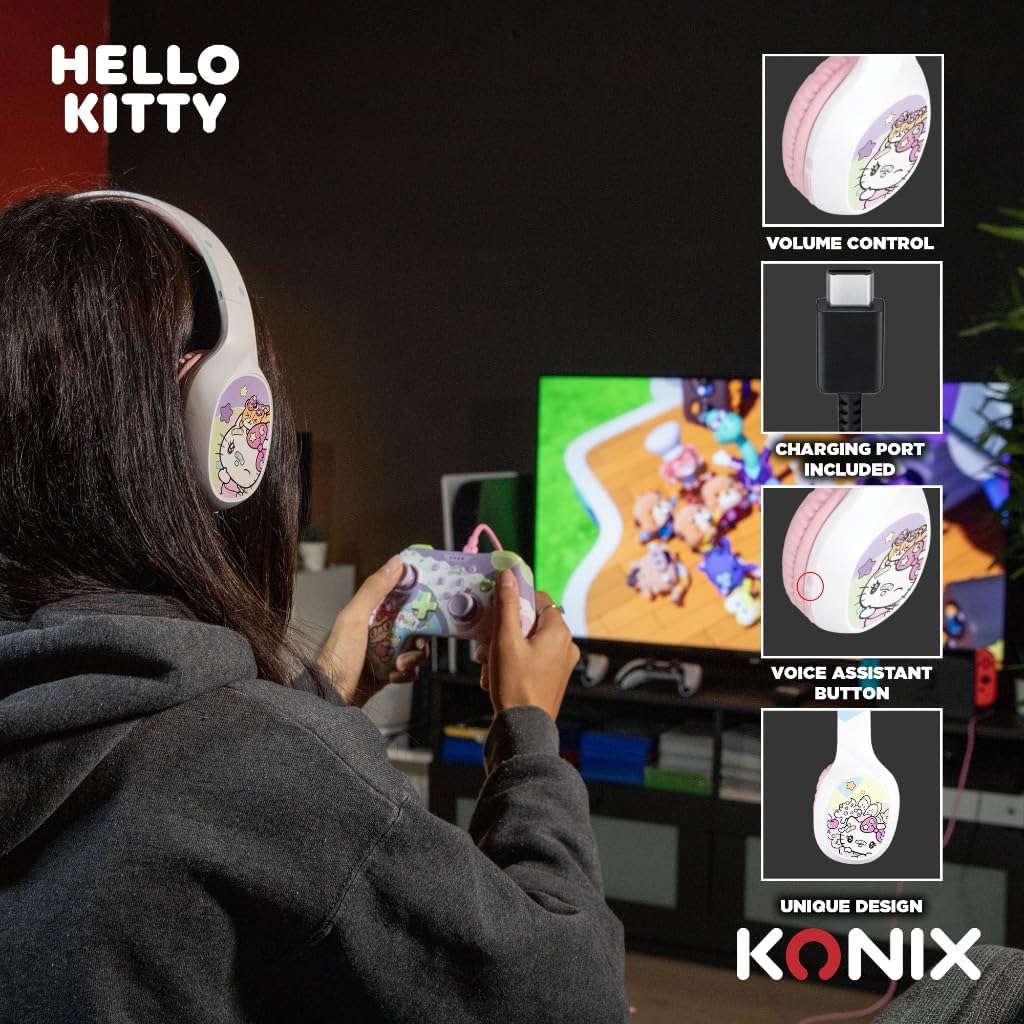
Image: A user interacting with the Konix Hello Kitty headphones, with insets highlighting the volume control, charging port, and voice assistant button located on the earcup.
Quản lý cuộc gọi
- Trả lời/Kết thúc cuộc gọi: Nhấn nút Đa chức năng.
- Từ chối cuộc gọi: Nhấn và giữ nút Đa chức năng.
- Gọi lại số cuối cùng: Nhấn đúp vào nút Đa chức năng.
Trợ lý giọng nói
Activate your device's voice assistant (Siri, Google Assistant, etc.) directly from the headphones.
- Kích hoạt Trợ lý giọng nói: Press the dedicated Voice Assistant button.
Bảo trì và chăm sóc
- Vệ sinh: Lau tai nghe bằng vải mềm, khô. Không sử dụng chất tẩy rửa có tính mài mòn hoặc dung môi.
- Kho: Bảo quản tai nghe ở nơi khô ráo, thoáng mát, tránh ánh nắng trực tiếp và nhiệt độ cao.
- Chăm sóc pin: Để kéo dài tuổi thọ pin, tránh xả pin thường xuyên. Hãy sạc tai nghe thường xuyên, ngay cả khi không sử dụng trong thời gian dài.
- Khả năng chống nước: Tai nghe này không chống nước. Tránh tiếp xúc với nước hoặc độ ẩm quá mức.
- Xử lý: Không được làm rơi, tháo rời hoặc tự ý sửa chữa tai nghe. Việc này có thể làm mất hiệu lực bảo hành và gây hư hỏng.
Xử lý sự cố
| Vấn đề | Nguyên nhân có thể | Giải pháp |
|---|---|---|
| Tai nghe không bật được. | Pin yếu. | Sạc đầy tai nghe. |
| Không thể ghép nối qua Bluetooth. | Tai nghe không ở chế độ ghép nối; Thiết bị Bluetooth tắt; Quá xa thiết bị. | Ensure headphones are in pairing mode; Turn on Bluetooth on your device; Move headphones closer to your device (within 10 meters). |
| Không có âm thanh hoặc âm lượng thấp. | Volume too low on headphones or device; Incorrect audio output selected; Headphones not properly connected (wired). | Increase volume on both headphones and device; Check device's audio output settings; Ensure 3.5mm cable is fully inserted. |
| Micrô không hoạt động. | Microphone muted on device; Incorrect input device selected. | Check microphone settings on your device; Ensure "Konix Hello Kitty" is selected as the input device. |
| Kết nối không liên tục. | Interference; Too far from device; Obstacles between devices. | Move away from other wireless devices; Reduce distance to paired device; Remove obstacles. |
Thông số kỹ thuật
| Tính năng | Chi tiết |
|---|---|
| Số hiệu mẫu | 3328170001175 |
| Kết nối | Kết nối không dây (Bluetooth 5.3), Kết nối có dây (jack 3.5mm) |
| Phiên bản Bluetooth | 5.3 |
| Kích thước loa | 40mm |
| Dải tần số | 20 Hz - 20,000 Hz |
| Thời lượng pin (Thời gian chơi) | Lên đến 30 giờ |
| Thời gian chờ | Lên đến 200 giờ |
| Thời gian sạc | Xấp xỉ 2.5 giờ |
| Micrô | Tích hợp sẵn |
| Màu sắc | Trắng, Hồng |
| Cân nặng | 290 gam (xấp xỉ) |
| Kích thước (Gói) | 20.1 x 18.8 x 8cm |
| Kiểm soát tiếng ồn | Khử tiếng ồn lai |
Bảo hành và Hỗ trợ
Konix products are designed and manufactured to the highest quality standards. For information regarding warranty coverage and customer support, please refer to the warranty card included with your product or visit the official Konix webtrang web. Vui lòng giữ lại bằng chứng mua hàng để yêu cầu bảo hành.
For technical assistance or inquiries, please contact Konix customer support through their official channels.


