Giới thiệu
Welcome to the VTech Genius XL Interactive Video Binoculars. This device is designed for children aged 5 and above to explore the world around them through observation, interactive videos, images, and educational games. This manual provides essential information for setup, operation, and maintenance to ensure optimal use and longevity of your product.

Image: The VTech Genius XL Interactive Video Binoculars, showing the main unit with its flip-up color screen and binocular lenses.
Thông tin an toàn quan trọng
CẢNH BÁO: Không thích hợp cho trẻ em dưới 36 tháng tuổi do có các bộ phận nhỏ.
- Luôn giám sát trẻ em trong quá trình sử dụng.
- Do not look directly at the sun through the binoculars, as this can cause serious eye damage.
- Đảm bảo pin được lắp đúng cách.
- Không sử dụng lẫn lộn pin cũ và pin mới hoặc các loại pin khác nhau.
- Tháo pin cạn kiệt ngay lập tức.
- Vứt bỏ pin một cách có trách nhiệm.
Có gì trong hộp
- 1 Pair of VTech Genius XL Interactive Video Binoculars
- Batteries (4 x LR6-AA)
- Dây đeo cổ
Cài đặt
1. Lắp đặt pin
- Xác định vị trí ngăn chứa pin trên thiết bị.
- Sử dụng tuốc nơ vít, mở nắp ngăn chứa pin.
- Insert 4 new LR6-AA batteries, ensuring correct polarity (+/-).
- Lắp lại nắp và vặn chặt vít.
2. Gắn dây đeo cổ
Thread the provided neck strap through the designated loops on the binoculars. Adjust the strap length for comfortable and secure wearing.

Image: A child wearing the VTech Genius XL Interactive Video Binoculars with the neck strap, demonstrating how it can be worn for outdoor exploration.
Hướng dẫn sử dụng
1. Bật/Tắt nguồn
Press and hold the power button to turn the device on or off. The device features an automatic shut-off function to preserve battery life.
2. ViewChế độ ing
The binoculars offer two primary viewing methods:
- Through the Binoculars: Look directly through the eyepieces (binocular lenses) for traditional observation. The interpupillary distance is adjustable for optimal comfort.
- On the LCD Screen: Flip up the 2.4-inch color LCD screen to view observations digitally.

Image: A child looking through the VTech Genius XL Interactive Video Binoculars, demonstrating the traditional viewphương pháp ing.
3. Magnification and Focus
- The binoculars provide up to Độ phóng đại 10x.
- Use the focus wheel to adjust the image clarity for both binocular and screen viewđang.
4. Chế độ nhìn ban đêm
Activate the integrated infrared system for night vision. This mode is exclusively available on the LCD screen, allowing observation in low-light or dark conditions.

Image: The VTech Genius XL Interactive Video Binoculars displaying a night vision image of a hedgehog on its screen, highlighting the night vision feature.
5. Chụp ảnh và quay video
The integrated camera allows you to capture images of flora and fauna. The internal memory can store up to 50 photos. A micro-SD card slot (card not included) is available to expand storage capacity and save photos for printing.

Image: The VTech Genius XL Interactive Video Binoculars with multiple captured images of animals and nature displayed around it, illustrating the photo capture function.
6. Interactive Content (BBC Videos & Images)
Explore over 340 official videos and images from the BBC, providing more than 700 educational facts categorized into 9 groups:
- Ampngười hibians
- Động vật chân đốt
- Terrestrial Birds
- Flying Birds
- Terrestrial Mammals
- Marine Mammals
- Bò sát
- Cây có hoa
- Other Plants and Fungi

Image: The VTech Genius XL Interactive Video Binoculars displaying an image of a mushroom on its screen, with a speech bubble indicating educational information, showcasing the BBC content.
7. Games and Quizzes
- Adventure Game: Navigate through 5 natural environments, encountering over 100 animals and exploring 25 levels.
- Educational Quiz: Test scientific knowledge through a 3-stage quiz (Training, Time Challenge, Clue Game).
- Use the joystick and 12 buttons to navigate through games and features.
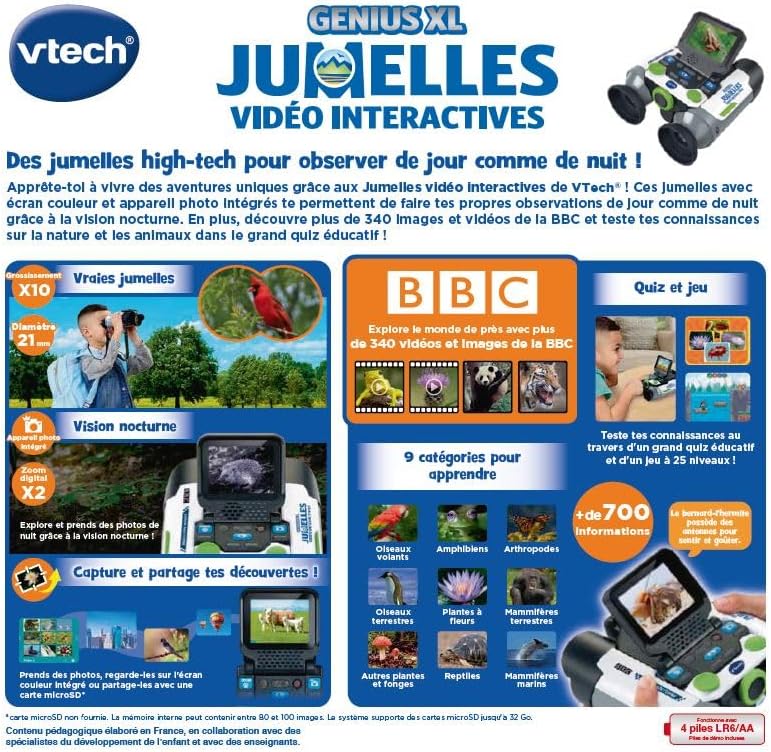
Image: A child holding the VTech Genius XL Interactive Video Binoculars, playing an adventure game on its screen, demonstrating the interactive game feature.
8. Điều khiển âm lượng
Adjust the sound volume using the dedicated controls on the device.
Tích hợp phương tiện truyền thông
Video sản phẩm chính thức
The following video demonstrates the key features and interactive capabilities of the VTech Genius XL Interactive Video Binoculars.
Video: Một đoạn giới thiệu ngắnview trình chiếu videoasing children using the VTech Genius XL Interactive Video Binoculars to observe nature, take photos, play games, and utilize the night vision mode. It highlights the educational BBC content and interactive features.
This video provides a broader overview of the Genius XL range, including the Interactive Video Binoculars and the Interactive Video Globe.
Video: Một đoạn giới thiệuview video demonstrating both the VTech Genius XL Interactive Video Binoculars and the Interactive Video Globe. It shows children engaging with both products, highlighting their educational and interactive aspects, including exploring animals and geography.
BẢO TRÌ
Vệ sinh
Lau thiết bị bằng hơi damp Lau bằng vải. Không sử dụng hóa chất mạnh hoặc chất tẩy rửa có tính mài mòn. Đảm bảo thiết bị khô ráo trước khi cất giữ.
Kho
Store the binoculars in a cool, dry place away from direct sunlight. Remove batteries if the device will not be used for an extended period.
Xử lý sự cố
- Thiết bị không bật: Kiểm tra việc lắp đặt pin và đảm bảo pin không bị cạn kiệt. Thay pin mới nếu cần thiết.
- Màn hình trống hoặc bị đóng băng: Try turning the device off and on again. If the issue persists, remove and reinsert the batteries.
- Sound not working: Check the volume settings. If the issue persists after checking volume and restarting, contact customer support.
- Photos lost or unable to access gallery: Ensure a micro-SD card is properly inserted if you are relying on external storage. If using internal storage and experiencing issues, a factory reset might be necessary, but this will erase all stored photos. It is recommended to regularly transfer important photos to an external micro-SD card.
- Image blurry: Điều chỉnh bánh xe lấy nét cho đến khi hình ảnh rõ nét.
Thông số kỹ thuật
| Tính năng | Chi tiết |
|---|---|
| Kích thước sản phẩm | 12.1 x 6.9 x 16.2cm |
| Cân nặng | 170 gram |
| Độ tuổi khuyến nghị | 5 tuổi trở lên |
| Giá trị giáo dục | Learning, Creativity, Animal Discoveries, Interaction |
| Ngôn ngữ | French (Note: Product content is in French as per specifications) |
| Tài liệu tham khảo của nhà sản xuất | 618605 |
| Số lượng mảnh | 1 |
| Pin cần thiết | Yes (4 x LR6-AA) |
| Bao gồm pin | Đúng |
| Vật liệu chính | Nhựa |
| Màu sắc | Xám |
| Tính năng đặc biệt | Tầm nhìn ban đêm |
| Đường kính ống kính vật kính | 21 milimét |
| Độ phóng đại tối đa | 10 lần |
| Kiểu lắp đặt | Collar (Neck Strap) |
| Tên mẫu | X21 |
| Binocular Prism Description | Lăng kính Porro |
Bảo hành và Hỗ trợ
Để biết thông tin về bảo hành và hỗ trợ khách hàng, vui lòng tham khảo tài liệu đi kèm khi mua hàng hoặc truy cập trang web chính thức của VTech. webtrang web. Giữ lại bằng chứng mua hàng để yêu cầu bảo hành.
Product support and spare parts availability may vary by region. The manufacturer states that spare parts are unavailable for this product.