1. Giới thiệu
This manual provides comprehensive instructions for the FTDI TTL-232R-3V3 USB to UART cable. This cable offers a simple and reliable solution for connecting devices with +3.3V TTL level UART signals to a computer via a USB port. It is designed for engineers, hobbyists, and developers working with embedded systems, microcontrollers, and other serial communication applications.
2. Thông tin an toàn
- Đảm bảo đúng voltage levels (+3.3V) are maintained to prevent damage to connected devices.
- Do not expose the cable to extreme temperatures, moisture, or corrosive environments.
- Tránh uốn cong hoặc xoắn dây cáp quá mức, vì điều này có thể làm hỏng các dây dẫn bên trong.
- Disconnect the cable from both the computer and the target device before performing any maintenance or modifications.
3. Nội dung gói hàng
Xác minh rằng tất cả các mục đều có trong gói hàng của bạn:
- 1 x FTDI TTL-232R-3V3 USB to UART Cable
- (Optional: Driver CD or link to driver download, if applicable. Refer to manufacturer's website for latest drivers.)
4. Sản phẩm hếtview
The FTDI TTL-232R-3V3 is a USB to serial UART (Universal Asynchronous Receiver/Transmitter) converter cable. It provides a USB-A connector on one end and a 6-pin SIL (Single In-Line) connector with 0.1" pitch on the other, offering +3.3V TTL level signals. The cable integrates an FT232R IC, handling all USB signaling and protocols.
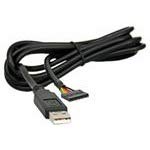
Hình 1: FTDI TTL-232R-3V3 USB to UART Cable. This image shows the black USB-A connector on one end and the 6-pin header on the other, with the cable coiled.
4.1 Mô tả chân cắm
The 6-pin SIL connector provides the following signals:
| Ghim | Tín hiệu | Sự miêu tả |
|---|---|---|
| 1 | GND | Đất |
| 2 | CTS | Clear To Send (Input to FT232R) |
| 3 | VCC | +5V power output from USB |
| 4 | TXD | Transmit Data (Output from FT232R) |
| 5 | ĐỒNG HỒ | Receive Data (Input to FT232R) |
| 6 | RTS | Request To Send (Output from FT232R) |
Note: The VCC pin (Pin 3) provides +5V from the USB port, which can be used to power external circuitry up to 75mA. The data signals (TXD, RXD, CTS, RTS) operate at +3.3V TTL levels.
5. Thiết lập
5.1 Cài đặt trình điều khiển
The FTDI TTL-232R-3V3 cable requires specific drivers to function correctly on your computer. These drivers are often automatically installed by modern operating systems (Windows 10/11, macOS, Linux) when the cable is first connected. If automatic installation fails, or for older operating systems, manual installation may be necessary.
- Tải xuống trình điều khiển: Visit the official FTDI webĐịa điểm (www.ftdichip.com/Drivers/VCP.htm) to download the latest Virtual COM Port (VCP) drivers for your operating system.
- Cài đặt trình điều khiển: Follow the instructions provided with the downloaded driver package. This typically involves running an executable file or following on-screen prompts.
- Kết nối cáp: Plug the USB-A end of the TTL-223R-3V3 cable into an available USB port on your computer.
- Xác minh cài đặt:
- Cửa sổ: Open Device Manager (search for "Device Manager" in the Start menu). Look under "Ports (COM & LPT)" for an entry like "USB Serial Port (COMx)", where 'x' is a number.
- hệ điều hành Mac: Open Terminal and type
ls /dev/tty.usbserial*. You should see an entry corresponding to the cable. - Linux: Open Terminal and type
ls /dev/ttyUSB*. You should see an entry corresponding to the cable.
5.2 Connecting to a Target Device
Connect the 6-pin SIL connector to your target device's UART interface. Ensure correct pin alignment:
- Connect the cable's TXD (Pin 4) to the target device's ĐỒNG HỒ.
- Connect the cable's ĐỒNG HỒ (Pin 5) to the target device's TXD.
- Connect the cable's GND (Pin 1) to the target device's GND.
- If hardware flow control is used, connect CTS (Pin 2) to target's RTS Và RTS (Pin 6) to target's CTS.
- If powering the target device from the cable, connect the cable's VCC (Pin 3) to the target device's +5V input (ensure the target device can accept 5V and its current draw does not exceed 75mA).
Thận trọng: Always double-check the pinout of your target device to avoid damage due to incorrect connections.
6. Hướng dẫn vận hành
Once the drivers are installed and the cable is connected to your target device, you can use a serial terminal program to communicate.
- Open Terminal Program: Use a serial terminal application such as PuTTY (Windows), CoolTerm (macOS/Windows), or Minicom/screen (Linux).
- Chọn cổng COM: In the terminal program settings, select the COM port number identified during driver installation (e.g., COM3, /dev/ttyUSB0).
- Configure Serial Settings:
- Tốc độ truyền: Set to match your target device's baud rate (e.g., 9600, 115200, up to 3MBaud).
- Bit dữ liệu: Thông thường là 8
- Ngang bằng: Không có
- Dừng lại một chút: Thông thường là 1
- Kiểm soát lưu lượng: None, or Hardware (RTS/CTS) if enabled on your target device.
- Thiết lập kết nối: Open the serial connection in your terminal program. You should now be able to send and receive data from your target device.
7. Bảo trì
- Vệ sinh: Hãy dùng khăn mềm, khô để lau sạch cáp và đầu nối. Không sử dụng chất tẩy rửa dạng lỏng hoặc dung môi.
- Kho: Store the cable in a cool, dry place, away from direct sunlight and extreme temperatures. Avoid tangling the cable.
- Điều tra: Periodically inspect the cable for any signs of damage, such as frayed wires, bent pins, or cracked insulation. Discontinue use if damage is found.
KHAI THÁC. Xử lý sự cố
8.1 Các vấn đề thường gặp và giải pháp
- No COM Port Detected:
- Hãy đảm bảo rằng trình điều khiển đã được cài đặt đúng cách (tham khảo Mục 5.1).
- Hãy thử một cổng USB khác trên máy tính của bạn.
- Khởi động lại máy tính của bạn.
- Check the cable for physical damage.
- Không có truyền/nhận dữ liệu:
- Verify the pinout connections between the cable and your target device (TXD to RXD, RXD to TXD, GND to GND).
- Confirm that the serial settings (baud rate, data bits, parity, stop bits, flow control) in your terminal program match those of your target device.
- Ensure the target device is powered on and functioning correctly.
- Check if the target device's UART is enabled and configured.
- Kết nối không liên tục:
- Check for loose connections at both the USB and 6-pin ends.
- Avoid electromagnetic interference from other devices.
- Ensure the cable is not excessively bent or stressed.
9. Thông số kỹ thuật
| Mã số sản phẩm | TTL-232R-3V3 |
| Tốc độ USB | Tốc độ đầy đủ (12Mbps) |
| UART Signal Levels | +3.3V TTL |
| Tỷ lệ Dữ liệu | Up to 3 MBaud |
| Thiết bị kết nối USB | Loại A |
| Kết nối cuối | 6 pin SIL, 0.1" pitch |
| Chiều dài cáp | 1.8 phút |
| Chi tiết cáp | 6 core, 5mm UL2464 24 AWG |
| I / O Voltage | 3.3V |
| Max Power Output (VCC) | +5V / 75mA |
| Internal IC | FT232R |
| Nhiệt độ hoạt động | -40°C đến +85°C |
| Hệ điều hành tương thích | Windows, macOS, Linux, Android |
10. Bảo hành và Hỗ trợ
For warranty information and technical support, please refer to the official FTDI website or contact your point of purchase. FTDI provides extensive documentation and support resources for their products.
- FTDI Webđịa điểm: www.ftdichip.com
- Hỗ trợ trình điều khiển: www.ftdichip.com/Drivers/VCP.htm