1. Giới thiệu
The Pronomic DX-50 USB MKII is a professional 4-channel DJ mixer designed for a wide range of applications, including discos, parties, restaurants, and presentations. Its user-friendly design ensures that both experienced and less experienced users can fully utilize its features. This manual provides detailed instructions for setting up, operating, and maintaining your mixer.
Key features include a recording function, integrated Bluetooth interface, USB player with transport controls, and multiple input channels.
2. Hướng dẫn an toàn quan trọng
- Đọc hướng dẫn: Đọc kỹ tất cả hướng dẫn an toàn và vận hành trước khi sử dụng sản phẩm.
- Giữ lại hướng dẫn: Giữ các hướng dẫn an toàn và vận hành để tham khảo trong tương lai.
- Lưu ý cảnh báo: Tuân thủ tất cả các cảnh báo trên sản phẩm và trong hướng dẫn vận hành.
- Thực hiện theo hướng dẫn: Thực hiện theo mọi hướng dẫn vận hành và sử dụng.
- Nước và độ ẩm: Không sử dụng thiết bị này gần nước (ví dụ: bồn tắm, chậu rửa mặt, bồn rửa chén, chậu giặt, tầng hầm ẩm ướt hoặc hồ bơi).
- Thông gió: Không chặn bất kỳ lỗ thông gió nào. Lắp đặt theo hướng dẫn của nhà sản xuất.
- Nhiệt: Không lắp đặt gần bất kỳ nguồn nhiệt nào như bộ tản nhiệt, thanh nhiệt, bếp lò hoặc các thiết bị khác (bao gồm amplò phản ứng) tạo ra nhiệt.
- Nguồn điện: Use only power sources specified by the manufacturer.
- Bảo vệ dây nguồn: Bảo vệ dây nguồn khỏi bị dẫm lên hoặc kẹp, đặc biệt là ở phích cắm, ổ cắm tiện lợi và điểm chúng thoát ra khỏi thiết bị.
- Vệ sinh: Chỉ lau sạch bằng vải khô.
- Bảo dưỡng: Không cố gắng tự bảo dưỡng sản phẩm này vì việc mở hoặc tháo nắp có thể khiến bạn gặp nguy hiểm.tage hoặc các mối nguy hiểm khác. Tham khảo tất cả các dịch vụ bảo dưỡng cho nhân viên dịch vụ có trình độ.
3. Nội dung gói hàng
Please check that all items listed below are included in your package. If any items are missing or damaged, contact your dealer immediately.
- Pronomic DX-50 USB MKII DJ Mixer
- Power Adapter (AC 12V)
- USB Stick (32 GB, if included in your specific bundle)
- Hướng dẫn sử dụng (tài liệu này)
4. Sản phẩm hếtview
Familiarize yourself with the various controls and connections on your DX-50 USB MKII mixer.
4.1 Bảng điều khiển phía trước
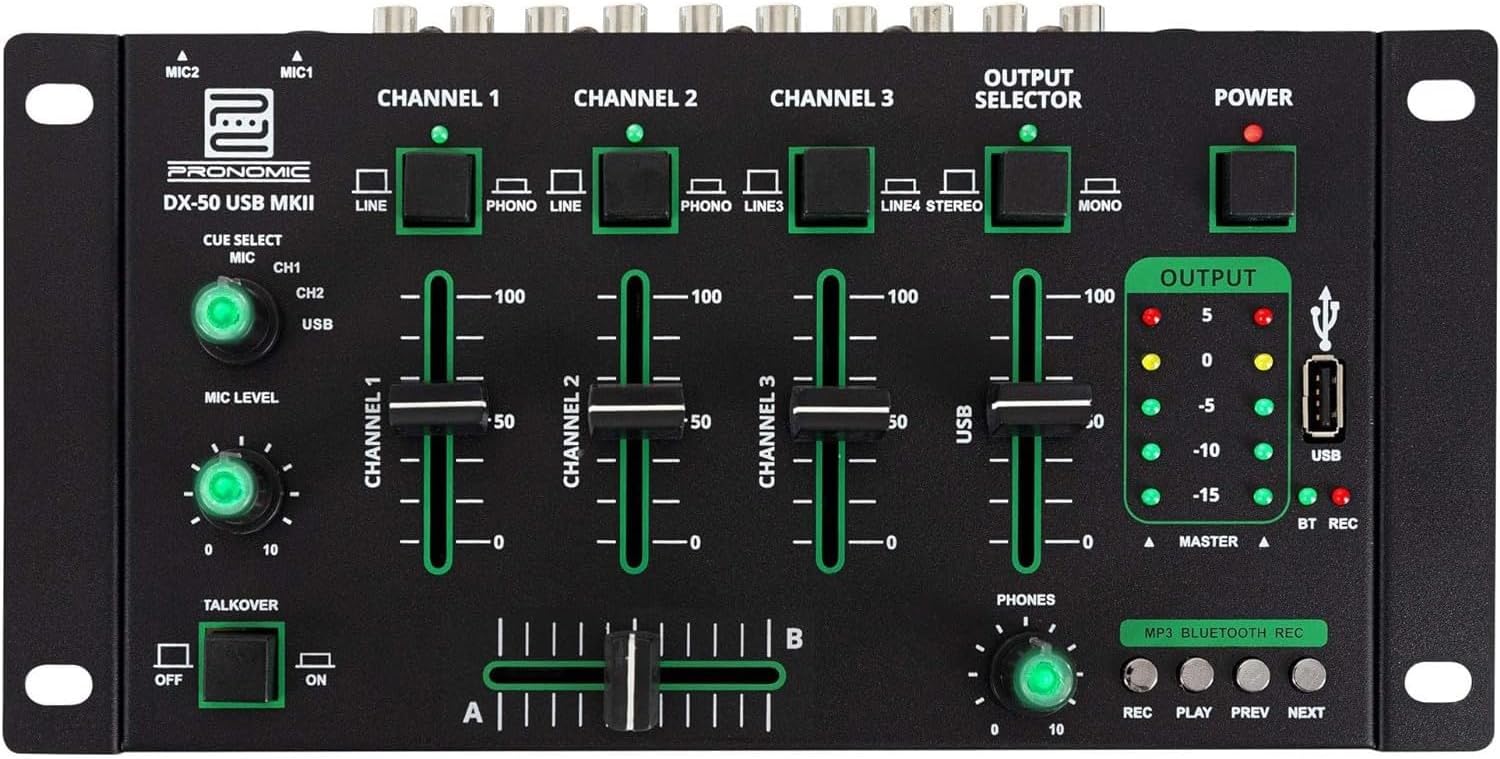
- MIC 1/2 Inputs: Connect microphones.
- Channel 1-4 Input Selectors: Switch between LINE, PHONO, or USB/Bluetooth inputs for each channel.
- Mốt kênh: Adjust the volume level for each channel.
- CUE Select Buttons: Route specific channels to the headphone output for monitoring.
- MIC Level Knob: Adjust the volume of the microphone inputs.
- Talkover Switch: Activates the talkover function, which automatically lowers music volume when speaking into the microphone.
- Bộ chọn đầu ra: Choose between Stereo or Mono master output.
- Công tắc điện: Bật/tắt máy trộn.
- Máy đo mức đầu ra: LED indicators showing the master output level.
- Cổng USB: Connect a USB drive for MP3 playback and recording.
- MP3/Bluetooth/REC Player Controls: Buttons for Play/Pause, Previous, Next, and Record functions for the integrated player.
- Núm điều chỉnh âm lượng điện thoại: Điều chỉnh âm lượng đầu ra của tai nghe.
- Crossfader (A/B): Blends between channels assigned to A and B.
4.2 Kết nối bảng điều khiển phía sau

- AC 12V Power Input: Kết nối bộ chuyển đổi nguồn được cung cấp tại đây.
- Đầu ra của PHONES: Giắc cắm 6.3mm để kết nối tai nghe.
- MASTER OUT L/R (RCA): Kết nối với máy chủ chính của bạn amploa kéo hoặc loa có công suất.
- Channel 1 & 2 Inputs (RCA Line/Phono): Connect turntables (Phono) or other line-level devices (CD players, media players). Use the front panel selector to switch.
- Channel 3 & 4 Inputs (RCA Line): Connect line-level devices.
- MIC 1 & 2 Inputs (6.3mm Jack): Connect microphones.
5. Thiết lập
Follow these steps to set up your Pronomic DX-50 USB MKII mixer:
- Kết nối nguồn điện: Ensure the mixer's power switch is in the OFF position. Connect the supplied AC 12V power adapter to the "AC 12V" input on the rear panel of the mixer. Plug the adapter into a suitable power outlet.
- Master Output Connection: Connect the "MASTER OUT L/R" RCA outputs on the rear panel to the inputs of your amploa kéo hoặc loa có công suất.
- Kết nối thiết bị đầu vào:
- Turntables: Connect turntables to the "CHANNEL 1" or "CHANNEL 2" RCA inputs. Set the corresponding input selector on the front panel to "PHONO".
- CD Players/Line Devices: Connect CD players, media players, or other line-level devices to "CHANNEL 1", "CHANNEL 2", "CHANNEL 3", or "CHANNEL 4" RCA inputs. Set the corresponding input selector on the front panel to "LINE".
- Micrô: Connect microphones to the "MIC 1" or "MIC 2" 6.3mm jack inputs on the rear panel.
- Kết nối tai nghe: Connect your headphones to the "PHONES" 6.3mm jack on the rear panel.
- USB Drive (Optional): If using a USB drive for playback or recording, insert it into the "USB" port on the front panel.
- Bật nguồn: Once all connections are made, switch the mixer's power switch to the ON position. The power indicator LED will illuminate.
6. Hướng dẫn vận hành
6.1 Pha trộn cơ bản
- Chọn đầu vào: For each channel, use the input selector switch (LINE/PHONO/USB/BT) to choose the desired audio source.
- Adjust Channel Volume: Use the vertical faders for each channel to adjust its individual volume level.
- Đầu ra chính: Monitor the "OUTPUT" LED meters and adjust the master volume knob (if present, otherwise rely on channel faders and amplifier volume) to achieve a suitable overall output level without clipping.
- Crossfader: Use the crossfader to smoothly transition between channels assigned to A and B. Channels 1 and 2 are typically assigned to the crossfader.
6.2 Sử dụng micrô
- Connect your microphone to one of the MIC inputs on the rear panel.
- Adjust the "MIC LEVEL" knob on the front panel to control the microphone's volume.
- Chức năng Talkover: Activate the "TALKOVER" switch to automatically reduce the volume of the music when you speak into the microphone. This is useful for announcements.
6.3 Phát lại và ghi âm qua USB
- Phát lại qua USB: Chèn ổ USB có chứa MP3 files into the "USB" port. Select "USB" as the input source for the dedicated USB channel. Use the "PLAY/PAUSE", "PREV", and "NEXT" buttons to control playback.
- Ghi USB: Press the "REC" button to start recording the master output to the connected USB drive. Press "REC" again to stop recording. Ensure your USB drive has sufficient free space and is formatted correctly (FAT32 is commonly supported).
6.4 Kết nối Bluetooth
- Kích hoạt Bluetooth: Select "BT" as the input source for the dedicated Bluetooth channel. The mixer will enter pairing mode.
- Ghép nối thiết bị: On your Bluetooth-enabled device (smartphone, tablet, etc.), search for available Bluetooth devices. Select "Pronomic DX-50 USB MKII" (or similar name) from the list to pair.
- Phát âm thanh: Once paired, you can play audio from your device through the mixer. Control playback from your device or using the mixer's transport controls (if supported by your device).
6.5 Monitoring with Headphones
- Connect headphones to the "PHONES" output.
- Use the "CUE SELECT" buttons to choose which channels you want to monitor in your headphones without affecting the main output.
- Adjust the "PHONES" level knob to set your desired headphone volume.
7. Bảo trì
- Vệ sinh: Disconnect the power before cleaning. Use a soft, dry cloth to wipe the surface of the mixer. Do not use liquid cleaners, aerosols, or solvents.
- Kho: Bảo quản máy trộn ở nơi khô ráo, thoáng mát, tránh ánh nắng trực tiếp và nhiệt độ cao.
- Fader and Knob Care: Avoid excessive force when operating faders and knobs. Periodically check for dust or debris accumulation around moving parts.
- Quản lý cáp: Ensure cables are not kinked or strained, which can lead to damage.
KHAI THÁC. Xử lý sự cố
| Vấn đề | Nguyên nhân có thể | Giải pháp |
|---|---|---|
| Không có điện | Power adapter not connected; Power switch off; Faulty power outlet. | Check power adapter connection; Ensure power switch is ON; Try a different power outlet. |
| No sound from main output | Master volume too low; Amplifier/speakers off or disconnected; Incorrect input selection; Channel faders down. | Increase master volume; Check amplifier/speaker connections and power; Verify correct input selected for channels; Raise channel faders. |
| Không có âm thanh từ tai nghe | Headphone volume too low; Headphones not connected; No CUE selected. | Increase PHONES level; Connect headphones properly; Press CUE button for desired channel. |
| Bluetooth không ghép nối | Bộ trộn không ở chế độ ghép nối; Thiết bị quá xa; Nhiễu sóng. | Ensure BT input is selected; Bring device closer; Restart mixer and device. |
| Phát lại USB không hoạt động | Ổ USB chưa được cắm đúng cách; Sai file Định dạng; Ổ USB chưa được định dạng đúng cách. | Cắm lại ổ USB; Đảm bảo files are MP3; Format USB drive to FAT32. |
9. Thông số kỹ thuật
| Người mẫu | Pronomic DX-50 USB MKII |
| Số lượng kênh | 4 |
| Công nghệ kết nối | Bluetooth, USB |
| Đầu vào âm thanh | RCA (line/phono), 6.3mm microphone, Bluetooth, USB |
| Loại đầu nối đầu ra | RCA (Master Out), 6.3mm (Phones) |
| Nguồn điện | Electric Cable (AC 12V adapter) |
| Dimensions (without corner brackets and controls) | 222 x 129 x 28 mm (Rộng x Sâu x Cao) |
| Total Dimensions (with corner brackets and controls) | 267 x 136 x 51 mm (Rộng x Sâu x Cao) |
| Cân nặng | 790 gam |
10. Bảo hành và Hỗ trợ
Để biết thông tin bảo hành và hỗ trợ kỹ thuật, vui lòng tham khảo tài liệu đi kèm khi mua hàng hoặc liên hệ với nhà bán lẻ. Vui lòng giữ lại hóa đơn mua hàng để phục vụ cho các yêu cầu bảo hành.
For further assistance, you may also visit the official Pronomic webtrang web hoặc liên hệ với bộ phận dịch vụ khách hàng của họ.