1. Thông tin an toàn
Please read all safety instructions carefully before operating the WAINLUX K10 laser engraving machine. Failure to follow these instructions may result in injury or damage to the device.
- Bảo vệ mắt: The machine features an eye-friendly shield and laser filtering. However, always ensure the shield is properly closed during operation. Avoid direct exposure to the laser beam.
- Thiết kế kèm theo: The WAINLUX K10 is designed with a fully enclosed structure to enhance safety.
- Automatic Stop Features:
- Micro-open Induction Safety Protection: The laser engraving machine will automatically stop operation immediately if the protective lid is opened during engraving.
- Tilt Induction Safety Protection: If the machine's angle relative to the horizontal plane exceeds 13(±5°) for more than 1 second, the laser will stop working immediately.
- Thông gió: The machine includes a built-in fan for smoke extraction. Ensure proper ventilation in your workspace.
- Khả năng tương thích của vật liệu: This laser engraver is suitable for materials such as wood, plastic, leather, parchment, plywood, painted metal, and black plastic. Do not engrave or cut white, transparent, or reflective materials directly as the laser may not interact with them effectively or could cause unexpected reflections.
- Vật liệu dễ cháy: Giữ các vật liệu dễ cháy tránh xa khu vực khắc.
- Giám sát: Không để máy không có người giám sát trong quá trình vận hành.

Image: Micro-open Induction Safety Protection Design. The machine stops when the lid is opened.

Image: Tilt Induction Safety Protection Design. The machine stops if tilted beyond a safe angle.

Hình ảnh: Trênview of multiple security protections including anti-blue light shield and built-in fan.
2. Sản phẩm hếtview
The WAINLUX K10 is a compact and versatile 3W mini laser engraving machine designed for various creative and practical applications. It offers high precision and multiple connectivity options.
Các tính năng chính:
- Kích thước nhỏ gọn: Measuring 27 x 27 x 14 cm, it is highly portable and suitable for various environments.
- Mô-đun laze: Features a 3W compressed spot laser module with 24W input power.
- Độ chính xác cao: Achieves an engraving accuracy of 0.01 mm for detailed results.
- Khu vực khắc: Provides an 80 mm x 80 mm engraving range.
- Tốc độ khắc: Capable of speeds up to 3000 mm/min.
- Kết nối: Supports Bluetooth connection via a mobile app (Android/iOS) and USB connection to Windows or Mac computers.
- Được hỗ trợ File Định dạng: JPG, BMP, PNG, PEG, GIF, PLT, XJ, HPGL, DXF.
- Engraving Modes: Black and white, discrete, and contour.
Tài liệu được hỗ trợ:
The WAINLUX K10 can engrave a wide range of materials, including:
- Wood chips, Plywood, Bamboo
- Plastic, Black Plastic
- Leather, Parchment
- Coated Metal (painted metal surfaces)
- Cardboard, Paper
- Silicagel
- Đá phiến
- Ceramic, Glass (with preparation, see Operating Instructions)
- Acrylic
- Đồ ăn
It can also be used as a laser cutter for parchment up to 0.5 mm thick.
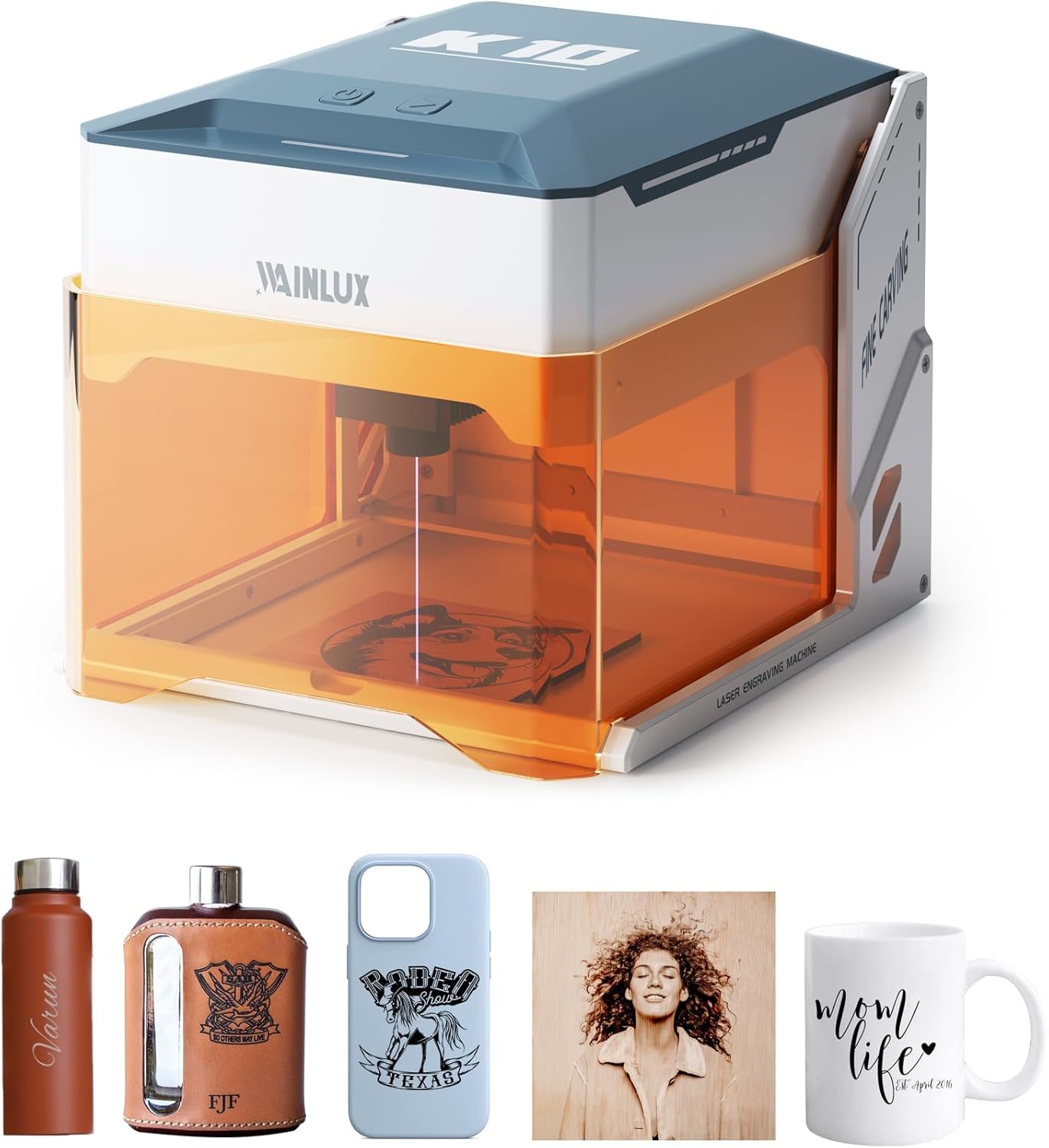
Image: The WAINLUX K10 laser engraver shown with various engraved items like a water bottle, flask, phone case, and mug.

Image: Demonstrates the compact size and capability of the K10, with a laptop displaying design software.

Hình ảnh: Examples of unique designs engraved on different materials such as cardboard, plywood, bamboo, leather, slate, and glass.
3. Thiết lập
Follow these steps to set up your WAINLUX K10 laser engraving machine.
Nội dung gói hàng:
Hãy kiểm tra xem tất cả các bộ phận tiêu chuẩn có được bao gồm trong gói hàng của bạn hay không:
- WAINLUX K10 Laser Engraver (3W)
- Hướng dẫn sử dụng
- Nguồn điện
- Cáp Type-C
- Maker Pen
- Wood Board *2
- Brush Kraft Paper *2
- Cờ lê
Optional parts (sold separately) may include an Air Purifier and an Engraving Positioning Module.

Image: The WAINLUX K10 machine along with its standard accessories and optional parts.
Thiết lập ban đầu:
- Vị trí: Place the WAINLUX K10 on a stable, level surface in a well-ventilated area.
- Kết nối nguồn điện: Connect the power supply to the machine and plug it into a suitable power outlet.
- Kết nối thiết bị:
- Bluetooth (Mobile App): Download the official WAINLUX app on your Android or iOS mobile phone. Enable Bluetooth on your phone and pair it with the K10 machine.
- USB (Computer): Connect the machine to your Windows or Mac computer using the provided Type-C USB cable.
- Software/App Installation: Install the WAINLUX application on your mobile device or the recommended software (e.g., CutlabX, LightBurn, LaserGRBL) on your computer. The application is free and supports various file định dạng.

Image: Demonstrates easy height adjustment for accommodating larger items or rotary attachments (not included).
4. Hướng dẫn vận hành
This section outlines the general steps for operating your WAINLUX K10 laser engraver.
Basic Engraving Process:
- Chuẩn bị nguyên liệu: Place the material you wish to engrave inside the machine's engraving area. Ensure it is flat and securely positioned.
- Kết nối thiết bị: Ensure your mobile phone or computer is connected to the K10 via Bluetooth or USB.
- Open Software/App: Launch the WAINLUX app or your chosen engraving software (e.g., CutlabX, LightBurn, LaserGRBL).
- Nhập/Tạo thiết kế: Import your desired image or design into the software. The app supports various image formats like JPG, BMP, PNG, etc.
- Điều chỉnh thông số: Set engraving parameters such as power, speed, and engraving mode (black and white, discrete, or contour) based on your material and desired outcome. Refer to the software's guide for detailed parameter settings.
- Trướcview (nếu có): Sử dụng tiềnview function to ensure the design is correctly positioned on your material.
- Bắt đầu khắc: Close the protective lid and initiate the engraving process from the software/app. The machine will begin engraving.
- Theo dõi tiến trình: Observe the engraving process through the eye-friendly shield. The machine will automatically stop if the lid is opened or if it is tilted.
- Hoàn thành: Once engraving is complete, the machine will stop. Carefully remove your engraved item.
Engraving on Glass (Example):
For engraving on transparent materials like glass, a preparatory step is often required:
- Soak Colored Paper: Soak a piece of colored paper (e.g., black) in water.
- Glue to Glass: Carefully glue the wet colored paper to the surface of the glass where you intend to engrave. This provides a surface for the laser to interact with.
- Mobile App Design: Use the mobile app to design or import your engraving pattern.
- Engrave: Place the prepared glass inside the machine and start the engraving process. The laser will engrave through the paper onto the glass.

Image: Step-by-step guide for engraving on glass, showing preparation with colored paper and the final engraved result.
5. Bảo trì
Regular maintenance ensures the longevity and optimal performance of your WAINLUX K10 laser engraver.
- Vệ sinh ống kính: Periodically inspect the laser lens for dust or debris. Use a soft, lint-free cloth and a small amount of lens cleaning solution (if recommended by manufacturer, otherwise dry clean) to gently wipe the lens.
- Vệ sinh khu vực khắc: After each use, clear any debris, dust, or small material scraps from the engraving platform and surrounding area. A small brush or vacuum can be used.
- Vệ sinh quạt: The built-in fan helps extract smoke and fumes. Over time, dust may accumulate. Gently clean the fan vents to ensure proper airflow.
- Làm sạch bên ngoài: Lau bên ngoài máy bằng vải mềm, damp vải. Tránh sử dụng hóa chất mạnh hoặc chất tẩy rửa mài mòn.
- Kho: Khi không sử dụng, hãy bảo quản máy ở nơi sạch sẽ, khô ráo, tránh ánh nắng trực tiếp và nhiệt độ quá cao hoặc quá thấp.
KHAI THÁC. Xử lý sự cố
If you encounter issues with your WAINLUX K10, refer to the following common problems and solutions.
| Vấn đề | Nguyên nhân có thể | Giải pháp |
|---|---|---|
| Máy không bật được nguồn. | Dây nguồn chưa được kết nối; ổ cắm điện bị lỗi. | Ensure power cable is securely connected to machine and outlet. Test outlet with another device. |
| Máy khắc laser không hoạt động hoặc khắc yếu. | Lens dirty; incorrect material settings; material incompatible. | Clean the laser lens. Adjust power/speed settings in software. Ensure material is compatible (not white/transparent/reflective). |
| Connection issues (Bluetooth/USB). | Bluetooth not enabled; incorrect USB port/cable; software driver issue. | Ensure Bluetooth is on and paired. Try a different USB port or cable. Reinstall software/drivers. |
| Chất lượng khắc kém hoặc không đồng nhất. | Material not flat; incorrect focus; machine vibration. | Ensure material is flat and secured. Verify laser focus. Place machine on a stable surface. |
| App/Software crashes or freezes. | Outdated software; system incompatibility; corrupted file. | Update app/software to the latest version. Check system requirements. Try a different design file. |
Nếu sự cố vẫn tiếp diễn sau khi đã thử các giải pháp này, vui lòng liên hệ với bộ phận hỗ trợ khách hàng để được hỗ trợ thêm.
7. Thông số kỹ thuật
| Tính năng | Chi tiết |
|---|---|
| Số hiệu mẫu | K10-3W |
| Nhà sản xuất | DEWALLIE |
| Kích thước sản phẩm | 21 x 21 x 0.1 cm (packaging/product base); Unit: 27 x 27 x 14 cm |
| Cân nặng | 2.6 Kilôgam |
| Công suất Laser | 3W (compressed spot laser module) |
| Công suất đầu vào | 24W |
| Độ chính xác khắc | 0.01mm |
| Tốc độ khắc | Lên đến 3000 mm/phút |
| Khu vực khắc | 80mm x 80mm |
| Kết nối | Bluetooth (Android/iOS App), USB (Windows/Mac) |
| Pin cần thiết | KHÔNG |
| Ngày đầu tiên có sẵn | Ngày 31 tháng 2024 năm XNUMX |
8. Bảo hành và Hỗ trợ
WAINLUX is committed to providing quality products and excellent customer service.
- Đảm bảo chất lượng: The WAINLUX K10 laser engraving machine undergoes rigorous quality checks to ensure performance and reliability.
- Dịch vụ khách hàng: A professional customer service team is available to assist you with any pre-sales inquiries or post-purchase issues.
- Ủng hộ: For product services, technical support, or warranty information, please refer to the official support website or contact customer service directly. Contact details can typically be found in the product packaging or on the manufacturer's webđịa điểm.


