Giới thiệu
Thank you for choosing the Nikon AF-S NIKKOR 400mm f/2.8E FL ED VR Lens. This super telephoto lens is engineered for exceptional clarity, sharpness, and color accuracy, featuring a bright f/2.8 maximum aperture and advanced optical, autofocus, and Vibration Reduction (VR) systems. This manual provides essential information for the safe and effective use of your lens.
Please read this manual thoroughly before using the lens to ensure proper operation and to maximize its performance. Keep this manual accessible for future reference.
Sản phẩm trênview
The Nikon AF-S NIKKOR 400mm f/2.8E FL ED VR lens is designed for FX-format Nikon F-mount cameras and is also compatible with DX models, providing a 600mm equivalent focal length. Its optical construction includes two fluorite and two extra-low dispersion (ED) elements to minimize chromatic aberrations and reduce overall weight. Nano Crystal and Super Integrated Coatings are applied to control flare and ghosting, enhancing contrast.
Các tính năng chính:
- Bright f/2.8 Maximum Aperture: Excels in low-light conditions and offers extensive depth of field control.
- Thiết kế quang học tiên tiến: Incorporates fluorite and ED elements for superior image quality and reduced weight.
- Nano Crystal and Super Integrated Coatings: Minimizes flare and ghosting for improved contrast.
- Giảm rung động (VR): Stabilizes against camera shake, offering up to four stops of advantage. Includes NORMAL and SPORT modes.
- Động cơ sóng âm (SWM): Enables rapid, quiet, and precise autofocus with full-time manual focus override.
- Internal Focusing: Maintains lens length during focusing for enhanced portability and speed.
- Xây dựng chịu được thời tiết: Magnesium-alloy barrel and fluorine-coated front element ensure durability in adverse conditions.
Các mặt hàng bao gồm:
- Nikon AF-S NIKKOR 400mm f/2.8E FL ED VR Lens
- Nắp ống kính
- Nắp ống kính sau Nikon LF-4
- Nikon HK-38 Lens Hood
- Nikon Neutral Clear Filter (40.5mm)
- 40.5mm Drop-In Filter Holder
- Nikon LN-2 Lens Strap
- Thùng xe CT-405
Các thành phần của thấu kính:
Familiarize yourself with the various parts of your lens:

Hình 1: Mặt bên view of the lens, highlighting the control switches and tripod collar.
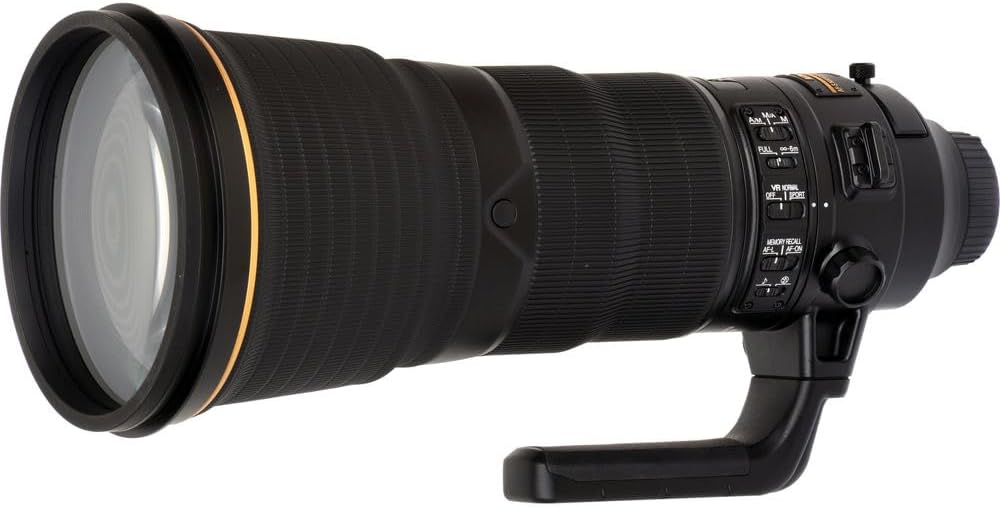
Hình 2: Góc trước view of the lens, displaying the large front element.

Figure 3: Close-up of the front lens element, illustrating the protective coatings.
Cài đặt
Gắn ống kính:
- Hãy đảm bảo cả máy ảnh và ống kính đều đã tắt nguồn.
- Tháo nắp ống kính phía sau khỏi ống kính và nắp thân máy khỏi máy ảnh.
- Hãy căn chỉnh dấu gắn trên ống kính với dấu gắn trên thân máy ảnh.
- Xoay thấu kính ngược chiều kim đồng hồ cho đến khi nghe thấy tiếng tách, báo hiệu thấu kính đã được khóa chắc chắn.
Attaching the Lens Hood (HK-38):
The lens hood helps to block stray light, reducing flare and ghosting, and provides physical protection to the front element.
- Căn chỉnh chấm đỏ trên loa che ống kính sao cho trùng với chấm đỏ ở phía trước thân ống kính.
- Rotate the hood clockwise until it locks securely.
Inserting the Drop-In Filter:
The lens features a drop-in filter slot for the included 40.5mm Neutral Clear Filter.
- Locate the filter slot on the side of the lens barrel.
- Gently slide the 40.5mm filter into the holder until it clicks into place.
- Ensure the filter is clean before insertion.
Vận hành ống kính
Focus Mode Switch:
The lens features a focus mode switch with three settings:
- A/M (Autofocus with Manual override): Allows immediate manual focus adjustment by rotating the focus ring even when autofocus is engaged.
- M/A (Manual-priority Autofocus): Similar to A/M, but requires more rotation of the focus ring before manual override takes effect, preventing accidental manual adjustments.
- M (Lấy nét thủ công): Disables autofocus, allowing only manual focus adjustment.
Công tắc giới hạn tiêu cự:
This switch restricts the autofocus range to improve focusing speed when subjects are within a known distance range.
- ĐẦY: The lens will focus across its entire range (from minimum focusing distance to infinity).
- ∞-6m: The lens will only focus on subjects 6 meters (approximately 19.7 feet) or further away. Use this setting for distant subjects to prevent the lens from hunting for focus on closer objects.
Vibration Reduction (VR) Switch:
The VR system helps reduce blur caused by camera shake. Select the appropriate mode based on your shooting situation.
- BÌNH THƯỜNG: Recommended for general photography, including static subjects and panning shots.
- THỂ THAO: Ideal for capturing unpredictable, fast-moving subjects. This mode provides a stable viewfinder image and allows for continuous shooting with minimal delay.
- TẮT: Disables Vibration Reduction. Use this when the camera is mounted on a sturdy tripod or when using very fast shutter speeds where VR is not necessary.
Memory Recall Buttons:
The lens features memory recall buttons that allow you to instantly recall a pre-focused distance. To set a memory focus position:
- Focus the lens manually or using autofocus to the desired distance.
- Nhấn và giữ BỘ NHỚ button until the indicator light flashes. The focus distance is now stored.
To recall the stored focus position, press any of the AF-BẬT buttons located around the lens barrel.
Máy ảnh tương thích:
This lens is compatible with a wide range of Nikon DSLR cameras, including but not limited to:
- Nikon D3200, D3300, D3400, D3500
- Nikon D3x, D4s, D5, D6
- Nikon D500, D5200, D5300, D5500, D5600
- Nikon D610, D7100, D7200, D750, D7500, D780
- Nikon D800E, D810, D810A, D850, Df
BẢO TRÌ
Vệ sinh ống kính:
- Các yếu tố ống kính: Use a blower brush to remove dust and loose particles. For smudges or fingerprints, apply a small amount of lens cleaning fluid to a clean microfiber cloth and gently wipe in a circular motion from the center outwards. Avoid applying fluid directly to the lens surface.
- Thân ống kính: Lau bằng vải mềm, khô. Đối với vết bẩn cứng đầu, hãy lau nhẹamp cloth can be used, followed by a dry cloth. Do not use organic solvents like paint thinner or benzene.
Kho:
- When not in use, attach the front lens cap and rear lens cap.
- Store the lens in its dedicated CT-405 Trunk Case in a cool, dry, and well-ventilated area, away from direct sunlight and high humidity.
- If storing for an extended period, consider using desiccant packets to prevent mold and mildew.
Biện pháp phòng ngừa khi xử lý:
- Avoid exposing the lens to extreme temperatures or sudden temperature changes.
- Do not leave the lens pointed at the sun for extended periods, as this can damage the camera's image sensor or internal lens elements.
- Handle the lens with care to prevent drops or impacts.
Xử lý sự cố
If you encounter issues with your lens, refer to the following common troubleshooting steps:
- Ống kính không lấy nét: Ensure the focus mode switch on the lens is set to A/M or M/A. Check the focus mode setting on your camera body. Verify the focus limiter switch is set appropriately for your subject distance.
- VR not working: Ensure the VR switch on the lens is set to NORMAL or SPORT. Check your camera's settings for any VR-related options. VR may be less effective at very fast shutter speeds or when mounted on a very stable tripod.
- Image quality issues (e.g., soft images, flare): Ensure the lens elements are clean. Check that the lens hood is properly attached. Verify that the lens is securely mounted to the camera body.
- Ống kính không được máy ảnh nhận diện: Power off both the camera and lens, then remount the lens, ensuring it clicks into place. Clean the electrical contacts on both the lens and camera with a clean, dry cloth.
If problems persist, consult your camera's instruction manual or contact Nikon customer support.
Thông số kỹ thuật
| Tính năng | Đặc điểm kỹ thuật |
|---|---|
| Số hiệu mẫu | 2217 |
| Độ dài tiêu cự | 400mm |
| Khẩu độ tối đa | f/2.8 |
| Ngàm ống kính | Nikon F-Mount |
| Giảm rung (VR) | Yes (NORMAL, SPORT modes) |
| Động cơ lấy nét tự động | Silent Wave Motor (SWM) |
| Các thành phần quang học | Fluorite, Extra-low Dispersion (ED) |
| Lớp phủ | Nano Crystal Coat, Super Integrated Coating, Fluorine Coat (front element) |
| Product Dimensions (L x Dia) | 14.09 x 6.28 inch (khoảng) |
| Trọng lượng sản phẩm | 20.4 pound (xấp xỉ) |
| Kích thước bộ lọc | 40.5mm (drop-in) |
Bảo hành và Hỗ trợ
Bảo hành của nhà sản xuất:
This Nikon product is covered by a manufacturer's warranty. For detailed information regarding warranty terms, conditions, and registration, please refer to the warranty card included with your product or visit the official Nikon webđịa điểm.
Hỗ trợ khách hàng:
For technical assistance, service, or further inquiries, please contact Nikon customer support through their official website or the contact information provided in your product documentation. Keep your proof of purchase and product serial number readily available when seeking support.
Nikon chính thức Webđịa điểm: www.nikonusa.com


