1. Giới thiệu
Thank you for choosing the Joso D9 Universal Wireless Game Controller. This device is designed to enhance your gaming experience across multiple platforms, including smartphones, tablets, PCs, and gaming consoles. This manual provides detailed instructions for setup, operation, and maintenance to ensure optimal performance.
2. Tính năng sản phẩm
- Cần điều khiển và cò Hall Effect: Provides precise control and extended durability.
- Các nút quay lại có thể lập trình: Two customizable M1/M2 buttons for advanced gameplay.
- Chức năng Turbo: Adjustable auto-fire settings for rapid input.
- Khả năng tương thích đa nền tảng: Supports iOS, Android, PC, Nintendo Switch, PS3, and PS4.
- Cảm biến con quay hồi chuyển 6 trục: High-sensitivity motion control for compatible games.
- Dual Motors Vibration: Enhances game immersion with tactile feedback.
- Sạc USB-C: Sạc nhanh và tiện lợi.

Image: The Joso D9 controller demonstrating its 6-axis gyro sensor for precise motion control and dual motors for enhanced vibration feedback, shown with a game displayed on a screen.
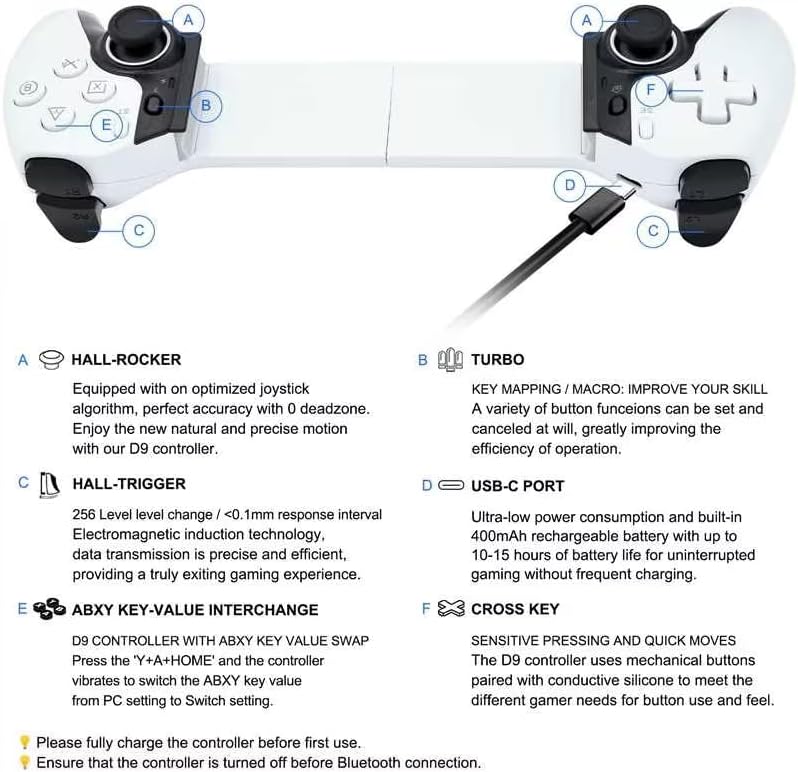
Image: A detailed diagram highlighting key features of the Joso D9 controller, including Hall-Rocker joysticks, Hall-Triggers, USB-C charging port, ABXY key value interchange, and the sensitive Cross Key.
3. Hướng dẫn cài đặt
3.1 Sạc bộ điều khiển
Before first use, fully charge the controller. Connect the provided USB-C charging cable to the controller's USB-C port and the other end to a power source (e.g., USB wall adapter, computer USB port). The indicator light will show charging status and turn off when fully charged.
3.2 Bật/Tắt nguồn
To power on, press and hold the Home button. To power off, press and hold the Home button until the indicator lights turn off.
3.3 Hướng dẫn ghép nối
Ensure the controller is turned off before initiating Bluetooth connection.
- For iOS (iPhone/iPad iOS 13.0+):
Nhấn và giữ A + Home buttons simultaneously until the indicator light flashes rapidly. On your iOS device, go to Bluetooth settings and select "D9 Controller" to pair. - For Android (Android 6.0+ phones/tablets):
Nhấn và giữ X + Trang chủ buttons simultaneously until the indicator light flashes rapidly. On your Android device, go to Bluetooth settings and select "D9 Controller" to pair. - Đối với Nintendo Switch:
On the Switch console, go to "Controllers" > "Change Grip/Order". Press and hold the Y + Trang chủ buttons simultaneously on the D9 controller until the indicator light flashes rapidly. The Switch will detect and pair with the controller. - For PC (Windows 10+ Laptops via Bluetooth):
Nhấn và giữ X + Trang chủ buttons simultaneously until the indicator light flashes rapidly. On your PC, go to Bluetooth settings, add a new device, and select "D9 Controller" to pair. The controller will be recognized as an Xbox controller. - For PS3/PS4/PS5 (Wired Connection):
Connect the controller to the PS3/PS4/PS5 console using the USB-C cable. The controller will automatically connect and function as a wired controller. For wireless PS4/PS3 gameplay, some games may require initial wired connection or specific in-game settings.

Image: The Joso D9 controller shown with various compatible devices, illustrating its stretchable design to accommodate different phone and tablet sizes, and its broad compatibility with iOS, Android, PC, PS, and Switch platforms.
4. Hướng dẫn vận hành
Bố cục 4.1 nút
The Joso D9 controller features standard gamepad buttons including A, B, X, Y, D-Pad, Left/Right Joysticks, L1/R1 (bumpers), L2/R2 (triggers), Home, Start, Select, and two programmable back buttons (M1, M2).
4.2 Programmable Back Buttons (M1/M2)
The M1 and M2 buttons on the back of the controller can be programmed to replicate other button inputs for quick access during gameplay. Up to 16 buttons can be mapped.
- Nhấn và giữ BỘ button (usually a small button on the back or bottom) until the indicator light starts flashing.
- Nhấn nút M1 hoặc M2 mà bạn muốn lập trình.
- Press the button(s) you want to assign to M1/M2 (e.g., A, B, X, Y, L1, R1, L2, R2, D-Pad directions).
- Nhấn nút BỘ button again to save the mapping. The indicator light will stop flashing.

Image: The Joso D9 controller highlighting the M1 and M2 programmable back buttons, which allow users to assign up to 16 button functions for improved control.
4.3 Chức năng Turbo
Chức năng Turbo cho phép nhấn giữ một nút nhiều lần, rất hữu ích cho các thao tác nhanh.
- Để kích hoạt Turbo: Nhấn và giữ TURBO button, then press the desired action button (A, B, X, Y, L1, R1, L2, R2). The button will now have Turbo enabled.
- Để điều chỉnh tốc độ Turbo: Nhấn nút TURBO button and then press the Right Joystick Up or Down to cycle through 8, 15, or 25 shots/second.
- Để tắt chế độ Turbo: Nhấn và giữ TURBO button, then press the action button again.
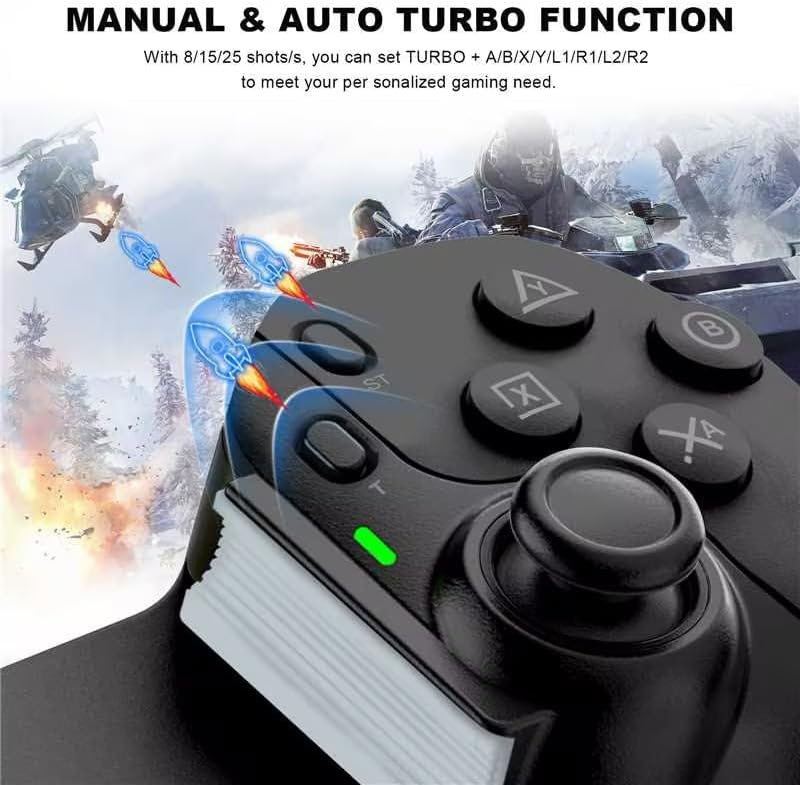
Image: A close-up of the Joso D9 controller's buttons, illustrating the manual and auto turbo function with adjustable speeds (8/15/25 shots/s) for buttons like A, B, X, Y, L1, R1, L2, R2.
4.4 ABXY Key Value Interchange
The D9 controller supports swapping the ABXY key values to match different platform layouts (e.g., Nintendo Switch vs. Xbox/PC). Press the 'Y' + 'A' + HOME buttons simultaneously to switch the ABXY key value from PC setting to Switch setting.
4.5 Điều chỉnh rung
To adjust the vibration intensity of the dual motors, press the TURBO phím, sau đó nhấn RIGHT ROCKER key up or down to increase or decrease the vibration level.
5. Khả năng tương thích
The Joso D9 controller offers extensive compatibility with various gaming devices and platforms:
- Direct Play: Supports Bluetooth connection for iPhone/iPad (iOS 13.0+) and Android phones/tablets (Android 6.0+) for direct game play.
- Máy Nintendo Switch: Bluetooth connection for playing Switch games.
- Máy tính: Bluetooth connectivity for Windows 10+ laptops, recognized as an Xbox controller.
- PlayStation: Wired connection for PS3/PS4/PS5 consoles to play PS4/PS3 games.
- Trò chơi trên nền tảng đám mây: Supports cloud gaming services on iOS/Android devices, including Arcade, Google Play Pass, Game Pass (Xbox Cloud), GeForce Now, Rainway, and Luna.
- Console/PC Streaming: Supports streaming from Xbox/PS5/PS4 consoles and PC via mobile applications like Xbox/PS Remote Play and Steam Link on iOS/Android devices.
Lưu ý đặc biệt:
- Only stream Xbox games via the Xbox mobile app. Direct play of Xbox games via Xbox console is not supported.
- Only play PS5 games via PS Remote Play app. Direct support for PS5 games via PS5 console is not available.

Image: A comprehensive chart detailing the Joso D9 controller's compatibility with various gaming platforms and services, including direct play for App Store, Google Play, and Steam, streaming for Xbox, PS4/PS5, and Steam, and cloud gaming for Arcade, Google Play Pass, GeForce Now, and Luna.
6. Bảo trì
6.1 Vệ sinh
Để vệ sinh bộ điều khiển, hãy sử dụng vải mềm, khô. Đối với vết bẩn cứng đầu, hãy lau nhẹamp cloth can be used, but ensure no liquid enters the controller. Do not use harsh chemicals or abrasive cleaners.
6.2 Lưu trữ
Bảo quản bộ điều khiển ở nơi khô ráo, thoáng mát, tránh ánh nắng trực tiếp và nhiệt độ quá cao hoặc quá thấp. Tránh đặt vật nặng lên bộ điều khiển.
6.3 Chăm sóc pin
To prolong battery life, avoid fully discharging the controller frequently. If storing for an extended period, charge the controller to about 50% every few months.
KHAI THÁC. Xử lý sự cố
- Bộ điều khiển không kết nối: Ensure the controller is charged. Verify the correct pairing mode is selected for your device (e.g., A+Home for iOS, X+Home for Android/PC, Y+Home for Switch). Turn off and restart both the controller and the device.
- Các nút không phản hồi: Check if the controller is properly paired. If using a wired connection, ensure the cable is securely connected. Test in a different game or application.
- Độ trễ đầu vào: Ensure your device's Bluetooth is not interfered with by other wireless signals. Try moving closer to your device.
- Rung không hoạt động: Check in-game settings to ensure vibration is enabled. Verify the vibration adjustment setting on the controller.
- Bộ điều khiển không sạc: Ensure the USB-C cable is functional and connected correctly to a working power source.
- Controller feels loose with device: The D9 controller stretches from 130-280mm. Ensure your device fits within this range. For smaller devices, use the included pads for a snug fit.
8. Thông số kỹ thuật
| Tính năng | Đặc điểm kỹ thuật |
|---|---|
| Số hiệu mẫu | D9 |
| Thương hiệu | Josô |
| Kích thước (Gói) | 27.8 x 11.5 x 7.4cm |
| Cân nặng | 350 gram |
| Công nghệ kết nối | Bluetooth, USB |
| Loại bộ điều khiển | Tay cầm chơi game |
| Thiết bị tương thích | iPhone, iPad, Android Phone, Android Tablet, PC, Nintendo Switch, PS4 |
| Màu sắc | Đen |
| Tính năng đặc biệt | Không dây |
| Số lượng nút | 16 |
| Nền tảng phần cứng | Gaming Console, Smartphone, Tablet, Television |
9. Bảo hành và Hỗ trợ
The Joso D9 Universal Wireless Game Controller comes with a standard manufacturer's warranty. For detailed warranty information, technical support, or service inquiries, please refer to the contact information provided with your purchase or visit the official Joso webđịa điểm.


