1. Giới thiệu
This manual provides comprehensive instructions for setting up, operating, maintaining, and troubleshooting your MERCUSYS Halo H1500X AX1500 WiFi 6 Mesh System (3-Pack). Please read this guide carefully to ensure proper installation and optimal performance of your mesh network.
2. Nội dung gói hàng
Xác minh rằng gói của bạn chứa các mục sau:
- 3 x Halo H1500X Units
- 3 x Bộ điều hợp nguồn
- 1 x cáp Ethernet
- 1 x Hướng dẫn cài đặt nhanh

Image: The MERCUSYS Halo H1500X 3-Pack Mesh WiFi System, including three white cube-shaped units and an Ethernet cable, displayed within its red retail packaging.
3. Sản phẩm hếtview
The MERCUSYS Halo H1500X is an AX1500 WiFi 6 Mesh System designed to provide seamless, high-speed internet coverage throughout your home. Key features include:
- Dual-Band WiFi 6 Speeds: Up to 1500 Mbps (1201 Mbps on 5 GHz and 300 Mbps on 2.4 GHz).
- Chuyển vùng liền mạch: Halo units work together to automatically switch between nodes as you move, maintaining a single unified WiFi network name and password.
- Bảo hiểm toàn diện cho ngôi nhà: A 3-pack system can cover up to 550 m² (approximately 5920 sq ft), eliminating WiFi dead zones.
- Kết nối nhiều thiết bị: Provides fast and stable connections for over 100 devices.
- Easy Network Management: Configure and manage your WiFi quickly using the MERCUSYS app, including parental controls for managing online time and content.
- Cổng Gigabit đầy đủ: Each unit includes Gigabit Ethernet ports for ultra-fast wired connections.

Image: Three white, cube-shaped MERCUSYS Halo H1500X units, viewed from the front, showcasing thiết kế tối giản của chúng.
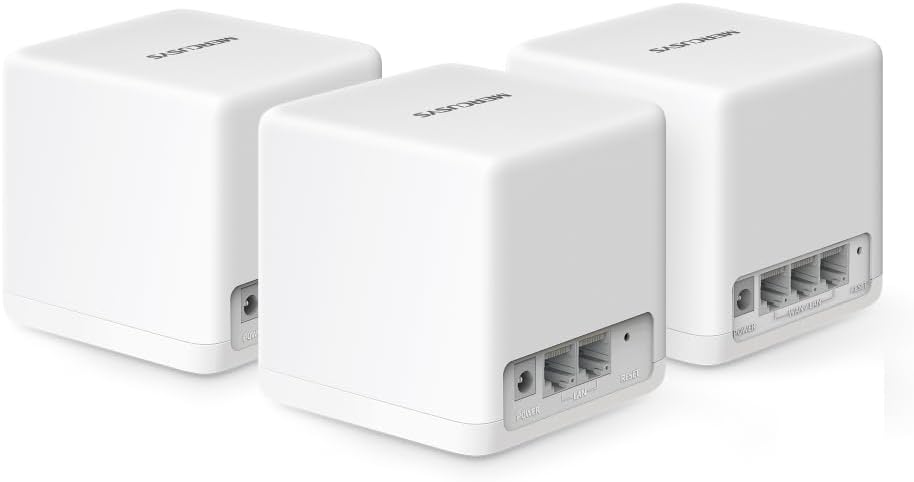
Hình ảnh: Phía sau view of three MERCUSYS Halo H1500X units, highlighting the power input, WAN/LAN, and LAN ports on each device.

Image: An infographic illustrating key features of the Halo H1500X, including 1500 Mbps Wi-Fi 6, seamless roaming, Mercusys app control, connectivity for over 100 devices, up to 550 m² coverage, and Gigabit ports.
4. Hướng dẫn cài đặt
Follow these steps to set up your MERCUSYS Halo H1500X Mesh System:
- Tải xuống ứng dụng MERCUSYS: Tìm kiếm "MERCUSYS" in your mobile device's app store (App Store for iOS or Google Play Store for Android) and download the application.
- Connect the Main Halo Unit:
- Unpack one Halo unit. This will be your main unit.
- Connect your modem's Ethernet port to any Ethernet port on the main Halo unit using the provided Ethernet cable.
- Connect the power adapter to the main Halo unit and plug it into a power outlet.
- Chờ cho đến khi đèn LED trên thiết bị Halo chuyển sang màu xanh lam ổn định, báo hiệu thiết bị đã sẵn sàng để thiết lập.
- Configure the Main Halo Unit via App:
- Open the MERCUSYS app on your smartphone or tablet.
- Follow the on-screen instructions to create a MERCUSYS ID (if you don't have one) and set up your main Halo unit. This includes creating your new WiFi network name (SSID) and password.
- Thêm các đơn vị Halo bổ sung:
- Place the remaining Halo units in desired locations within your home to extend coverage. Ensure they are within range of another Halo unit or the main unit.
- Connect the power adapters to the additional Halo units and plug them into power outlets.
- The additional units will automatically detect and join the existing mesh network. Wait for their LED indicators to turn solid blue.
- You can verify the connection and signal strength of each unit through the MERCUSYS app.

Image: A visual guide showing the four steps for setting up the Halo H1500X: identifying components, connecting devices (modem to Halo), configuring the main Halo via the app, and powering on additional units for automatic network integration.
5. Hướng dẫn vận hành
Once your Halo Mesh System is set up, it operates as a single, unified WiFi network. Your devices will automatically connect to the strongest signal as you move around your home, ensuring a seamless online experience.
5.1 Using the MERCUSYS App
The MERCUSYS app is your central control panel for the mesh system:
- Quản lý thiết bị: View all connected devices, their connection status, and which Halo unit they are connected to.
- Kiểm soát của phụ huynh: Tạo người dùng chuyên nghiệpfiles, set time limits for internet access, and filter content for specific devices.
- Mạng khách: Easily create a separate WiFi network for guests, keeping your main network secure.
- Network Prioritization (QoS): Prioritize bandwidth for specific devices or activities (e.g., gaming, streaming) to ensure optimal performance.
- Cập nhật chương trình cơ sở: Check for and install the latest firmware updates to ensure security and performance.

Image: A smartphone screen displaying the MERCUSYS app interface, showing a list of connected devices and their respective network speeds, illustrating easy network management.
5.2 Đèn báo LED
The LED on each Halo unit provides status information:
- Xanh dương: Hoạt động chính xác.
- Màu xanh xung: Starting up or connecting.
- Màu đỏ đặc: No internet connection or an issue with the unit.
- Xung đỏ: Disconnected from the mesh network.
6. Bảo trì
To ensure the longevity and optimal performance of your MERCUSYS Halo Mesh System, consider the following maintenance tips:
- Cập nhật chương trình cơ sở thường xuyên: Check the MERCUSYS app periodically for new firmware updates. Updates often include security patches, performance improvements, and new features.
- Vị trí tối ưu: Ensure Halo units are placed in open areas, away from obstructions like large metal objects, thick walls, or other electronic devices that may cause interference.
- Vệ sinh: Dùng khăn mềm, khô lau nhẹ nhàng các thiết bị để loại bỏ bụi. Không sử dụng chất tẩy rửa dạng lỏng hoặc vật liệu mài mòn.
- Khởi động lại: If you experience minor network issues, try restarting your Halo units and modem. Unplug them from power, wait 30 seconds, then plug them back in.
KHAI THÁC. Xử lý sự cố
This section addresses common issues you might encounter with your Halo Mesh System.
7.1 Không có kết nối Internet
- Kiểm tra Modem: Hãy đảm bảo modem của bạn hoạt động bình thường và có kết nối internet ổn định.
- Kết nối cáp: Verify that the Ethernet cable connecting your modem to the main Halo unit is securely plugged in.
- Đèn LED vòng: If the main Halo unit's LED is solid red, it indicates no internet connection. Check your modem and ISP status.
- Khởi động lại: Restart your modem and then your main Halo unit.
7.2 Poor WiFi Coverage or Slow Speeds
- Vị trí đơn vị: Relocate Halo units to optimize coverage. Ensure they are not too far apart and are centrally located. Refer to the coverage diagram in the Product Overview.
- Sự can thiệp: Move Halo units away from potential sources of interference such as microwaves, cordless phones, or large metal objects.
- Kết nối đường truyền ngược: For optimal performance, especially in multi-story homes or large areas, consider using an Ethernet cable to connect Halo units (wired backhaul) if possible. This provides a more stable and faster connection between units than wireless backhaul.
- Số lượng thiết bị: While the system supports over 100 devices, excessive simultaneous high-bandwidth usage can impact performance.
- Phần mềm: Ensure all Halo units are running the latest firmware.
7.3 Cannot Connect to the MERCUSYS App
- Kết nối wifi: Ensure your smartphone is connected to the Halo WiFi network.
- Phiên bản ứng dụng: Make sure you have the latest version of the MERCUSYS app installed.
- MERCUSYS ID: Verify your MERCUSYS ID and password.
8. Thông số kỹ thuật
| Tính năng | Đặc điểm kỹ thuật |
|---|---|
| Thương hiệu | MERCUSYS |
| Tên mẫu | Halo H1500X (Bộ 3 chiếc) |
| Loại kết nối không dây | 802.11ac, 802.11ax (WiFi 6), 802.11n |
| Lớp băng tần | Băng tần kép |
| Tiêu chuẩn giao tiếp không dây | 802.11ac, 802.11ax, 802.11n |
| Công nghệ kết nối | Ethernet, Wi-Fi |
| Thiết bị tương thích | Máy tính xách tay, Điện thoại thông minh, Máy tính bảng |
| Tính năng đặc biệt | QoS (Chất lượng dịch vụ) |
| Loại Ăng-ten | Nội bộ |
| Trọng lượng sản phẩm | 490 gam |
| Kích thước gói hàng | 34.1 x 15.7 x 13.4cm |
| Màu sắc | Trắng |
9. Bảo hành và Hỗ trợ
Để biết thông tin về bảo hành và hỗ trợ kỹ thuật, vui lòng tham khảo trang web chính thức của MERCUSYS. website or contact their customer service. Details are typically provided in the product packaging or on the manufacturer's support pages.


