1. Giới thiệu
Cảm ơn bạn đã muaasing the MUSE M-15 Alarm Clock Radio. This manual provides essential information for the safe and efficient operation of your device. Please read it thoroughly before use and retain it for future reference.
2. Thông tin an toàn
- Nguồn điện: Use only the specified battery type (1 AA battery). Ensure correct polarity when inserting batteries.
- Nước và độ ẩm: Do not expose the device to water, rain, or excessive moisture. Avoid placing it near liquids.
- Nhiệt: Giữ thiết bị tránh xa các nguồn nhiệt như bộ tản nhiệt, thanh nhiệt, bếp lò hoặc các thiết bị khác (bao gồm amplò phản ứng) tạo ra nhiệt.
- Vệ sinh: Chỉ lau sạch bằng vải khô. Không sử dụng chất tẩy rửa hoặc làm sạch dạng phun chất lỏng.
- Bảo dưỡng: Đừng cố gắng tự bảo dưỡng sản phẩm này. Giới thiệu tất cả các dịch vụ cho nhân viên dịch vụ có trình độ.
- Xử lý: Dispose of batteries and the device according to local regulations. Do not dispose of batteries in fire.
3. Sản phẩm hếtview
Familiarize yourself with the components of your MUSE M-15 Alarm Clock Radio.
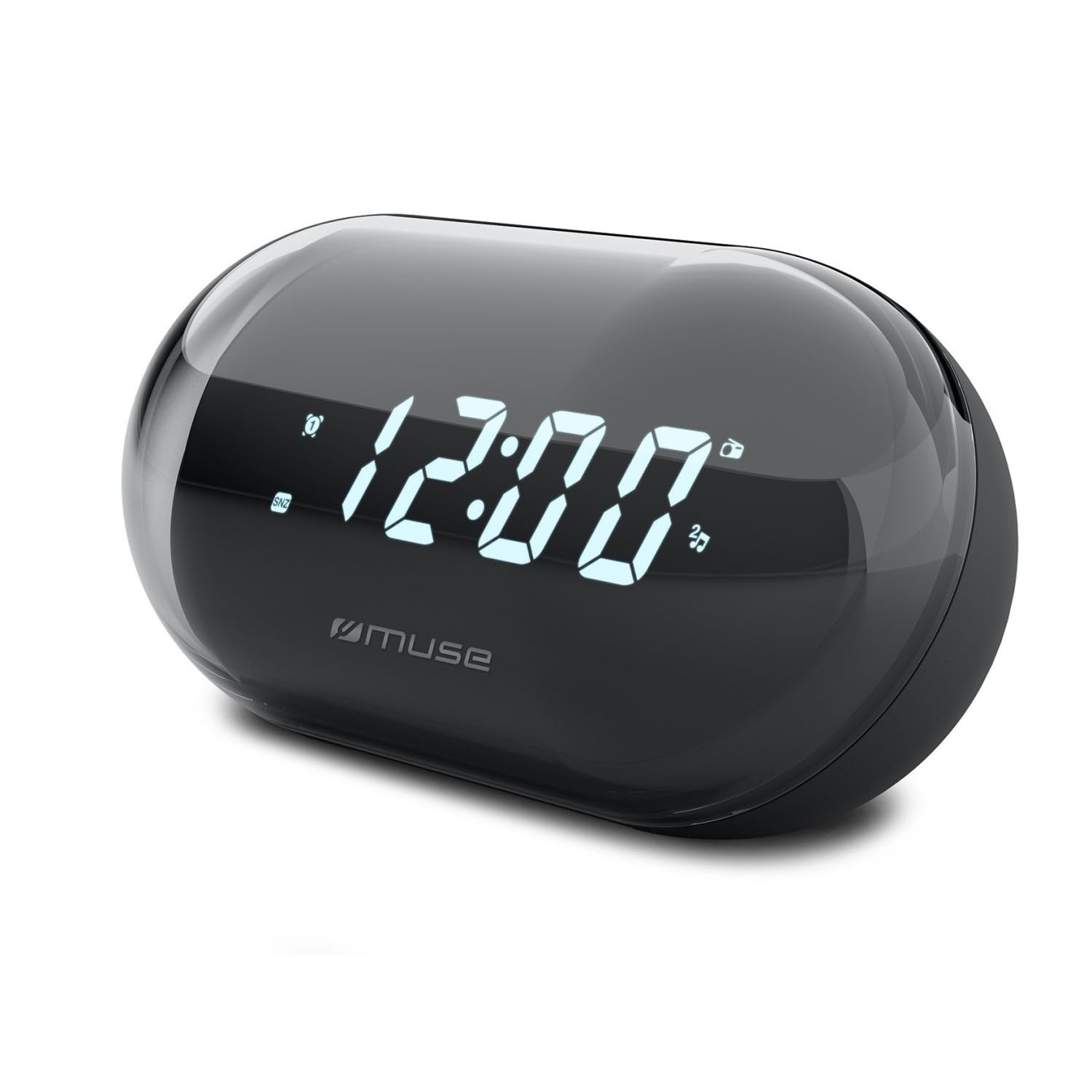
Hình ảnh: Mặt trước view of the MUSE M-15 Alarm Clock Radio, showing the digital display and control buttons.
Điều khiển và tính năng:
- Màn hình kỹ thuật số: Hiển thị thời gian, trạng thái báo động và tần số vô tuyến.
- Nút cài đặt thời gian: Used to adjust the current time.
- Nút cài đặt báo thức: Được sử dụng để cài đặt và kích hoạt/hủy kích hoạt báo động.
- Các nút điều chỉnh (+/-): Used to adjust radio frequency.
- Kiểm soát âm lượng: Điều chỉnh mức đầu ra âm thanh.
- Nút Nguồn / Chế độ: Turns the device on/off and switches between radio and clock modes.
- Nút đèn ngủ: Tắt tạm thời chuông báo động.
- Ngăn chứa pin: Located on the back, for 1 AA battery.
4. Thiết lập
4.1 Lắp đặt pin
- Xác định vị trí nắp ngăn chứa pin ở mặt sau của thiết bị.
- Trượt hoặc nhấc nắp để mở ngăn.
- Insert one (1) AA battery, ensuring the correct polarity (+ and -) matches the diagram inside the compartment.
- Lắp lại nắp ngăn chứa pin một cách an toàn.
Note: The MUSE M-15 is battery-powered and does not require an external power adapter.
5. Hướng dẫn vận hành
5.1 Đặt thời gian
- Ở chế độ đồng hồ, bấm và giữ Nút đặt thời gian until the hour digits begin to flash.
- Sử dụng Tuning Buttons (+/-) to adjust the hour. Press the Nút đặt thời gian Lặp lại thao tác để xác nhận giờ và chuyển sang phút.
- Sử dụng Tuning Buttons (+/-) to adjust the minutes. Press the Nút đặt thời gian Nhấn lại một lần nữa để tiết kiệm thời gian và thoát khỏi chế độ cài đặt thời gian.
5.2 Đặt báo thức
- Nhấn và giữ Nút đặt báo thức until the alarm hour digits begin to flash.
- Sử dụng Tuning Buttons (+/-) to adjust the alarm hour. Press the Nút đặt báo thức xác nhận lại và chuyển sang biên bản.
- Sử dụng Tuning Buttons (+/-) to adjust the alarm minutes. Press the Nút đặt báo thức Thêm một lần nữa để lưu lại thời gian báo thức.
- To activate or deactivate the alarm, briefly press the Nút đặt báo thức. An alarm icon will appear on the display when activated.
5.3 Using the Radio
- Nhấn nút Nút Nguồn/Chế độ to switch to radio mode. The display will show the radio frequency.
- Sử dụng Tuning Buttons (+/-) to manually tune to your desired radio station.
- Điều chỉnh âm lượng bằng cách sử dụng Kiểm soát âm lượng.
- Để tắt radio, hãy bấm Nút Nguồn/Chế độ again to return to clock mode or turn off the device.
5.4 Chức năng báo lại
Khi báo thức kêu, hãy bấm Nút đèn ngủ to temporarily silence the alarm for a few minutes. The alarm will sound again after the snooze period ends.
6. Bảo trì
6.1 Vệ sinh
Wipe the exterior of the device with a soft, dry cloth. Do not use abrasive cleaners, waxes, or solvents as they may damage the finish.
6.2 Thay thế pin
When the display dims or the device functions become erratic, it is time to replace the battery. Follow the battery installation steps in Section 4.1.
KHAI THÁC. Xử lý sự cố
| Vấn đề | Nguyên nhân có thể | Giải pháp |
|---|---|---|
| Thiết bị không bật. | Pin hết hoặc lắp không đúng cách. | Replace the AA battery or check its polarity. |
| Chuông báo động không kêu. | Chuông báo thức không được kích hoạt hoặc âm lượng quá nhỏ. | Ensure the alarm icon is visible on the display. Increase the volume. |
| Bắt sóng vô tuyến kém. | Tín hiệu yếu hoặc nhiễu. | Reposition the device or extend the antenna (if applicable). Try tuning to a stronger station. |
| Cài đặt thời gian/báo thức đã được đặt lại. | Pin quá yếu. | Thay pin AA. |
8. Thông số kỹ thuật
- Người mẫu: MUSE M-15
- Kích thước sản phẩm (D x R x C): 15 x 3.81 x 10 cm (5.9 x 1.5 x 3.9 inch)
- Cân nặng: 300 gam (0.66 lb)
- Nguồn điện: 1 x Pin AA (không bao gồm)
- Kiểu hiển thị: Điện tử
- Đặc trưng: Alarm, Radio, Digital Time Display
- Kiểu lắp đặt: Bảng gắn
9. Bảo hành và Hỗ trợ
This product is covered by a standard manufacturer's warranty. For detailed warranty information, please refer to the warranty card included with your purchase or visit the official MUSE webđịa điểm.
For technical support, troubleshooting assistance, or spare parts inquiries, please contact MUSE customer service through their official webtrang web hoặc thông tin liên lạc được cung cấp trên bao bì sản phẩm của bạn.
Please have your model number (M-15) and purchase date available when contacting support.


