1. Giới thiệu
Thank you for choosing the BOTSLAB 2.5K Front Dash Cam. This device is designed to provide superior video quality and enhanced safety features for your vehicle. With its 2.5K HD resolution, 170° ultra-wide angle lens, and advanced functionalities like 24/7 parking mode, built-in GPS, and driver alerts, it ensures comprehensive coverage and peace of mind on the road. This manual will guide you through the setup, operation, and maintenance of your dash cam.
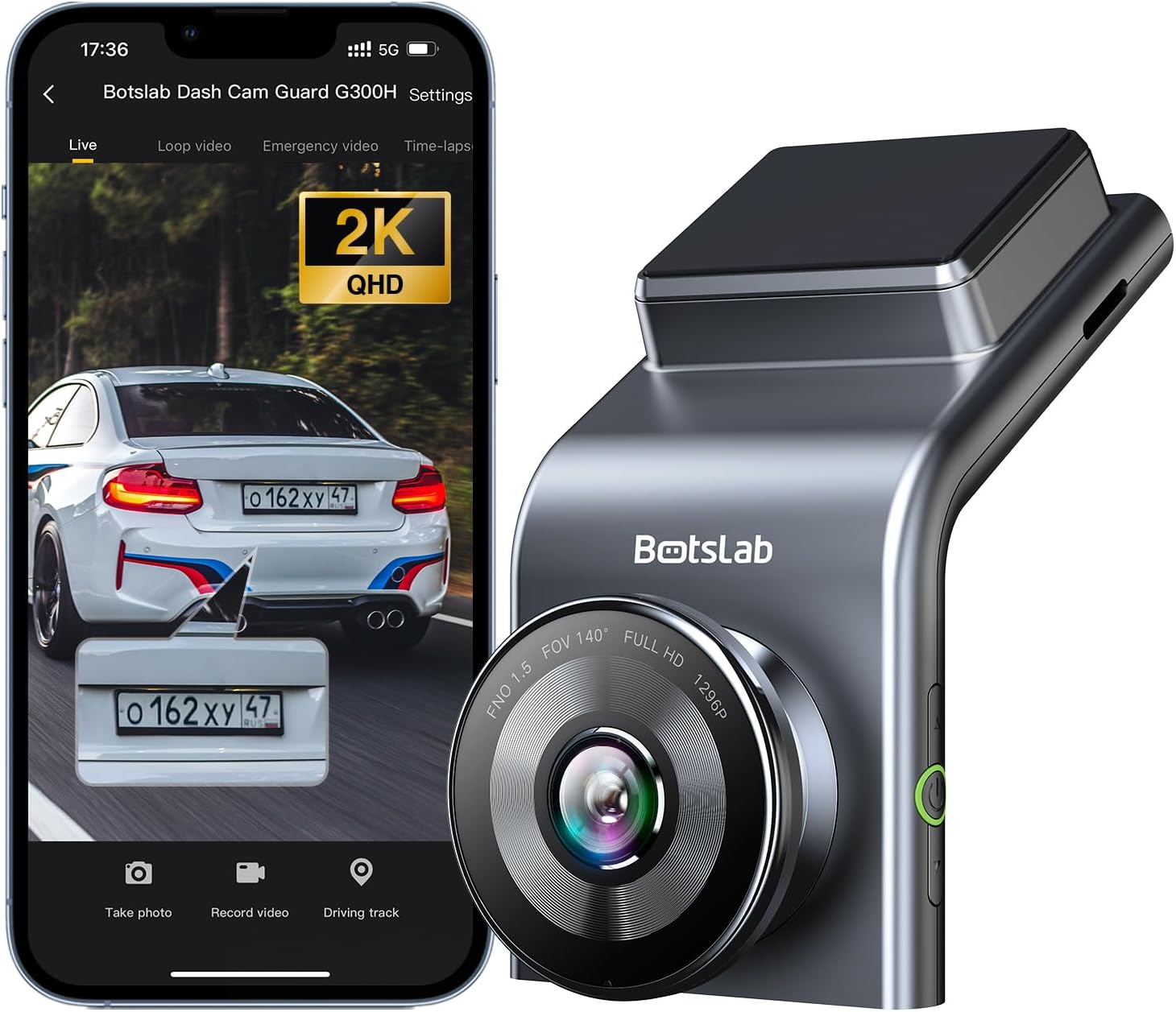
Figure 1: BOTSLAB 2.5K Front Dash Cam Overview
2. Có gì trong hộp
Vui lòng kiểm tra nội dung gói hàng để đảm bảo có đầy đủ tất cả các mục:
- Front Camera (x1)
- Sạc xe hơi (x1)
- USB Power Cord (x1)
- Installation Pry Bar (x1)
- Hướng dẫn sử dụng (x1)
- Electrostatic Film (x1)

Hình 2: Nội dung gói hàng
3. Thiết lập và Cài đặt
The BOTSLAB Dash Cam is designed for easy installation with invisible wiring, ensuring a clean and integrated look in your vehicle. Follow these steps for proper setup:
- Chọn vị trí lắp đặt: Chọn một vị trí trên kính chắn gió của bạn không cản trở view của con đường. Thông thường, vị trí này nằm phía sau xe.view gương.
- Làm sạch kính chắn gió: Đảm bảo khu vực đã chọn trên kính chắn gió sạch sẽ và khô ráo.
- Ứng dụng màng tĩnh điện: Peel off the protective layer from the electrostatic film and apply it to the cleaned area on your windshield. Smooth out any air bubbles. This film allows for easy removal of the dash cam mount without leaving residue.
- Attach Dash Cam Mount: Secure the dash cam mount to the electrostatic film. Ensure it is firmly attached.
- Gắn camera hành trình: Slide the dash cam onto its mount until it clicks into place.
- Kết nối nguồn: Connect the USB power cord to the dash cam and route the cable along the edge of the windshield and dashboard to the car charger. Use the installation pry bar to tuck the cable neatly into the gaps for an invisible wiring setup.
- Cắm vào bộ sạc ô tô: Cắm bộ sạc ô tô vào ổ cắm bật lửa trên xe.
- Điều chỉnh góc: Power on the dash cam and adjust its angle to ensure the camera captures the road ahead clearly, covering the desired field of view (170° ultra-wide angle).

Figure 3: Easy Installation and Cable Management
4. Hướng dẫn vận hành
4.1. Power On/Off and Basic Recording
The dash cam will automatically power on and begin recording when your vehicle starts. It will power off automatically when the vehicle is turned off. Ensure a microSD card (not included, supports up to 256GB) is inserted for recording.

Figure 4: MicroSD Card Slot for Storage
4.2. 2.5K HD Video Quality and Night Vision
Experience 2.5K superior HD video quality with a 170° ultra-wide view angle that fully covers all lanes without blind spots. Coupled with clear Night Vision, you'll have full-color, high-quality videos in any lighting condition.

Figure 5: Enhanced Clarity with 2.5K Resolution
4.3. Chế độ đỗ xe 24/7
When used with the G300H dedicated hard-wired kit (ASIN: B0D3QK86TQ, sold separately), the G300H front dash cam can achieve 24/7 uninterrupted recording. Video is recorded any time there is a collision or accident. Benefit from Time-lapse Recording for uninterrupted 24-hour parking monitoring, utilizing minimal memory space. The Loop Recording feature ensures continuous recording, preserving vital clips while overwriting older videos.

Hình 6: Giám sát bãi đậu xe 24/7
4.4. Enhanced Awareness and Safety Features
Stay in sync with traffic through the Front Vehicle Start Reminder and enhance safety with Pedestrian Collision Alert. These features keep you alert to movement around you, automatically triggering notifications for a seamless and vigilant driving experience.
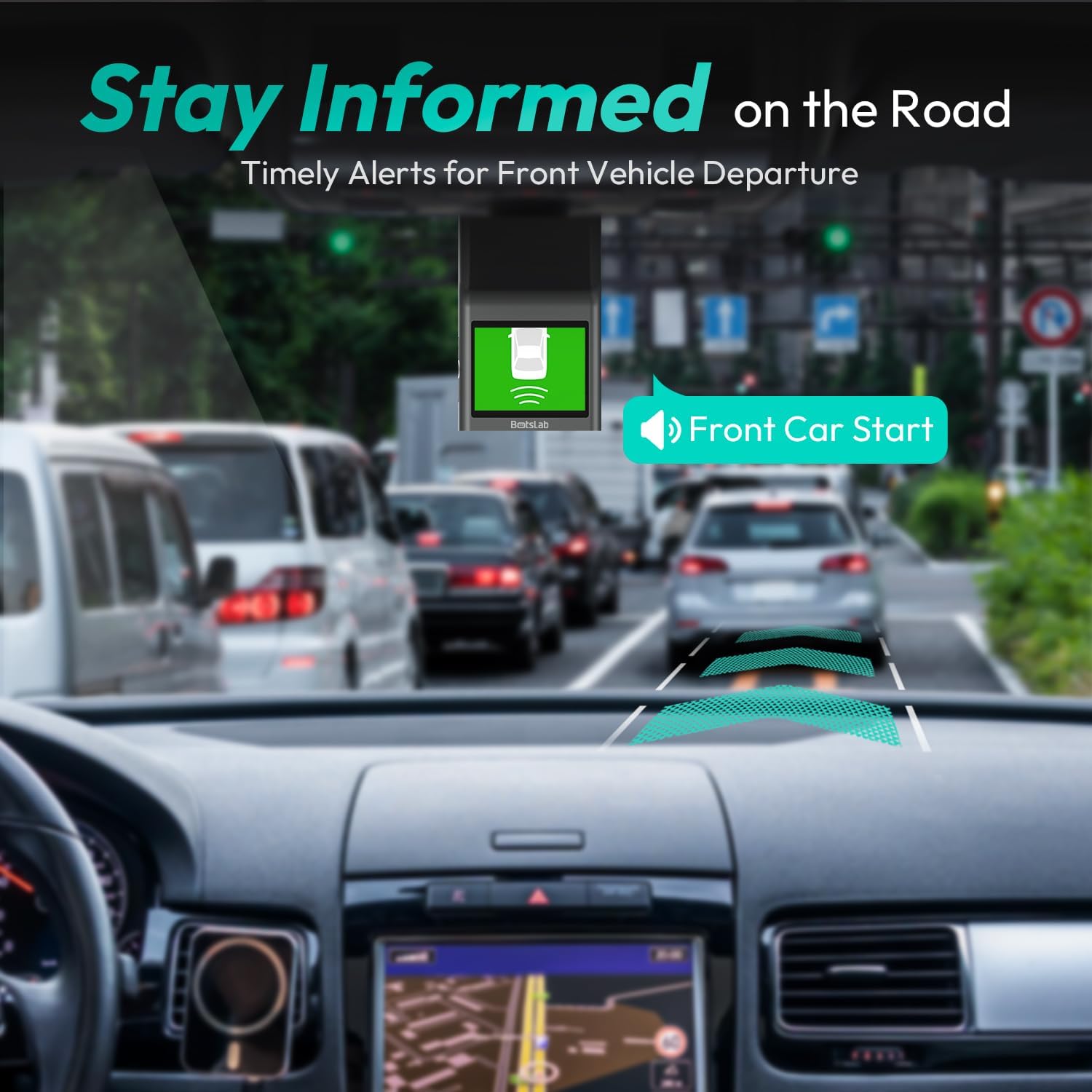
Figure 7: Front Vehicle Start Reminder

Figure 8: Pedestrian Collision Alert
4.5. GPS Integration
Built-in GPS functionality records every detail of your journey, from speed to location. View your personalized routes on Google Maps, right from your phone. It's not just about convenience; it's about keeping your travel data private and secure.

Figure 9: Precise Location Tracking with GPS
4.6. G-Sensor and Emergency Video Protection
In the event of a collision or sudden movement, the G-Sensor automatically locks videos, preventing overwriting. This feature provides the detailed evidence you need for insurance claims or traffic disputes.

Figure 10: Emergency Video Protection
5. Bảo trì
To ensure the longevity and optimal performance of your BOTSLAB Dash Cam, follow these maintenance guidelines:
- Làm sạch ống kính: Thường xuyên lau ống kính máy ảnh bằng vải mềm, không xơ để đảm bảo chất lượng hình ảnh rõ nét. Tránh sử dụng các chất tẩy rửa có tính mài mòn.
- Kiểm tra thẻ MicroSD: Periodically check the microSD card for errors or corruption. Format the card monthly to maintain optimal performance and prevent data loss. Back up any important footage trước khi định dạng.
- Cập nhật chương trình cơ sở: Check the BOTSLAB app or website for available firmware updates. Keeping your dash cam's firmware up-to-date ensures you have the latest features and bug fixes.
- Kiểm soát nhiệt độ: Avoid exposing the dash cam to extreme temperatures for prolonged periods. If parked in direct sunlight, consider removing the dash cam or using a sunshade.
- Lắp đặt an toàn: Ensure the dash cam remains securely mounted to prevent vibrations that could affect video quality or cause the device to fall.
KHAI THÁC. Xử lý sự cố
Nếu bạn gặp sự cố với camera hành trình, hãy tham khảo các vấn đề và giải pháp thường gặp sau đây:
| Vấn đề | Nguyên nhân có thể | Giải pháp |
|---|---|---|
| Camera hành trình không bật được. | Không có nguồn điện; bộ sạc/cáp ô tô bị lỗi. | Check car charger connection and vehicle's power outlet. Try a different USB cable or car charger. |
| Ghi âm dừng lại hoặc footage bị hỏng. | MicroSD card full, corrupted, or incompatible. | Format the microSD card regularly. Use a high-quality Class 10 or U3 microSD card. Replace the card if issues persist. |
| Sự cố kết nối Wi-Fi. | Interference; incorrect app settings. | Ensure you are within range. Restart the dash cam and your smartphone. Reinstall the BOTSLAB app. |
| GPS not tracking location. | Poor satellite signal; dash cam not receiving GPS data. | Đảm bảo camera hành trình có hình ảnh rõ nét view của bầu trời. Tránh xa các tòa nhà cao tầng hoặc đường hầm. |
| Chất lượng video kém. | Ống kính bẩn; lớp màng bảo vệ vẫn còn trên ống kính; điều kiện ánh sáng yếu. | Clean the camera lens. Remove any protective film. Ensure proper lighting for optimal recording. |
Để được hỗ trợ thêm, vui lòng tham khảo mục hỗ trợ hoặc liên hệ với bộ phận chăm sóc khách hàng.
7. Thông số kỹ thuật
| Tính năng | Chi tiết |
|---|---|
| Kích thước sản phẩm | 0.59 x 0.98 x 2.17 inch |
| Trọng lượng sản phẩm | 14.9 ounce |
| Số hiệu mẫu | G300H |
| Công nghệ kết nối | WiFi 2.4GHz |
| Tính năng đặc biệt | Pedestrian Collision Alert, Built-In GPS, 24/7 Parking Monitoring |
| Độ phân giải quay video | 2.5K |
| Màu sắc | màu xanh nhạt |
| Nhà sản xuất | 360 Smart Network |
| Ngày đầu tiên có sẵn | Ngày 23 tháng 2023 năm XNUMX |
| Định hướng | Đằng trước |
| Loại dịch vụ xe | Bus, Car, Truck |
| Kiểu lắp đặt | Giá đỡ kính chắn gió |
8. Bảo hành và Hỗ trợ
BOTSLAB is committed to providing high-quality AI-Vision security products and excellent customer service. Your dash cam comes with comprehensive support to ensure your satisfaction.
8.1. Thông tin bảo hành
The BOTSLAB Dash Cam G300H includes a 365-Day Quality Guarantee. For detailed terms and conditions, please refer to the official warranty documentation or contact customer support.
8.2. Hỗ trợ kỹ thuật
Chúng tôi cung cấp Lifetime Technical Help for your product. If you encounter any issues or have questions, please utilize the following support channels:
- Trò chuyện trực tiếp: Download the Botslab APP, register and sign in, then navigate to 'Me' > 'Support' > 'Live Chat' for 24-hour assistance.
- Chính thức Webđịa điểm: Thăm nom global.botslab.com để biết thông tin sản phẩm, câu hỏi thường gặp và tài nguyên hỗ trợ.
- Hỗ trợ qua Email: Send your inquiries to Service@botslab.com. We aim for 48 Hours Fast Support.
- Cộng đồng người dùng: Join the Botslab Users Group for peer support and discussions.


Figure 11: BOTSLAB Support and Care Information
For a complete digital version of this manual, you can access the Hướng dẫn sử dụng (PDF).


